
Submi SU106
Submi Ergonomic Mesh Office Chair SU106 User Manual
Model: SU106
1. Safety Information
Please read all safety instructions carefully before assembling and using the chair. Retain this manual for future reference.
- Weight Capacity: We recommend optimal use under 220 lbs (100 kg) for best comfort. The maximum safe load is 350 lbs (159 kg). Never exceed the maximum weight to avoid tipping or structural damage.
- Environmental Factors: Keep the chair away from heat sources, open flames, and sharp objects to protect the upholstery and frame. Avoid long-term direct sunlight exposure.
- Pinch & Tip Risk: Keep fingers away from adjustable gaps when reclining or adjusting height.
- Children Safety: Children must not climb, stand, or rock on the chair.
- Reclining: Do not over-recline sharply.
- Gas Lift: Check screws regularly. Do not disassemble the gas lift privately.
- Surface: Use the chair only on flat, stable ground.
- Damage: Stop use immediately if you notice any defects, broken parts, or malfunctions, and contact customer service.
2. Assembly Instructions
The Submi Ergonomic Mesh Office Chair is designed for quick and easy assembly. All necessary tools and an illustrated step-by-step manual are included in the package. Assembly typically takes 15-20 minutes.
Assembly Steps:
- Place the chair base flat on a stable surface.
- Install the casters (wheels) into the designated slots on the base.
- Insert the gas lift cylinder into the center opening of the base. Fit the gas lift cover over the cylinder.
- Align and attach the seat mechanism to the top of the gas lift cylinder. Ensure it is securely seated.
- Attach the backrest to the seat assembly.
- Install the armrests to the sides of the seat.
- Tighten all screws securely, but do not overtighten.
- Adjust the chair for stability and ensure all components are properly connected before use.
For detailed visual guidance, refer to the illustrated manual included in your product packaging.
3. Operating Instructions
Your Submi Ergonomic Mesh Office Chair offers multiple adjustments to customize your seating experience for optimal comfort and support.

Image: A person seated comfortably in the Submi Ergonomic Mesh Office Chair in an office setting, demonstrating typical use.
3.1. Height Adjustment
To adjust the chair's height, locate the lever under the seat on the right side. While seated, pull the lever up to lower the chair. To raise the chair, stand up slightly and pull the lever up. Release the lever at your desired height.
3.2. Recline Function and Footrest
The chair features a 135-degree recline function with three tilting positions, allowing you to recline up to 125 degrees for rest or a nap. To recline, pull the recline lever (usually on the left side under the seat) and lean back. Release the lever to lock the position. The integrated retractable footrest can be pulled out from under the seat to elevate your legs, reducing tension and improving circulation.

Image: Chair demonstrating 90, 120, and 135-degree recline positions with the footrest extended. The footrest has an extendable length of 14 inches.
3.3. Adjustable Lumbar Support
The chair includes an adjustable lumbar support pad designed to target lower back strain. This support can be moved up and down or adjusted forward and backward to fit the natural curve of your spine. Locate the knob on the backrest to adjust the lumbar support position and depth.

Image: Detailed view of the lumbar support, showing its ability to adjust 3.5cm (1.38in) forward/backward and 4cm (1.57in) up/down.
3.4. Adjustable Headrest
The height-adjustable headrest helps ease neck fatigue during long hours of sitting. It can be adjusted up and down, and its angle can be tilted to suit your personal preference and provide optimal neck support.

Image: The headrest showing up/down and swivel adjustments. Also visible is an integrated clothes hanger on the back of the chair.
3.5. Swivel Function
The chair features a full 360-degree swivel function, allowing for easy movement and access to different areas of your workspace without needing to reposition the entire chair.
4. Maintenance
To ensure the longevity and optimal performance of your Submi Ergonomic Mesh Office Chair, follow these simple maintenance guidelines:
- Cleaning: Wipe clean with a damp cloth. Avoid harsh chemicals or abrasive cleaners that could damage the mesh fabric or frame.
- Inspection: Periodically check all screws and bolts to ensure they are tight. Retighten if necessary.
- Environment: Keep the chair in a dry environment and avoid prolonged exposure to direct sunlight to prevent material degradation.
- Casters: Keep the casters free of hair and debris to ensure smooth rolling.
5. Troubleshooting
If you encounter any issues with your Submi Ergonomic Mesh Office Chair, please refer to the following common solutions or contact customer support.
- Chair Sinks or Does Not Hold Height: Ensure the gas lift lever is fully engaged. If the issue persists, the gas lift may need replacement. Contact customer service.
- Casters Not Rolling Smoothly: Check for debris (hair, lint) wrapped around the caster wheels. Clean them thoroughly. Ensure the chair is on a suitable surface (hard floor recommended).
- Chair Wobbles or Feels Unstable: Verify that all assembly screws are securely tightened. Ensure the chair is on a flat, even surface.
- Recline Function Not Working: Check if the recline lock lever is fully disengaged. Ensure no obstructions are preventing the backrest from moving.
For problems not listed here or if solutions do not resolve the issue, please contact Submi customer service for further assistance.
6. Product Specifications
| Feature | Detail |
|---|---|
| Brand | Submi |
| Model Name | SU106 |
| Colour | Deep Grey |
| Material | Plastic, Metal (Frame), Mesh (Seat/Back), Foam (Fill) |
| Product Dimensions (D x W x H) | 50D x 65W x 120H centimetres |
| Item Weight | 17 kg |
| Maximum Weight Recommendation | 158.76 kg (350 lbs) |
| Back Style | Ergonomic |
| Special Features | Adjustable Height, Back Support, Foot Rest, Rolling, Swivel |
| Reclining Position Count | 1 (with 3 tilting positions up to 125 degrees) |
| Number of Height Positions | 5 |
| Recommended Uses | Computer, Office, Relaxing, Study, Video Game |
| Surface Recommendation | Hard Floor |
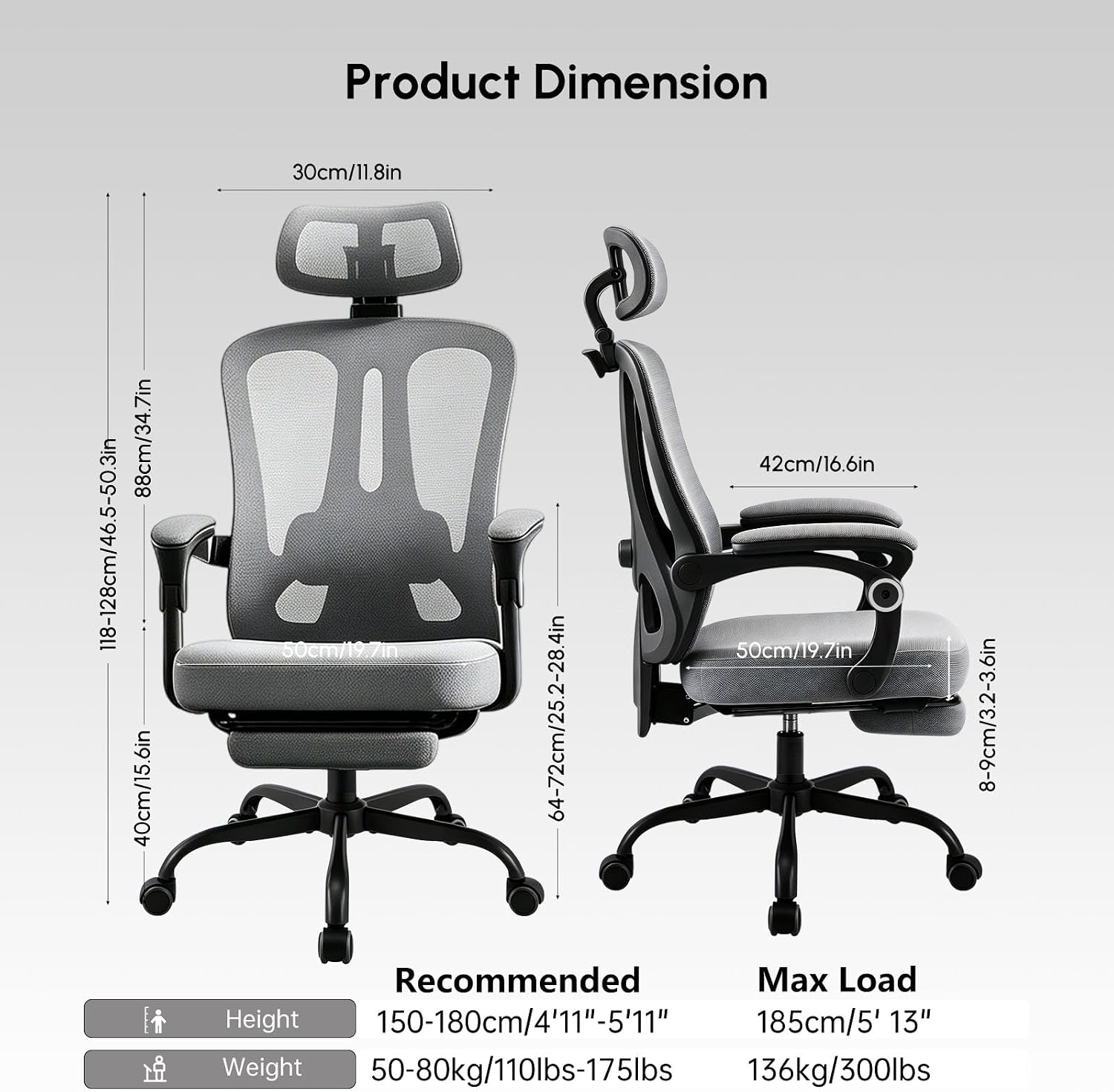
Image: Detailed product dimension diagram showing height, width, and depth measurements for various parts of the chair, including recommended height and weight ranges.
7. Warranty and Support
Submi is committed to providing excellent customer service and product support for your ergonomic mesh office chair.
- Customer Service: We offer 24/7 bilingual (English/French) customer service to assist with any inquiries or issues you may have.
- Product Support: The chair comes with lifetime product support, covering all usage and after-sales issues.
- Contact: For support, please refer to the contact information provided in your product packaging or visit the official Submi website.
Ask a question about this manual
Ask about setup, troubleshooting, compatibility, parts, safety, or missing instructions. Manuals+ will review the question and use this page’s manual context to help answer it.