
1. Introduction
Thank you for choosing the WALKINGPAD MX10 Folding Treadmill. This manual provides essential information for the safe and efficient use of your new treadmill. Please read it thoroughly before operation and retain it for future reference.
The MX10 is designed for home use, offering a compact and versatile solution for walking, brisk walking, and light jogging. Its unique vertical folding design and integrated desk tray support a productive and active lifestyle.
2. Safety Information
- Always place the treadmill on a flat, stable surface.
- Ensure adequate clear space around the treadmill (at least 2 feet on sides and 6 feet behind).
- Keep children and pets away from the treadmill during operation.
- Do not operate the treadmill if it is damaged or malfunctioning.
- Wear appropriate athletic footwear.
- Consult a physician before starting any new exercise program.
- Use the safety key at all times during operation.
3. Packing List
Verify that all components are present in the package:
- WALKINGPAD MX10 Treadmill
- Handles (2)
- Cup Holder
- Power Cord
- Remote Control
- Safety Key
- Allen Key
- Screws
- Silicone Oil
- User Manual (this document)
For a visual guide to the packing list and initial setup, please refer to the video below:
Video: Operating Method of WALKINGPAD MX10. This video demonstrates the unboxing, assembly, and basic operation of the treadmill.
4. Setup
4.1 Unfolding the Treadmill
- Carefully remove the treadmill from its packaging.
- Place the folded treadmill on a flat surface.
- Lift the main body of the treadmill to its upright position.
- Secure the handles using the provided screws and Allen key.
- Attach the cup holder to the designated slot.
- Slide the deck to unfold it completely until it locks into place. Ensure the safety lock is engaged.

Image: The MX10 treadmill demonstrating its unique vertical folding design and a user engaging in a light run.
4.2 Power Connection
Connect the power cord to the treadmill's power inlet and then to a grounded electrical outlet. Flip the power switch to the 'ON' position.
5. Operating Instructions
5.1 Starting and Adjusting Speed
- Attach the safety key to your clothing and insert it into the designated slot on the treadmill.
- Press the power button on the remote control to start the treadmill.
- Use the '+' and '-' buttons on the remote control to adjust the speed. The speed range is 1-6.5 MPH.
- To stop, press the power button on the remote control or pull the safety key.
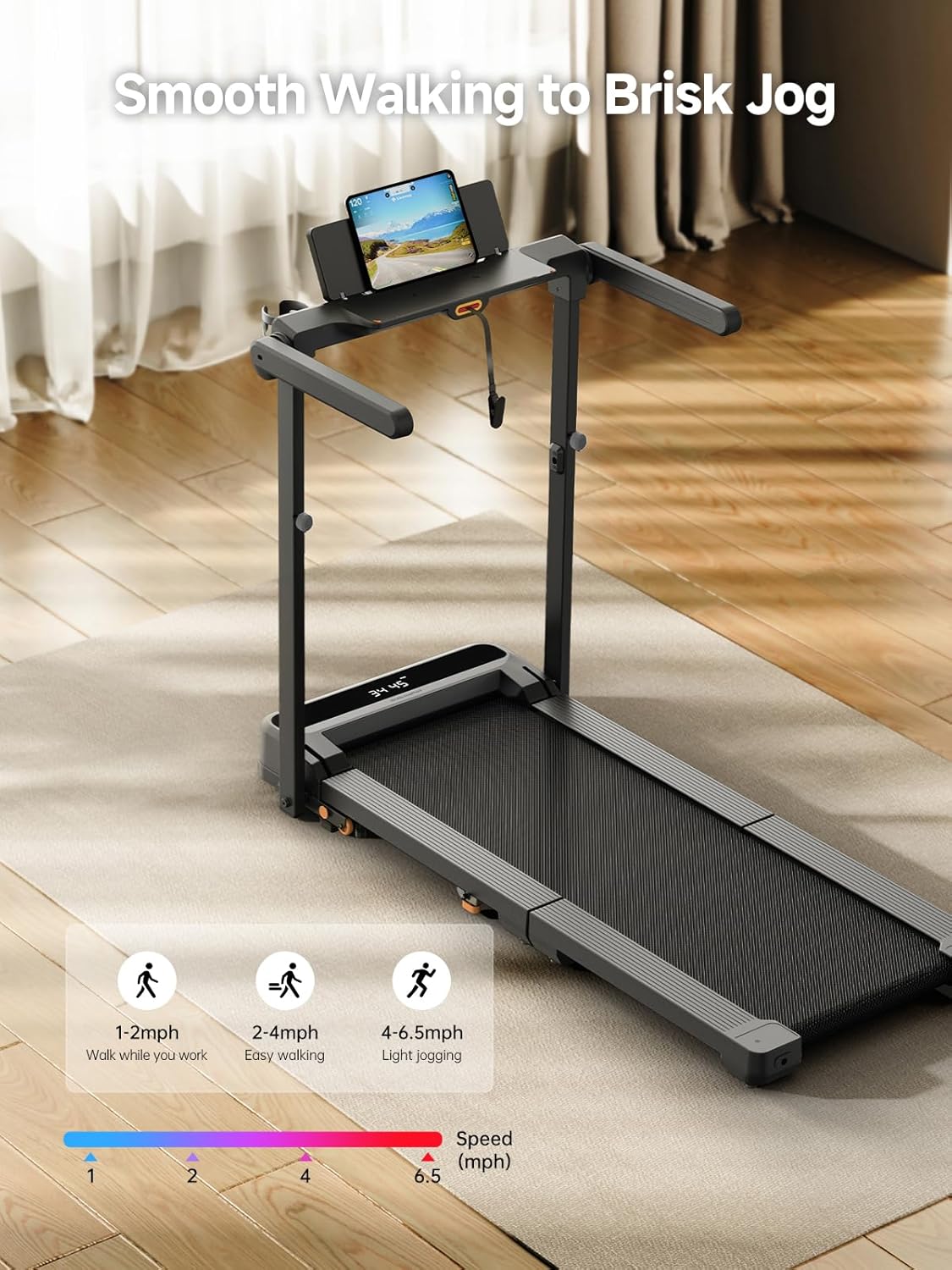
Image: The treadmill's display indicating optimal speed ranges for various activities, from 1-2 mph for working to 4-6.5 mph for light jogging.
5.2 Using the Integrated Desk Tray
The MX10 features an integrated desk tray that supports laptops up to 15.6 inches, tablets, or phones. This allows for multitasking during your workout.

Image: A user walking on the MX10 treadmill while using a laptop on the built-in desktop tray, highlighting the walk-and-work feature.
Video: WALKINGPAD MX10 Vertical Fold Walking Pad for Multitasking. This video showcases the treadmill's features for combining work and exercise.
5.3 LED Display and App Control
The integrated LED display tracks speed, distance, time, and calories. For more detailed tracking and interactive workouts, connect the treadmill to the WALKINGPAD app.

Image: The LED display on the MX10 treadmill, clearly showing real-time workout data such as time, speed, distance, and calories burned.
6. Maintenance
6.1 Lubrication
Regular lubrication of the running belt is crucial for optimal performance and longevity. Apply silicone oil every 3 months or after 100 hours of use. Refer to the user manual for specific instructions on how to apply the oil.
6.2 Cleaning
Wipe down the treadmill with a damp cloth after each use. Avoid using abrasive cleaners or solvents.
6.3 Belt Adjustment
If the running belt becomes misaligned or loose, adjust it using the provided Allen key. Follow the detailed instructions in the full user manual to ensure proper tension and alignment.
7. Troubleshooting
If you encounter any issues with your WALKINGPAD MX10, please refer to the troubleshooting section in the comprehensive user manual. Common issues include:
- Treadmill not starting: Check power connection, safety key, and power switch.
- Unusual noises: Inspect for loose parts, ensure proper lubrication, and check belt alignment.
- Belt slipping: Adjust belt tension as per maintenance instructions.
For persistent problems, contact customer support.
8. Folding and Storage
The MX10 features a tri-fold technology for convenient vertical storage, saving floor space.
- Ensure the treadmill is powered off and unplugged.
- Fold the desk tray down.
- Release the safety lock and fold the running deck upwards.
- Secure the deck in its folded position.
- The treadmill can then be moved using its transport wheels and stored vertically.

Image: The MX10 treadmill shown in its compact, vertically folded position, demonstrating its space-saving design.
9. Specifications
| Feature | Specification |
|---|---|
| Brand | WALKINGPAD |
| Model Name | MX10 Vertical Fold Treadmill |
| Product Dimensions (Unfolded) | 56.9"D x 31.1"W x 41.2"H |
| Folded Size | 11.2"D x 31.1"W x 41.2"H |
| Item Weight | 86 Pounds |
| Material | Metal |
| Maximum Speed | 6.5 Miles per Hour |
| Minimum Speed | 1 Miles per Hour |
| Maximum Weight Recommendation | 265 Pounds |
| Motor Horsepower | 2 Horsepower |
| Metrics Measured | Calories Burned, Distance, Speed, Time |
| Assembly Required | No (minimal setup) |

Image: Detailed product dimensions for the MX10 treadmill, illustrating its size when in use and when folded for storage.

Image: Close-up view of the treadmill's cushioned deck, emphasizing its four-layer construction designed for low-impact on joints.
10. Warranty and Support
The WALKINGPAD MX10 Treadmill comes with a 1-year warranty from the date of purchase. This warranty covers manufacturing defects and malfunctions under normal use. For warranty claims, technical support, or any questions not covered in this manual, please contact WALKINGPAD customer service through the official website or your retailer.


