
DF Models 9955
DF Models Robot Dog/Cat DIY Kit
Model: 9955 - Instruction Manual
1. Introduction
Thank you for choosing the DF Models Robot Dog/Cat DIY Kit. This kit provides an engaging experience in assembling your own remote-controlled robot, which can be configured as either a dog or a cat. This manual will guide you through the assembly process, operation, and maintenance of your new robot.
This kit is designed to enhance fine motor skills, technical understanding, and logical thinking for both children and adults.
2. Safety Information
- Adult Supervision: Adult supervision is recommended during assembly and operation, especially for younger users.
- Small Parts: This kit contains small parts that may pose a choking hazard. Keep out of reach of children under 3 years old.
- Battery Safety: Use only the specified battery type (2 x AAA for the robot, not included; remote control battery is included). Do not mix old and new batteries, or different types of batteries. Insert batteries with correct polarity. Remove batteries if the device will not be used for an extended period.
- Electrical Components: Handle electronic components with care. Do not expose to water or extreme temperatures.
- Intended Use: This product is an educational toy. Do not modify or use for purposes other than its intended design.
3. Package Contents
Please verify that all components listed below are present in your kit before beginning assembly.
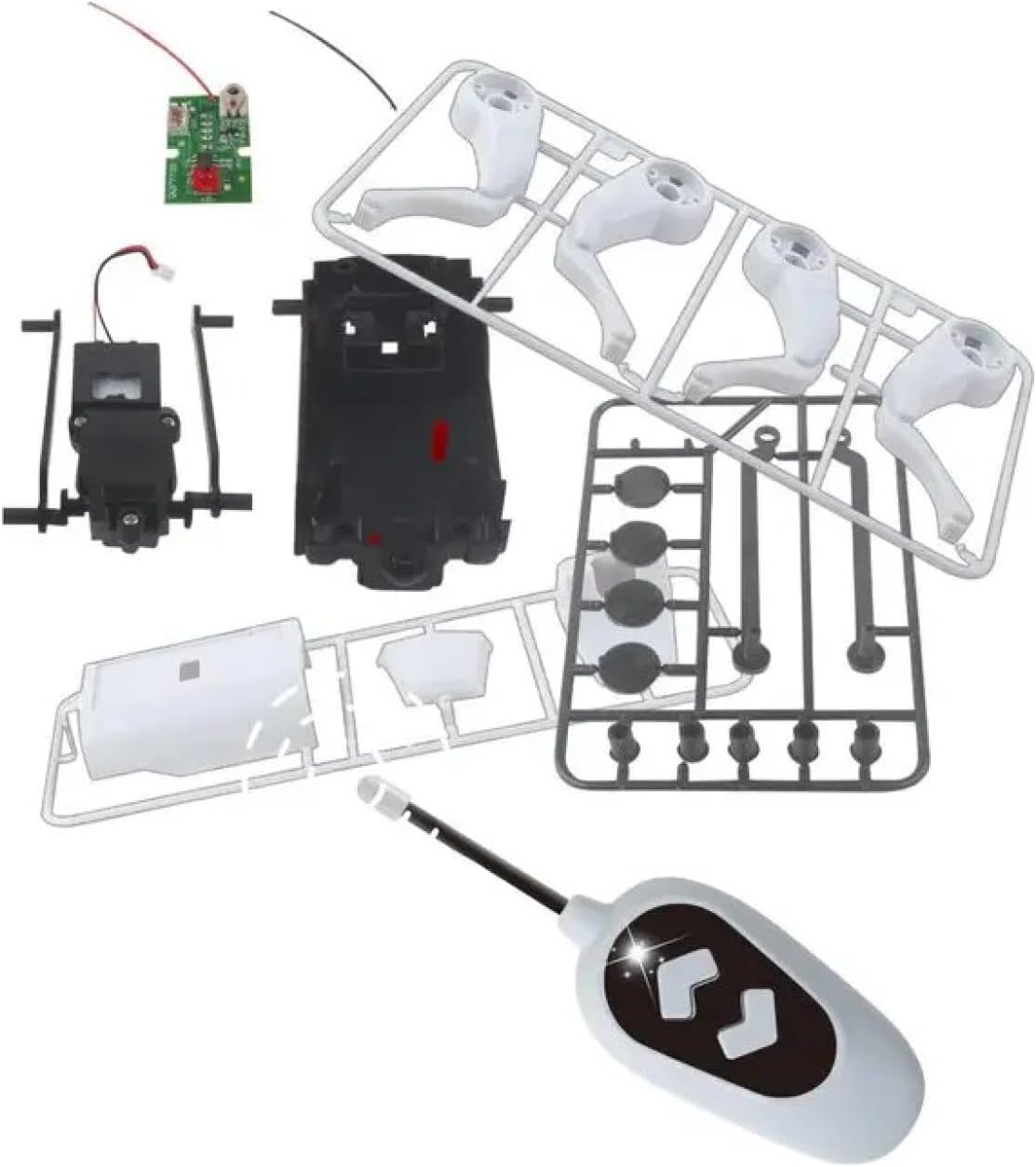
Image: All components included in the DF Models Robot Dog/Cat DIY Kit. This includes various plastic body parts, legs, a motor, a circuit board, wires, and the remote control unit.
- Robot body parts (plastic frames for dog and cat heads, main body, legs)
- Motor and gear assembly
- Circuit board with wiring
- Remote control (including battery)
- Instruction manual (this document)
Required accessories (not included): 2 x AAA batteries for the robot's main power.
4. Assembly Instructions
Follow these steps carefully to assemble your robot. You will choose to build either the robot dog or the robot cat during this process.
- Prepare Components: Carefully detach all plastic parts from their frames. Use a small file or sandpaper if necessary to smooth any rough edges.
- Assemble the Main Body: Connect the motor and gear assembly to the main body frame. Ensure all gears mesh correctly.
- Install Circuit Board: Secure the circuit board within the designated slot in the main body. Connect the motor wires to the circuit board as indicated in the diagram (refer to the included paper instructions for detailed wiring diagrams).
- Attach Legs: Connect the four leg assemblies to the main body. Ensure they can move freely.
- Choose Head: Decide whether to assemble the dog head or the cat head. Attach the chosen head to the front of the main body.
- Battery Installation (Robot): Open the battery compartment on the robot's main body. Insert 2 x AAA batteries, observing the correct polarity (+/-). Close the compartment securely.
- Battery Installation (Remote Control): Open the battery compartment on the remote control. The remote control typically comes with a pre-installed battery, but ensure it is properly seated.
- Final Check: Before operating, ensure all connections are secure and all parts are firmly attached.
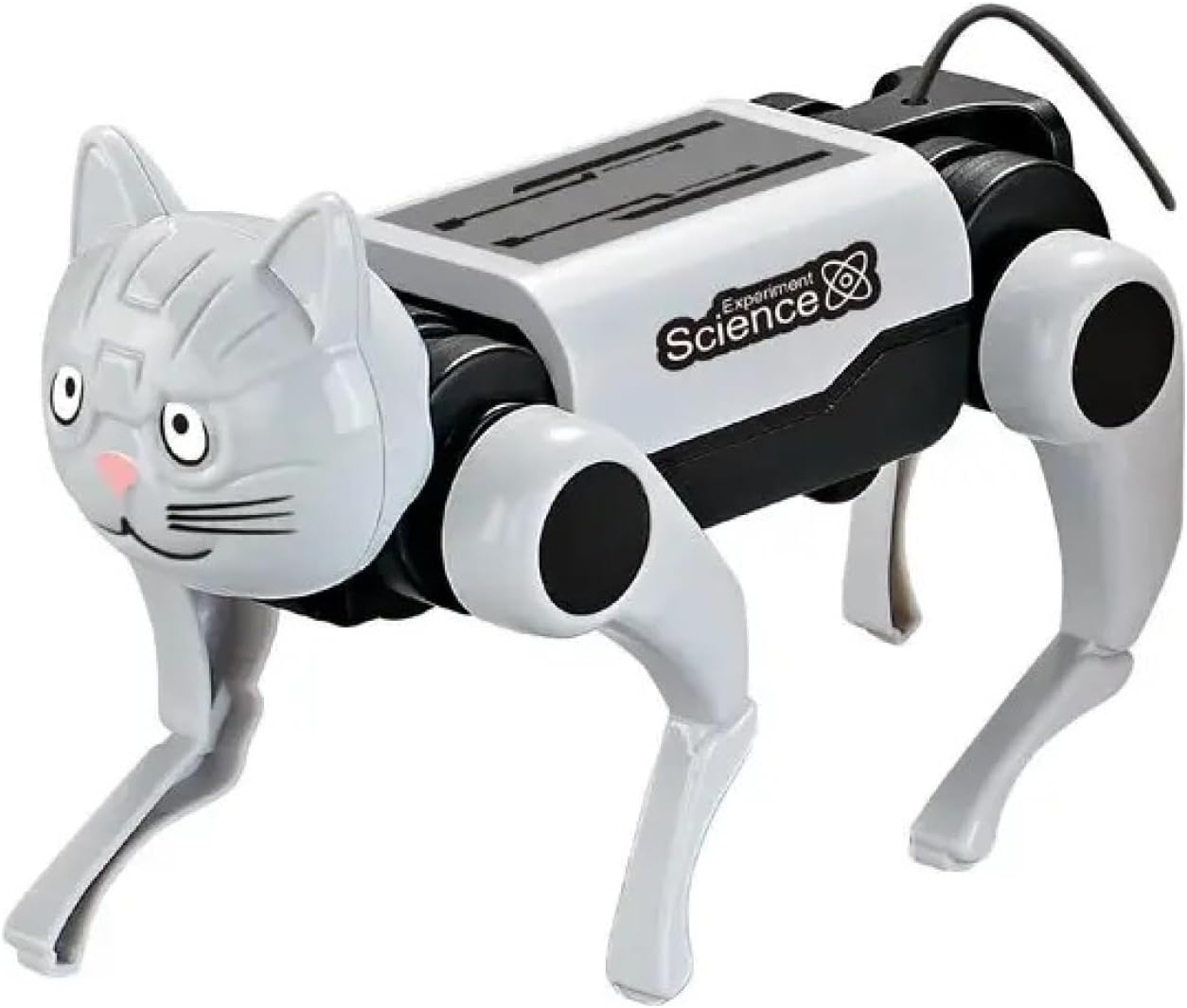
Image: The fully assembled DF Models Robot Dog. This shows the robot's body, legs, and the distinct dog head attachment.

Image: The fully assembled DF Models Robot Cat. This shows the robot's body, legs, and the distinct cat head attachment.
5. Operating Instructions
Once assembled and batteries are installed, your robot is ready for operation.
- Power On: Ensure the robot's power switch (if present, usually on the underside or side of the main body) is in the 'ON' position.
- Remote Control: The remote control has buttons for forward and backward movement.
- Forward Movement: Press and hold the 'Forward' button on the remote control to make the robot move forward.
- Backward Movement: Press and hold the 'Backward' button on the remote control to make the robot move backward.
- Turning: The robot's design allows for simple forward and backward movement. Turning is achieved by adjusting the robot's initial direction.
- Power Off: When finished playing, switch the robot's power to 'OFF' to conserve battery life.
6. Maintenance
- Cleaning: Wipe the robot with a dry, soft cloth. Do not use water or cleaning agents, as this can damage electronic components.
- Storage: Store the robot in a cool, dry place away from direct sunlight and extreme temperatures.
- Battery Removal: If the robot will not be used for an extended period, remove the batteries from both the robot and the remote control to prevent leakage.
- Component Check: Periodically check for loose parts or connections and re-secure them if necessary.
7. Troubleshooting
| Problem | Possible Cause | Solution |
|---|---|---|
| Robot does not move. | Batteries are dead or incorrectly installed. Power switch is off. Loose wiring. | Replace batteries, ensuring correct polarity. Turn power switch to 'ON'. Check all wire connections to the circuit board and motor. |
| Remote control does not work. | Remote control battery is dead. Out of range. | Replace the remote control battery. Ensure the robot is within the remote's operating range. |
| Robot moves slowly or erratically. | Low batteries. Obstruction in gears. | Replace robot batteries. Check gears for any debris or obstructions and carefully remove them. |
8. Specifications
- Model: 9955
- Brand: DF Models
- Product Type: DIY Robot Kit (Dog/Cat)
- Material: Plastic
- Dimensions (assembled): Approximately 22L x 18W x 4.6H cm
- Control: Remote Control
- Movement: Forward, Backward
- Power Source (Robot): 2 x AAA batteries (not included)
- Power Source (Remote Control): 1 x button cell battery (included)
- Recommended Age: 36 months and up (with adult supervision)
9. Warranty and Support
DF Models products are manufactured with quality and care. For any questions, technical support, or warranty inquiries, please contact your retailer or the DF Models customer service department. Please retain your proof of purchase for warranty claims.
For further assistance, visit the official DF Models website or contact their support channels.
Related documents9955

Ask a question about this manual
Ask about setup, troubleshooting, compatibility, parts, safety, or missing instructions. Manuals+ will review the question and use this page’s manual context to help answer it.