
Arshin B0GSW63PD8
Arshin Foldable 4-Wheel Electric Mobility Scooter User Manual
Model: B0GSW63PD8 | Brand: Arshin
Introduction
This manual provides essential information for the safe operation, maintenance, and troubleshooting of your Arshin Foldable 4-Wheel Electric Mobility Scooter. Please read this manual thoroughly before using the scooter to ensure proper function and safety.
Important Safety Information
- Always ensure the scooter is fully charged before use to avoid unexpected power loss.
- Operate the scooter at a safe speed, especially in crowded areas or on uneven terrain. Maximum speed is 4 MPH.
- Be aware of your surroundings and avoid distractions while operating the scooter.
- The scooter is equipped with LED lights for improved visibility. Use them during nighttime or low-light conditions.
- The electromagnetic brake system stops the scooter when the throttle is released. Familiarize yourself with this feature.
- Do not exceed the maximum weight capacity of 300 lbs.
- Avoid climbing slopes greater than 15 degrees.
- Keep hands and feet clear of moving parts.
- Store the scooter in a dry, safe place when not in use.
Setup and Initial Use
Your Arshin mobility scooter requires no assembly and is designed for quick deployment.
Unfolding the Scooter
- Place the folded scooter on a flat, stable surface.
- Gently lift the handlebars until they lock into the upright position.
- Adjust the seat and armrests to your preferred comfortable position.

Figure 1: Unfolded Arshin Mobility Scooter with key dimensions.
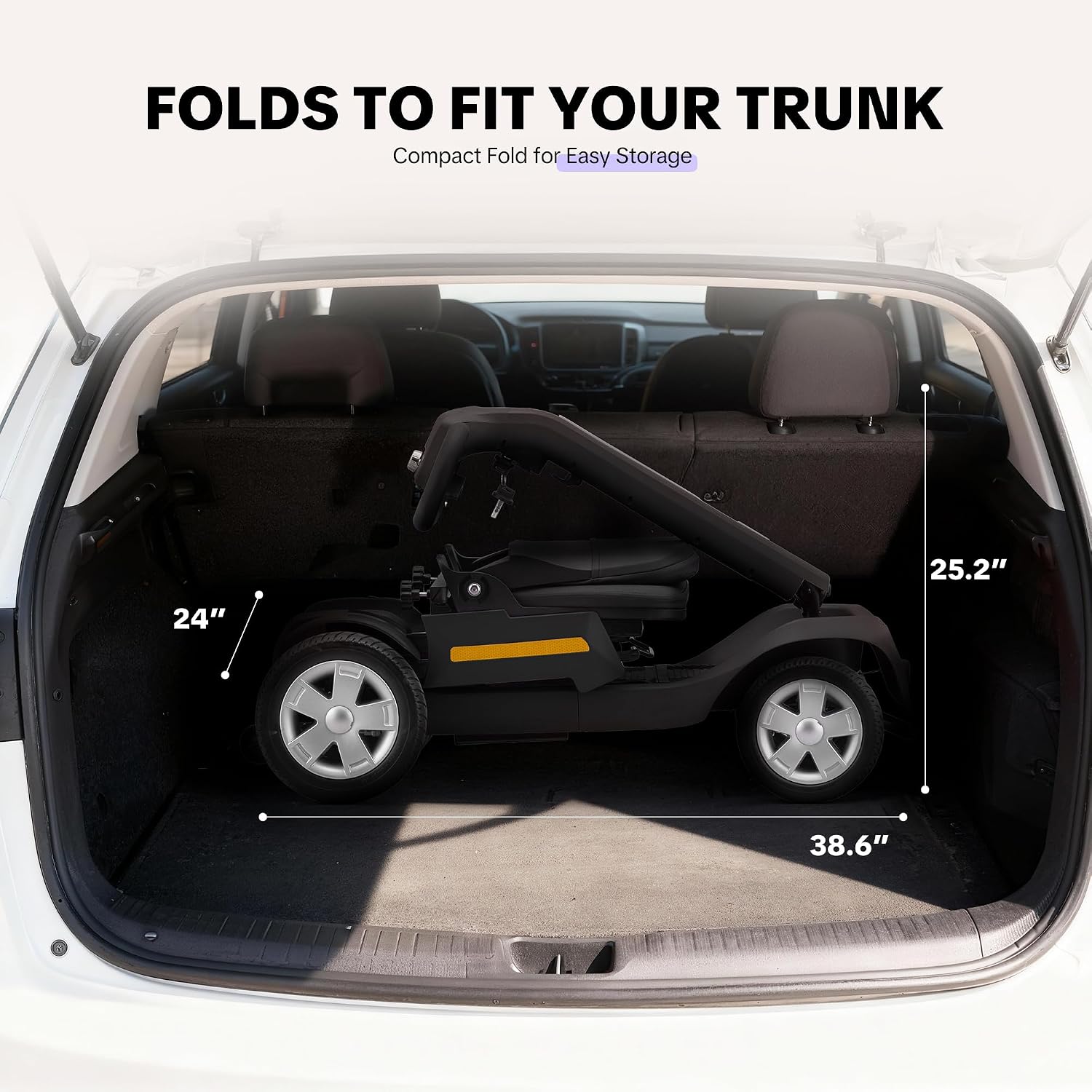
Figure 2: The scooter folded for transport in a car trunk.
Charging the Battery
- Locate the charging port on the scooter.
- Connect the charger to the scooter and then plug it into a standard electrical outlet.
- The battery indicator on the control panel will show charging status. A full charge typically takes 6-7 hours.
- Do not overcharge the battery. Disconnect the charger once fully charged.

Figure 3: Charging the scooter battery.
Operating Instructions
Control Panel Overview
Figure 4: Detailed view of the control panel.
- Console: Displays speed and battery level.
- Battery Level Indicator: Shows remaining battery charge.
- Speed Adjustment Knob: Adjusts the maximum speed (0-4 MPH).
- Throttle Control Lever: Push forward to move forward, pull back to reverse. Releasing stops the scooter.
- Horn Button: Activates the horn.
- Headlight Button: Turns the LED headlights and taillights on/off.
Driving the Scooter
- Ensure the scooter is powered on and the battery is sufficiently charged.
- Adjust the speed knob to a comfortable setting, starting with a lower speed for initial use.
- Gently press the throttle control lever to move forward or backward.
- To stop, release the throttle lever. The electromagnetic brake will engage automatically.
- Use the handlebars to steer. The scooter has a tight turning radius for maneuverability.
- Activate the LED lights when riding in low light conditions.

Figure 5: Scooter with LED lights for nighttime visibility.

Figure 6: Scooter navigating various terrains including gravel, grass, and wet surfaces.
Video 1: Demonstration of the Arshin Mobility Scooter in use, highlighting its features and maneuverability.
Video 2: Overview of the Arshin Mobility Scooter for Seniors & Adults, showcasing its design and functionality.
Key Features
- Foldable Design: Easily folds for compact storage and transport. Dimensions when folded: 38.6" L x 24" W x 25.2" H.
- Powerful Motor: 300W motor provides a top speed of 4 MPH and can climb slopes up to 15°.
- Long Range Battery: 24V 12AH lithium battery offers up to 15 miles on a single charge.
- Triple Safety Design: LED lights, rear anti-roll wheels, and electromagnetic braking system.
- All-Terrain Capability: Oversized 9-inch front and 10-inch rear wheels for stable performance on various surfaces.
- Comfortable Seating: Spacious 16.5" x 13.4" cushioned seat with adjustable armrests.
- Integrated Storage: Under-seat storage bag with a 4.4 lbs capacity.

Figure 7: Under-seat storage bag for personal items.
Maintenance
- Cleaning: Wipe down the scooter with a damp cloth. Do not use harsh chemicals or immerse any electrical components in water.
- Battery Care: Charge the battery regularly, even if not in frequent use, to maintain its lifespan. Store the battery in a cool, dry place.
- Tire Inspection: Periodically check tire pressure and for any signs of wear or damage.
- Fasteners: Ensure all bolts and fasteners are secure. Do not overtighten.
- Storage: When storing for extended periods, ensure the battery is fully charged and disconnect it if possible. Store in a dry, protected area.
Troubleshooting
| Problem | Possible Cause | Solution |
|---|---|---|
| Scooter does not power on. | Battery is discharged or not connected. | Charge the battery. Ensure battery connections are secure. |
| Scooter moves slowly or loses power quickly. | Low battery charge or battery degradation. | Fully charge the battery. If problem persists, battery may need replacement. |
| Unusual noises during operation. | Loose components or obstruction. | Inspect for loose parts or foreign objects. Contact support if noise continues. |
| Brakes not engaging properly. | Issue with electromagnetic brake system. | Ensure throttle is fully released. If problem persists, contact support. |
For issues not listed here, please contact customer support.
Specifications
| Feature | Detail |
|---|---|
| Product Dimensions (Unfolded) | 38.6" D x 24" W x 39" H |
| Product Dimensions (Folded) | 38.6" L x 24" W x 25.2" H |
| Item Weight | 88 Pounds |
| Maximum Weight Recommendation | 300 Pounds |
| Motor Power | 300W |
| Battery | 24V 12AH Lithium Battery |
| Maximum Speed | 4 Miles per Hour |
| Maximum Range | 15 Miles |
| Max Climbing Angle | 15 Degrees |
| Charging Time | 6-7 Hours |
| Brake Style | Electromagnetic |
| Front Wheel Size | 9 Inches |
| Rear Wheel Size | 10 Inches |
| Seat Depth | 13.4 Inches |
| Turn Radius | 24 Inches |
| Material Type | Aluminum |
| Required Assembly | No |
Warranty and Support
Warranty Description: The Arshin Mobility Scooter comes with a 30-day free return and exchange policy. Additionally, there is a 90-day period for free replacement parts and repairs. Please retain the original packaging for any returns or exchanges.
Customer Support: For any questions, assistance, or warranty claims, please contact Arshin customer support. You can reach us through the seller "YKYJG" on Amazon or refer to the contact information provided with your purchase. Arshin offers 24/7 online support.
Ask a question about this manual
Ask about setup, troubleshooting, compatibility, parts, safety, or missing instructions. Manuals+ will review the question and use this page’s manual context to help answer it.