
1. Introduction
Thank you for choosing the Gautye G1 Pro Steam Cleaner. This manual provides essential information for the safe operation, maintenance, and troubleshooting of your device. Please read it thoroughly before first use and retain it for future reference.
2. Safety Information
Always observe basic safety precautions when using electrical appliances to reduce the risk of fire, electric shock, or injury.
General Safety Warnings:
- Hot Steam Hazard: The steam cleaner produces high-temperature steam. Avoid direct contact with skin or eyes. Keep hands and face away from the nozzle during operation.
- Electrical Safety: Do not immerse the appliance, power cord, or plug in water or other liquids. Ensure your power outlet matches the voltage specified on the appliance. Unplug the unit when not in use and before cleaning or maintenance.
- Water Tank: Only use distilled or demineralized water to prevent mineral buildup. Do not overfill the water tank.
- Children and Pets: Keep the appliance out of reach of children and pets. Do not leave the steam cleaner unattended while it is operating or connected to power.
- Surface Compatibility: Test the steam on an inconspicuous area of the surface to be cleaned before full application, especially on delicate materials.
- Maintenance: Do not attempt to repair the appliance yourself. Contact qualified service personnel for repairs.
3. Package Contents
Verify that all items are present in the package:
- 1 x Gautye G1 Pro Steam Cleaner Unit
- 1 x Power Cord
- 1 x Descaling Needle
- 1 x Sealing Ring
- 1 x Nylon Small Brush
- 1 x Brass Brush
- 1 x Glass Scraper
- 1 x Heat-Resistant Gloves (Pair)
- 1 x Steam Scraper
- 3 x Cloth Covers
- 1 x Extension Rod
- 3 x Round Brushes
- 1 x High-Pressure Nozzle
- 1 x Extension Nozzle

4. Product Overview
The Gautye G1 Pro is a versatile steam cleaner designed for various household cleaning tasks. It features a durable ABS polymer construction, a transparent water tank, and an adjustable handle for ergonomic use.
Key Features:
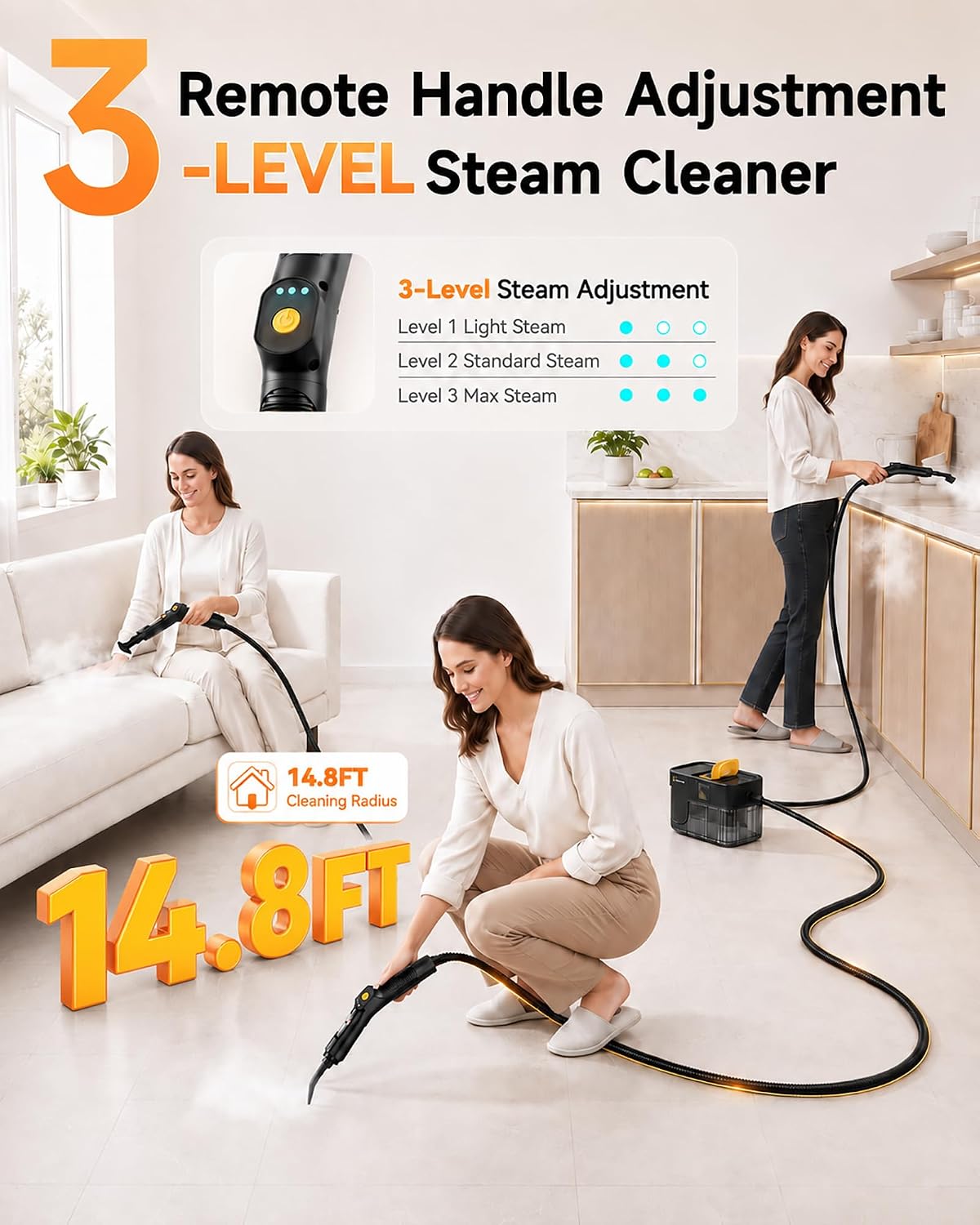
- 3-Level Adjustable Handle: Allows for comfortable use and varied reach.
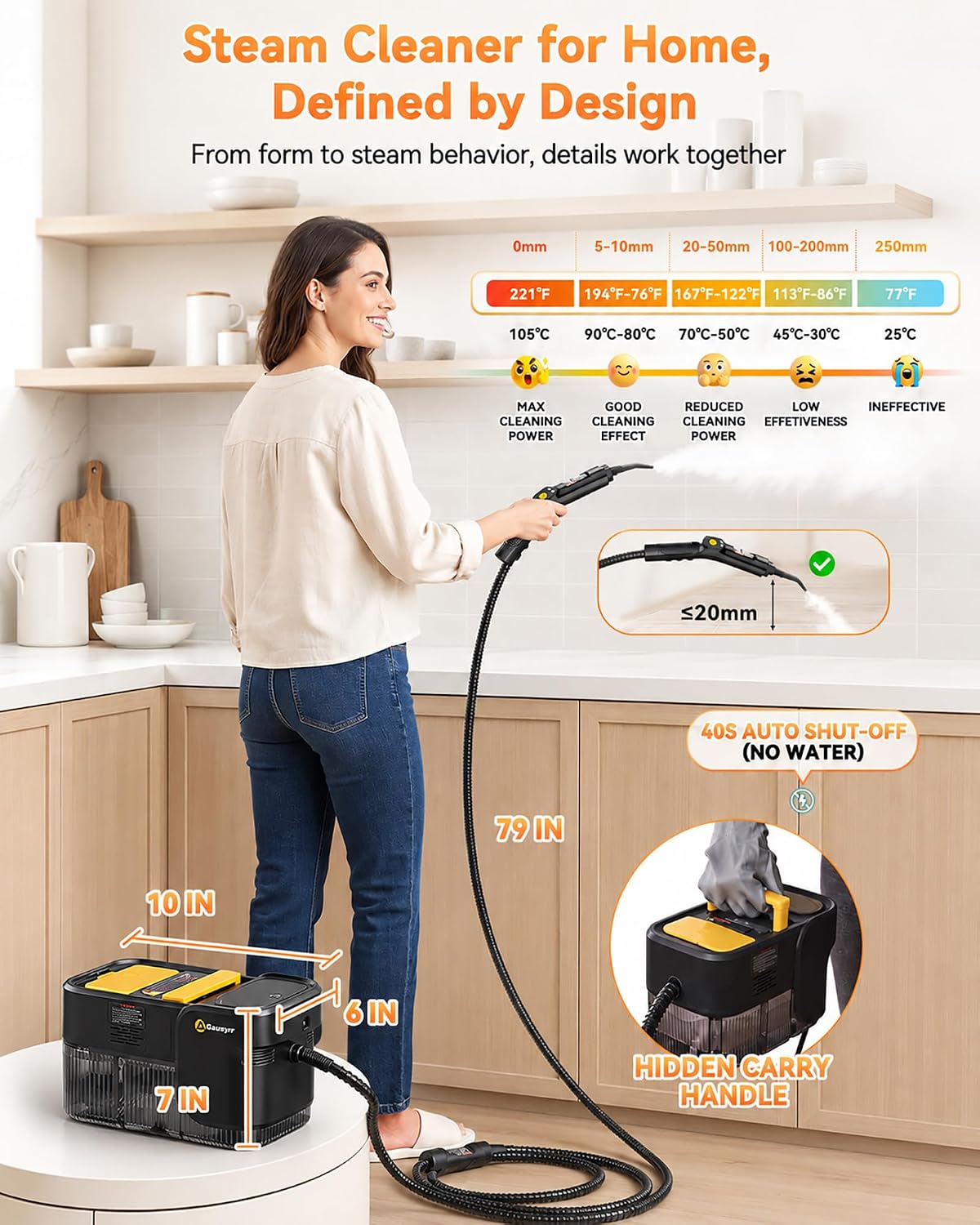
- 2.11 Quarts Transparent Water Tank: Provides extended cleaning time and allows for easy monitoring of water levels. Supports hot refilling.
- 10-Second Rapid Heat-Up: Minimizes waiting time before use.
- 3 Bar Steam Pressure: Delivers powerful steam for effective cleaning.
- 14.8 FT Cleaning Radius: Combines a 98-inch power cord with a 79-inch steam hose for extensive reach.
- Compact Design: Measures approximately 10×6×7 inches with a hidden carry handle for easy storage and portability.
- Automatic Shut-off: Activates after 40 seconds if no water is detected, enhancing safety.

5. Setup
Follow these steps to prepare your steam cleaner for use:
- Unpack: Carefully remove all components from the packaging.
- Fill Water Tank: Open the water tank cap. Using a measuring cup or funnel, fill the 2.11-quart transparent tank with distilled or demineralized water. Do not exceed the maximum fill line. Close the cap securely.
- Attach Accessories: Select the appropriate cleaning accessory for your task and securely attach it to the steam hose handle. Ensure it clicks into place.
- Connect Power: Plug the power cord into a grounded electrical outlet.
6. Operation
Operating your Gautye G1 Pro Steam Cleaner:
- Power On: Press and hold the power button on the handle. The indicator lights will illuminate.
- Heat Up: The unit will begin heating. This typically takes about 10 seconds. The indicator light will change or stop flashing when ready.
- Adjust Steam Level: The steam cleaner offers 3 adjustable steam levels. Press the steam adjustment button on the handle to cycle through Light Steam (Level 1), Standard Steam (Level 2), and Max Steam (Level 3). Select the appropriate level for the cleaning task.
- Begin Cleaning: Direct the nozzle towards the surface to be cleaned. Press the steam trigger to release steam. Move the nozzle slowly over the surface.
- Refilling (Hot): The transparent tank allows visual monitoring. If water runs low during operation, you can safely refill the tank without waiting for the unit to cool down.
- Power Off: When finished, release the steam trigger and press and hold the power button to turn off the unit. Unplug the power cord from the outlet.
7. Accessory Usage Guide
The 18-piece accessory kit provides specialized tools for various cleaning applications:
| Accessory | Primary Use |
|---|---|
| Extended Sprayer Rod | Extends reach for floors, high areas, or deep crevices. |
| Window Scraper | For cleaning glass surfaces like windows and mirrors. |
| Scraper | Removes tough, caked-on grime from hard surfaces. |
| Nylon Brush | General scrubbing for tiles, grout, bathroom fixtures, kitchen surfaces. |
| Brass Brush | For heavy-duty scrubbing on durable surfaces like grills, oven racks, or metal parts. |
| Large Nylon Brush | Wider coverage for larger areas like floors or walls. |
| Pressurized Nozzle | Concentrated steam for targeted cleaning in tight spaces. |
| High-Pressure Nozzle | Similar to pressurized nozzle, for blasting dirt from crevices. |
| Water Tank Plug | Seals the water tank opening. |
| Window Scraper with Towel Cover | For streak-free window cleaning. |
| Seal Ring | Replacement part for maintaining a tight seal. |
| Heat-Insulating Gloves | Protects hands from heat during operation. |
| Descaling Needle | Used for maintenance to clear mineral buildup. |
| Cloth Covers (3) | For use with steam scraper or other attachments for wiping and absorbing dirt. |

8. Maintenance
Proper maintenance ensures the longevity and performance of your steam cleaner.
After Each Use:
- Empty Water Tank: Allow the unit to cool completely. Carefully open the water tank cap and drain any remaining water.
- Clean Accessories: Wash cloth covers and brushes with water. Remove any debris from nozzles.
- Wipe Down Unit: Wipe the exterior of the steam cleaner with a damp cloth.
Descaling (As Needed):
If you notice reduced steam output or mineral buildup, descaling may be necessary. Use the provided descaling needle to clear any blockages in the nozzle or steam outlet. For internal descaling, consult a qualified technician or follow specific descaling instructions if provided with a descaling solution (not included).
Storage:
Store the steam cleaner and its accessories in a cool, dry place, out of reach of children.
9. Troubleshooting
Refer to this section for common issues and their solutions.
| Problem | Possible Cause | Solution |
|---|---|---|
| No steam or low steam output. | Water tank empty; unit not heated; nozzle blocked; mineral buildup. | Refill water tank; wait for heat-up indicator; clear nozzle with descaling needle; descale unit. |
| Unit not turning on. | Not plugged in; power outlet issue; power button not pressed correctly. | Ensure power cord is securely plugged in; check power outlet; press and hold power button. |
| Water leaking from connections. | Accessories not securely attached; seal ring damaged or missing. | Ensure all attachments are firmly connected; check and replace seal ring if necessary. |
| Steam is not hot enough. | Unit not fully heated; steam level set too low. | Wait for the unit to reach full temperature; increase steam level setting. |
10. Specifications
| Feature | Specification |
|---|---|
| Brand | Gautye |
| Model Name | G1 Pro |
| Wattage | 1700 watts |
| Voltage | 110 volts |
| Heat Time | 10 seconds |
| Maximum Temperature | 212 °F (100 °C) |
| Tank Volume | 2.11 quarts |
| Item Weight | 4.9 pounds |
| Item Dimensions (D x W x H) | 9.8"D x 6.3"W x 5.9"H |
| Cleaning Radius | 14.8 FT (98IN power cord + 79IN steam hose) |
| Material | ABS Polymer |
| UPC | 199874988801 |
11. Warranty and Support
The Gautye G1 Pro Steam Cleaner comes with a one-year after-sales support. This includes free replacement for defective products and complimentary accessories as needed. For warranty claims or technical assistance, please contact Gautye customer support through your retailer or the official brand website.