
Introduction
The BLOW Ice Cool IPL Epilator is designed for safe, effective, and comfortable hair reduction and skin care at home. Utilizing advanced Intense Pulsed Light (IPL) technology, this device helps to reduce unwanted hair growth and improve skin appearance. Key features include 9 adjustable intensity levels, an integrated Ice Cool cooling function, and a long-lasting lamp with 1,000,000 flashes.
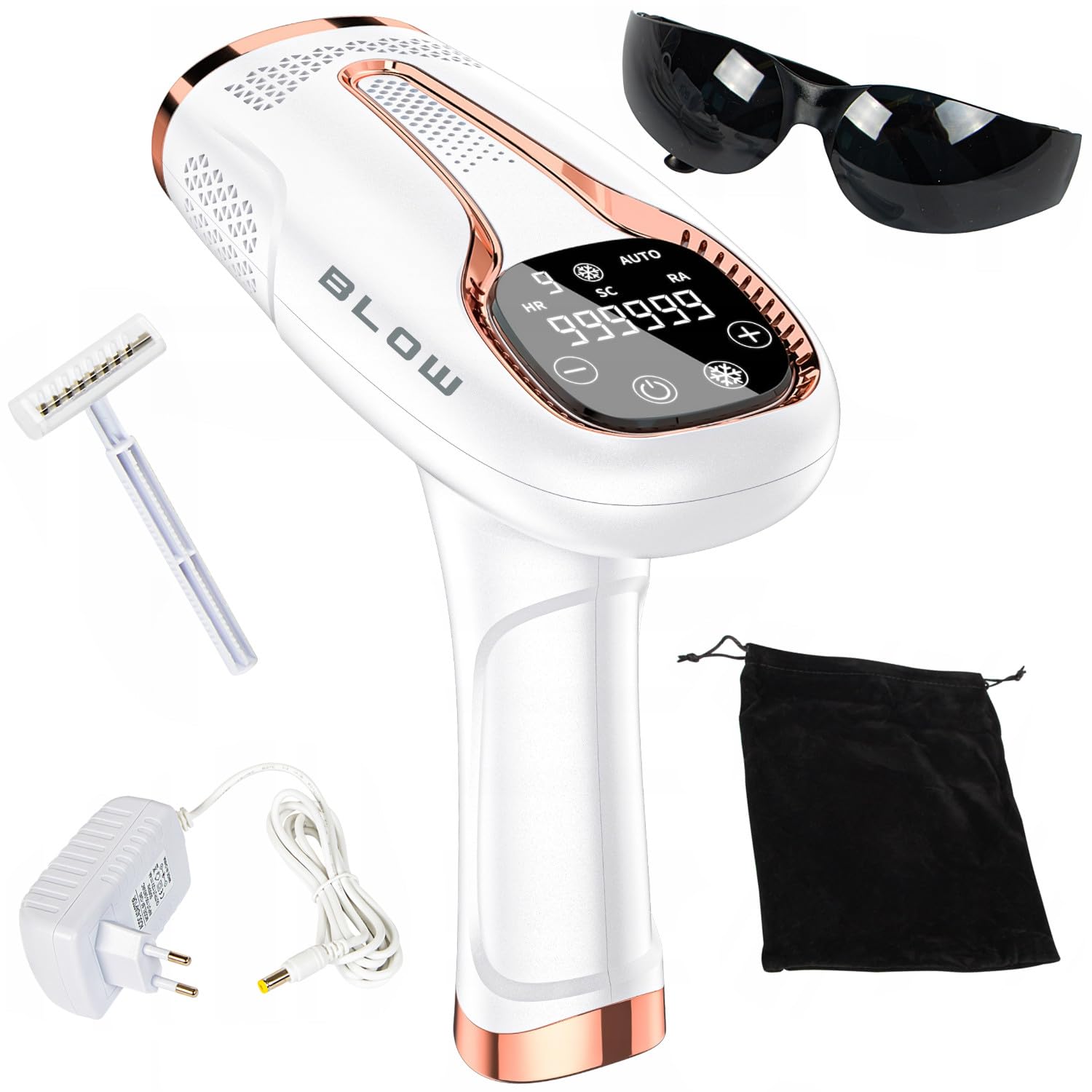
Image 1: The BLOW Ice Cool IPL Epilator. This image displays the overall design of the device, highlighting its ergonomic shape and the control panel with a digital display.
Important Safety Information
Before using the BLOW Ice Cool IPL Epilator, please read all instructions carefully. Failure to follow safety guidelines may result in injury or device damage.
- Eye Protection: Always wear the provided protective glasses during treatment to shield your eyes from intense pulsed light. Do not look directly into the light window.
- Skin Type and Hair Color: This device is most effective on light to medium skin tones with dark hair. It is not suitable for very dark skin tones or very light (blonde, red, grey, white) hair. Consult the skin tone chart in the full manual if available.
- Skin Condition: Do not use on irritated, sunburned, infected, or wounded skin. Avoid areas with tattoos, permanent makeup, or moles.
- Medical Conditions: Consult a doctor before use if you have any underlying medical conditions, are pregnant or breastfeeding, or are taking photosensitizing medications.
- UV Filter: The device includes an integrated UV filter to protect the skin from harmful UV radiation.
- Safety Lock: The device features a safety lock mechanism to prevent accidental flashing. The flash will only activate when the treatment window is in full contact with the skin.
- Children and Pets: Keep the device out of reach of children and pets.
Package Contents
Verify that all items are present in the package:
- BLOW Ice Cool IPL Epilator Device
- Storage Bag
- Protective Glasses
- Razor
- Power Adapter with Cable
- User Manual (this document)

Image 2: Included accessories. This image shows the IPL device, protective glasses, a razor, the power adapter, and a storage bag, representing the complete package contents.
Setup
- Prepare Skin: Ensure the treatment area is clean, dry, and free of lotions, creams, or deodorants. Shave the hair in the treatment area using the provided razor or another suitable method. Do not wax or pluck, as the hair follicle needs to be present for IPL to be effective.
- Connect Power: Plug the power adapter into the device and then into a suitable electrical outlet.
- Wear Protective Glasses: Always put on the protective glasses before turning on the device to shield your eyes from the intense light.
Operating Instructions
Powering On/Off
Press and hold the power button (usually marked with a circle icon) for a few seconds to turn the device on or off. The display will illuminate upon activation.

Image 3: Device display and controls. This image focuses on the control panel, showing the digital display with flash count (e.g., 999,999) and buttons for power, intensity adjustment, and mode selection.
Adjusting Intensity Levels
The device offers 9 intensity levels (8-16 J light energy) to suit different skin sensitivities and hair types. Use the '+' and '-' buttons on the control panel to adjust the intensity. Start with a lower level and gradually increase it if comfortable. Higher intensity levels are generally more effective but require careful skin monitoring.
Ice Cool Function
Activate the Ice Cool function (indicated by a snowflake icon) to cool the treatment surface to approximately -6°C. This feature enhances comfort during treatment, especially for sensitive skin. The cooling function can be toggled on or off as desired.
Treatment Modes
- Automatic Flash Mode: Ideal for treating large areas like legs, arms, or the back. In this mode, the device will automatically emit flashes when the treatment window is in full contact with the skin and moved continuously.
- Manual Flash Mode: Suitable for smaller, more precise areas such as the face, underarms, or bikini line. Press the flash button (often integrated with the power button or a separate trigger) each time you want to emit a flash.
Performing a Treatment
- Ensure skin is prepared and protective glasses are worn.
- Select the desired intensity level and activate the Ice Cool function if preferred.
- Place the treatment window firmly against the skin. The device will detect skin contact and be ready to flash.
- For manual mode, press the flash button. For automatic mode, glide the device slowly over the skin, ensuring continuous contact.
- Move to the next area, ensuring slight overlap to cover all hair follicles.
- After treatment, turn off the device and unplug it.

Image 4: Treatment window. This image shows the underside of the device, highlighting the flash window where the pulsed light is emitted. Proper skin contact with this window is essential for operation.
Treatment Schedule
For optimal results, use the device regularly. Visible hair reduction can typically be observed after approximately 2 months of consistent use. Follow the recommended schedule provided in the full manual for your specific needs.
Maintenance
Cleaning the Device
- Always ensure the device is turned off and unplugged before cleaning.
- Use a soft, dry cloth to wipe the device body.
- Gently clean the treatment window with a lint-free cloth. Do not use abrasive cleaners or harsh chemicals.
- Ensure no moisture enters the device openings.
Storage
Store the device in its original storage bag in a cool, dry place, away from direct sunlight and moisture. Keep it out of reach of children.
Troubleshooting
| Problem | Possible Cause | Solution |
|---|---|---|
| Device does not turn on. | Not properly connected to power; power outlet issue. | Ensure the power adapter is securely plugged into both the device and a working electrical outlet. Try a different outlet. |
| Device flashes intermittently or not at all. | Treatment window not in full contact with skin; safety lock engaged. | Ensure the treatment window is pressed firmly and completely against the skin. The device will only flash when proper contact is detected. |
| Skin feels too hot or uncomfortable. | Intensity level is too high; Ice Cool function not activated. | Reduce the intensity level. Activate the Ice Cool function. If discomfort persists, discontinue use. |
| No visible hair reduction after several weeks. | Inconsistent use; incorrect intensity level; unsuitable skin/hair type. | Ensure consistent use according to the recommended schedule. Increase intensity if comfortable. Verify suitability for your skin tone and hair color. |
Technical Specifications
- Light Energy: 8-16 J (depending on selected level)
- Lamp Life: 1,000,000 flashes
- Wavelength Range: 600-1200 nm
- Power: 36 W
- Voltage: 12 V
- Power Type: Wired
- Cable Length: 150 cm
- Certifications: CE, RoHS, FCC, PSE
- Model Number: 44-480#
Warranty and Support
For warranty information, technical support, or service inquiries, please refer to the specific warranty card included with your product or contact the retailer or manufacturer directly. Keep your proof of purchase for warranty claims.
Disposal Information
This product contains electronic components and should not be disposed of with household waste. Please take it to an appropriate collection point for the recycling of electrical and electronic equipment. Proper disposal helps prevent potential negative consequences for the environment and human health.