
Introduction
Welcome to the ANTHBOT Genie600E Robot Lawn Mower instruction manual. This document provides essential information for the safe and efficient operation, setup, and maintenance of your robotic lawnmower. Please read this manual thoroughly before using the product.
Setup and Installation
1. Unboxing and Components
Upon receiving your ANTHBOT Genie600E, carefully unbox all components. The package includes the robotic lawn mower, charging station, RTK base station, power adapter, extension cable, ground screws, pegs for cable, Allen key, and spare blades. Ensure all parts are present before proceeding.

Image: Quick Installation Guide showing steps for RTK location, network setup, mapping, and starting global mowing.
2. Finding an Unobstructed Area for RTK Base Station
The RTK base station requires an unobstructed view of the sky for optimal GPS signal reception. Place it in an open area, away from tall buildings, dense trees, or other structures that may interfere with the signal. Ensure it is within range of your Wi-Fi network or has good 4G coverage.
3. Charging Station Placement
Place the charging station on a flat, level surface in your lawn area. Connect the power adapter and extension cable as needed. Secure the charging station to the ground using the provided ground screws.
4. App Operation and Mapping
Download the ANTHBOT app from your device's app store. Follow the in-app instructions to add your device. The mower supports both automatic and manual mapping. For automatic mapping, the mower uses its 4-camera system to identify boundaries and create optimal cutting routes. For manual mapping, you can guide the mower using the app to define specific zones and no-go areas.
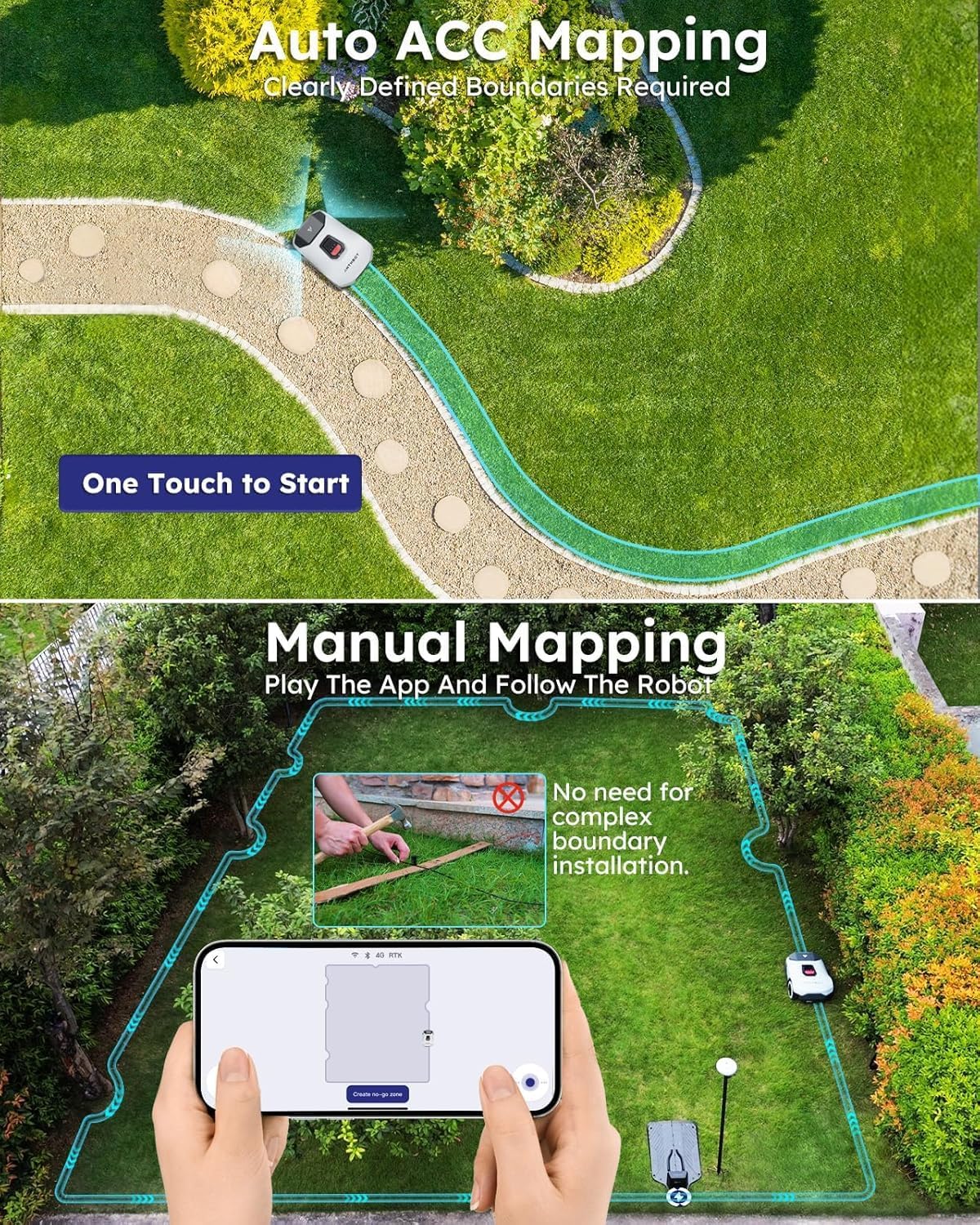
Image: Two panels illustrating Auto ACC Mapping (one-touch start) and Manual Mapping via the app, highlighting no complex boundary installation.
Operating Instructions
1. Host Operation
Unlock the mower using the default PIN code (0000) or your custom code. Press the 'Mow' button to start global mowing. The mower will return to the docking station automatically when its task is complete or battery is low.
2. Adjusting Cutting Height
The cutting height can be adjusted via the mobile app. The ANTHBOT Genie600E offers a range of cutting heights from 1.18 inches (30mm) to 2.76 inches (70mm).
3. Multi-Zone and No-Go Zone Management
Customize mowing settings for up to 20+ lawn zones through the Smart App. You can define specific areas as 'no-go zones' (e.g., around swimming pools) to prevent the mower from entering these areas, enhancing safety and accuracy.

Image: An aerial view illustrating multi-zone management with defined mowing times for each zone and a central 'no-go zone'.
4. Intelligent Hosting Mode
Activate Intelligent Hosting Mode via the app for automated lawn care. The mower will intelligently generate and adjust mowing schedules based on your lawn's size, seasonal changes, location, weather conditions, and time, ensuring scientific lawn maintenance.
Key Features
RTK+4-Eye Vision Accurate Positioning System
The ANTHBOT Genie600E utilizes Full Band RTK and human-like 3D vision positioning technology for reliable, high-precision navigation. This dual positioning system ensures uninterrupted mowing, even in areas with weak or no GPS signals, such as under dense trees or near buildings.
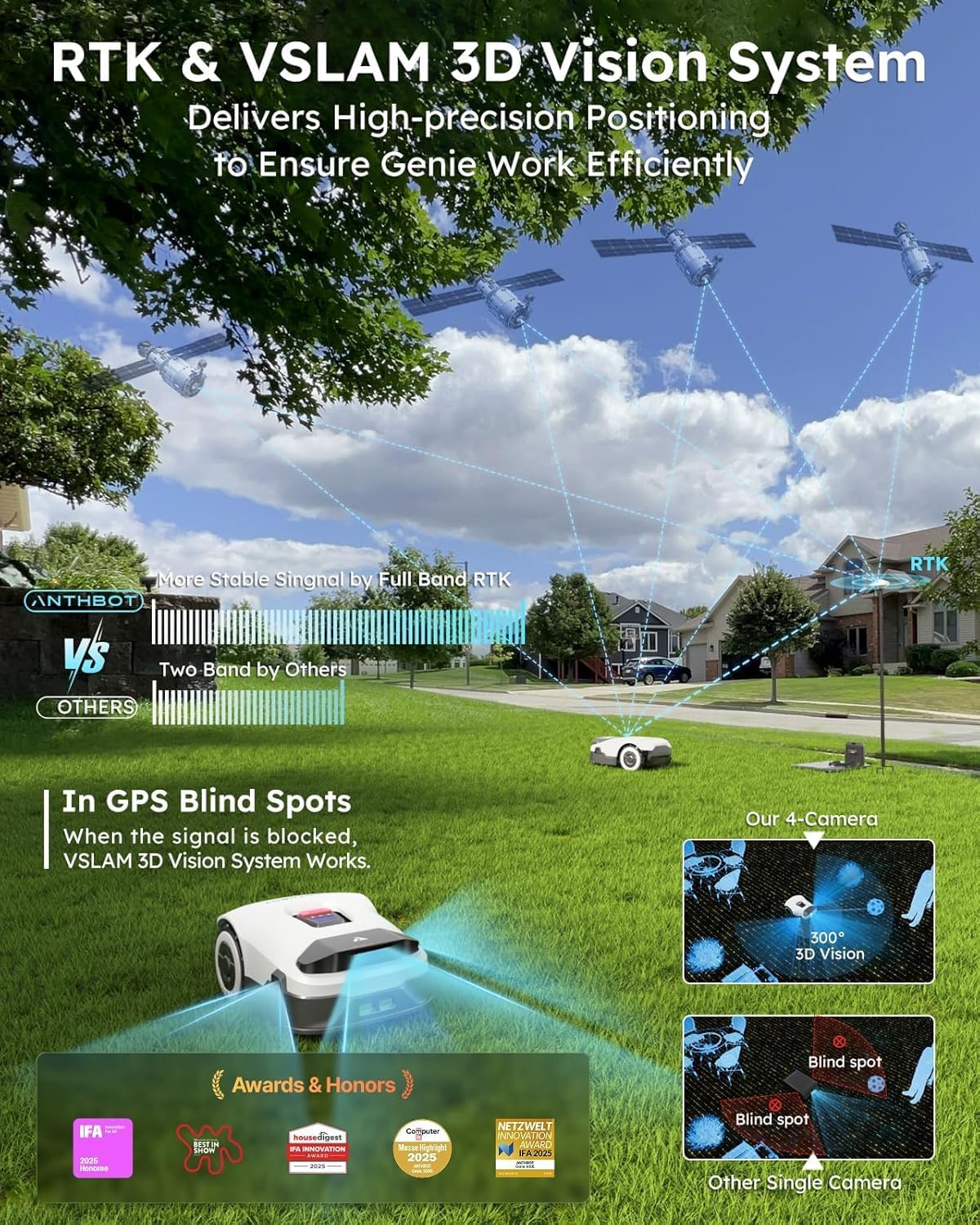
Image: A graphic illustrating the RTK & VSLAM 3D Vision System, showing satellites communicating with the mower and a comparison of 4-camera 3D vision versus single camera blind spots.
No Perimeter Wires
This robotic lawn mower operates without the need for perimeter wires, simplifying setup and eliminating the hassle of installation and maintenance associated with traditional robotic mowers.
Intelligent Obstacle Avoidance
Equipped with a 300° field-of-view camera and built-in AI algorithms, the mower can detect over 1000 types of common garden objects. This ensures strong obstacle avoidance capabilities, maintaining a safe distance from animals and preventing collisions.
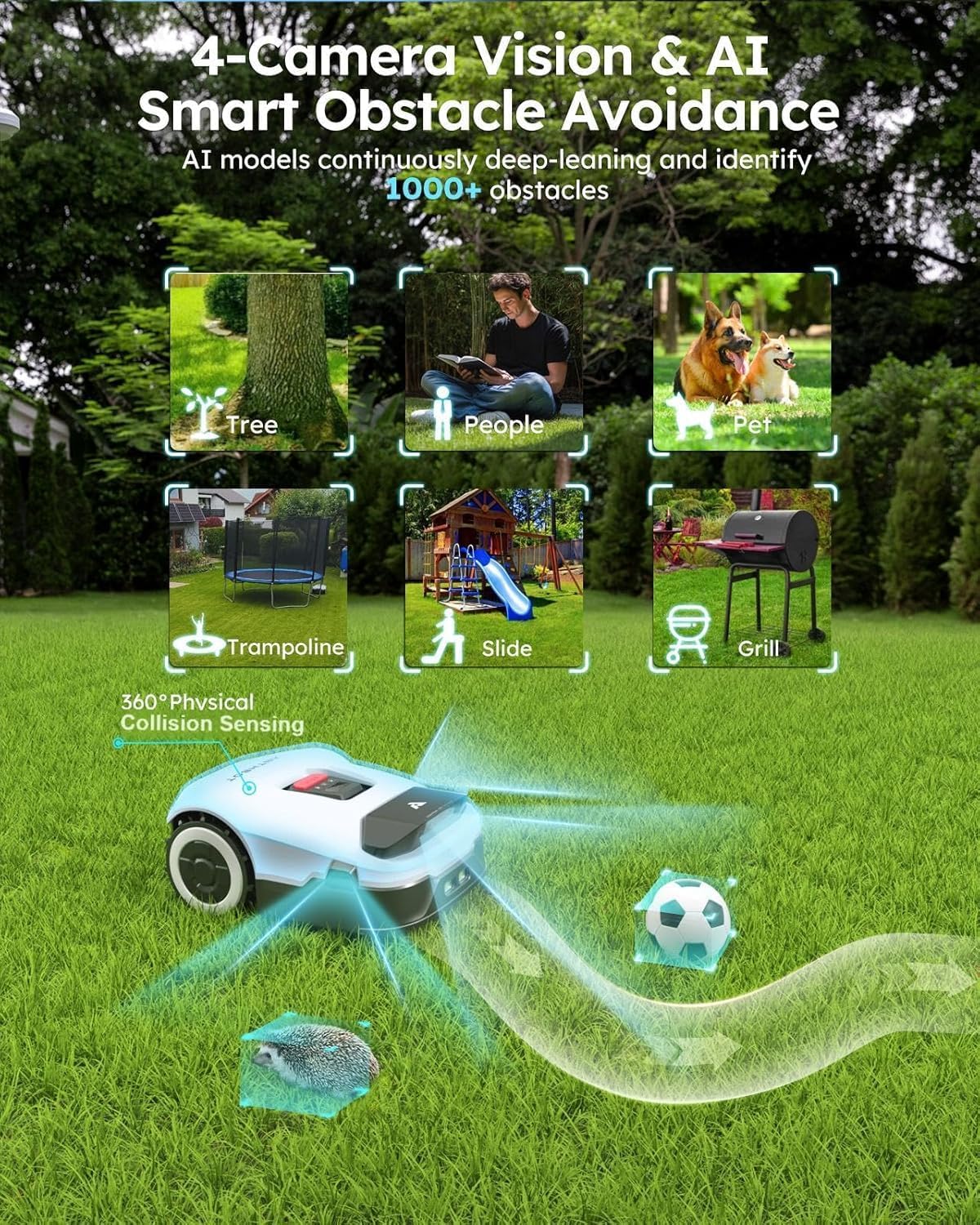
Image: A visual representation of the mower's 4-Camera Vision and AI Smart Obstacle Avoidance, showing it detecting various garden objects.
Additional Functions
- Cut to Edge: Ensures precise mowing along lawn edges.
- 45% (24°) Slope Climbing Ability: Capable of navigating sloped terrain.
- Anti-Theft Design: Features a system to prevent unauthorized use or theft.
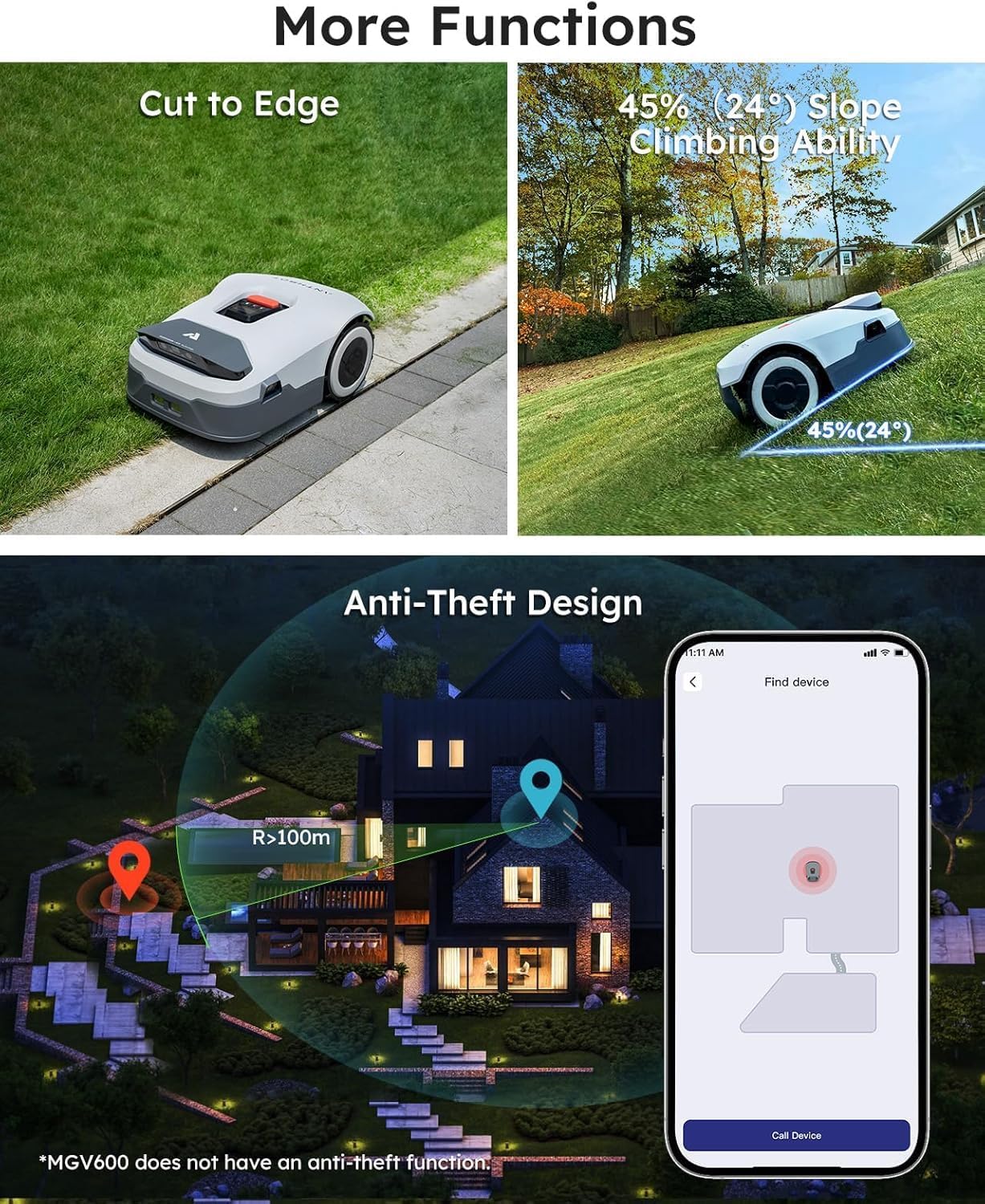
Image: A composite image demonstrating the mower's ability to cut close to edges, climb slopes, and its anti-theft features with app integration.
Maintenance
1. Blade Care
The mower is equipped with five razor blades that can be flipped over to utilize both sides, extending their lifespan. Regularly inspect blades for wear and replace them as needed using the provided screwdriver and spare blades.
2. Rain Sensor
The built-in rain sensor detects precipitation and automatically directs the mower back to its charging station. Mowing in wet conditions is generally not recommended, but this feature can be disabled via the app if desired.
Troubleshooting
If the mower encounters an issue, consult the detailed instruction manual for specific error codes and solutions. Common issues include signal loss (addressed by the dual positioning system), getting stuck (AI obstacle avoidance minimizes this), and charging problems (ensure proper docking).
Specifications
| Feature | Specification |
|---|---|
| Brand | ANTHBOT |
| Model Number | Genie600E |
| Power Source | Battery Powered |
| Material | Aluminum |
| Color | Gray |
| Item Weight | 26.4 Pounds |
| Cutting Width | 7.9 Inches |
| Operation Mode | Automatic |
| Product Dimensions | 25"D x 10.99"W x 16"H |
| Assembly Required | Yes |
| Maximum Adjustable Cutting Height | 2.76 Inches |
| Minimum Adjustable Cutting Height | 1.18 Inches |
| Coverage Area | Reception 0.15 Acre, Max. 0.22 Acre |
Warranty and Support
The ANTHBOT Genie600E Robot Lawn Mower comes with a 3-year warranty. For customer service and technical support, please contact: support@anthbot.com. You can also visit the official website for more information: https://www.anthbot.com.

Image: The ANTHBOT Robot Lawn Mower on a lawn with a family, highlighting the 3-year warranty.