
1. Introduction
Thank you for choosing the YINYOO KZ ZST PRO X In-Ear Monitor Headphones. These headphones are designed to provide a high-fidelity audio experience with a hybrid driver system, suitable for gaming, music, and professional monitoring. This manual provides essential information for setup, operation, maintenance, and troubleshooting to ensure optimal performance and longevity of your device.
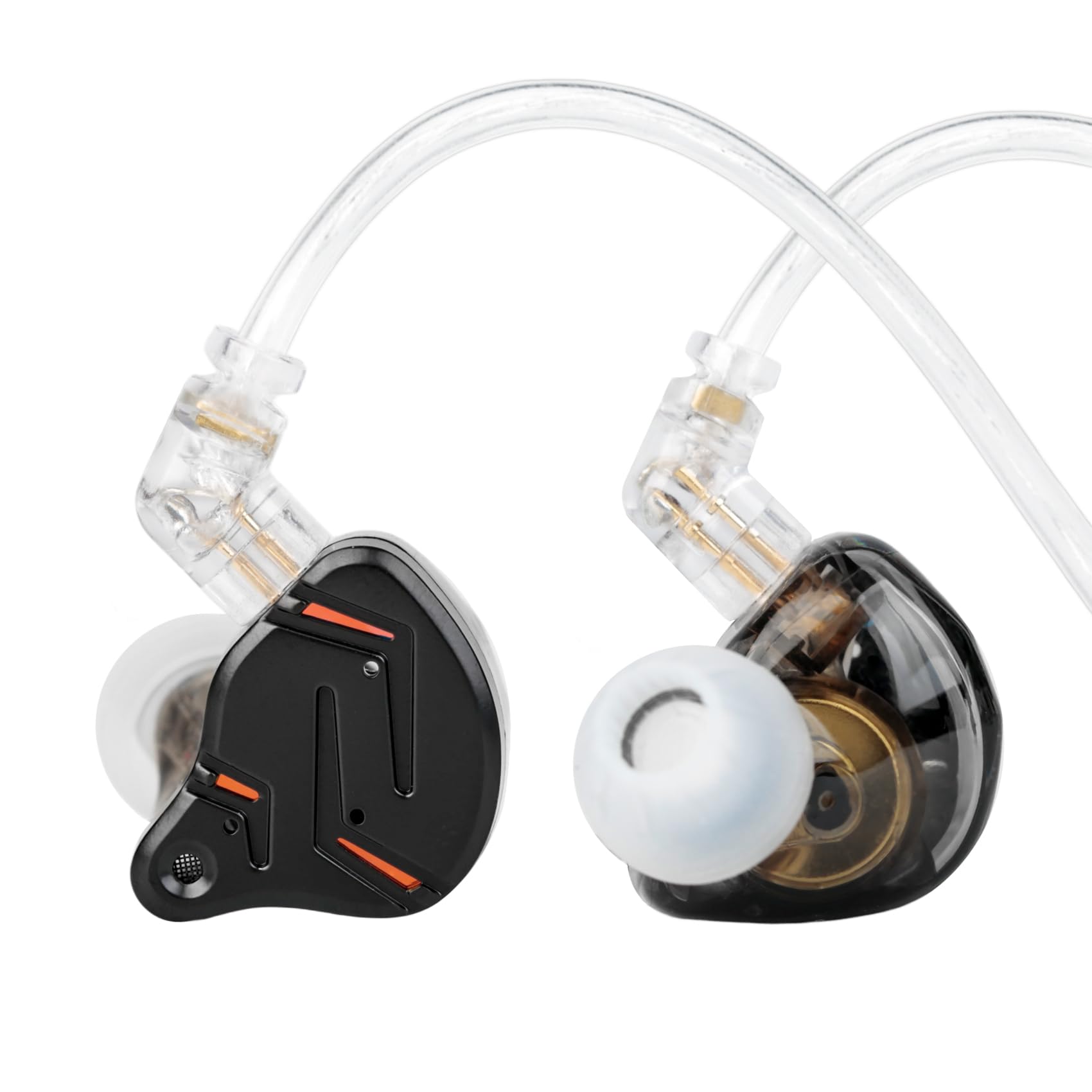
Image: The YINYOO KZ ZST PRO X In-Ear Monitor Headphones in Black Gold.
2. Product Features
The KZ ZST PRO X headphones incorporate advanced audio technology for superior sound quality and user comfort.
- Game-Ready Precision: Designed for accurate sound imaging, powerful transient response, and superior dynamics, aiding in precise opponent location in gaming.
- 3.5MM Plug, Universal Compatibility: Easily connects to most audio devices including music players, game consoles, and laptops. Features a high-performance omnidirectional HD microphone (if applicable to variant) for clear communication.
- 30019 Balanced Armature: Optimized for mid-to-high range frequencies, restoring lifelike vocal and instrumental tones with fuller, more expressive sound.
- Upgraded Super-Linear Dynamic Driver: Tuned for pure low frequencies, offering lower distortion, stronger control, deeper bass extension, and full-bodied impact.
- Stylish and Durable Design: Features a lightweight metal faceplate and skin-friendly resin shell for aesthetics, comfort, and durability.
- Ergonomic Over-Ear Design: Shell designed to fit the natural curvature of the ear with an over-ear cable for secure and comfortable fit during extended listening.

Image: Detailed view of the Super-Linear Dynamic Driver and Custom 30019 High-Frequency Balanced Armature components.

Image: A comparison illustrating the advantages of the Super-Linear Dynamic Driver over traditional dynamic drivers.
3. What's in the Box
Upon unboxing your KZ ZST PRO X, you should find the following items:
- KZ ZST PRO X In-Ear Monitor Headphones
- Detachable Cable (3.5mm L-shaped plug)
- Multiple pairs of Eartips (various sizes)
Video: An unboxing video demonstrating the contents of the KZ ZST PRO X package.
4. Setup Instructions
Follow these steps to set up your KZ ZST PRO X headphones:
- Attach the Cable: Carefully align the cable connectors with the headphone units. The cable is detachable and designed for a secure fit. Ensure the left (L) and right (R) indicators on the cable match the respective earbud units. Push firmly until you feel a click.
- Select Eartips: Choose the eartips that provide the best seal and comfort for your ears. A good seal is crucial for optimal sound quality and bass response.
- Wear the Headphones: Place the earbuds into your ears, ensuring a snug fit. Route the cable over your ear for added stability and comfort.
- Connect to Device: Insert the 3.5mm L-shaped plug into the audio jack of your music player, smartphone, game console, or computer.

Image: The 3.5mm gold-plated L-shaped audio plug, designed for wide compatibility and durability.
5. Operating Instructions
Once connected, you can control your audio playback and calls using the inline remote (if your cable variant includes one):
- Play/Pause: Press the button once.
- Next Song: Press the button twice in quick succession.
- Previous Song: Press the button three times in quick succession.
- Answer/End Call: Press the button once during an incoming call or during an active call.
- Reject Call: Press and hold the button during an incoming call.

Image: People using the KZ ZST PRO X headphones in different scenarios, highlighting their versatility.
Video: A demonstration of the KZ ZST PRO X Gaming Earbuds in use, showcasing their audio performance.
6. Maintenance
Proper maintenance ensures the longevity and performance of your headphones:
- Cleaning: Regularly wipe the earbuds and cable with a soft, dry cloth. For eartips, remove them and clean with mild soap and water, then dry thoroughly before reattaching.
- Storage: When not in use, store your headphones in a clean, dry place, preferably in a protective case, to prevent tangling and damage.
- Avoid Moisture: Do not expose the headphones to excessive moisture or liquids.
- Handle with Care: Avoid pulling the cable forcefully or bending the connectors at sharp angles.
7. Troubleshooting
If you encounter any issues, refer to the following common solutions:
| Problem | Solution |
|---|---|
| No Sound |
|
| Poor Sound Quality / Low Bass |
|
| Microphone Not Working (if applicable) |
|
| Earbuds Fall Out Easily |
|
8. Specifications
Key technical specifications for the YINYOO KZ ZST PRO X In-Ear Monitor Headphones:

Image: A visual summary of the KZ ZST PRO X product specifications.
| Specification | Detail |
|---|---|
| Brand | YINYOO |
| Model Number | ZST PROX |
| Ear Placement | In Ear |
| Form Factor | In Ear |
| Impedance | 40 Ohms |
| Audio Driver Type | Hybrid Driver (1BA 1DD) |
| Frequency Range | 20-40KHz |
| Connectivity Technology | Wired |
| Headphone Jack | 3.5 mm Jack |
| Cable Features | Detachable |
| Noise Control | Sound Isolation |
| Enclosure Material | Metal, Polycarbonate (PC) |
| Color | Black Gold |
9. Warranty and Support
Your YINYOO KZ ZST PRO X In-Ear Monitor Headphones come with a 1-year warranty from the date of purchase. This warranty covers manufacturing defects and ensures your product functions as intended under normal use.
For warranty claims, technical support, or any questions regarding your product, please contact Yinyoo Audio customer service. Any reported issues will be addressed, typically in the form of a replacement, and quick responses are provided to all inquiries.
For further assistance, please visit the YINYOO Store on Amazon or refer to the contact information provided with your purchase.