
FOSSIBOT S7
FOSSIBOT S7 Smartphone User Manual
Model: S7
Introduction
Welcome to the FOSSIBOT S7 Smartphone User Manual. This guide provides essential information for setting up, operating, maintaining, and troubleshooting your new device. Please read this manual thoroughly to ensure optimal performance and longevity of your smartphone.

Image: FOSSIBOT S7 smartphone highlighting its main features.
1. Setup
1.1 Package Contents
Before you begin, ensure all items are present in your package:
- FOSSIBOT S7 Smartphone
- Charging Cable
- Power Adapter
- SIM Ejector Tool
- Quick Start Guide
1.2 SIM Card Installation
- Locate the SIM card tray on the side of your device.
- Insert the SIM ejector tool into the small hole next to the tray and press gently until the tray pops out.
- Place your Nano SIM card(s) and/or TF card (microSD) into the designated slots on the tray. Ensure the gold contacts face downwards.
- Carefully push the tray back into the slot until it is flush with the phone's body.

Image: Side view of the FOSSIBOT S7, illustrating the SIM tray location.
1.3 Powering On/Off
- To Power On: Press and hold the Power button (located on the side) until the FOSSIBOT logo appears.
- To Power Off: Press and hold the Power button, then select "Power Off" from the options on the screen.
- To Restart: Press and hold the Power button, then select "Restart" from the options on the screen.
1.4 Initial Device Configuration
Upon first power-on, follow the on-screen prompts to set up your device:
- Select your language and region.
- Connect to a Wi-Fi network.
- Sign in with your Google account or create a new one.
- Set up screen lock (PIN, pattern, password, fingerprint, or face unlock).
- Review and accept terms and conditions.
2. Operating Your FOSSIBOT S7
2.1 Display and Navigation
The FOSSIBOT S7 features a 6.9-inch FHD display with a 120Hz refresh rate for smooth visuals and responsive touch. It also includes a personalized touch-sensitive secondary display on the rear.

Image: FOSSIBOT S7 main display specifications.
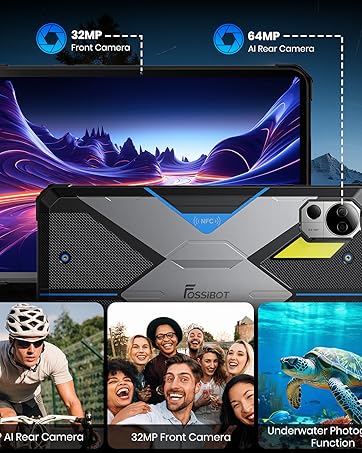
Image: Customizable secondary display on the rear of the FOSSIBOT S7.
2.2 Battery Management
The FOSSIBOT S7 is equipped with a 5000mAh battery, designed for extended use. To optimize battery life:
- Adjust screen brightness.
- Close unused applications running in the background.
- Enable battery saver mode when needed.
- Limit background data usage for certain apps.

Image: Battery performance estimates for the FOSSIBOT S7.
2.3 Performance and Storage
Your FOSSIBOT S7 features a Unisoc Octa-core processor, 32GB of RAM (8GB physical + 24GB extended), and 256GB of internal storage. Storage can be expanded up to 2TB using a TF (microSD) card.

Image: FOSSIBOT S7 memory and storage capabilities.
2.4 Operating System: Android 16
The FOSSIBOT S7 runs on Android 16, offering enhanced navigation, resource management, and privacy controls. This ensures a smooth and responsive user experience for various applications and tasks.

Image: Android 16 operating system interface.
2.5 Gemini AI Assistant
The integrated Gemini AI Assistant provides several functionalities:
- Smart Q&A: Get instant answers to questions and insights from photos.
- AI Image Creation: Generate custom visuals from text prompts.
- AI Coding Assistant: Supports multiple languages for writing, debugging, and optimizing code.

Image: Overview of Gemini AI Assistant capabilities.
2.6 Camera Features
The FOSSIBOT S7 is equipped with a 16MP rear camera and an 8MP front camera. Explore various photography modes:
- Standard Photo Mode
- Panorama Mode
- Night Mode
- Video Recording (up to 1080p at 30FPS)

Image: FOSSIBOT S7 camera specifications and sample images.
2.7 Security Features
Secure your device and data using:
- Fingerprint ID: Register your fingerprint for quick and secure unlocking.
- Face Unlock: Use facial recognition to unlock your device.
- Standard PIN, Pattern, and Password options.

Image: Face Unlock and Fingerprint ID functionality.
2.8 Connectivity and Integrated Tools
The FOSSIBOT S7 supports 4G cellular networks (compatible with T-Mobile, Boost Mobile, Metro by T-Mobile, Straight Talk, Consumer Cellular, Mint, Ultra Mobile, Red Pocket Mobile, and Good2Go Mobile. Note: ATT and CRICKET are not supported.), Bluetooth 5.0, 2.4Ghz/5Ghz Wi-Fi, and GPS/GLONASS/Galileo/Beidou navigation systems. It also includes a software toolkit with various utilities:
- Compass
- Sound Meter
- Gradienter
- Pedometer
- Torch (Flashlight)
- Alarm Bell (Warning Siren)
- Protractor
- Height Measure
- Plumb Bob
- Magnifier
- Pic Hanging

Image: Connectivity options and built-in software tools.
3. Maintenance
3.1 Software Updates
Regularly check for and install software updates to ensure your device has the latest features, security patches, and performance improvements. You can usually find this option in your phone's Settings menu under "System" or "About phone".
3.2 Cleaning and Care
- Use a soft, lint-free cloth to clean the screen and body of the phone.
- Avoid using harsh chemicals or abrasive materials.
- Keep the device away from extreme temperatures and direct sunlight.
- While the phone is designed to be durable, avoid unnecessary drops or impacts.
4. Troubleshooting
If you encounter issues with your FOSSIBOT S7, try the following solutions:
| Problem | Solution |
|---|---|
| Device won't turn on | Ensure the battery is charged. Connect to a charger for at least 15 minutes, then try powering on again. |
| Poor battery life | Reduce screen brightness, close background apps, disable unnecessary features (GPS, Bluetooth, Wi-Fi when not in use). Check for power-intensive apps in battery settings. |
| Network connectivity issues | Check if your SIM card is correctly inserted. Ensure you are in an area with network coverage. Restart the device. Verify your carrier is supported (T-Mobile and its MVNOs are supported; ATT and Cricket are not). |
| Apps crashing or freezing | Clear the app's cache and data in Settings > Apps. If the issue persists, uninstall and reinstall the app. Ensure your device software is up to date. |
| Touchscreen unresponsive | Restart the device. If the issue continues, perform a factory reset (backup data first). |
5. Specifications
Key technical specifications of the FOSSIBOT S7 smartphone:
| Feature | Detail |
|---|---|
| Brand | FOSSIBOT |
| Model Name | S7 |
| Operating System | Android 16.0 |
| RAM Memory Installed Size | 32 GB (8GB physical + 24GB extended) |
| Memory Storage Capacity | 256 GB |
| Flash Memory Supported Size Maximum | 2 TB (via TF card) |
| CPU Speed | 2 GHz (Unisoc Octa-core) |
| Screen Size | 6.9 inches |
| Refresh Rate | 120 Hz |
| Display Resolution Maximum | 1080x2400 |
| Display Type | LCD |
| Rear Facing Camera Photo Sensor Resolution | 16 MP |
| Front Photo Sensor Resolution | 8 MP |
| Video Capture Resolution | 1080p at 30FPS |
| Battery Power | 5000 mAh (45 watt-hours) |
| Phone Talk Time | 40 hours |
| Wireless Carrier Support | T-Mobile, Boost Mobile, Metro by T-Mobile, Straight Talk, Consumer Cellular, Mint, Ultra Mobile, Red Pocket Mobile, Good2Go Mobile (ATT and Cricket NOT supported) |
| Cellular Technology | 4G (LTE) |
| SIM Card Slot Count | Dual SIM (Nano) |
| Supported Satellite Navigation System | GPS, GLONASS, Galileo, Beidou |
| Water Resistance Level | Not Water Resistant |
Note: The cellular technology is listed as 4G/LTE in detailed specifications, despite 5G being mentioned in the product title. The device is explicitly stated as not water resistant.
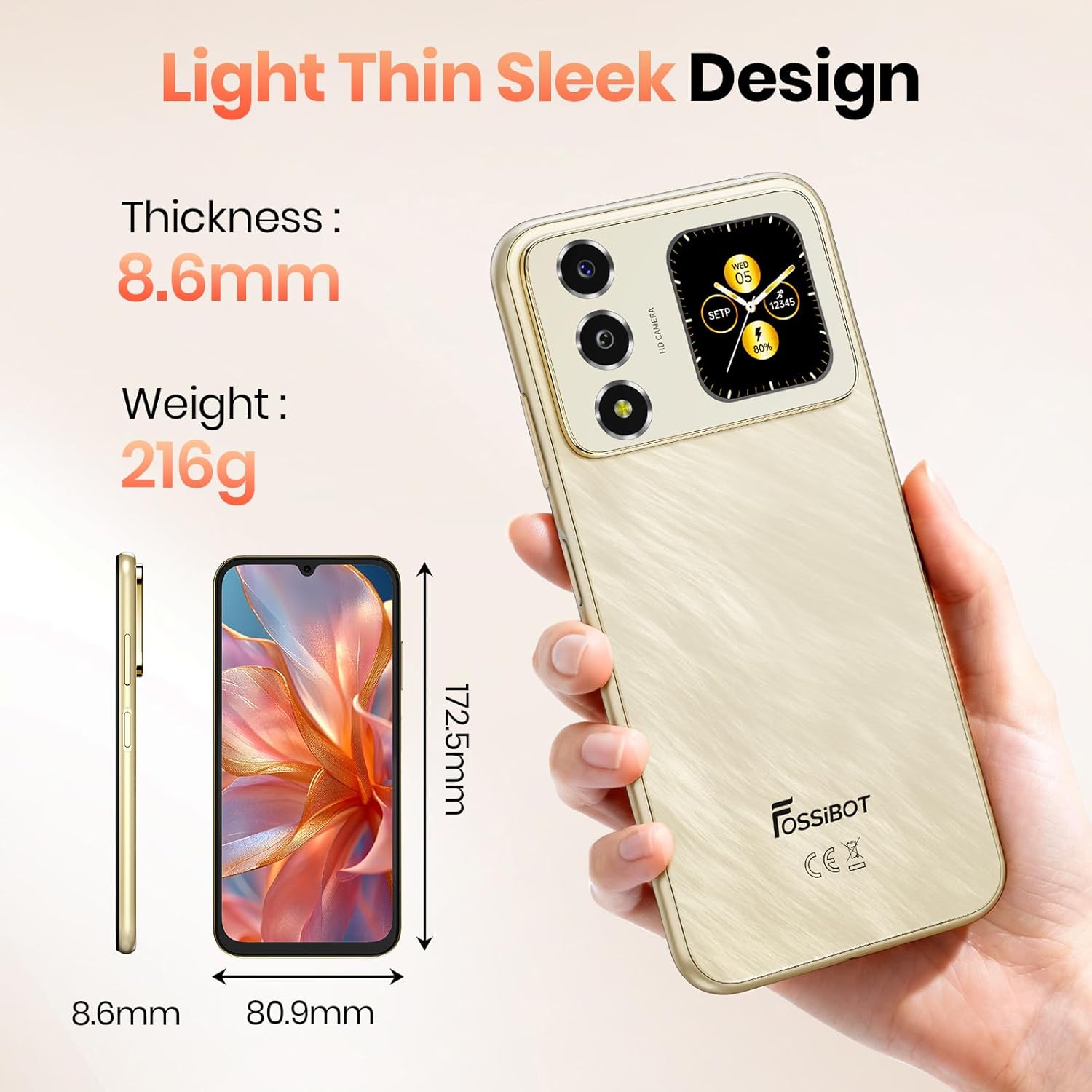
Image: Physical dimensions and weight of the FOSSIBOT S7.
6. Warranty and Support
6.1 Product Warranty
FOSSIBOT provides a 2-year warranty covering material and workmanship defects under normal use. This warranty ensures your device is protected against manufacturing faults.
6.2 Customer Support
For any questions, technical assistance, or warranty claims, FOSSIBOT offers 24/7 online after-sales support. Please refer to the contact information provided with your purchase or visit the official FOSSIBOT website for support details.
7. Product Video Overview
Video: An official overview of the FOSSIBOT S7 smartphone, demonstrating its features and design.
Ask a question about this manual
Ask about setup, troubleshooting, compatibility, parts, safety, or missing instructions. Manuals+ will review the question and use this page’s manual context to help answer it.