
1. Introduction
The YW-532X is a high-accuracy digital sound level meter designed for measuring environmental noise. It provides precise measurements of sound pressure levels (SPL) in various environments. This device is suitable for monitoring noise in workplaces, residential areas, construction sites, and other settings where sound levels need to be assessed. The YW-532X features data recording capabilities and PC software connectivity for advanced analysis.
2. Product Overview
The YW-532X Noise Level Meter is a handheld device equipped with a microphone, display screen, and control buttons. It is designed for ease of use and accurate sound measurement.
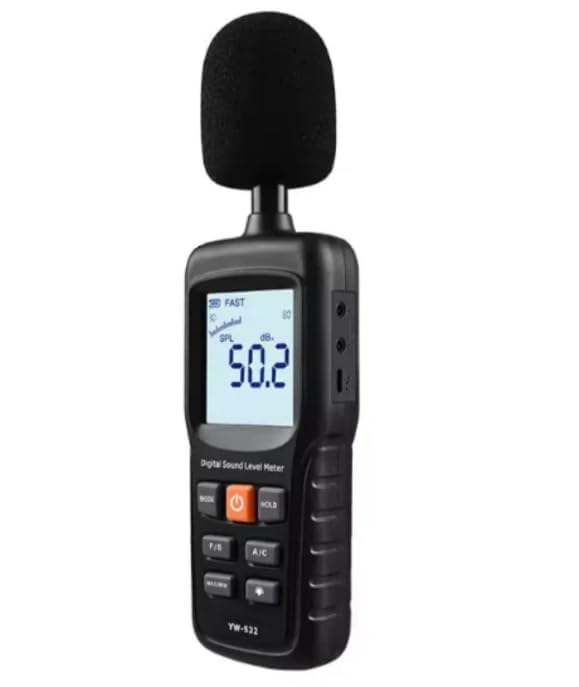
Figure 2.1: YW-532X Noise Level Meter in operation, showing the display and controls.

Figure 2.2: YW-532X Noise Level Meter with the protective foam windscreen installed on the microphone.
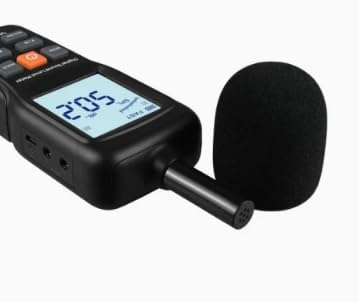
Figure 2.3: Close-up view of the YW-532X microphone, showing the sensor without the foam windscreen.
3. Setup
3.1 Battery Installation
- Locate the battery compartment cover on the back of the device.
- Slide or unclip the cover to open the compartment.
- Insert two 1.5V AA alkaline batteries or two 1.2V AA rechargeable batteries, ensuring correct polarity (+/-).
- Replace the battery compartment cover securely.
3.2 Powering On/Off
- To power on the device, press and hold the power button (usually marked with an orange square or power symbol) until the display illuminates.
- To power off the device, press and hold the power button again until the display turns off.
3.3 Microphone Windscreen
- For outdoor measurements or in windy conditions, attach the provided foam windscreen to the microphone to minimize wind noise interference.
- Gently slide the windscreen over the microphone head until it is securely in place.
4. Operating Instructions
4.1 Basic Measurement
- Power on the device.
- Point the microphone towards the sound source.
- The current sound level will be displayed on the screen in decibels (dB).
4.2 Frequency Weighting (A/C)
- Press the 'A/C' button to switch between A-weighting (dBA) and C-weighting (dBC).
- A-weighting (dBA): Simulates the human ear's response to sound, commonly used for environmental noise assessment.
- C-weighting (dBC): Provides a flatter response, suitable for measuring peak sound levels or noise from machinery.
4.3 Time Weighting (FAST/SLOW)
- Press the 'F/S' button to toggle between FAST and SLOW time weighting.
- FAST: (125 milliseconds) Provides a quick response to rapidly changing noise levels.
- SLOW: (1 second) Provides a more averaged reading for stable noise levels.
4.4 Data Hold Function
- Press the 'HOLD' button to freeze the current reading on the display.
- Press 'HOLD' again to release the function and resume live measurement.
4.5 MAX/MIN Measurement
- Press the 'MAX/MIN' button to enter MAX/MIN recording mode.
- The device will display the maximum (MAX) or minimum (MIN) sound level recorded since entering this mode.
- Press 'MAX/MIN' repeatedly to cycle through MAX, MIN, and current readings.
- To exit MAX/MIN mode, press and hold the 'MAX/MIN' button.
4.6 Data Recording and PC Software
- The YW-532X supports data recording with a capacity of 17280 sets of measurements.
- Recording intervals can be set from 1 second to 10 minutes. Refer to the device's on-screen menu or the dedicated PC software for detailed recording setup.
- Connect the device to a computer via the 5V USB port to transfer recorded data and utilize the PC software for advanced analysis and reporting.
4.7 AC/DC Signal Output
- The device provides AC and DC signal outputs for connection to external recording devices or data loggers.
- AC Signal Output: 4Vrms with an output impedance of approximately 100Ω per full scale.
- DC Signal Output: 10mV/dB with an output impedance of approximately 85Ω.
5. Maintenance
5.1 Cleaning
- Wipe the device with a soft, dry cloth. Do not use abrasive cleaners or solvents.
- Keep the microphone free from dust and debris.
5.2 Storage
- When not in use for extended periods, remove the batteries to prevent leakage.
- Store the device in a dry place with a temperature range of -10°C to 60°C and humidity between 10% and 70% RH.
5.3 Battery Replacement
- Replace batteries when the low battery indicator appears on the display.
- Follow the battery installation steps outlined in Section 3.1.
6. Troubleshooting
- Device does not power on: Check battery installation and ensure batteries are not depleted. Replace if necessary.
- Inaccurate readings: Ensure the microphone is clean and unobstructed. Check for strong electromagnetic interference nearby. Calibrate the device if possible (refer to advanced user guide or contact support).
- Display is blank or frozen: Try removing and reinserting batteries. If the issue persists, contact customer support.
7. Specifications
| Feature | Specification (YW-532X) |
|---|---|
| Recording function | Yes |
| PC software | Yes |
| Storage capacity | 17280 sets of measurements |
| Record interval | 1 second to 10 minutes |
| Measuring range | 30-130dBA, 35-130dBC |
| Resolution | 0.1dB |
| Precision | ±1.5dB (reference tone standard, 94dB@1kHz) |
| Measuring gear | 30-80dB; 50-100dB; 60-130dB |
| Response frequency | 31.5Hz-8.5kHz |
| Sampling frequency | 2 per second |
| Frequency weighted characteristics | A and C rights |
| Time weighting characteristics | FAST (time constant 125 milliseconds), SLOW (time constant 1 second) |
| Analogical depiction | 2dB/Characterization (30-130dB gear), 1dB/Characterization (other gear) |
| AC signal output | 4Vrms/output impedance is about 100Ω per full scale |
| DC signal output | The output impedance of 10mV/dB, is approximately 85Ω |
| Operating environment | Temperature: 0-40°C, Humidity: 10-80%RH |
| Storage environment | Temperature: -10-60°C, Humidity: 10-70%RH |
| Power supply | 2 pcs of 1.5V AA alkaline batteries, 2 pcs of 1.2V AA rechargeable batteries, 5V USB |
| Protection level | IP40 |
| Dimension | 221*65*30 mm |
| Material | ABS |
| Weight | About 155g (without batteries) |
8. Warranty and Support
This product comes with a standard manufacturer's warranty. For specific warranty terms and conditions, please refer to the documentation included with your purchase or contact the seller directly. For technical support or service inquiries, please reach out to the retailer or manufacturer's customer service department.