
1. Introduction
The ALIENPRO Polar-B is a high-performance portable Bluetooth speaker designed to deliver powerful, clear, and immersive sound for various occasions, including gatherings, parties, karaoke, outdoor use, or home entertainment. This manual provides detailed instructions for setting up, operating, and maintaining your speaker to ensure optimal performance and longevity.
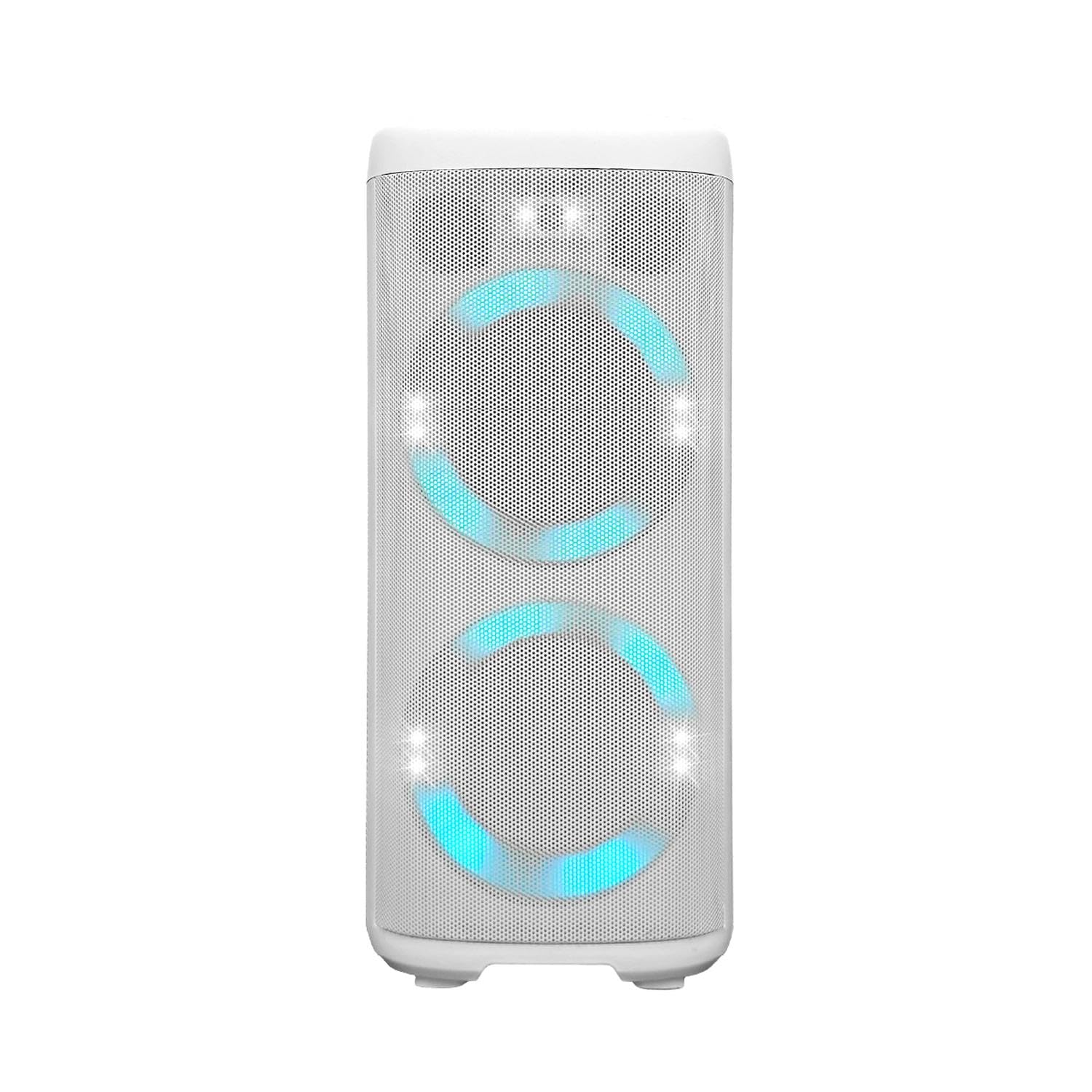
Image: Front view of the ALIENPRO Polar-B Portable Bluetooth Speaker, showcasing its design.
2. Important Safety Instructions
Please read and follow all safety instructions before using this product. Keep this manual for future reference.
- Do not expose the speaker to water, moisture, or extreme temperatures.
- Do not attempt to disassemble or modify the speaker. This will void the warranty and may cause damage or injury.
- Use only the charging cable and adapter provided or recommended by the manufacturer.
- Keep the speaker away from heat sources such as radiators, heat registers, stoves, or other apparatus (including amplifiers) that produce heat.
- Clean only with a dry cloth.
- Ensure proper ventilation and do not block any ventilation openings.
- Avoid placing heavy objects on the speaker.
- Disconnect the speaker during lightning storms or when unused for long periods.
3. Package Contents
Verify that all items are present in the package:
- ALIENPRO Polar-B Bluetooth Speaker
- Charging Cable
- User Manual (this document)
4. Product Features
The ALIENPRO Polar-B speaker offers a range of features designed for a superior audio experience:
- Powerful Audio Output: Equipped with two 6.5-inch woofers and a 3-inch tweeter, delivering 80W RMS for deep bass, defined mids, and clear highs.
- Rechargeable Battery: Integrated 7.4V / 3600mAh battery for extended wireless playback.
- Multiple Connectivity Options: Bluetooth, USB, TF card, AUX input, and FM radio.
- True Wireless Stereo (TWS): Connect two Polar-B speakers wirelessly for enhanced stereo sound and coverage.
- Dynamic RGB Lighting: Integrated LED lights with dynamic effects to create an engaging visual atmosphere.
- User-Friendly Design: Features an LCD display, voice prompts, recording function, and bass/treble controls.
- Portable Design: Includes a carrying handle for easy transport.

Image: Side view of the ALIENPRO Polar-B speaker, highlighting its portable design and handle.

Image: Rear view of the ALIENPRO Polar-B speaker, showing the bass reflex port and ALIENPRO branding.
5. Controls and Connections
Familiarize yourself with the control panel and various input/output ports on your ALIENPRO Polar-B speaker.

Image: Top control panel of the ALIENPRO Polar-B speaker, showing various buttons and ports.
- GT Input: Guitar input port.
- MIC Input: Microphone input port.
- LINE IN / TF CARD: 3.5mm AUX input jack and TF (MicroSD) card slot.
- USB: USB port for media playback.
- DC 9V IN: Power input for charging.
- Volume Down / Previous Track: Press to decrease volume, hold to go to the previous track.
- Play/Pause / TWS: Press to play/pause, hold to activate TWS pairing.
- Volume Up / Next Track: Press to increase volume, hold to go to the next track.
- RGB Light Control: Press to change RGB lighting modes or turn off.
- Bluetooth (BT) / Menu: Press to switch to Bluetooth mode, hold for menu options.
- Mode: Press to cycle through input modes (Bluetooth, AUX, USB, TF, FM).
- Power On/Off: Press and hold to turn the speaker on or off.
6. Setup
6.1 Initial Charging
Before first use, fully charge the speaker. Connect the provided charging cable to the DC 9V IN port on the speaker and the other end to a suitable power adapter (not included) or power source. The charging indicator on the display will show charging status. A full charge typically takes several hours.
6.2 Powering On/Off
Press and hold the Power On/Off button (12) for approximately 3 seconds to turn the speaker on or off. The LCD display will illuminate, and a voice prompt will indicate the current mode.
7. Operating Instructions
7.1 Bluetooth Pairing
- Turn on the speaker. It will automatically enter Bluetooth pairing mode, indicated by a flashing "BT" on the LCD display and a voice prompt.
- Enable Bluetooth on your mobile device (smartphone, tablet, etc.).
- Search for "ALIENPRO POLAR-B" in your device's Bluetooth list and select it to connect.
- Once connected, the speaker will emit a confirmation tone, and "BT" on the display will stop flashing.
- You can now play audio from your device through the speaker.
7.2 USB / TF Card Playback
Insert a USB flash drive or TF (MicroSD) card into the respective port (4 or 3). The speaker will automatically detect the storage device and begin playing audio files. Use the Previous Track (6) and Next Track (8) buttons to navigate tracks, and the Play/Pause (7) button to control playback.
7.3 AUX Input
Connect an external audio device (e.g., MP3 player, laptop) to the LINE IN port (3) using a 3.5mm audio cable (not included). Press the Mode button (11) until "AUX" is displayed. Audio will now play from your connected device.
7.4 FM Radio
Press the Mode button (11) repeatedly until "FM" is displayed. The speaker will enter FM radio mode.
- Auto Scan: Press and hold the Play/Pause button (7) to automatically scan and save available FM stations.
- Change Station: Use the Previous Track (6) and Next Track (8) buttons to switch between saved stations.
7.5 Microphone and Guitar Input
Connect a microphone to the MIC input (2) or a guitar to the GT input (1) for karaoke or live performance. Adjust the volume using the main volume controls or dedicated controls if available on the microphone/guitar.
7.6 RGB Lighting Control
Press the RGB Light Control button (9) to cycle through different lighting effects or to turn the lights off.
7.7 Volume and EQ Adjustment
Adjust the main volume using the Volume Down (6) and Volume Up (8) buttons. The speaker also features bass and treble controls for sound customization. Refer to the display or voice prompts for specific adjustment methods.
8. TWS Function (True Wireless Stereo)
The TWS function allows you to connect two ALIENPRO Polar-B speakers wirelessly for a true stereo sound experience.
- Ensure both Polar-B speakers are powered on and in Bluetooth mode, but not yet connected to any device.
- On one of the speakers (this will be the primary speaker), press and hold the Play/Pause / TWS button (7) for a few seconds until you hear a confirmation tone. The speaker will begin searching for another TWS-compatible speaker.
- The two speakers will automatically pair with each other. Once connected, you will hear another confirmation tone.
- Now, connect your mobile device to the primary speaker via Bluetooth as described in section 7.1.
- Audio will now play in stereo across both speakers.
Note: TWS functionality only works with two identical ALIENPRO Polar-B speakers.
9. Charging the Battery
The ALIENPRO Polar-B speaker is equipped with a 7.4V / 3600mAh rechargeable battery. When the battery level is low, the speaker will indicate this via the LCD display or a voice prompt. To charge:
- Connect the charging cable to the DC 9V IN port (5) on the speaker.
- Plug the other end of the charging cable into a compatible power adapter (e.g., 9V DC, 2A) or power outlet.
- The charging indicator on the display will show the charging status.
- Once fully charged, disconnect the charging cable.
Note: Do not use the speaker while it is charging for extended periods to preserve battery life.
10. Maintenance
To ensure the longevity and optimal performance of your ALIENPRO Polar-B speaker, follow these maintenance guidelines:
- Cleaning: Wipe the speaker's exterior with a soft, dry cloth. Do not use abrasive cleaners, waxes, or solvents.
- Storage: Store the speaker in a cool, dry place away from direct sunlight and extreme temperatures. If storing for an extended period, charge the battery to about 50% every few months to prevent deep discharge.
- Avoid Impacts: Protect the speaker from drops and impacts, which can damage internal components.
11. Troubleshooting
If you encounter issues with your ALIENPRO Polar-B speaker, refer to the following common problems and solutions:
| Problem | Possible Solution |
|---|---|
| Speaker does not turn on. | Ensure the battery is charged. Connect the speaker to a power source and try again. |
| No sound. | Check the volume level on both the speaker and your connected device. Ensure the correct input mode (Bluetooth, AUX, USB, TF) is selected. |
| Bluetooth pairing fails. | Ensure the speaker is in Bluetooth pairing mode. Turn off Bluetooth on other devices that might be connected. Try restarting both the speaker and your device. Ensure the speaker is within range. |
| Poor sound quality. | Check the audio source quality. Ensure the speaker is not too far from the Bluetooth device. Adjust bass and treble settings. |
| TWS pairing fails. | Ensure both speakers are Polar-B models and are not connected to any other Bluetooth device. Follow the TWS pairing steps carefully. |
12. Specifications
Detailed technical specifications for the ALIENPRO Polar-B speaker:
| Feature | Specification |
|---|---|
| Brand | ALIENPRO |
| Model Name | POLAR-B |
| Speaker Type | Portable Speaker |
| Connectivity Technology | Bluetooth, AUX, USB, TF Card, FM Radio |
| Wireless Technology | Bluetooth |
| Audio Output Mode | Stereo |
| Max Speaker Output Power | 80 Watts RMS |
| Woofer Diameter | 6.5 Inches (x2) |
| Tweeter Diameter | 3 Inches |
| Battery Capacity | 7.4V / 3600 mAh |
| Power Source | Battery |
| Control Method | Tactile, Voice |
| Material | Plastic |
| Color | White |
| Dimensions (DxWxH) | 31 x 31 x 68.5 centimeters |
| Item Weight | 6.94 Kilograms |
| Compatible Devices | Karaoke Machine, Laptop, MP3 Player, Smartphone, Tablet |
| Country of Origin | China |
13. Warranty and Support
The ALIENPRO Polar-B speaker comes with a manufacturer's warranty. Please refer to the warranty card included in your package or contact ALIENPRO customer support for detailed warranty terms and conditions.
For technical assistance, troubleshooting, or further inquiries, please visit the official ALIENPRO website or contact their customer service department.
Keep your purchase receipt as proof of purchase for warranty claims.