
Introduction
The DOTSTAR 2-in-1 Dog Wireless Fence and Training Collar System provides a versatile solution for pet owners seeking to manage their dog's behavior and ensure their safety. This system combines a wireless containment fence with a remote training collar, offering adjustable control over a wide range. It is designed for medium to large dogs, providing humane and effective training options.
This manual provides detailed instructions for setting up, operating, and maintaining your DOTSTAR system. Please read it thoroughly before use to ensure proper function and the safety of your pet.
Video Description: An overview of the DOTSTAR T9 dog training fence 2-in-1 system, demonstrating its features and how it can be used for both containment and training. The video highlights the remote control and collar functionalities.
Package Contents
Upon opening your DOTSTAR Dog Wireless Fence & Training Collar System, you should find the following items:
- Remote Transmitter
- Receiver Collar(s) (for 2 dogs, as per product variant)
- USB Charger
- USB Charge Cable
- Metal Contact Points (two sizes: small for short-haired dogs, large for long-haired dogs)
- Test Light
- Boundary Flags
- User Manual

Image Description: A clear view of all components included in the DOTSTAR 2-in-1 Dog Wireless Fence and Training Collar System package. The image displays the remote, two collars, charging cables, contact points, and flags neatly arranged in their packaging.
Safety Information
Your pet's safety and comfort are paramount. Please adhere to the following guidelines:
- Do not leave the receiver collar on your dog for more than 12 consecutive hours.
- Regularly check your dog's neck for signs of irritation or sores from the contact points. If irritation occurs, discontinue use until the skin heals.
- Ensure the collar is fitted correctly – snug enough for contact points to touch the skin, but loose enough to allow two fingers to fit comfortably under the strap.
- Always start training with the lowest stimulation levels (beep or vibration) and gradually increase if necessary.
- This system is designed for training and containment, not as a primary restraint.
- Keep the remote transmitter and receiver collars away from children.
Setup Guide
1. Charging the Devices
Before initial use, fully charge the remote transmitter and all receiver collars. Use the provided USB charger and cable.
- Connect the charging cable to the charging port on the remote and collar.
- Plug the USB charger into a standard wall outlet.
- The indicator light will show charging status (refer to the device's specific light indicators for full charge).
- Important Note: When using the device, turn on the transmitter first, then turn on the receiver. When not in use, turn off the receiver first, then turn off the transmitter. Before charging the transmitter, turn off the receiver to prevent the receiver from triggering an alert due to loss of signal from the transmitter.
2. Fitting the Receiver Collar
Proper fit is crucial for the collar's effectiveness and your dog's comfort.
- Select the appropriate metal contact points (short for short-haired dogs, long for long-haired dogs) and screw them onto the receiver.
- Place the collar around your dog's neck, ensuring the contact points touch the skin.
- Adjust the strap so it is snug but not too tight. You should be able to fit two fingers between the collar and your dog's neck.
- The collar is adjustable for neck sizes ranging from 8 to 28 inches, accommodating dogs between 10 and 110 pounds. The reflective collar enhances nighttime visibility.
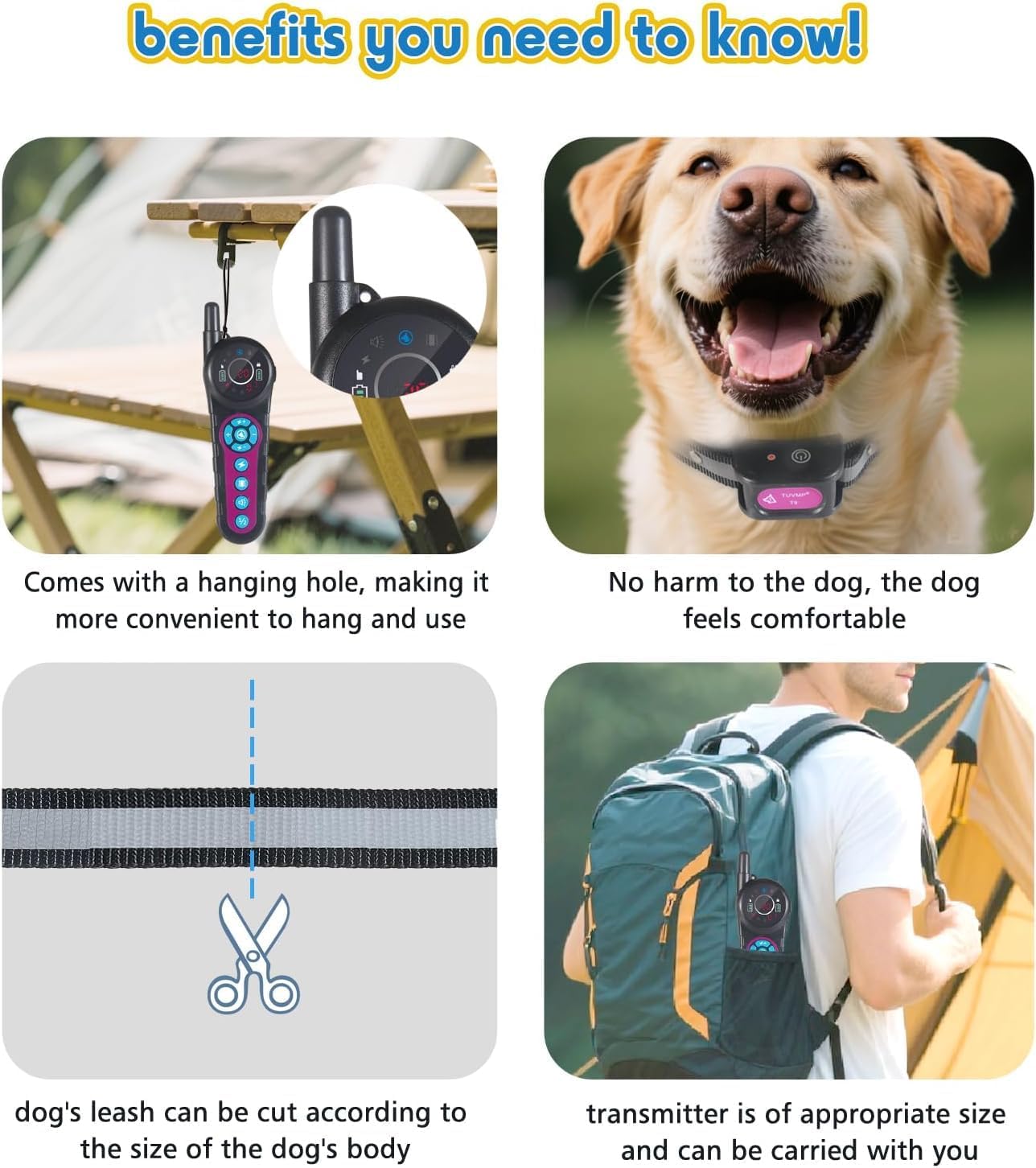
Image Description: A composite image illustrating key features: a hanging hole on the transmitter for convenience, a happy dog wearing the comfortable collar, scissors indicating the collar strap can be cut to size, and the compact transmitter fitting into a backpack for portability.
3. Setting Up the Wireless Fence Boundary
The wireless fence mode allows you to create a circular boundary for your dog.
- Place the remote transmitter in a central location within the desired containment area.
- Adjust the range setting on the transmitter. The system offers 20 levels of adjustable distance, from 65 feet to 5000 feet.
- Use the provided boundary flags to visually mark the perimeter of the safe zone. This helps your dog understand the boundaries during initial training.
- When your dog approaches the set boundary line, the receiver collar will automatically emit a warning beep, followed by vibration and static shock (if enabled), alerting the dog to return to the safe zone.

Image Description: An illustration of the wireless fence mode. A dog is shown in a large grassy yard with a house in the background. A circular boundary is depicted, indicating a signal distance adjustable from 65ft to 5000ft. Text explains that when the dog approaches the boundary, the receiver emits a warning beep, then vibration, then static stimulation, cycling twice if the dog does not return.
Operating Instructions
1. Wireless Fence Mode
Once the boundary is set and your dog is wearing the collar, the system operates automatically. The collar will provide corrective feedback if your dog attempts to cross the established perimeter.
2. Training Mode
The remote training collar allows you to manually correct your dog's behavior up to a range of 5000 feet.
- The remote offers three training modes: Beep, Vibrate, and SAFE Static (1-19 levels).
- Use the remote's buttons to select the desired mode and intensity level.
- Always start with the lowest level of static stimulation (Level 1) and increase only if necessary, observing your dog's reaction.
- Use the test light to verify the static shock function before placing the collar on your dog.

Image Description: An image depicting the remote training mode. A dog is shown knocking over a trash can, illustrating 'bad behavior'. The remote transmitter is prominently displayed with text highlighting a '5000 feet' training distance and icons for the three corrective functions: sound, vibration, and static shock.
Maintenance
Cleaning
- Clean the receiver collar and contact points regularly with a damp cloth.
- Ensure contact points are free of dirt or debris to maintain proper function.
Battery Care
- The system features incredible battery life. Recharge devices when the battery indicator shows low power.
- The receiver collar is IP67 waterproof, making it suitable for use in various weather conditions and even swimming.

Image Description: A Corgi dog is shown swimming happily underwater, wearing the receiver collar. The text 'IP67 WATERPROOF RECEIVER' is overlaid, highlighting the collar's waterproof capability.
Troubleshooting
If you encounter issues with your DOTSTAR system, refer to the following common problems and solutions:
| Problem | Possible Cause | Solution |
|---|---|---|
| Collar not responding to remote | Low battery, out of range, not paired, or incorrect mode. | Charge devices, ensure within 5000ft range, re-pair if necessary, check selected mode (fence/training). |
| No static shock | Contact points not touching skin, static level too low, or faulty contact points. | Adjust collar fit, increase static level, use test light to verify, replace contact points if damaged. |
| Dog not responding to fence boundary | Boundary range too wide, dog not trained to boundary, or collar not functioning. | Reduce range, conduct boundary training with flags, check collar function. |
| Short battery life | Frequent use of high stimulation, old battery, or improper charging. | Ensure full charge, avoid excessive high-level use, contact support if battery life remains short. |
Specifications
- Model Number: 02-ZJ-T9-2C
- Brand: DOTSTAR
- System Type: 2-in-1 Wireless Fence & Training Collar
- Control Range: Adjustable from 65 feet to 5000 feet (20 levels)
- Training Modes: Beep, Vibration, Static Shock (1-19 levels)
- Receiver Waterproof Rating: IP67
- Collar Fit: Adjustable for neck sizes 8-28 inches
- Recommended Dog Weight: 10-110 pounds
- Batteries: 3 Lithium Ion batteries (included)
- Included Components: Remote transmitter, receiver collar(s), USB charger, USB charge cable, metal contact points (small & large), test light, boundary flags.
- Color: Black
Warranty and Support
For warranty information or technical support, please refer to the contact details provided on the product packaging or visit the official DOTSTAR website. Keep your purchase receipt as proof of purchase for any warranty claims.