
1. Product Overview
The ANENG 683 Smart Multimeter is a versatile digital instrument designed for accurate electrical measurements. It features a touch screen, auto-ranging capabilities, and a rechargeable battery, making it suitable for both professional electricians and DIY enthusiasts. This multimeter can measure a wide range of electrical parameters, ensuring comprehensive circuit analysis and troubleshooting.
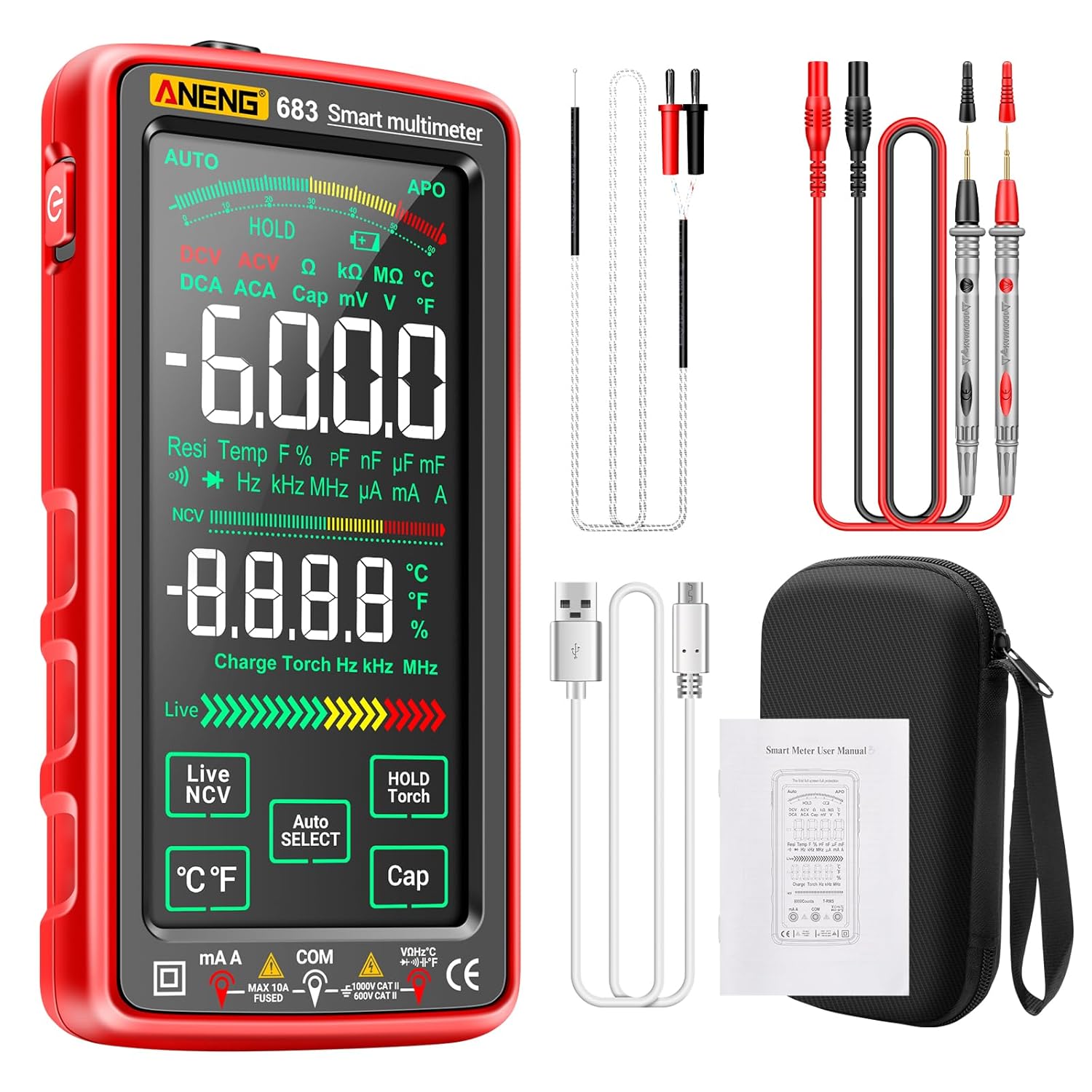
Figure 1: Front view of the ANENG 683 Smart Multimeter.
Key Features:
- Multi-Function Measurement: Measures AC/DC voltage, current, temperature, resistance, capacitance, frequency, continuity, NCV, and diodes. Includes live wire testing.
- Smart Mode & Touchscreen: Automatically identifies measurements and selects optimal ranges. Features a VA color reverse display with 6000 counts and data hold function.
- Rechargeable & Portable: Compact, phone-sized design with a rechargeable battery and Type-C charging. Auto-sleep/shutdown conserves power.
- Safety Protection: Double insulation and overload protection, continuity tester with buzzer, and high-quality test leads.
- Built-in Flashlight: Enhances readability in low-light conditions.
2. Package Contents
Upon opening the package, please verify that all items are present and in good condition:
- 1 x ANENG 683 Digital Multimeter
- 1 x Test Lead Set
- 1 x Temperature Probe
- 1 x Type-C Charging Cable
- 1 x User Manual (this document)
- 1 x Storage Bag

Figure 2: Included accessories with the ANENG 683 Multimeter.
3. Setup
3.1 Charging the Multimeter
The ANENG 683 Multimeter is equipped with a built-in rechargeable battery. Before first use, or when the low battery indicator appears, charge the device using the provided Type-C USB cable.
- Connect the Type-C end of the charging cable to the multimeter's charging port (typically located on the side or top).
- Connect the USB-A end of the charging cable to a standard USB power adapter (not included) or a computer's USB port.
- The charging indicator on the multimeter will show the charging status. Disconnect the cable once fully charged.

Figure 3: Multimeter connected for USB charging.
3.2 Connecting Test Leads
Always ensure test leads are securely connected before taking measurements.
- Insert the red test lead into the 'VΩmA' input jack.
- Insert the black test lead into the 'COM' (common) input jack.
- For high current measurements (e.g., 10A), insert the red test lead into the '10A' input jack.
4. Operating Instructions
The ANENG 683 features a 'Smart Mode' that automatically detects the measurement type. For specific functions, manual selection is also available via the touchscreen.
4.1 Power On/Off
Press and hold the power button located on the side of the multimeter to turn it on or off.
4.2 Smart Mode (Automatic Measurement)
In Smart Mode, the multimeter automatically identifies AC/DC voltage, resistance, and continuity. Simply connect the test leads to the circuit, and the device will display the appropriate measurement.

Figure 4: Automatic measurement in progress.
4.3 Specific Measurement Functions
Use the touchscreen interface to select specific measurement modes if not using Smart Mode or for functions not automatically detected.
- Voltage Measurement (AC/DC): Select ACV or DCV mode. Connect test leads in parallel to the circuit or component.
- Current Measurement (AC/DC): Select ACA or DCA mode. Connect test leads in series with the circuit. Ensure correct input jack (VΩmA or 10A) is used.
- Resistance Measurement: Select Ω mode. Ensure the circuit is de-energized. Connect test leads across the component.
- Continuity Test: Select continuity mode (often indicated by a buzzer icon). Connect test leads across the circuit. A beep indicates continuity.
- Diode Test: Select diode mode. Connect test leads across the diode. The display will show the forward voltage drop.
- Capacitance Measurement: Select Cap mode. Ensure the capacitor is discharged before testing.
- Frequency (Hz) Measurement: Select Hz mode.
- Temperature Measurement: Connect the temperature probe to the multimeter and place the probe tip on the object to be measured.
- NCV (Non-Contact Voltage) Detection: Activate NCV mode. Bring the top of the multimeter near a live wire. The device will indicate voltage presence without direct contact.
- Live Wire Detection: Select Live mode. Insert the red test lead into the live wire socket. The multimeter will indicate if it's a live line or zero line.

Figure 5: Examples of different measurement types.

Figure 6: Live and Zero Line Detection.
4.4 Flashlight Function
Press and hold the 'HOLD/Torch' button to activate or deactivate the built-in flashlight for illumination in dark work areas.
4.5 Data Hold
Press the 'HOLD' button to freeze the current reading on the display. Press again to release.
4.6 Instructional Video
Video 1: Demonstrates various functions and usage of the ANENG 683 Smart Multimeter, including diode testing and other measurements.
5. Maintenance
5.1 Cleaning
Wipe the multimeter casing with a damp cloth. Do not use abrasive cleaners or solvents. Ensure the device is off and disconnected from any power source before cleaning.
5.2 Battery Care
To prolong battery life, avoid fully discharging the battery frequently. Recharge the multimeter when the low battery indicator appears. If storing for an extended period, charge the battery to approximately 50% and recharge every few months.
5.3 Storage
Store the multimeter in its provided storage bag in a cool, dry place, away from direct sunlight and extreme temperatures. Keep out of reach of children.
5.4 Test Lead Inspection
Regularly inspect the test leads for any signs of damage, such as cracked insulation or exposed wires. Replace damaged leads immediately to ensure safety and accurate measurements.
6. Troubleshooting
- Multimeter does not power on: Ensure the battery is charged. Connect the Type-C charging cable and allow it to charge for a period before attempting to power on again.
- Inaccurate readings: Check that test leads are correctly and securely connected. Ensure the correct measurement mode is selected for the task. Verify the circuit is de-energized for resistance or continuity tests.
- No display or partial display: Recharge the battery. If the issue persists, contact customer support.
- Continuity buzzer not working: Ensure continuity mode is selected. Check test leads for damage.
- Auto-ranging not functioning correctly: Ensure the multimeter is in Smart Mode. If manually selecting a range, ensure it is appropriate for the expected value.
7. Specifications

Figure 7: Product Dimensions.
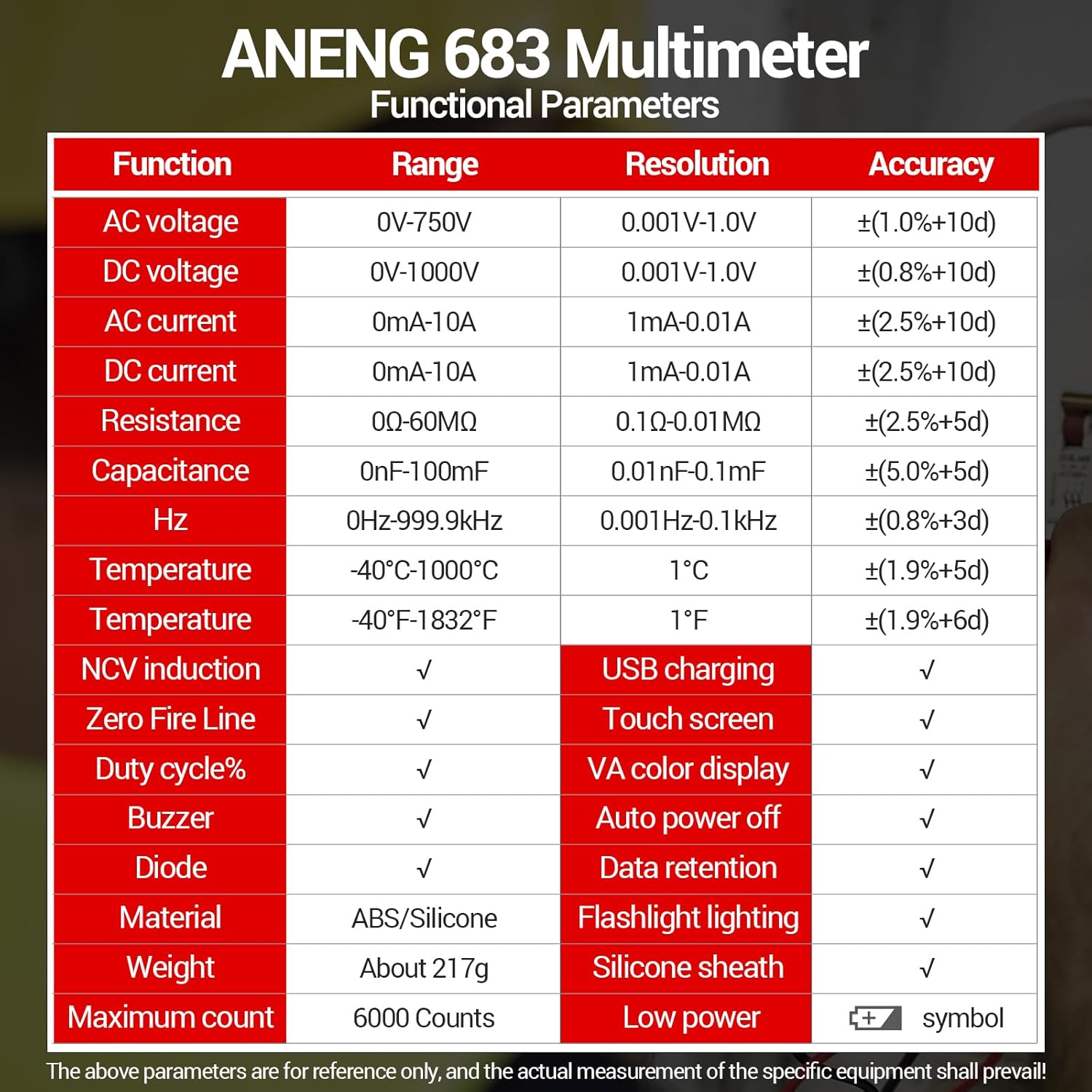
Figure 8: Functional Parameters Table.
| Parameter | Value |
|---|---|
| Brand | ANENG |
| Model | Multimeter 683 |
| Power Source | Rechargeable (Corded Electric via USB-C) |
| Display | Touch Screen, VA Color Reverse Display, 6000 Counts |
| Maximum Operating Voltage | 1000V DC |
| Item Weight | 200 g |
| Material | ABS/Silicone |
| Included Components | Smart Multimeter, Test Lead, Temperature Probe, Charging Cable, Manual, Storage Bag |
8. Warranty and Support
ANENG provides dedicated technical support for its products. If you encounter any issues with your ANENG 683 Smart Multimeter that cannot be resolved using this manual or through standard troubleshooting, please contact the ANENG seller team directly. Your full satisfaction is our priority, and we are committed to assisting you with any concerns.
For support, please refer to the contact information provided with your purchase or visit the official ANENG brand store on Amazon.


