
1. Important Safety Information
Please read all instructions carefully before operating the dehumidifier. Retain this manual for future reference.
Electrical Safety
- Ensure the power supply matches the voltage specified on the unit's rating label.
- Always plug the unit into a grounded electrical outlet. Do not use extension cords or adapter plugs.
- Do not operate the dehumidifier if the power cord or plug is damaged.
- Unplug the unit before cleaning, servicing, or moving it.
General Safety
- This appliance is for indoor residential use only.
- Do not block the air inlet or outlet. Maintain at least 8 inches (20 cm) clearance from walls or furniture.
- Do not use the unit in areas where flammable liquids or gases are stored.
- Keep children and pets away from the unit during operation.
- Always operate the unit in an upright position.
2. Product Overview
The OLIXIS 30-Pint Dehumidifier is designed to efficiently remove moisture from your indoor environment, covering up to 2,000 sq. ft. It features an intelligent humidity display, multiple operating modes, and convenient drainage options.
Key Features
- Energy Star Most Efficient: Up to 30%+ more efficient than standard ENERGY STAR units, reducing energy consumption.
- Intelligent Humidity Display Ring: Visual indicator for current humidity levels (Blue: <45% Dry, Green: 45-65% Comfortable, Red: >65% High Humidity).
- 4-in-1 Operating Modes: Auto, Drying, Sleep, and Air Purification for versatile use.
- 2-Liter Water Tank: Removable tank with 0.53-gallon capacity for manual drainage.
- Continuous Drainage: Includes a 3.28 ft drain hose for continuous water removal.
- Portability: Equipped with four 360° swivel casters for easy movement.
- Automatic Defrost: Prevents frost buildup in colder conditions.
- 24-Hour Timer: Allows for scheduled automatic shut-off or start-up.
Product Components
Familiarize yourself with the main parts of your dehumidifier.
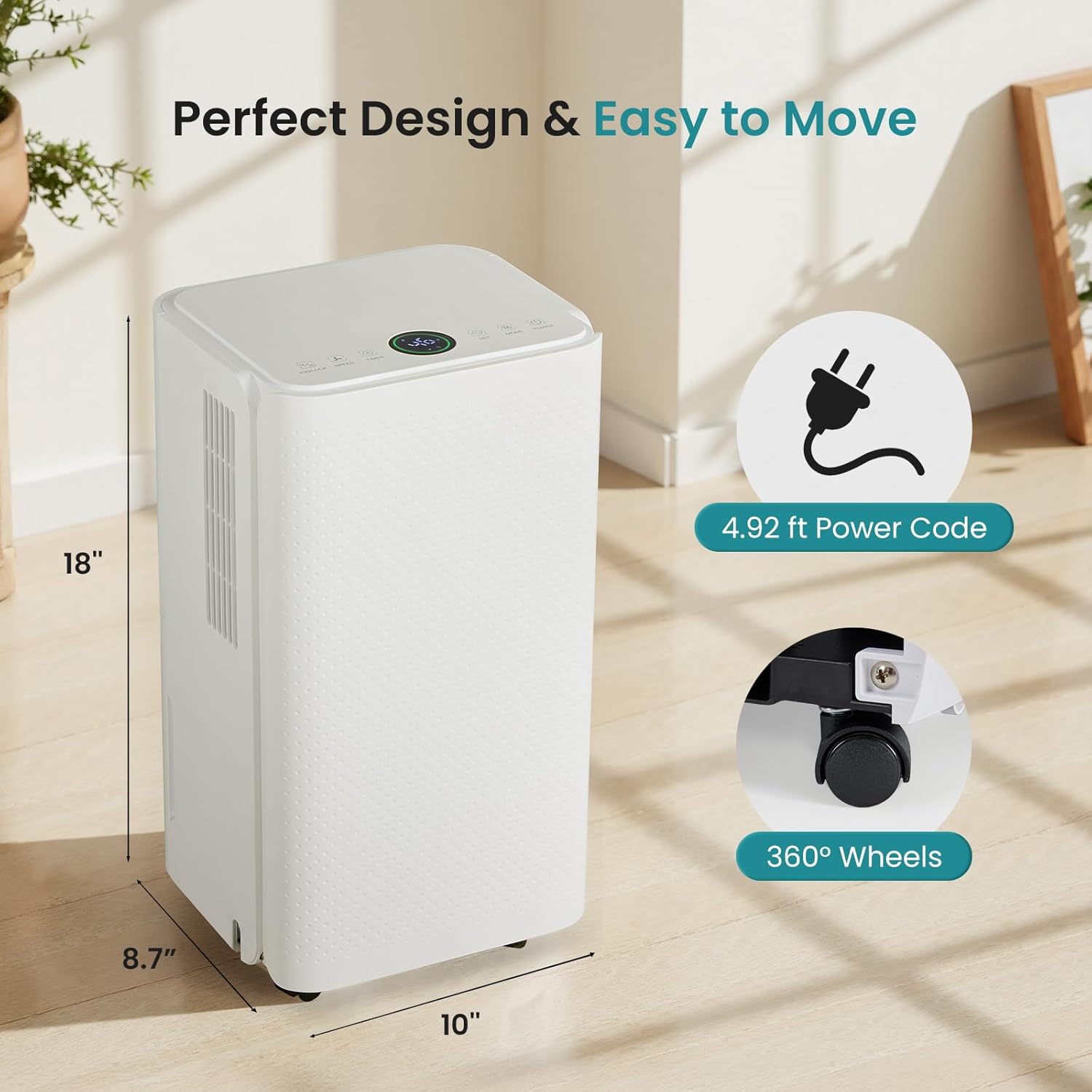
Image: The dehumidifier showing its dimensions (8.7"D x 10"W x 18"H), 4.92 ft power cord, and 360° wheels.
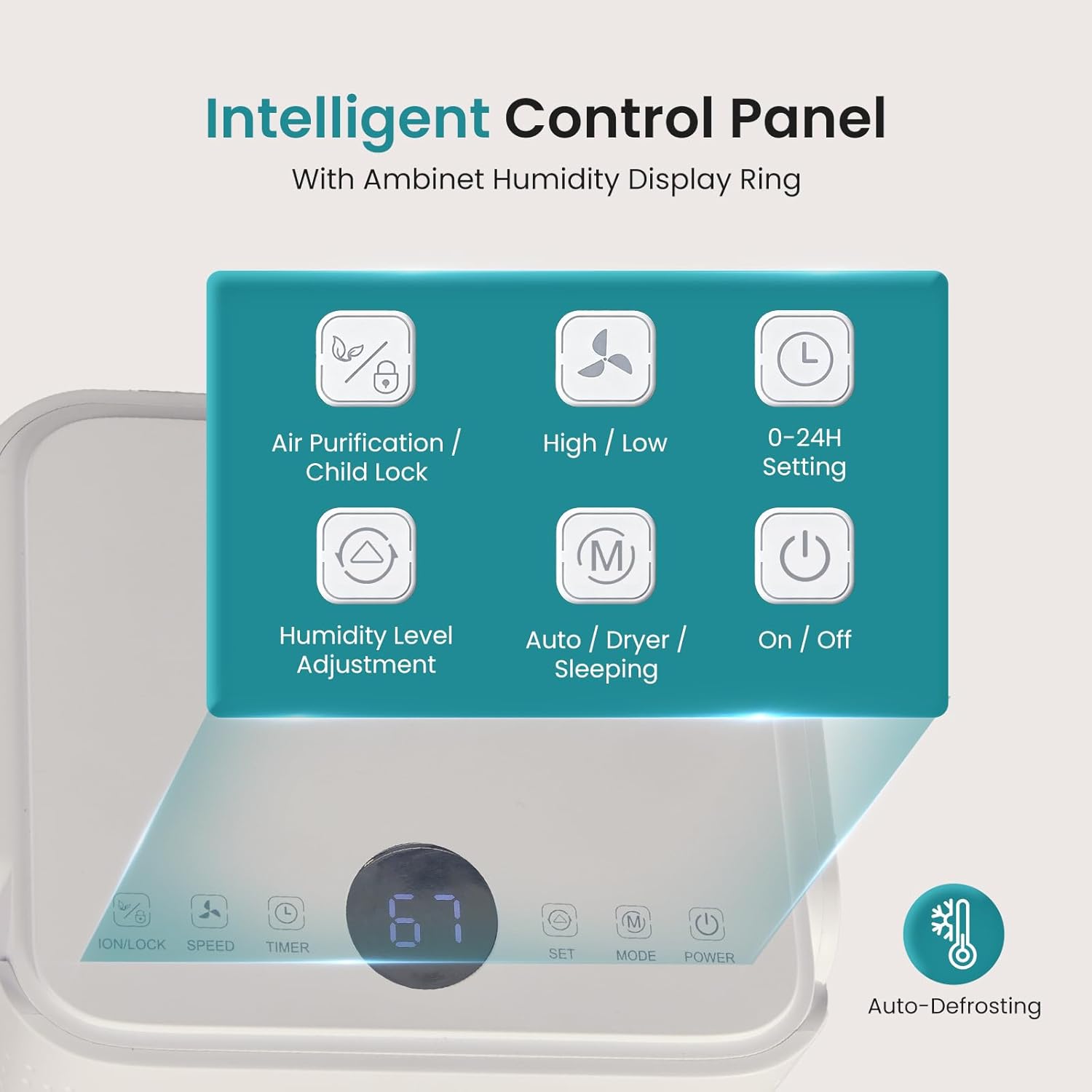
Image: Close-up of the intelligent control panel with buttons for Air Purification/Child Lock, High/Low fan speed, 0-24H Setting, Humidity Level Adjustment, Auto/Dryer/Sleeping mode, and On/Off. An auto-defrost icon is also visible.
3. Setup Instructions
Unpacking
- Carefully remove the dehumidifier from its packaging.
- Remove all packing materials, including any tape or protective films.
- Check for any shipping damage. If the unit is damaged, do not operate it and contact customer support.
Placement
- Place the dehumidifier on a flat, stable surface.
- Ensure there is at least 8 inches (20 cm) of space around the unit for proper airflow.
- Avoid placing the unit near heat sources or in direct sunlight.
- For optimal performance, close all doors and windows in the room where the dehumidifier is operating.

Image: The dehumidifier shown in different household settings, illustrating its suitability for various rooms such as bathrooms, living rooms, bedrooms, and kitchens.
Power Connection
- Plug the power cord into a grounded 120V/60Hz electrical outlet.
- The unit will beep once, and the display will show the current humidity level.
Drainage Options
Your dehumidifier offers two drainage methods: manual emptying of the water tank or continuous drainage using the included hose.

Image: The dehumidifier demonstrating two drainage options: a 3.28 ft drain hose connected for continuous drainage, and the removable 2L (0.53 GAL) water tank for manual emptying.
Manual Drainage (Water Tank)
- When the water tank is full, the unit will automatically shut off and an indicator light will illuminate.
- Carefully pull out the water tank from the front of the unit.
- Empty the collected water.
- Slide the empty tank back into the unit until it clicks into place. The unit will resume operation.
Continuous Drainage (Drain Hose)
- Locate the drain outlet on the back of the unit.
- Remove the rubber stopper from the drain outlet.
- Connect the included 3.28 ft drain hose to the outlet. Ensure a secure connection.
- Route the other end of the hose to a suitable drain (e.g., floor drain, large bucket) ensuring it is sloped downwards for gravity drainage.
- The unit will now continuously drain water without the need to empty the tank.
4. Operating Instructions
Control Panel Overview
The control panel is located on the top of the unit and features an intelligent humidity display ring.

Image: The intelligent humidity-sensing display ring showing different colors based on humidity levels: Blue for <45% humidity, Green for 45-65% humidity, and Red for >65% humidity.
- Power Button: Turns the unit On or Off.
- Mode Button: Cycles through operating modes: Auto, Drying, Sleep, Air Purification.
- Humidity Level Adjustment: Use the up/down arrows to set your desired humidity level (typically between 30% and 80% relative humidity).
- Speed Button: Adjusts fan speed between High and Low.
- Timer Button: Sets the 0-24 hour timer for automatic start-up or shut-off.
- Air Purification / Child Lock Button: Press once to activate air purification. Press and hold for 3 seconds to activate/deactivate child lock.
Operating Modes
- Auto Mode: The unit automatically adjusts fan speed and operation based on the ambient humidity to maintain the set humidity level.
- Drying Mode: Operates at high fan speed to quickly reduce humidity, ideal for drying clothes or very damp areas.
- Sleep Mode: Operates at a low fan speed with reduced noise (approx. 38dB) and dimmed display lights for quiet nighttime operation.
- Air Purification Mode: Activates the air filter to reduce airborne contaminants.
Video: A short demonstration of the OLIXIS 30-Pint Dehumidifier operating quietly in a bedroom, highlighting its low noise level suitable for sleep mode.
Setting the Timer
The 24-hour timer allows you to schedule when the unit turns on or off.
- Auto Shut-Off: While the unit is running, press the Timer button. Use the up/down arrows to set the desired number of hours (1-24) after which the unit will turn off.
- Auto Start-Up: While the unit is in standby mode, press the Timer button. Use the up/down arrows to set the desired number of hours (1-24) after which the unit will turn on.
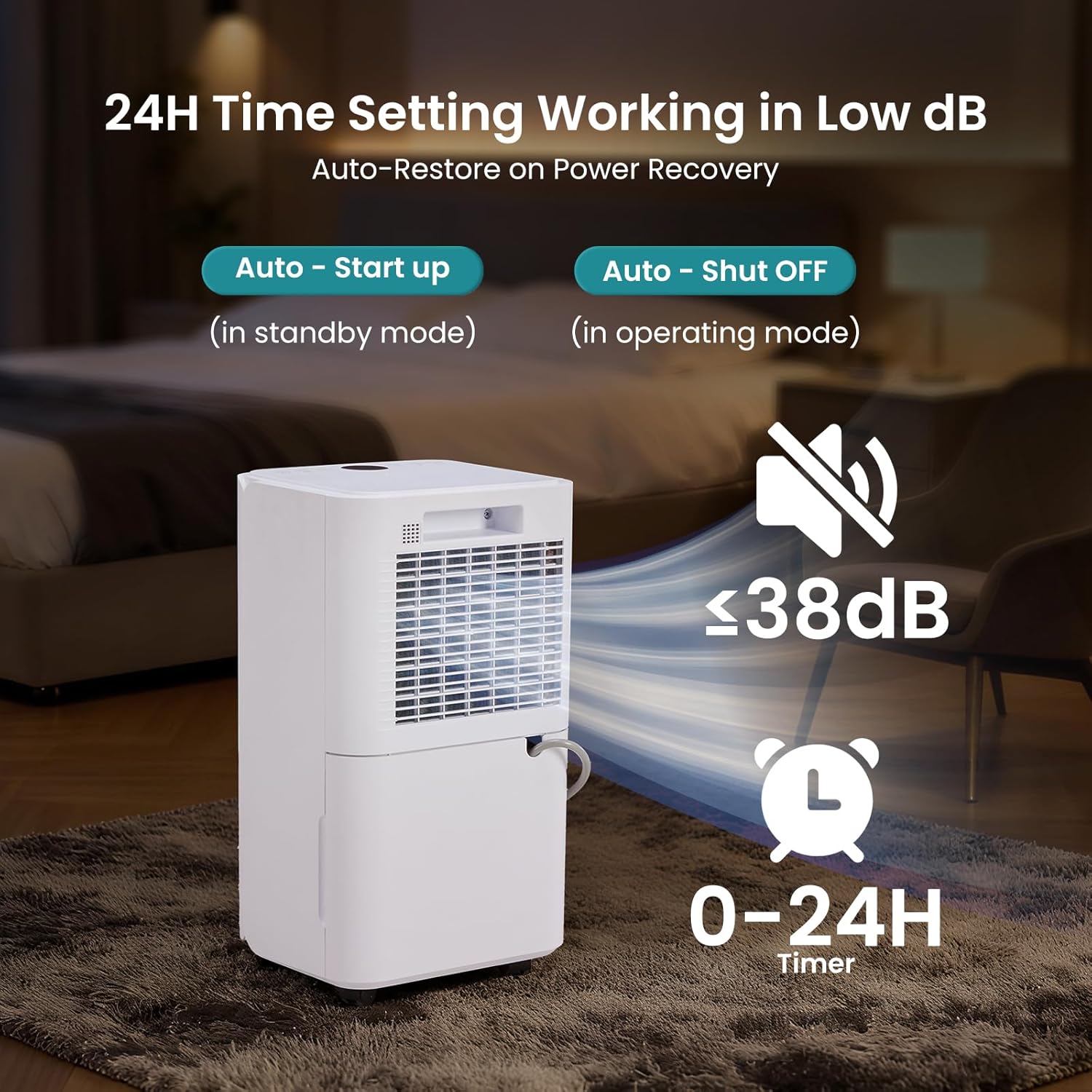
Image: The dehumidifier operating with a visual representation of low noise (<38dB) and a 0-24H timer function for auto start-up and auto shut-off.
5. Maintenance
Regular maintenance ensures optimal performance and extends the lifespan of your dehumidifier.
Cleaning the Air Filter
The removable air filter should be cleaned every two weeks or more frequently depending on usage and air quality.
- Turn off the dehumidifier and unplug it from the power outlet.
- Locate the air filter on the back or side of the unit.
- Gently pull out the filter.
- Wash the filter with warm, soapy water or vacuum it to remove dust and debris.
- Rinse thoroughly and allow the filter to air dry completely before reinstalling.
- Reinsert the dry filter into the unit.
Cleaning the Water Tank
Clean the water tank periodically to prevent mold and mildew growth.
- Remove the water tank as described in the "Manual Drainage" section.
- Wash the tank with warm water and a mild detergent.
- Rinse thoroughly and dry before placing it back into the unit.
Storing the Dehumidifier
If the unit will not be used for an extended period:
- Unplug the unit and empty the water tank completely.
- Clean the air filter and the exterior of the unit.
- Coil the power cord neatly.
- Store the dehumidifier in an upright position in a cool, dry place, away from direct sunlight and extreme temperatures.
6. Troubleshooting
Refer to this section for common issues and their solutions.
| Problem | Possible Cause | Solution |
|---|---|---|
| Dehumidifier does not turn on. | No power supply. Power cord not plugged in. Full water tank. | Ensure unit is plugged into a live outlet. Empty water tank and reinsert correctly. |
| No water collected. | Ambient humidity is too low. Temperature is too low. Air filter is clogged. | Check current humidity level. Unit may not operate below 41°F (5°C). Clean air filter. |
| Unit is noisy. | Unit is not on a level surface. Air filter is clogged. | Place unit on a flat, stable surface. Clean air filter. |
| Water leaks from the unit. | Water tank not inserted correctly. Drain hose connection is loose or blocked. | Reinsert water tank firmly. Check drain hose for secure connection and clear any blockages. |
| Dehumidifier runs continuously. | Desired humidity level is set too low. Room size is too large. | Increase the desired humidity setting. Ensure room is within recommended coverage area. |
7. Specifications
Technical details for the OLIXIS 30-Pint Dehumidifier.
| Feature | Specification |
|---|---|
| Brand | OLIXIS |
| Model Name | 30 Pint Dehumidifier |
| Model Number | OL-CSJ-2L3 |
| Dehumidification Capacity | 30 Pints per Day |
| Floor Area Coverage | Up to 2000 Square Feet |
| Tank Volume | 2 Liters (0.53 Gallons) |
| Product Dimensions (D x W x H) | 8.7" x 10" x 18" |
| Item Weight | 22 Pounds |
| Number of Speeds | 2 (High/Low) |
| Special Features | Adjustable Humidity Control, Automatic Defrost, Automatic Restart, Automatic Shutoff, Child Lock, Smart Humidity Ring |
| Included Components | Air Filter, Drain Hose, Power Cord, User Manual |
| Material | Metal |
| UPC | 700476342597 |

Image: Certifications for the OLIXIS Dehumidifier, including Energy Star, ETL Certified, and FCC Certified, along with a Child Lock icon.
8. Warranty and Support
For warranty information and customer support, please refer to the warranty card included with your product or contact OLIXIS customer service directly. Ensure you have your model number (OL-CSJ-2L3) and proof of purchase available when contacting support.
