
1. Introduction
Thank you for choosing the MZEIBO 50W Sound Bar. This sound bar is designed to enhance your audio experience for Smart TVs, offering powerful sound and versatile connectivity options. This manual provides essential information for safe and effective use, including setup, operation, maintenance, and troubleshooting.
Please read this manual thoroughly before using the product and retain it for future reference.
2. Safety Information
- Do not expose this appliance to dripping or splashing water.
- Do not place objects filled with liquids, such as vases, on the appliance.
- Ensure proper ventilation. Do not block any ventilation openings.
- Place the sound bar on a stable, flat surface.
- Use only the power adapter supplied with the unit.
- Unplug the appliance during lightning storms or when unused for long periods.
- Do not attempt to repair the unit yourself. Refer all servicing to qualified personnel.
3. Package Contents
Verify that all items listed below are included in your package:
- MZEIBO Sound Bar (Model: tv soundbar)
- Power Cable
- Quick Start Guide
- Remote Control
- ARC Cable
- Optical Cable
- Audio Line (AUX Cable)
- Wall Mount Screws

Image: Contents of the MZEIBO Sound Bar package, showing the sound bar, power cable, ARC cable, optical cable, AUX cable, remote control, user manual, and wall mount screws.
4. Product Overview
Key Features:
- Powerful 50W Audio Output: Delivers rich, immersive sound with deep bass and crisp highs.
- Multiple Connection Options: Bluetooth 5.3, HDMI ARC, Optical, and AUX for versatile connectivity.
- Compact 17-Inch Design: Sleek design fits neatly on desks or shelves.
- Enhanced Sound Technology: Three equalizer modes (Music, Movie, News) to optimize audio.
- 360° Surround & Deep Bass: Four speakers combined with a built-in bass system create dynamic audio.
Components:

Image: An internal view of the sound bar highlighting its high-powered rectangular speakers with dual full-range drivers and sound ports for clear audio.

Image: The rear panel of the MZEIBO Sound Bar, illustrating the Bluetooth, Optical, ARC, AUX, and DC IN connection ports.
5. Setup
Placement:
Place the sound bar on a flat, stable surface in front of your TV or mount it on the wall below your TV. Ensure there are no obstructions in front of the sound bar for optimal sound projection.

Image: The MZEIBO Sound Bar positioned neatly on a media console directly below a television, demonstrating typical placement.
Connecting to Power:
- Connect the power cable to the DC IN port on the back of the sound bar.
- Plug the other end of the power cable into a wall outlet.
Audio Connections:
Choose one of the following methods to connect the sound bar to your audio source (e.g., TV, projector, computer).
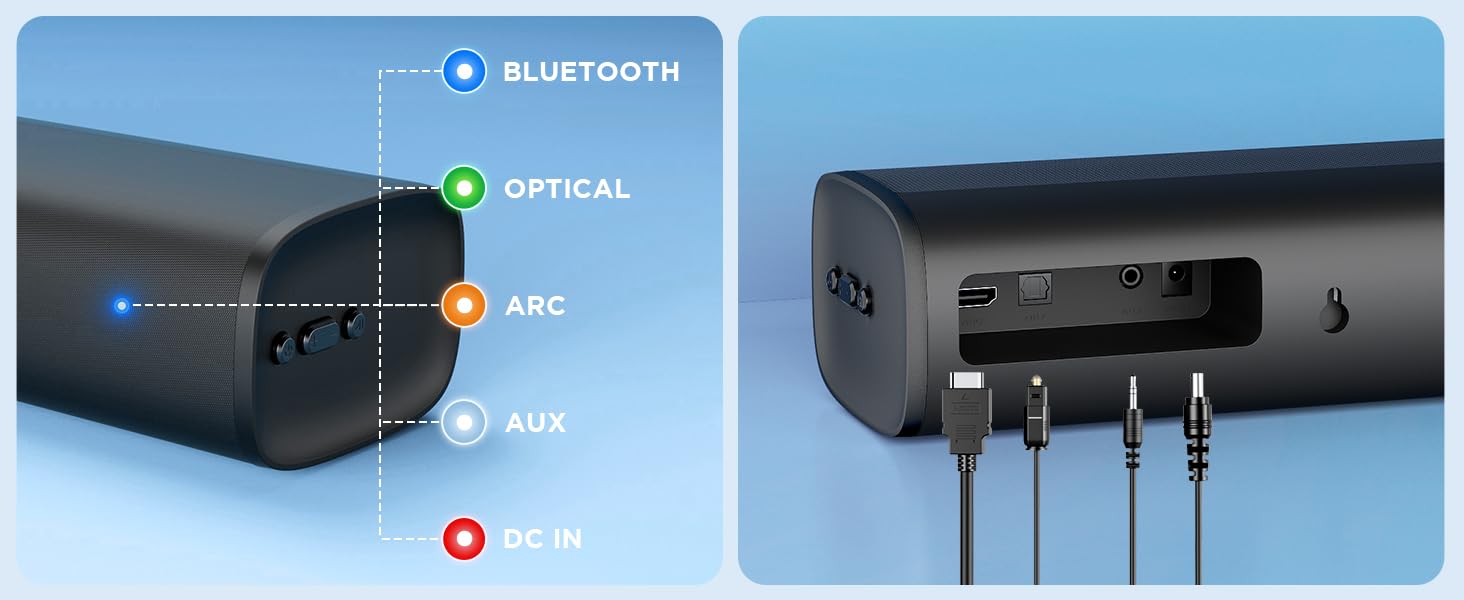
Image: A diagram illustrating the multiple connection options (Bluetooth, HDMI ARC, Optical, 3.5mm Aux) and compatible devices such as televisions, projectors, desktops, laptops, tablet PCs, and mobile phones.
HDMI ARC Connection:
- Connect one end of the HDMI ARC cable to the HDMI ARC port on the sound bar.
- Connect the other end to the HDMI ARC port on your TV.
- Select the HDMI ARC input on your TV.
Optical Connection:
- Connect one end of the Optical cable to the OPTICAL port on the sound bar.
- Connect the other end to the Optical output port on your TV.
- Select the Optical input on your TV.
AUX Connection:
- Connect one end of the 3.5mm AUX cable to the AUX port on the sound bar.
- Connect the other end to the 3.5mm audio output port on your device (e.g., TV, phone).
- Select the AUX input on the sound bar.
Bluetooth Connection:
- Power on the sound bar.
- Press the 'Mode' button on the remote or sound bar until 'BT' (Bluetooth) mode is selected. The indicator light will flash.
- On your device (e.g., smartphone, tablet), enable Bluetooth and search for 'MZEIBO Sound Bar'.
- Select the sound bar from the list of available devices to pair. Once connected, the indicator light will stop flashing.
6. Operating Instructions
Basic Functions:
- Power On/Off: Press the power button on the remote or sound bar.
- Volume Control: Use the Volume Up (+) and Volume Down (-) buttons on the remote or sound bar.
- Input Mode Selection: Press the 'Mode' button on the remote or sound bar to cycle through Bluetooth, HDMI ARC, Optical, and AUX inputs.
Sound Modes:
The MZEIBO Sound Bar features three optimized sound modes for different content types:
- Movie Mode: Enhances dialogue clarity and provides a wider soundstage for films.
- Music Mode: Optimizes audio for a balanced and rich musical experience with noticeable bass response.
- News Mode: Focuses on vocal clarity, making spoken content easier to understand.
To switch between modes, press the corresponding button (Movie, Music, News) on the remote control.

Image: A remote control pointing towards the sound bar, with icons representing Movie Mode, Music Mode, and News Mode displayed on a screen, indicating the sound bar's equalizer settings.
Video: A demonstration of the MZEIBO Sound Bar's features and sound quality, showcasing its use with a Smart TV.
7. Maintenance
- Cleaning: Use a soft, dry cloth to clean the surface of the sound bar. Do not use liquid cleaners or abrasive materials.
- Storage: If storing the sound bar for an extended period, unplug it from the power outlet and store it in a cool, dry place.
- Avoid Obstructions: Ensure the speaker grilles are free from dust and debris to maintain optimal sound quality.
8. Troubleshooting
| Problem | Possible Cause | Solution |
|---|---|---|
| No power | Power cable not connected or outlet not working. | Check power cable connection. Try a different power outlet. |
| No sound | Incorrect input mode selected. Volume too low. Cable not connected properly. | Select the correct input mode. Increase volume. Reconnect audio cables securely. Check TV audio output settings. |
| Bluetooth pairing failed | Sound bar not in pairing mode. Device too far. Interference. | Ensure sound bar is in BT pairing mode (flashing light). Move device closer. Avoid other wireless devices. |
| Remote control not working | Batteries are dead or incorrectly inserted. Obstruction between remote and sound bar. | Replace batteries. Ensure correct polarity. Remove any obstructions. Point remote directly at the sound bar. |
9. Specifications
| Feature | Specification |
|---|---|
| Brand | MZEIBO |
| Model Number | tv soundbar |
| Speaker Maximum Output Power | 50 Watts |
| Frequency Response | 20 KHz |
| Connectivity Technology | Bluetooth, HDMI (ARC), Optical, AUX (3.5mm) |
| Bluetooth Version | 5.3 |
| Audio Output Mode | Surround |
| Mounting Type | Tabletop Mount |
| Speaker Type | Soundbar |
| Control Method | Remote |
| Speaker Size | 17 Inches |
| Item Dimensions (D x W x H) | 16.54"D x 3.94"W x 2.72"H |
| Power Source | Corded Electric |
10. Warranty
The MZEIBO Sound Bar (Model: tv soundbar) comes with a 36-month warranty from the date of purchase. This warranty covers manufacturing defects and workmanship under normal use. It does not cover damage caused by misuse, accidents, unauthorized modifications, or improper installation.
Please retain your proof of purchase for warranty claims.
11. Support
For technical support, warranty claims, or any questions regarding your MZEIBO Sound Bar, please contact our customer service team through the retailer where you purchased the product or visit the official MZEIBO brand store online.
We are committed to providing excellent customer service and support.

