
1. Introduction
Thank you for purchasing the EUHOMY 2.6kW Portable Spot Cooler. This manual provides essential information for the safe and efficient operation of your appliance. Please read it thoroughly before use and retain it for future reference.

Image 1.1: The EUHOMY 2.6kW Portable Spot Cooler unit.
2. Safety Information
To reduce the risk of fire, electric shock, or injury, always follow basic safety precautions when operating this appliance.
- Ensure the power supply matches the voltage specified on the rating label.
- Do not operate the unit with a damaged cord or plug.
- Keep the appliance away from water and other liquids.
- Do not block air inlets or outlets. Maintain at least 50cm clearance from the front and rear, and 30cm from the sides.
- Always ensure the exhaust duct is properly installed to vent hot air outside the room.
- Unplug the unit before cleaning or performing any maintenance.
- This appliance is not intended for use by persons with reduced physical, sensory, or mental capabilities unless supervised.
3. Package Contents
Verify that all items are present in the package:
- Spot Cooler Main Unit (1)
- Window Panels (4)
- Exhaust Duct (1)
- Drain Hose (1)
- Exhaust Nozzle (1)
- Duct End Connector (1)
- Remote Control (1)
- User Manual (1)

Image 3.1: Included components of the EUHOMY Portable Spot Cooler.
4. Product Features
4.1. Powerful Cooling Performance
The EUHOMY Spot Cooler provides a powerful 2.6kW (60Hz) cooling capacity, capable of lowering room temperature by 5°C within 15 minutes. It is designed for effective cooling in areas up to 10 tatami (approximately 16.5 square meters), making it suitable for living rooms, bedrooms, garages, and warehouses.

Image 4.1: Overview of cooling capabilities and specifications.
4.2. Three Operating Modes
This unit offers three versatile operating modes to suit various seasonal needs:
- Cooling Mode: Provides rapid cooling for hot environments.
- Dehumidifying Mode: Removes up to 28.98 liters of moisture per day, helping to maintain a comfortable humidity level between 40% and 60% RH, especially useful during rainy seasons.
- Fan Mode: Circulates air with two adjustable fan speeds (Weak/Strong) to provide ventilation.

Image 4.2: Three-in-one functionality for year-round comfort.
4.3. Smart Sleep Mode
The smart sleep mode adjusts the set temperature gradually to ensure comfortable sleep. After 1 hour, the temperature increases by 1°C, and after 2 hours, it increases by another 1°C (total 2°C increase from initial setting). The unit then maintains this temperature, preventing overcooling or overheating during the night. This mode also reduces power consumption by approximately 25% over 8 hours compared to normal operation.
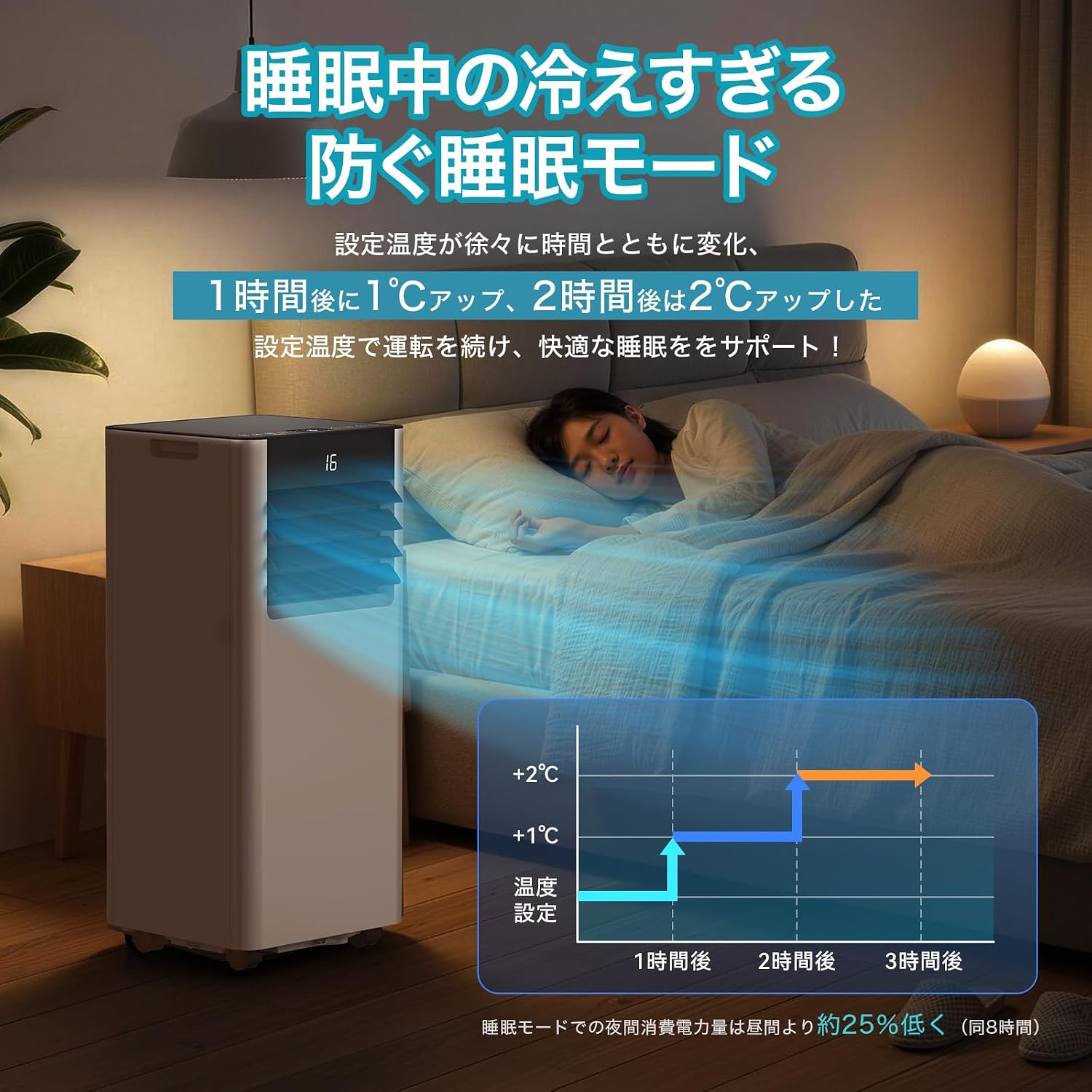
Image 4.3: Smart Sleep Mode for optimized overnight comfort and energy saving.
4.4. 24-Hour Timer Function
Set the unit to automatically turn on or off within a 1 to 24-hour period. This feature allows for efficient operation, ensuring the room is cooled before you arrive home or turns off after you leave, saving energy.
5. Setup and Installation
The EUHOMY Spot Cooler is designed for easy installation without requiring professional construction. Follow these steps for setup:
5.1. Positioning the Unit
Place the unit on a flat, stable surface. Ensure there is adequate clearance around the unit for proper airflow (at least 50cm from front/rear, 30cm from sides). The unit is equipped with casters for easy movement between rooms.
5.2. Window Panel Installation
Assemble the window panels according to your window size. The panels are adjustable from 50cm to 135cm to fit various window types (sliding or vertical sash windows). Secure the panels in the window frame using screws. The 2026 model includes four window panels for improved adaptability and sealing.

Image 5.1: Window panel installation guide.
5.3. Exhaust Duct Connection
Attach the exhaust duct to the unit's exhaust outlet and then connect the other end to the window panel. Ensure a secure connection to prevent hot air from re-entering the room. The improved exhaust duct design in the 2026 model enhances sealing performance by 50%.
6. Operation
The unit can be operated using the touch control panel on top of the unit or the included remote control.

Image 6.1: Control panel and remote control layout.
6.1. Power On/Off
Press the Power button (運転入/切) on the control panel or remote to turn the unit on or off.
6.2. Mode Selection
Press the Mode button (モード) to cycle through Cooling (冷房モード), Dehumidifying (除湿モード), and Fan (送風モード) modes.
6.3. Temperature Adjustment
In Cooling mode, use the Up (+) and Down (-) buttons to set the desired temperature between 16°C and 32°C.
6.4. Fan Speed Adjustment
In Fan mode, press the Fan Speed button (風量) to select between Weak (弱) and Strong (強) airflow.
6.5. Timer Setting
Press the Timer button (タイマー機能) to set the auto-on or auto-off time in 1-hour increments, from 1 to 24 hours.
6.6. Sleep Mode Activation
Press the Sleep button (睡眠) to activate the smart sleep mode for quiet and comfortable overnight operation.
6.7. Louver Adjustment
Manually adjust the vertical louvers to direct the airflow as desired.
7. Maintenance
Regular maintenance ensures optimal performance and longevity of your spot cooler.
7.1. Drainage
The unit is designed with a non-drainage system for cooling mode, where condensed water is evaporated and expelled with the exhaust air. However, in high humidity conditions or during dehumidifying mode, significant water accumulation may occur. Connect the included drain hose to the drainage port for continuous drainage to prevent overflow.
7.2. Filter Cleaning
Periodically clean the air filter to maintain air quality and unit efficiency. Refer to the detailed instructions in the printed user manual for filter removal and cleaning procedures.
7.3. Exterior Cleaning
Wipe the exterior of the unit with a soft, damp cloth. Do not use harsh chemicals or abrasive cleaners.
8. Troubleshooting
Before contacting customer support, refer to the following common issues and solutions:
| Problem | Possible Cause | Solution |
|---|---|---|
| Unit does not turn on | No power supply; Power cord not plugged in; Circuit breaker tripped. | Check power connection; Reset circuit breaker. |
| Insufficient cooling | Windows/doors open; Exhaust duct not properly installed; Air filter dirty; Room size too large. | Close windows/doors; Ensure duct is sealed; Clean air filter; Use in recommended room size. |
| Water leakage | Drain hose not connected or blocked; Water tank full (if applicable). | Connect drain hose; Clear any blockages; Ensure continuous drainage in high humidity. |
| Unit is noisy | Unit not on a flat surface; Air filter dirty; Normal operating sound. | Place on a flat surface; Clean air filter; Some operating noise is normal for portable ACs. |
9. Specifications
| Feature | Detail |
|---|---|
| Brand | EUHOMY |
| Model Number | OL-A016UC26N4 |
| Cooling Capacity | 2.3kW (50Hz) / 2.6kW (60Hz) |
| Applicable Area | 8-10 Tatami |
| Temperature Setting Range | 16°C to 32°C |
| Power Supply | 100V (50/60Hz) |
| Cooling Power Consumption | 750W (50Hz) / 800W (60Hz) |
| Dehumidifying Capacity | 28.98 L/day |
| Noise Level | 55dB (Operating Sound: 43dB) |
| Refrigerant | R-410A |
| Unit Dimensions (D x W x H) | 30.3 x 28.95 x 67.3 cm |
| Unit Weight | Approx. 20.5 kg |
| Controller Type | Touch Control |

Image 9.1: Detailed product specifications and dimensions.
10. Warranty and Support
10.1. One-Year Quality Guarantee
This product comes with a one-year quality guarantee from the date of purchase. Please retain your proof of purchase for warranty claims.

Image 10.1: One-Year Quality Guarantee.
10.2. Customer Support
For any questions regarding the product or delivery, please contact our customer support. You can reach us via email or inquiry. For inquiries after purchase, navigate to 'Order History' > 'Problem with order' > 'View profile' > 'Ask a question' or refer to the contact information in the Japanese instruction manual.

Image 10.2: Customer support contact options.


