
1. Introduction
This manual provides essential information and instructions for the USARemote Smart Key Fob Replacement. This product is designed to replace lost, worn, or damaged key fobs for compatible vehicles. Please read this manual thoroughly before attempting to program or use the key fob.
2. Compatibility
This smart key fob is compatible with select General Motors (GM) SUVs equipped with push-to-start ignition systems. It is not compatible with standard turn-key ignitions.
- Compatible Vehicles:
- 2015-2019 Chevrolet Suburban
- 2015-2019 Chevrolet Tahoe
- 2015-2020 GMC Yukon
- 2015-2020 GMC Yukon XL
Part Numbers: HYQ1AA, 13580802
Before use, verify that your vehicle's year, model, and original remote's appearance and part number (HYQ1AA / 13580802) match the specifications of this product.

3. Package Contents
Each USARemote Smart Key Fob Replacement package includes:
- Complete smart key fob remote with electronic assembly
- Pre-installed battery
- Insert valet key

4. Setup and Programming
The USARemote Smart Key Fob is designed for self-programming in most situations, provided you have at least one existing working key. This process can help save time and setup costs.
Self-Programming (with one working key):
- Ensure your vehicle is in a safe, well-lit area.
- Have all existing working key fobs and the new key fob(s) with you.
- Follow the specific programming instructions provided with your vehicle's owner's manual or consult a reputable online resource for your exact vehicle model and year. The general procedure often involves placing a working key in a specific location, then initiating a programming sequence for the new key.
- Test all key fob functions (lock, unlock, remote start, etc.) after programming to ensure successful setup.
Important Note:
Depending on your vehicle's condition or system configuration, self-programming may not always be successful. In such cases, programming by a certified dealer or professional locksmith may be required. If you encounter difficulties, it is recommended to seek professional assistance.
5. Operating Instructions
The key fob features several buttons for controlling your vehicle's functions:
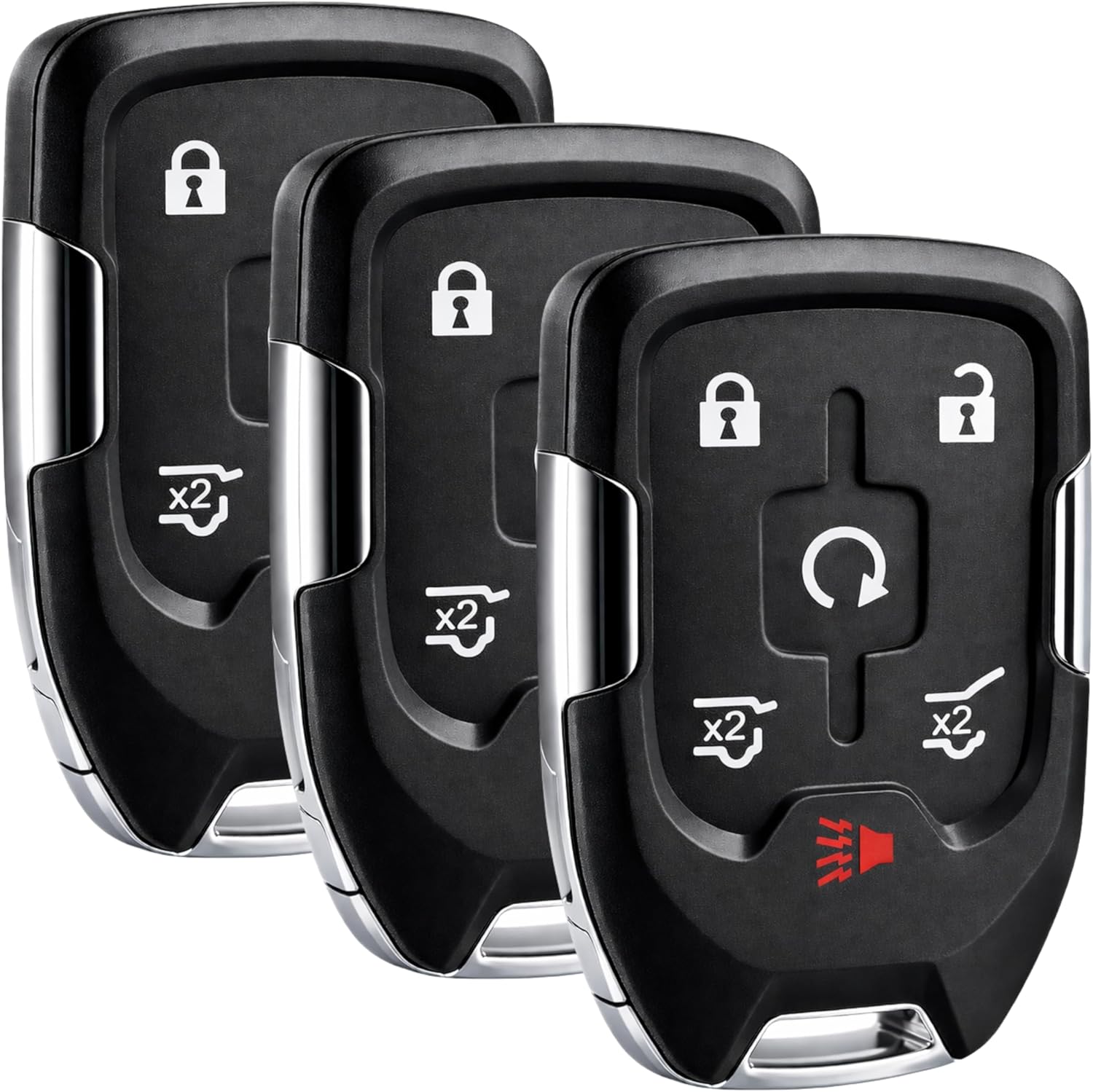
- Lock Button (🔒): Press once to lock all doors.
- Unlock Button (🔓): Press once to unlock the driver's door, press twice to unlock all doors.
- Remote Start Button (↻): Press and hold to remotely start the vehicle. The vehicle will run for a set period (refer to your vehicle's manual) before automatically shutting off.
- Tailgate/Trunk Release Button (x2): Press twice to open the power tailgate or trunk.
- Panic Alarm Button (🔊): Press and hold to activate the vehicle's panic alarm. Press again to deactivate.
Using the Valet Key:
The key fob includes an insert valet key. This key can be accessed by pressing the small button on the side of the fob and pulling the key out. It is used for manual entry into the vehicle if the key fob battery is depleted or if electronic entry fails.
6. Maintenance
Battery Replacement:
The key fob is powered by a small button cell battery. If the remote's range decreases or it stops functioning, the battery may need replacement. To replace the battery:
- Carefully open the key fob casing. Refer to your vehicle's owner's manual or an online guide for specific instructions on opening your fob model.
- Note the type and orientation of the existing battery.
- Remove the old battery and insert a new one of the same type, ensuring correct polarity.
- Close the key fob casing securely.
Battery Type: 1 Nonstandard Battery (included) per remote.
7. Troubleshooting
- Fob not responding: Check the battery. Replace if necessary. Ensure the fob is properly programmed to the vehicle.
- Programming difficulties: Ensure you are following the correct procedure for your specific vehicle model. If issues persist, professional programming by a dealer or locksmith may be required.
- Reduced range: This often indicates a low battery. Replace the battery.
8. Specifications
- Brand: USARemote
- Model Number: HYQ1AA (Mfr Part Number: g-q1aa-6b)
- Connectivity Technology: Radio Frequency
- Number of Buttons: 6
- Controller Type: Button Control
- Number of Batteries: 1 Nonstandard Battery (included) per remote
- Smart Home Compatibility: Not Smart Home Compatible
- Unit Count: 3.0 Count (for the 3-Pack variant)
9. Warranty
This product comes with a 30-day warranty from the date of purchase. Please retain your proof of purchase for any warranty claims.
10. Support
For further assistance, technical support, or inquiries regarding your USARemote Smart Key Fob, please refer to the contact information provided by your retailer or the manufacturer's official website.