
1. Introduction
Welcome to the user manual for your new Motorola Moto G57 5G smartphone. This guide provides essential information on setting up, operating, maintaining, and troubleshooting your device to ensure optimal performance and user experience. Please read this manual thoroughly before using your phone.
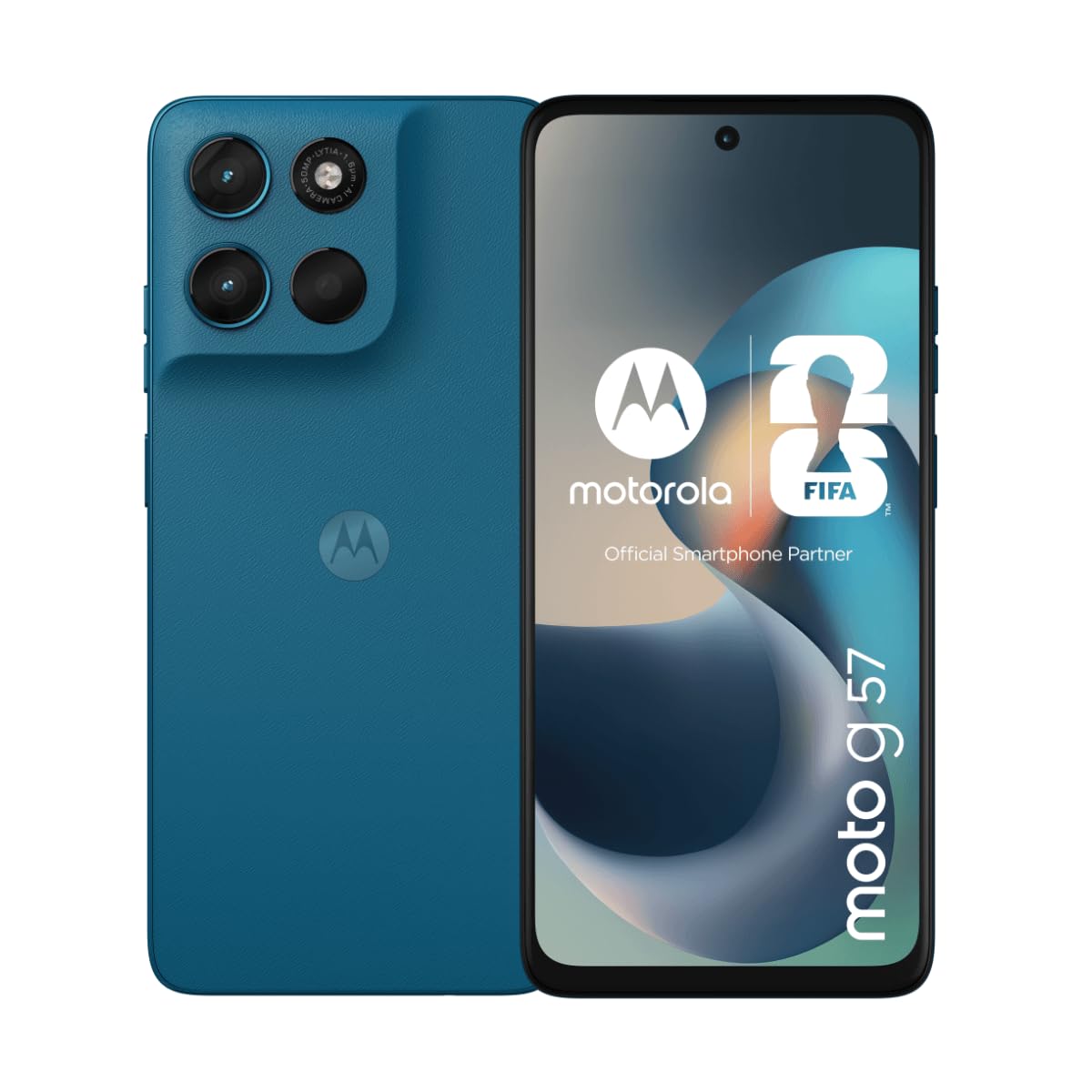
Image 1.1: Front view of the Motorola Moto G57 5G smartphone.
2. Package Contents
Ensure that your package contains the following items:
- Motorola Moto G57 5G Smartphone
- USB Cable
- Quick Start Guide (may vary by region)
- SIM Ejector Tool (may vary by region)
3. Device Overview
Familiarize yourself with the physical features of your Motorola Moto G57 5G.
3.1 Front View
- Front Camera: For selfies and video calls.
- Display: 6.72-inch Full HD+ LCD IPS screen.
- Earpiece: For calls.
3.2 Rear View
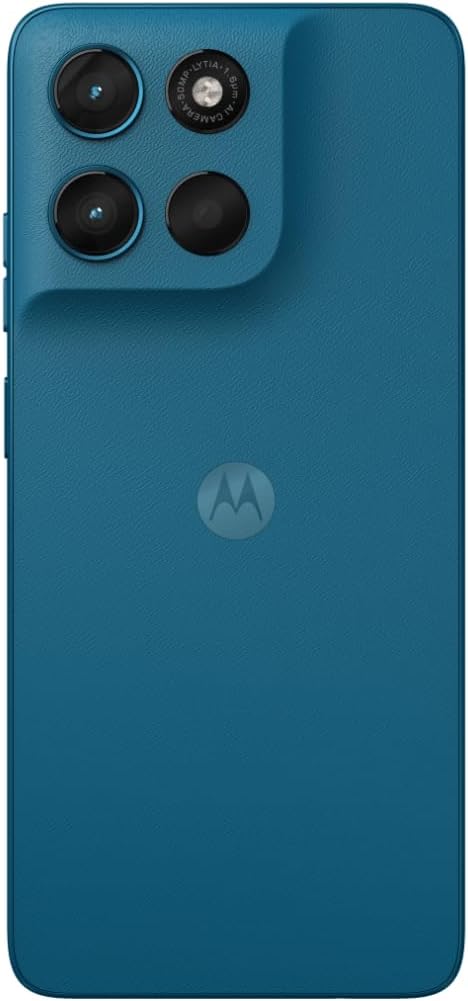
Image 3.1: Rear view of the Motorola Moto G57 5G, showing the camera module and Motorola logo.
- Main Camera Module: Includes 50 MP main sensor and 8 MP ultra-wide sensor.
- Flash: For low-light photography.
- Motorola Logo: Brand identification.
3.3 Side Views

Image 3.2: Side view of the Motorola Moto G57 5G, typically showing power and volume buttons.
- Power Button: Turns the device on/off, locks/unlocks the screen.
- Volume Buttons: Adjusts media and call volume.
- SIM/SD Card Tray: Located on the side for inserting SIM cards and an optional microSD card.
- USB-C Port: For charging and data transfer.
- 3.5mm Headphone Jack: For wired audio accessories.
4. Setup
4.1 Inserting SIM Card(s) and MicroSD Card
- Locate the SIM/SD card tray on the side of your phone.
- Insert the SIM ejector tool into the small hole next to the tray and push gently until the tray pops out.
- Place your Nano-SIM card(s) and/or microSD card into the tray with the gold contacts facing down. The Motorola Moto G57 5G supports Dual SIM functionality.
- Carefully reinsert the tray into the phone.

Image 4.1: Side view illustrating the location of the SIM/SD card tray.
4.2 Charging the Battery
Before first use, fully charge your phone's battery.
- Connect the USB cable to the USB-C port on your phone.
- Connect the other end of the USB cable to a compatible power adapter (sold separately) and plug it into a power outlet.
- The charging indicator will appear on the screen.
4.3 Powering On/Off
- To Power On: Press and hold the Power button until the Motorola logo appears.
- To Power Off: Press and hold the Power button, then tap 'Power off' on the screen.
4.4 Initial Setup Wizard
Upon first power-on, follow the on-screen instructions to set up your device, including language selection, Wi-Fi connection, Google account login, and security settings.
5. Operating Your Device
5.1 Basic Navigation
- Touch: Tap items on the screen to select them.
- Swipe: Drag your finger across the screen to scroll or switch between screens.
- Pinch: Use two fingers to zoom in or out on photos and web pages.
5.2 Making Calls and Sending Messages
- Open the Phone app to dial numbers or select contacts.
- Open the Messages app to compose and send text messages.
5.3 Camera Usage
Your Motorola Moto G57 5G features a versatile camera system:
- Main Camera: 50 MP sensor with Quad Pixel technology for detailed photos, especially in low light.
- Ultra-wide Camera: 8 MP sensor for capturing broader scenes.
- Front Camera: 8 MP for high-quality selfies.
Open the Camera app, select your desired mode (Photo, Video, Portrait, etc.), and tap the shutter button to capture images or start recording.
5.4 Connectivity
- 5G: Enjoy fast mobile data speeds.
- Wi-Fi: Connect to wireless networks for internet access.
- Bluetooth: Pair with wireless headphones, speakers, and other devices.
5.5 Audio Features
Experience immersive sound with:
- Dolby Atmos: Enhanced audio for music, movies, and games.
- 3.5mm Headphone Jack: Connect your favorite wired headphones.
6. Maintenance
6.1 Cleaning Your Device
Use a soft, lint-free cloth to clean your phone. Avoid abrasive materials or harsh chemicals. The display can be cleaned with a screen cleaner specifically designed for electronics.
6.2 Software Updates
Regularly check for and install software updates to ensure your device has the latest features, security patches, and performance improvements. Go to Settings > System > System updates.
6.3 Battery Care
- Avoid extreme temperatures.
- Do not let the battery drain completely often.
- Use the provided USB cable for charging.
6.4 Water Resistance
The Motorola Moto G57 5G is rated IP64 for water resistance, meaning it is protected against dust and splashing water from any direction. It is not designed to be submerged in water. Avoid exposing the device to pressurized water or liquids other than fresh water.
7. Troubleshooting
7.1 Device Not Turning On
- Ensure the battery is charged. Connect the phone to a charger for at least 15 minutes.
- Press and hold the Power button for 10-15 seconds to force a restart.
7.2 Network Issues
- Check if your SIM card is properly inserted.
- Restart your phone.
- Go to Settings > Network & internet > Mobile network and ensure mobile data is enabled.
7.3 Apps Crashing or Freezing
- Close and reopen the app.
- Clear the app's cache and data (Settings > Apps > [App Name] > Storage & cache).
- Update the app from the Google Play Store.
7.4 Factory Reset
If issues persist, you may need to perform a factory reset. This will erase all data on your phone. Back up important data before proceeding.
- Go to Settings > System > Reset options.
- Tap Erase all data (factory reset).
- Follow the on-screen prompts to confirm.
8. Specifications
| Feature | Detail |
|---|---|
| Model Name | Motorola Moto G57 |
| Operating System | Android 16 |
| Processor | Qualcomm SM6435-AA Snapdragon 6s Gen 4 (4 nm) |
| RAM | 8 GB |
| Internal Storage | 256 GB |
| Display Size | 6.72 inches |
| Display Type | LCD IPS |
| Display Resolution | 1080 x 2400 pixels |
| Refresh Rate | 120 Hz |
| Main Camera | 50 MP, f/1.8 (wide) |
| Ultra-wide Camera | 8 MP, f/2.2 |
| Front Camera | 8 MP |
| Battery Capacity | 5200 mAh |
| Charging | 30W Fast Charging (adapter sold separately) |
| Connectivity | 5G, Wi-Fi, Bluetooth, USB-C |
| SIM Slots | Dual SIM |
| Audio | Stereo speakers with Dolby Atmos, 3.5mm headphone jack |
| Water Resistance | IP64 (splash resistant) |
| Dimensions | 8 x 76 x 166 mm |
| GTIN/UPC | 840493619057 |
9. Warranty and Support
For warranty information, please refer to the warranty card included with your product or visit the official Motorola support website. For technical assistance, software updates, or further inquiries, please contact Motorola customer support.
You can often find support resources, FAQs, and contact information on the official Motorola website: www.motorola.com/support


