
1. Introduction
Thank you for choosing the Trisomy 3.5HP Foldable Under Desk Treadmill. This manual provides essential information for the safe and effective use, setup, operation, and maintenance of your new fitness equipment. Please read this manual thoroughly before use and retain it for future reference.
This innovative 4-in-1 walking pad treadmill is designed to support various fitness levels and activities, including walking, running, climbing, and desk workouts. It features an adjustable handlebar, multiple incline settings, a powerful yet quiet motor, and advanced shock absorption for a comfortable and safe exercise experience.
2. Safety Information
To ensure your safety and prolong the life of your treadmill, please observe the following precautions:
- Always place the treadmill on a flat, stable surface.
- Ensure adequate clear space around the treadmill (at least 2 feet on sides and 6 feet behind).
- Keep children and pets away from the treadmill during operation.
- Wear appropriate athletic footwear.
- Use the safety clip at all times. Attach it to your clothing before starting your workout.
- Do not operate the treadmill if it is damaged or malfunctioning.
- Consult a physician before starting any new exercise program.
- Maximum user weight capacity is 350 lbs.
3. Package Contents
Carefully unpack the box and ensure all items are present:
- Treadmill Unit
- Quick Installation Guide
- Tablet Holder
- Safe Lock (Safety Clip)
- L-shaped Wrench
- User Manual
- Remote Control
- Handlebar Fixing Nut (x2)
- Tablet Holder Nut (x2)
- Lubricant
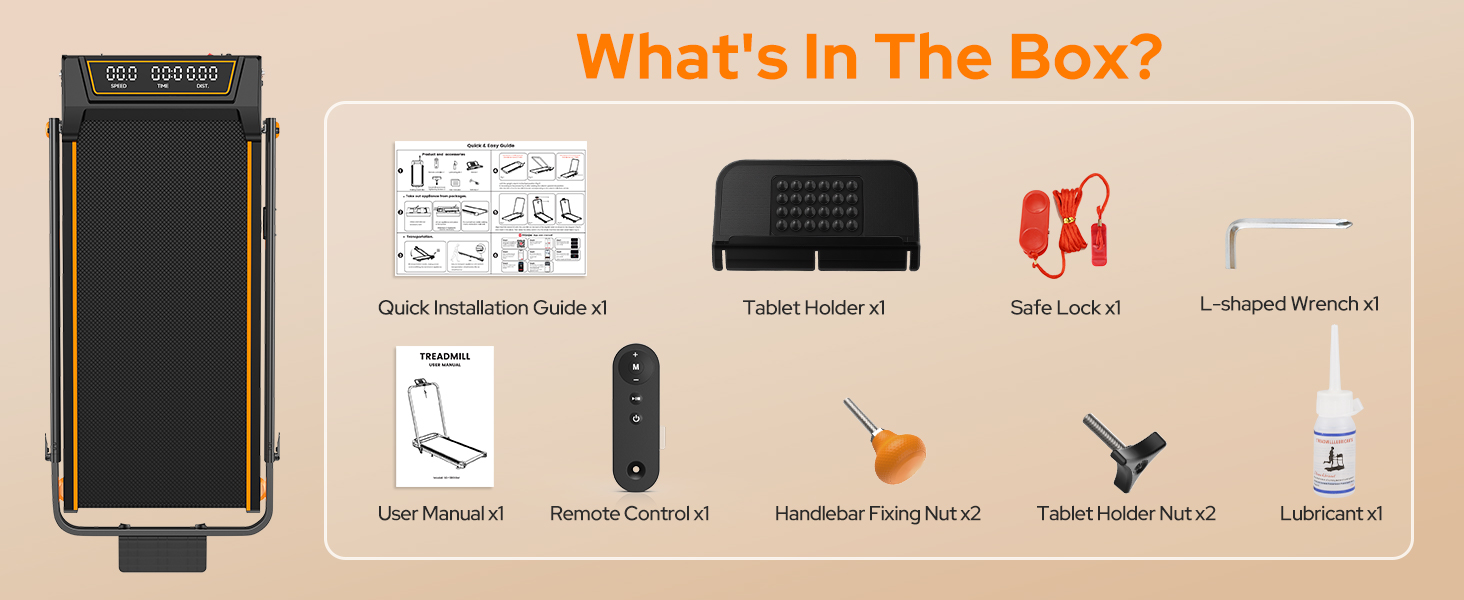
Figure 3.1: Included Components
4. Setup
The Trisomy treadmill is designed for tool-free assembly, making setup quick and easy.
4.1 Unfolding the Treadmill
1. Remove the treadmill from its packaging.

Figure 4.1: Treadmill Unfolded
4.2 Attaching the Handlebar and Tablet Holder
1. Raise the handlebar to the desired height. The handlebar features 6 adjustable levels from 35" to 47".
2. Secure the handlebar in place using the two handlebar fixing nuts. Rotate them by hand until they are firmly tightened.
3. Attach the tablet holder to the top of the handlebar using the two tablet holder nuts, rotating them by hand to secure.

Figure 4.2: Handlebar and Tablet Holder Assembly
4.3 Adjusting Incline
The treadmill offers 3 manual incline settings (0-12%).
1. To adjust the incline, locate the incline adjustment screws at the rear of the treadmill.
2. Manually adjust these screws to select your desired incline level (0%, 6%, or 12%).

Figure 4.3: Manual Incline Adjustment
4.4 Power Connection
1. Plug the power cord into a grounded electrical outlet.
2. Turn on the main power switch, usually located near the power cord connection point.
5. Operating Instructions
Your Trisomy treadmill supports various modes and control options.
5.1 Modes of Operation
The treadmill offers four distinct modes:
- Working Mode: Handlebar folded down, ideal for light walking under a desk (0.6-1.5 mph).
- Walking Mode: Handlebar folded down, for general walking (0.6-4.0 mph).
- Running Mode: Handlebar raised, for jogging or running (4.0-6.0 mph).
- Climbing Mode: Handlebar raised with incline activated, for a more intense workout.

Figure 5.1: Treadmill Operating Modes
5.2 Using the Remote Control
The included remote control allows you to start/stop the treadmill, adjust speed, and switch display metrics. It also features a mute option for quiet operation.

Figure 5.2: LED Display and Remote Control
5.3 App Connectivity
Connect your treadmill to the "FITSHOW" app via Bluetooth for enhanced workout tracking and customized exercise journeys. The app allows you to monitor your duration, distance, speed, and calories burned, and can help you set and achieve fitness goals.

Figure 5.3: App Control Interface
6. Maintenance
Regular maintenance ensures optimal performance and longevity of your treadmill.
6.1 Cleaning
Wipe down the treadmill with a damp cloth after each use to remove sweat and dust. Avoid using abrasive cleaners or solvents.
6.2 Lubrication
The running belt requires periodic lubrication to reduce friction and wear. Use the provided lubricant and follow these steps:
- Turn off and unplug the treadmill.
- Loosen the running belt by turning the rear rollers counter-clockwise (usually 2-3 turns).
- Apply a small amount of lubricant evenly under the center of the running belt.
- Tighten the running belt by turning the rear rollers clockwise until snug.
- Run the treadmill at a low speed (e.g., 1 mph) for 2-3 minutes to distribute the lubricant.

Figure 6.1: Adjusting the Running Belt
6.3 Belt Adjustment
If the running belt is off-center or slipping, adjust it using the L-shaped wrench provided. Refer to the detailed instructions in the Quick Installation Guide for precise adjustments.
7. Troubleshooting
If you encounter any issues, please refer to the following common problems and solutions:
- Treadmill not starting: Ensure the power cord is securely plugged in, the main power switch is on, and the safety clip is correctly attached.
- Belt slipping: The running belt may need tensioning or lubrication. Refer to Section 6.2 and 6.3.
- Unusual noise: Check for loose parts or foreign objects under the belt. Lubricate the belt if necessary.
- Display not working: Check power connections. If the issue persists, contact customer support.
For more complex issues, please contact Trisomy customer support.
8. Specifications
| Feature | Specification |
|---|---|
| Brand | Trisomy |
| Model Name | HSM-T12C1 |
| Color | Black |
| Product Dimensions | 42.5"D x 22.4"W x 4.4"H |
| Item Weight | 1 Pounds (Note: This seems to be an error in the source data, actual weight is likely higher) |
| Material | Alloy Steel |
| Maximum Horsepower | 3.5 Horsepower |
| Maximum Incline Percentage | 12% (3 manual levels) |
| Speed Range | 0.6 - 6.0 mph |
| Adjustable Handlebar Height | 35" to 47" (6 levels) |
| Display Type | LED |
| Maximum User Weight | 350 LBS |
| Special Features | Adjustable Height, Adjustable Speed, Compact Design, Cushioned Running Belt, Foldable, Bluetooth Speaker, APP Control |
9. Storage
The Trisomy treadmill is designed for easy storage due to its foldable design and built-in wheels.
1. To fold, loosen the handlebar fixing nuts and lower the handlebar completely.
2. The treadmill can then be moved using its built-in wheels and stored under a sofa, desk, or bed, or leaned against a wall.

Figure 9.1: Easy Storage
10. Warranty & Support
The Trisomy treadmill comes with a 2-year warranty. We offer 24/7 customer service and lifetime technical support.
If you have any questions, concerns, or require technical assistance, please do not hesitate to contact us. You can find our contact information in the Quick Installation Guide or on the last page of your User Manual.

Figure 10.1: Customer Support Information