
1. Setup and Installation
This section guides you through the process of setting up your litokam Window Camera and its dedicated Window Mount.
Product Components
- litokam Window Camera (LF-C4t)
- litokam Window Mount
- Power Adapter and Cable
Camera Features Overview
- 2K Resolution: Advanced 3MP sensor for ultra-high-definition video.
- Anti-glare Design: Optimized for window use to minimize reflections.
- AI Full-Color Night Vision: Provides vivid, clear full-color images in low-light conditions.
- Smart Detection: Precise human shape, motion, and sound detection.
- Real-Time Alerts: Sends notifications to your smartphone upon detection.
- Dual-Band Wi-Fi: Supports 2.4GHz & 5GHz networks.
- Wide View Angle: 104° field of view.
Mount Features Overview
- Compatibility: Exclusively designed for the litokam Window Camera LF-C4t.
- Magnetic Quick-Install: Allows for easy and secure attachment of the camera.
- Fixed 20-Degree Tilt: Provides a flexible 20-degree tilt in all directions (up/down/left/right) for optimal viewing angles.
- Versatile Mounting: Can be mounted on any single-frame transparent glass surface, such as windows, glass doors, or cabinets.
- Damage-Free Installation: No screws required, ensuring no damage to surfaces.
Installation Steps
- Attach Camera to Mount: Align the litokam Window Camera LF-C4t with the magnetic window mount. The camera will snap securely into place. Ensure a firm connection.

Image: The litokam camera is shown being magnetically attached to its window mount, illustrating the quick and secure installation process.
- Verify Compatibility: Ensure you are using the correct litokam Window Camera LF-C4t with the mount. The mount is not compatible with other camera models.

Image: A visual comparison showing the correct fit of the LF-C4t camera with the mount versus an incompatible camera, emphasizing exclusive compatibility.
- Mount to Glass Surface: Clean the desired glass surface thoroughly. Press the mount firmly onto the clean glass. The damage-free design allows for secure attachment without screws.

Image: The litokam Window Camera is shown mounted on a window, providing a view of the outside, with a smartphone displaying the live feed.
- Adjust Viewing Angle: Utilize the 20-degree tilt feature of the mount to adjust the camera's angle for optimal coverage of your desired monitoring area.

Image: A side-by-side view demonstrates how the litokam window mount allows the camera to tilt by 20 degrees, enabling flexible angle adjustments.
- Power On: Connect the power cable to the camera and plug the adapter into a power outlet.
- App Setup: Download the litokam app on your smartphone. Follow the in-app instructions to connect your camera to your home Wi-Fi network (supports 2.4GHz and 5GHz).
2. Operating Instructions
Learn how to effectively use your litokam Window Camera for home security.
Using the litokam App
- Live View: Access real-time video feed from your camera anytime, anywhere.
- Recording Playback: Review recorded footage (24/7 recording is supported).
- Alert Settings: Customize detection zones, sensitivity levels, and notification preferences for person, motion, and sound detection.
- Night Vision Mode: The camera automatically switches to AI Full-Color Night Vision in low-light conditions.
Key Operational Features
- AI Full-Color Night Vision: The camera provides clear, full-color images even in very dim environments, enhancing visibility and identification at night.

Image: A comparison demonstrating the superior clarity and color of litokam's AI Full-Color Night Vision compared to a standard night view.
- Smart Human Detection: The camera can accurately identify human shapes, reducing false alarms from pets or inanimate objects. When a person is detected, you receive an immediate alert.
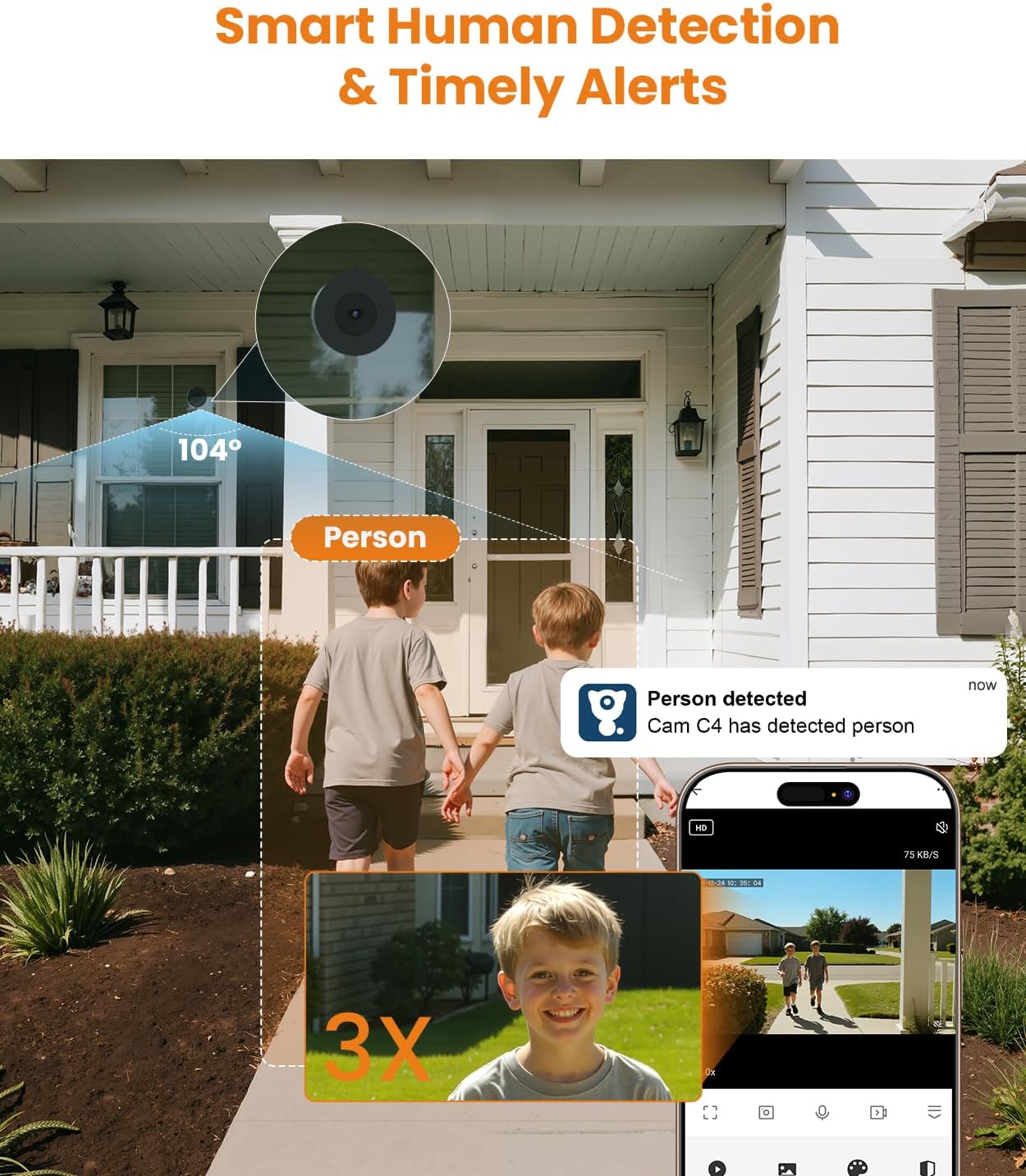
Image: The camera's smart human detection feature is shown identifying two children, triggering a 'Person detected' alert on a smartphone.
- Motion and Sound Detection: In addition to human detection, the camera also detects general motion and unusual sounds, sending real-time alerts to your phone.

Image: An example of the camera's detection capabilities, showing a vehicle detected in a driveway at night with an accompanying smartphone alert.
3. Maintenance
Proper maintenance ensures the longevity and optimal performance of your litokam Window Camera.
- Cleaning the Lens: Gently wipe the camera lens with a soft, lint-free cloth. Avoid abrasive cleaners that could scratch the lens.
- Cleaning the Mount and Glass Surface: Periodically clean the surface of the window mount and the glass area where it is attached to maintain strong adhesion and prevent dust buildup.
- Power Connection Check: Ensure the power cable is securely connected to both the camera and the power adapter, and that the adapter is firmly plugged into a working outlet.
- Wi-Fi Connectivity: Regularly check your Wi-Fi signal strength in the camera's location via the app to ensure stable connectivity and uninterrupted monitoring.
- Firmware Updates: Check the litokam app for available firmware updates. Keeping your camera's firmware up-to-date ensures you have the latest features and security enhancements.
4. Troubleshooting
If you encounter issues with your litokam Window Camera, refer to the following common problems and solutions.
| Problem | Possible Cause | Solution |
|---|---|---|
| Camera not powering on | Loose power connection, faulty adapter, power outage. | Check power cable connections. Ensure the power adapter is working and the outlet has power. Try a different outlet. |
| No image/offline in app | No power, Wi-Fi disconnected, incorrect app setup. | Verify camera is powered on. Check Wi-Fi router and signal strength. Re-add camera to the app if necessary. |
| Poor image quality/reflections | Dirty lens, strong external light source, incorrect mounting. | Clean the camera lens. Ensure the anti-glare design is positioned correctly. Adjust camera angle to minimize direct light interference. |
| No alerts received | Detection settings off, app notifications disabled, poor network. | Check detection settings (human, motion, sound) in the app. Enable app notifications on your phone. Ensure stable Wi-Fi connection. |
| Mount not adhering to glass | Dirty glass surface, uneven surface. | Clean the glass surface thoroughly before mounting. Ensure the surface is flat and smooth. |
5. Specifications
Detailed technical specifications for the litokam Window Camera and Window Mount.
| Feature | Detail |
|---|---|
| Model Number | LF-C4t |
| Resolution | 2K (3MP Sensor) |
| Night Vision | AI Full-Color Night Vision |
| Detection | Human Shape, Motion, Sound |
| Connectivity | 2.4GHz & 5GHz Wi-Fi |
| View Angle | 104° |
| Mount Tilt Angle | Fixed 20-degree (adjustable up/down/left/right) |
| Mounting Type | Damage-free, magnetic, glass surface |
| ASIN | B0GS59MKLV |
| Brand | litokam |
6. Warranty and Support
Information regarding product warranty and customer support was not provided in the available data. For details on warranty coverage, technical support, or service inquiries, please refer to the official litokam website or contact their customer service directly.