
1. Safety Information
Please read and understand all safety warnings before assembly and use of this product. Failure to follow these instructions may result in injury or product damage.
- Do not exceed the maximum weight capacity of 800 lbs.
- Be cautious of sharp edges and corners during assembly and use.
- Always unplug the charging station and LED lights from the power source before making the bed, cleaning, or performing any maintenance.
- Keep the charging station and LED lights away from water and other liquids to prevent electrical hazards.
- Always follow the assembly instructions carefully to prevent instability or collapse of the bed frame.
- Ensure all connections for the charging station and LED lights are secure before use.
2. Setup and Assembly
This bed frame is designed for straightforward assembly. All necessary tools and labeled accessories are included.
2.1 Unpacking and Preparation
- Open the packaging carefully and remove all components.
- Verify that all parts and hardware are present by comparing them with the included parts list.
- Lay out all components on a clean, soft surface (e.g., a rug or blanket) to prevent scratches.
2.2 Assembly Steps
- Assemble the Headboard: Attach the wingback sections to the main headboard panel. Ensure the hidden storage compartment mechanism is correctly aligned.
- Install Charging Station and LED Lights: Secure the charging station and LED light strip into the designated slots within the headboard. Connect the wiring as per the diagram.
- Construct the Side Rails and Footboard: Connect the side rails to the headboard and footboard using the provided hardware. Ensure all bolts are tightened securely.
- Attach Support Legs: Fasten the sturdy round legs to the bed frame.
- Install Slats: Place the Velcro-secured wooden slats across the bed frame. Ensure they are evenly spaced and firmly attached to the Velcro strips on the frame for noise-free support.
- Final Check: Double-check all connections and ensure the frame is stable before placing a mattress on it.
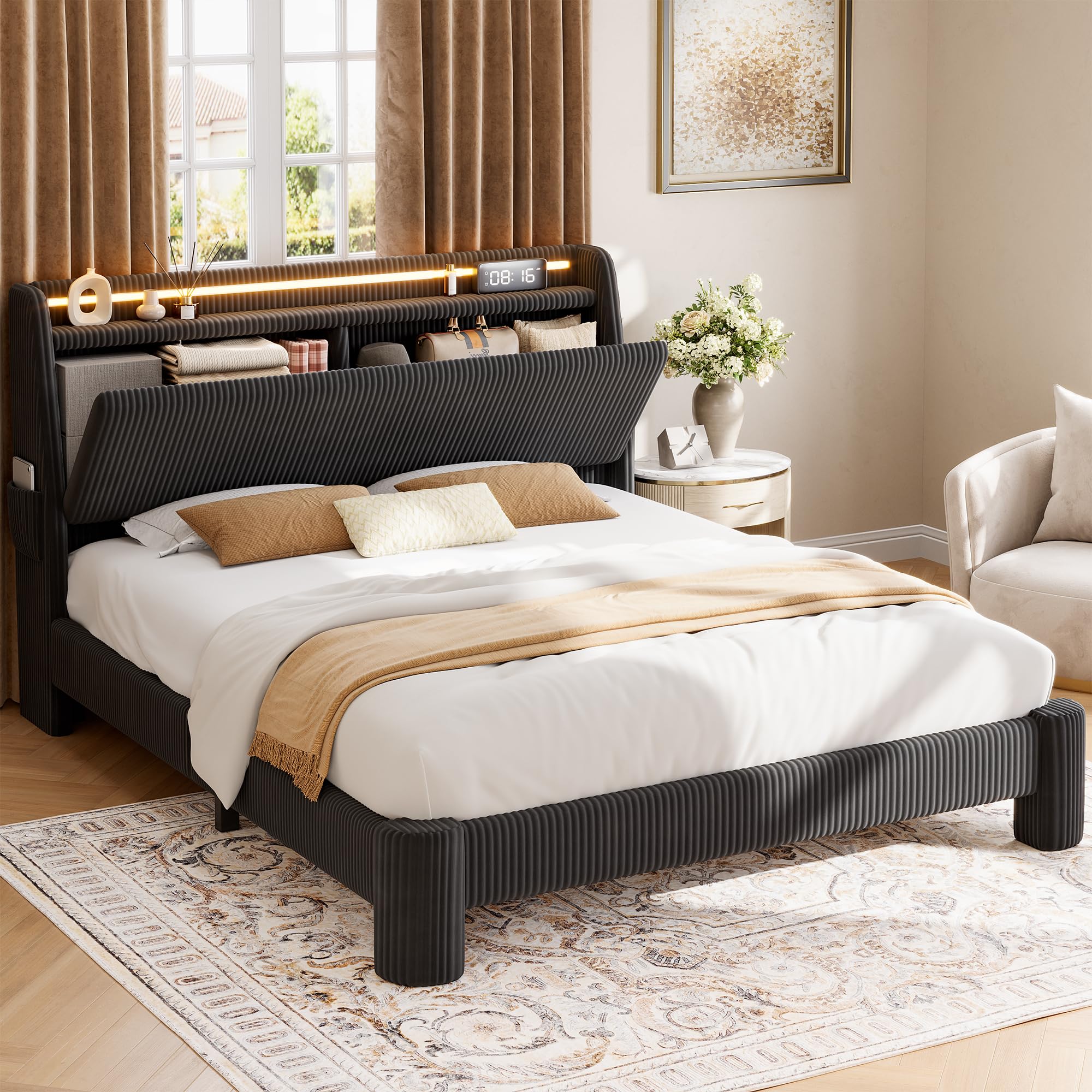
Figure 2.2.1: Overall dimensions and structure of the Jocoevol Full LED Bed Frame.

Figure 2.2.2: Detail of the bed frame's sturdy metal legs, Velcro-secured slats for easy installation, and noise-free structure with EVA padding.
3. Operating Instructions
3.1 Charging Station
The headboard features a built-in charging station with 2 AC outlets, 1 USB port, and 1 Type-C port.
- Power Connection: Ensure the bed frame's power cord is securely plugged into a functional wall outlet.
- Using Outlets/Ports: Plug your devices into the appropriate AC outlets, USB-A, or USB-C ports for charging.
- Safety: Do not overload the charging station. Disconnect devices when not in use.

Figure 3.1.1: Integrated charging station with multiple power options for convenience.

Figure 3.1.2: Detailed view of the 3-in-1 charging station, specifying 2 AC outlets (125V/12A), USB-A (5V/2A), and USB-C (5V/2A) ports.
3.2 RGB LED Lighting
The headboard features built-in RGB LED lighting with various colors and effects.
- Control: The LED lights can be controlled via a dedicated app (iOS/Android) or the included remote control.
- Features: Explore over 16 million colors, 20+ light effects, and dynamic modes.
- Music Sync: The lights can synchronize with music beats, changing rhythmically.
- Brightness and Timing: Adjust brightness levels and set timing functions using the control options.

Figure 3.2.1: The RGB LED lighting system, demonstrating music synchronization and control options via app or remote.
3.3 Hidden Storage Headboard
The headboard includes a hidden storage compartment and side pockets.
- Accessing Storage: The top shelf of the headboard flips open to reveal a 6.9''D x 13.2''H compartment.
- Side Pockets: Utilize the pockets on the bed wings for convenient storage of small items like books or tablets.

Figure 3.3.1: The hidden storage compartment within the headboard, shown open with various items stored.

Figure 3.3.2: The hidden storage headboard with an open display area, providing both concealed and accessible storage.
4. Maintenance
4.1 Cleaning the Bed Frame
- Upholstered Surfaces: For the corduroy fabric, gently vacuum with an upholstery attachment to remove dust and debris. For spills, blot immediately with a clean, dry cloth. For stubborn stains, use a mild fabric cleaner following the product instructions, testing on an inconspicuous area first.
- Wood and Metal Surfaces: Wipe with a soft, damp cloth. Avoid harsh chemicals or abrasive cleaners that could damage the finish.
4.2 Electrical Components
- Charging Station: Keep the charging ports free of dust and debris. Do not insert foreign objects into the ports.
- LED Lights: The LED lights have a lifespan of over 100,000 hours and generally require no maintenance. If issues arise, refer to the troubleshooting section.
- General: Always ensure the bed frame is unplugged from the power source before cleaning or inspecting electrical components.
4.3 Structural Maintenance
- Periodically check all bolts and screws to ensure they remain tight. Retighten as necessary to maintain stability and prevent noise.
- Inspect the wooden slats for any signs of damage or wear. Replace any broken slats immediately to ensure proper mattress support.
5. Troubleshooting
| Problem | Possible Cause | Solution |
|---|---|---|
| Bed frame is wobbly or noisy. | Loose bolts or screws; improperly installed slats. | Ensure all bolts and screws are tightened. Check that slats are properly seated and secured to the Velcro strips. |
| Charging station is not working. | Power cord unplugged; faulty outlet; device not properly connected. | Verify the bed frame's power cord is securely plugged into a working wall outlet. Test the outlet with another device. Ensure your device is correctly plugged into the charging port. |
| LED lights are not turning on or functioning correctly. | Power cord unplugged; loose LED connection; remote/app issue. | Check the main power connection. Ensure the LED light strip is properly connected to its power source within the headboard. Replace remote batteries if applicable. Re-pair the remote or app if necessary. |
| Hidden storage compartment does not open/close smoothly. | Obstruction; hinge issue. | Remove any items that may be obstructing the mechanism. Inspect hinges for damage or misalignment. |
6. Specifications
| Feature | Detail |
|---|---|
| Model Number | C-1667 |
| Size | Full |
| Material | Engineered Wood, Corduroy, Metal |
| Product Dimensions (L x W x H) | 83.86" x 54.13" x 43.5" |
| Item Weight | 98.7 pounds |
| Maximum Weight Recommendation | 800 pounds |
| Headboard Features | Corduroy Upholstered, Wingback, Hidden Storage, RGB LED Lighting, Charging Station |
| Charging Station Ports | 2 AC Outlets (125V/12A), 1 USB-A Port (5V/2A), 1 USB-C Port (5V/2A) |
| LED Lighting | RGB, 16+ Million Colors, 20+ Effects, Music Sync, App/Remote Control |
| Box Spring Needed | No |
| Compatible Mattress Size | Full |

Figure 6.1: Visual representation of key product specifications.
7. Warranty Information
Specific warranty details for the Jocoevol Full LED Bed Frame (Model C-1667) are not provided in the product information. Please refer to the retailer's return policy or contact Jocoevol customer support for warranty inquiries.
8. Customer Support
If you have any questions or require assistance with your Jocoevol Full LED Bed Frame, please contact our dedicated support team. We aim to respond to all inquiries within 24 hours.
- Contact Method: Refer to the contact information provided with your purchase or on the official Jocoevol website.
- Before Contacting: Please have your model number (C-1667) and purchase details ready to expedite the support process.