
1. Introduction
This manual provides essential instructions for the safe operation, setup, and maintenance of your Genérico GT8 Professional Drone. The GT8 drone is designed for aerial photography and videography, featuring a Full HD camera, obstacle sensors, brushless motors, and an intuitive remote control with a built-in screen for an immersive flight experience. Please read this manual thoroughly before operating the drone.
2. Package Contents
Verify that all items listed below are present in your package:
- 1 x GT8 Professional Drone
- 1 x Remote Control
- 3 x Batteries (1800 mAh Lithium Polymer each)
- 1 x USB Charging Cable
- 1 x Philips Screwdriver
- 2 x Pairs of Extra Propellers
- 4 x Extra Screws
- 1 x User Manual (this document)
- 1 x Storage Bag/Case
- 1 x 8GB Memory Card
- 1 x USB Adapter for Memory Card

Figure 2.1: Complete package contents of the GT8 drone.

Figure 2.2: The included transport case for the GT8 drone and accessories.

Figure 2.3: The 8GB memory card and USB adapter for data transfer.
3. Safety Precautions
Always prioritize safety during drone operation. Failure to follow these guidelines may result in injury, damage to property, or legal issues.
- Read the Manual: Thoroughly understand all instructions before first flight.
- Pre-Flight Check: Ensure all components are correctly assembled and batteries are fully charged.
- Environmental Conditions: Do not fly in strong winds, rain, snow, or fog. Avoid extreme temperatures.
- Obstacle Avoidance: The GT8 features obstacle sensors, but always maintain visual line of sight and avoid flying near people, animals, buildings, or trees.
- Restricted Areas: Do not fly near airports, military bases, or other restricted airspace. Respect local regulations.
- Battery Safety: Use only approved chargers and batteries. Do not overcharge or puncture batteries.
- Propeller Safety: Keep hands and face clear of rotating propellers. Ensure propellers are securely attached before flight.
- Return to Home: Utilize the automatic return-to-home function in case of signal loss or low battery.
4. Setup
4.1. Unfolding the Drone
The GT8 drone is foldable for portability. Carefully unfold the arms until they click into place. Ensure all arms are fully extended and locked.

Figure 4.1: The GT8 drone in its folded and unfolded configurations.
4.2. Battery Installation and Charging
- Insert a fully charged battery into the drone's battery compartment until it clicks securely.
- To charge the batteries, connect the USB charging cable to the battery and a suitable USB power source (e.g., computer, USB wall adapter).
- Charging indicators on the battery will show charging status. Ensure batteries are fully charged before each flight.

Figure 4.2: The three included batteries for extended flight time.
4.3. Propeller Installation
If propellers are not pre-installed or need replacement:
- Match the propellers with the corresponding motor shafts (usually marked A and B).
- Securely attach each propeller using the provided screws and screwdriver. Do not overtighten.
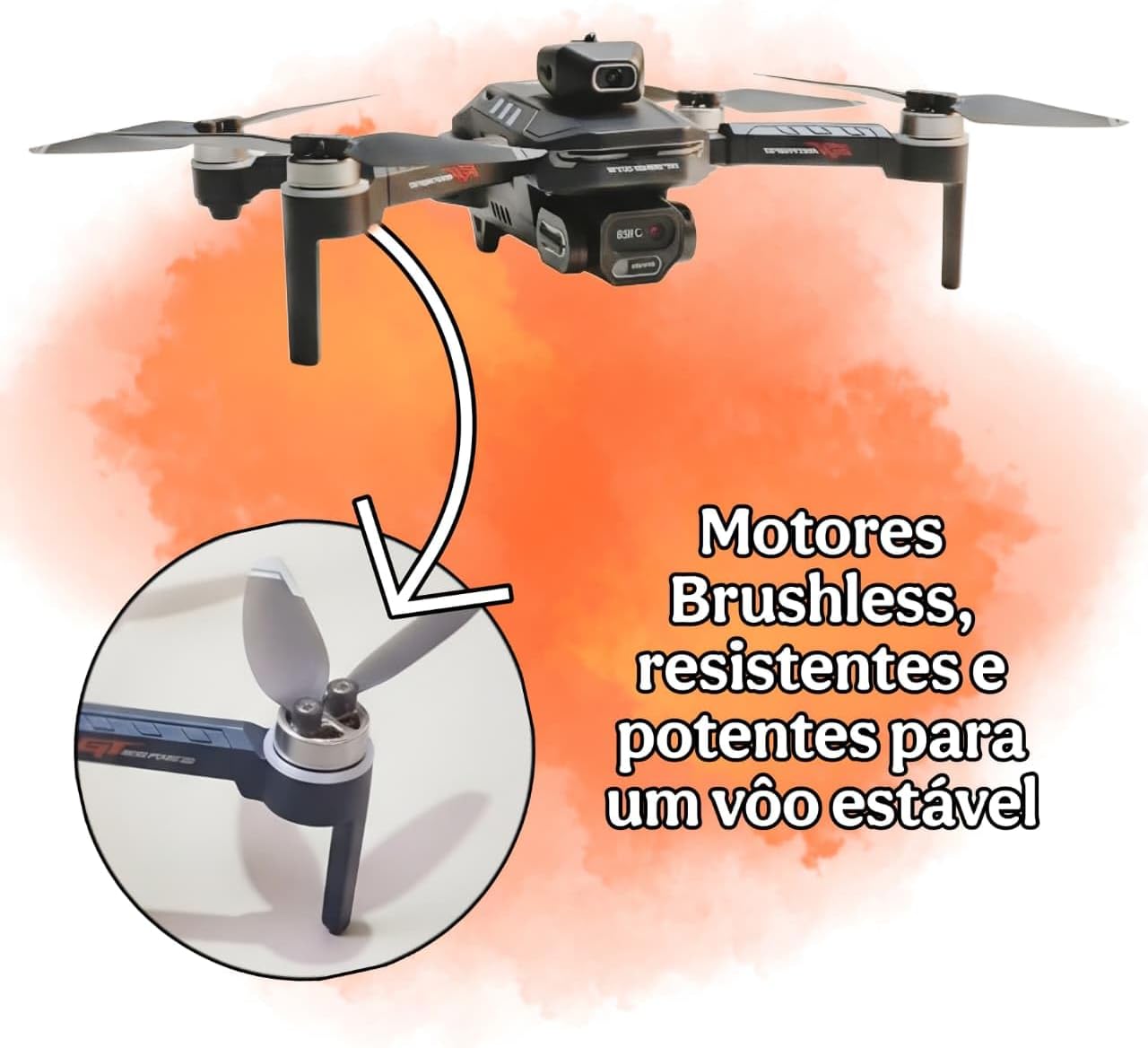
Figure 4.3: Brushless motors and propeller attachment point.
4.4. Remote Control Setup
- Install batteries into the remote control (not specified in JSON, assume standard AA/AAA or internal rechargeable).
- Power on the remote control.
- Power on the drone.
- Follow the on-screen instructions on the remote control's display to pair with the drone. The remote control uses Bluetooth technology for connection.
5. Operating Instructions
5.1. Pre-Flight Checks
- Ensure drone and remote control batteries are fully charged.
- Check propellers for damage and ensure they are securely attached.
- Verify that the flight area is clear of obstacles and people.
- Confirm GPS signal acquisition before takeoff for stable flight and return-to-home functionality.
5.2. Takeoff and Landing
- Place the drone on a flat, level surface.
- Perform calibration as instructed by the remote control or drone's indicator lights.
- Use the one-key takeoff button or manually push the throttle stick up to initiate flight.
- For landing, use the one-key landing button or gently pull the throttle stick down until the drone lands.
5.3. Flight Controls
Refer to the remote control's specific layout for detailed control functions. Generally:
- Left Stick: Controls altitude (throttle up/down) and yaw (rotate left/right).
- Right Stick: Controls forward/backward (pitch) and left/right (roll) movement.
- Obstacle Avoidance: The drone features 360° optical obstacle sensors to enhance flight safety. These sensors help detect and avoid obstacles during flight.

Figure 5.1: The GT8 drone's 360° optical obstacle avoidance system.
5.4. Camera Operation
The GT8 drone is equipped with a camera capable of 1080p video capture and 5 MP still images.
- Video Recording: Press the dedicated video button on the remote control to start/stop recording.
- Photo Capture: Press the dedicated photo button to take a still image.
- FPV (First Person View): The remote control's screen provides real-time image transmission, allowing for an immersive FPV experience.
- Storage: Videos and photos are saved directly to the inserted 8GB memory card.

Figure 5.2: The GT8 drone's camera, capable of 1080p video recording.
5.5. Advanced Features
- GPS Positioning: Provides stable hovering and precise positioning.
- Automatic Return to Home (RTH): The drone will automatically return to its takeoff point if the signal is lost or the battery is critically low.
- Long-Distance Control: The GT8 offers an approximate control range of 1km.
6. Maintenance
- Cleaning: Regularly clean the drone body, camera lens, and sensors with a soft, dry cloth. Avoid using liquids.
- Propeller Inspection: Check propellers for cracks, bends, or other damage before each flight. Replace damaged propellers immediately using the provided extra pairs.
- Battery Care: Store batteries in a cool, dry place. Do not fully discharge batteries for long-term storage. Charge them to about 50-60% if storing for extended periods.
- Motor Care: The GT8 features brushless motors, which require less maintenance than brushed motors. Keep them free from dust and debris.
- Firmware Updates: Check the manufacturer's website or accompanying app for any available firmware updates to ensure optimal performance and new features.
7. Troubleshooting
If you encounter issues with your GT8 drone, refer to the following common problems and solutions:
| Problem | Possible Cause | Solution |
|---|---|---|
| Drone does not power on | Battery not installed correctly or discharged. | Ensure battery is fully charged and securely inserted. |
| Remote control does not connect | Remote control or drone not powered on; pairing failed. | Ensure both devices are on. Re-attempt pairing as per Section 4.4. |
| Unstable flight or drifting | Improper calibration; strong winds; damaged propellers. | Perform IMU/compass calibration. Avoid flying in strong winds. Check and replace damaged propellers. |
| Poor image/video quality | Dirty camera lens; insufficient lighting; memory card issues. | Clean camera lens. Ensure adequate lighting. Check memory card for errors or replace if faulty. |
| Drone does not respond to controls | Out of range; signal interference; low drone battery. | Fly within operational range (approx. 1km). Avoid areas with strong interference. Check drone battery level. |
| Obstacle avoidance not working | Sensors are dirty or obstructed; flying too fast. | Clean sensors. Reduce flight speed in complex environments. |
8. Specifications
Detailed technical specifications for the Genérico GT8 Professional Drone:
| Feature | Detail |
|---|---|
| Brand | Genérico |
| Model Name | GT8 |
| Special Features | Long-distance control, Foldable, Image stabilization, Obstacle avoidance, First-person view (FPV) |
| Color | Black |
| Video Capture Resolution | 1080p |
| Final Resolution (Photos) | 5 MP |
| Connectivity Technology | USB (for charging/data transfer) |
| Skill Level | Intermediate |
| Battery Capacity | 1800 Milliamp Hours (per battery) |
| Battery Cell Composition | Lithium Polymer |
| Batteries Included | 3 |
| Material | Plastic |
| Manufacturer | HBO Toys |
| Part Number | GTT8 |
| Country of Origin | China |
| Item Weight | 300 Grams |
| Item Dimensions (Unfolded) | 22 cm (L) x 17 cm (W) x 8 cm (H) (approximate, based on image) |
| Item Dimensions (Folded) | 13 cm (L) x 8.5 cm (W) x 8 cm (H) (approximate, based on image) |
| Max Flight Time | Up to 17 minutes (per battery) |
| Wi-Fi Frequency | 5 GHz |
| Control Range | Approx. 1 km |
9. Warranty and Support
Information regarding product warranty and customer support is not provided in the available product data. Please refer to your purchase documentation or contact the retailer for details on warranty coverage and support options for your Genérico GT8 Professional Drone.