
1. Product Overview
This Loddery car radio multimedia system is designed for VW Transporter T6 models from 2016 to 2019. It operates on Android 13 with 2GB RAM and 32GB ROM, ensuring smooth performance. Key features include wireless CarPlay and Android Auto, Mirror Link, steering wheel control compatibility, rear view camera input, FM/RDS radio, and split-screen functionality.
Before installation, verify your vehicle's model year to ensure compatibility.
2. Setup and Installation
2.1 Package Contents
The package includes the following components:
- 1 x Vehicle Navigation System
- Power Cable(s)
- GPS Antenna
- Camera Input Cable
- Instruction Manual
- 2 x USB Cables
- Canbus Box (if applicable)
- Radio Adaptor
2.2 Fitment Verification
To ensure proper fitment, carefully measure your vehicle's dashboard dimensions. The unit features a 9-inch IPS touchscreen with dimensions of approximately 220mm (8.6in) width and 128mm (5.0in) height.

Image: Diagram illustrating the car radio's dimensions and the various accessories included in the package, such as power cables, GPS antenna, camera input, USB cables, Canbus box, and radio adaptor.
2.3 Wiring Diagram for Backup Camera
For reference, connect the included backup camera as follows:
- Connect the yellow RCA cable from the camera to the 'Camera Input' on the head unit.
- Connect the reversing detection line (usually a pink or brown wire) from the head unit's harness to the reversing light signal wire in your vehicle.
- Connect the camera's power cable: the positive pole to the positive pole of the reversing light and the negative pole to the negative pole of the reversing light (ground).

Image: A detailed wiring diagram showing connections for the backup camera, including the video signal, reversing detection line, and power connections to the vehicle's reversing light.
2.4 General Wiring Considerations
The wiring configuration may vary slightly based on your vehicle's original setup. Refer to the specific diagrams for Volkswagen models:
- For Volkswagen low-profile models: Connect the power cable and GPS cable. The protocol serial line may not require connection to a protocol box during installation.
- For Volkswagen models with steering wheel control (high-end models): The protocol box must be connected during installation to enable steering wheel controls.

Image: Two wiring diagrams illustrating connections for different Volkswagen vehicle configurations. The left diagram shows a setup for low-profile models, while the right diagram shows a setup for models with steering wheel control, highlighting the use of a protocol box.
3. Operating Instructions
3.1 CarPlay and Android Auto
The system supports both wireless and wired CarPlay and Android Auto. Connect your smartphone via Bluetooth for wireless access or use a USB cable for a wired connection. This allows voice control for navigation, calls, messages, and music playback.

Image: A visual representation of the CarPlay and Android Auto interfaces on the car radio screen, demonstrating voice command capabilities for navigation and music, along with various application icons.
3.2 Mirror Link
Utilize Mirror Link to project your smartphone screen onto the car radio display. This feature enables viewing navigation maps, videos, and other content from your phone directly on the larger screen.
3.3 Split Screen Functionality
The split-screen feature allows two applications to be displayed simultaneously on the 9-inch screen. For example, you can view navigation maps while listening to music or watching a video.

Image: A composite image showing the Mirror Link function, where a smartphone screen is mirrored to the car radio, and the Split Screen function, displaying two applications (e.g., map and music) concurrently.
3.4 Steering Wheel Control
The system is compatible with your vehicle's existing steering wheel controls. This allows you to manage media playback and navigate applications without touching the touchscreen, enhancing driving safety.
3.5 Rear View Camera Input
The car radio supports an external rear view camera, automatically displaying the camera feed when the vehicle is in reverse. This improves parking safety with a clear, wide-angle view, often featuring night vision and waterproof capabilities.

Image: A visual guide to the rear view camera functionality, highlighting features like wide-angle, clear image, waterproof, and night vision. Also shown is the steering wheel control interface for managing radio functions.
3.6 Bluetooth Connectivity
The integrated Bluetooth module supports hands-free calling, music playback, and synchronization of contacts. Pair your smartphone to make and receive calls safely and stream audio wirelessly.
3.7 FM/RDS Radio
Enjoy clear radio reception with the powerful FM tuner, which includes RDS (Radio Data System) functionality for real-time traffic information, news broadcasts, and weather forecasts. A 36-band graphic equalizer with 5 preset modes allows for audio customization.

Image: Displays the Bluetooth interface for hands-free calling and music streaming, along with the FM radio interface showing frequency tuning and station information.
3.8 GPS Navigation
The unit features a built-in GPS module supporting both online and offline maps. Access various navigation applications to plan routes and receive turn-by-turn directions.
3.9 WiFi Hotspot
Connect to a WiFi network or use your phone's hotspot to browse the internet, watch videos, access web pages, and download various applications directly on the car radio.
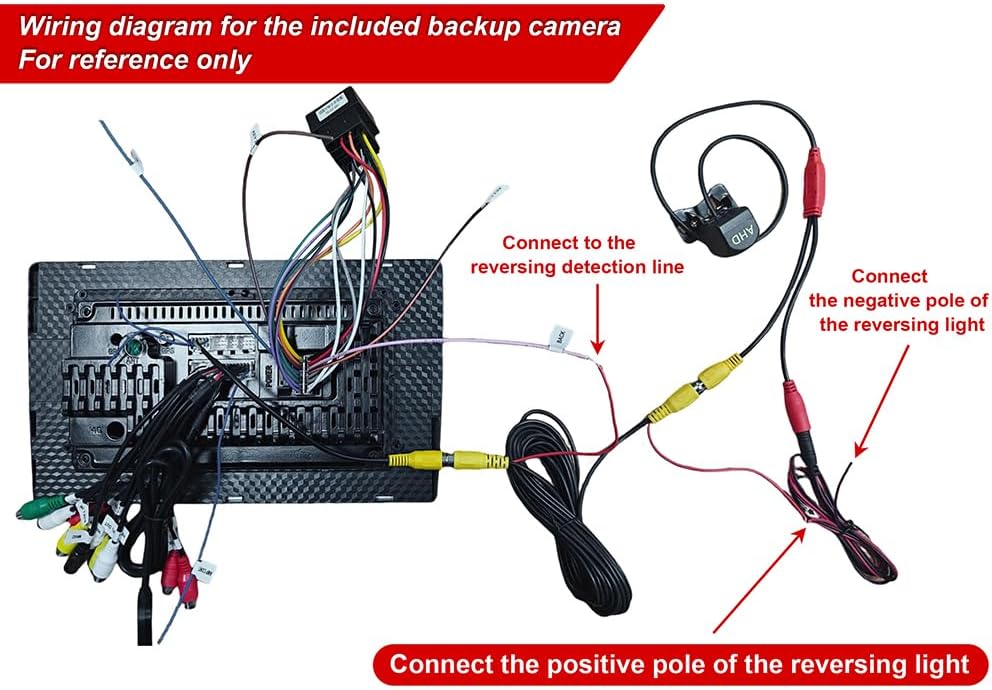
Image: Illustrates the GPS navigation system with map displays and the WiFi hotspot feature, showing various applications accessible online.
4. Maintenance
To ensure optimal performance and longevity of your Loddery car radio, follow these general maintenance guidelines:
- Cleaning: Use a soft, dry cloth to clean the touchscreen and exterior surfaces. Avoid abrasive cleaners or solvents that could damage the display or finish.
- Software Updates: Periodically check for available software updates to ensure the system has the latest features and security patches. Follow the on-screen instructions for any updates.
- Environmental Conditions: Avoid exposing the unit to extreme temperatures, direct sunlight for prolonged periods, or excessive moisture.
- Cable Connections: Ensure all cables are securely connected. Loose connections can lead to intermittent functionality.
5. Troubleshooting
If you encounter issues with your car radio, consider the following basic troubleshooting steps:
- No Power: Check all power connections and fuses. Ensure the vehicle's ignition is on.
- No Sound: Verify speaker connections, volume settings, and audio source selection.
- Touchscreen Unresponsive: Try restarting the unit. If the issue persists, a factory reset might be necessary (refer to system settings).
- GPS Signal Issues: Ensure the GPS antenna is properly installed and has a clear view of the sky.
- Bluetooth Pairing Problems: Ensure Bluetooth is enabled on both the car radio and your smartphone. Delete previous pairings and try reconnecting.
- CarPlay/Android Auto Not Connecting: Check USB cable integrity for wired connections. For wireless, ensure Bluetooth and Wi-Fi are active on your phone and the car radio.
For persistent issues, consult the detailed troubleshooting section in the full product manual or contact customer support.
6. Specifications
| Feature | Detail |
|---|---|
| Brand | Loddery |
| Model Number | YMQYILI-QJ0580X-UN38-HWC-09 |
| Operating System | Android 13 |
| RAM | 2 GB |
| ROM | 32 GB |
| Screen Size | 9 Inches |
| Display Type | IPS Touchscreen |
| Connectivity Technology | WiFi, Bluetooth, Wireless |
| Special Features | Bluetooth, Touchscreen, GPS, FM/RDS Radio, CarPlay, Android Auto, Mirror Link, Steering Wheel Control, Rear Camera Input, Split Screen |
| Compatible Vehicle Type | Car (VW Transporter T6 2016-2019) |
| Supported Satellite Navigation System | GPS |
| Control Method | Touch |
| Components Included | 1 x Vehicle Navigation System |
7. Warranty and Support
For warranty information, please refer to the documentation included with your purchase or contact the retailer. For technical support or further assistance, please reach out to Loddery customer service through their official channels or the point of purchase.