
Gyxel PKM-C01-L
Gyxel C01-L Smart Automatic Dual Swing Gate Opener Kit
User Manual
1. Introduction
This manual provides comprehensive instructions for the installation, operation, maintenance, and troubleshooting of your Gyxel C01-L Smart Automatic Dual Swing Gate Opener Kit. Please read this manual thoroughly before installation and use to ensure proper function and safety.
The Gyxel C01-L is designed for medium-duty dual swing gates, supporting gates up to 14 feet long or 440 lbs per arm. It features smartphone app control, multiple power options (AC, battery, solar-compatible), and advanced safety features.
2. Important Safety Information
WARNING: Failure to follow these safety instructions may result in serious injury or property damage.
- Always disconnect power before performing any service or maintenance.
- Keep children and pets away from the gate area during operation.
- Do not allow children to operate the gate opener or play with remote controls.
- Ensure the gate area is clear of obstructions before operating.
- Install the gate opener according to all local electrical and safety codes.
- Use only genuine Gyxel replacement parts.
- A manual release key is provided for emergency access during power outages.
3. Package Contents
Verify that all components listed below are included in your package:
- 2x Gate Opener Actuators
- 1x Control Box with Control Board
- 2x Remote Controls with Keychain (Built-in 12V 27A battery)
- 2x Remote Clips
- 1x Transformer
- Mounting Hardware Set (M10*150 Bolts, Nuts, Washers, Post Pivot Bracket, M8*30 Bolts, Gate Brackets, Clevis Pins, Hairpin Clips)
- 1x Limit Stop
- 2x Limit Stop Screws
- 4x Post Brackets
- 2x Warning Signs
- 1x 26-foot Cable
- 1x 6-foot Cable with Plug
- 1x Manual Release Key


4. Product Specifications
| Feature | Specification |
|---|---|
| Model Number | PKM-C01-L |
| Manufacturer | Gyxel |
| Gate Type | Dual Swing Gate |
| Max Gate Length (per arm) | 14 ft |
| Max Gate Weight (per arm) | 440 lbs |
| Motor Power | 40W (24V DC) |
| Actuator Speed | 1.6 cm/s (0.63 ips) |
| Opening Time | 9-20 seconds |
| Max Actuator Travel | 11.81 inches |
| Operating Temperature | -7°F to 131°F (-21°C to 55°C) |
| IP Rating | IP55 (Water and Dust Resistant) |
| Remote Control Range | Up to 100 ft |
| Power Options | 110V AC, 24V Battery (not included), Solar (panels/controller sold separately) |
| Included Remotes | 2 (capacity for up to 128) |

5. Installation and Setup
5.1 Gate Compatibility and Opening Options
The Gyxel C01-L is suitable for various gate types including steel, wood, or vinyl. It supports both pull-to-open (inward swinging) and push-to-open (outward swinging) installations.

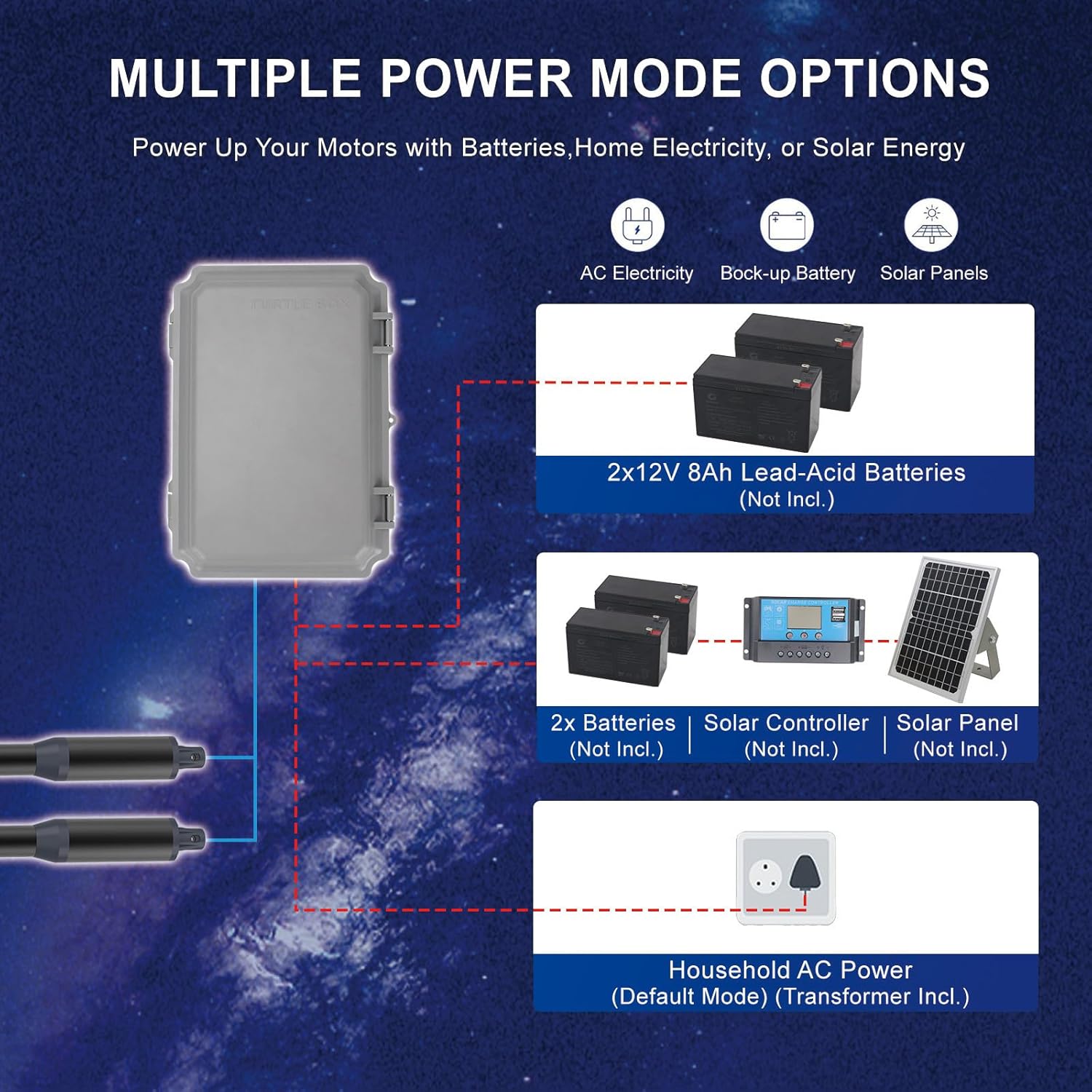
5.2 Power System Configuration
The gate opener offers flexible power options:
- 110V AC Household Power: Connect directly for standard operation. (Transformer included)
- 24V Battery Backup: Connect a 24V battery (not included) for operation during power outages.
- Solar Compatibility: Add solar panels and a charge controller (sold separately) to keep the battery charged for off-grid use.

5.3 Step-by-Step Installation
Refer to the detailed installation instructions provided in the included manual for step-by-step guidance on mounting the actuators, wiring the control box, and setting up the limit stops. Ensure all connections are secure and weather-protected.
6. Operation
6.1 Smartphone App Control
Download the XHouse IOT app from the Apple App Store or Google Play Store. Follow the in-app instructions to pair your gate opener. The app allows you to open, close, stop, and activate pedestrian mode from anywhere.

6.2 Remote Control Operation
The kit includes two remote controls with a range of up to 100 feet. Press button "1" to control Motor 2, and button "2" to simultaneously control both Motor 1 and Motor 2. Up to 128 remotes can be programmed.

6.3 Automatic Closing Function
The gate opener features an adjustable auto-close function. This can be configured via the control box menu. The auto-closing function activates only when the gate is fully open. If an obstruction is detected by the infrared signal during closing, the gate will reverse to open.

6.4 Obstacle Detection
Built-in safety features include automatic stop-and-reverse upon detecting obstacles during opening or closing. This prevents damage to the gate, property, or injury to individuals.

6.5 Manual Release
In case of a power outage or system malfunction, use the provided manual release key to disengage the gate opener and operate the gate manually.
7. Maintenance
Regular maintenance ensures the longevity and reliable operation of your gate opener.
- Monthly: Inspect all mounting hardware for tightness. Check the gate hinges for smooth operation and lubricate if necessary.
- Quarterly: Clean the gate opener arms and control box to remove dirt, dust, and debris. Ensure the path of the gate is clear of vegetation or other obstructions.
- Annually: Have a qualified technician inspect the electrical connections and motor for wear. Check battery health if using a backup battery system.
The gate opener is rated IP55 for water and dust resistance, designed to perform reliably in extreme temperatures from -7°F to 131°F.

8. Troubleshooting
Before contacting support, review the following common issues and solutions:
| Problem | Possible Cause | Solution |
|---|---|---|
| Gate does not respond to remote/app. | No power, remote battery dead, remote not programmed, signal interference. | Check power supply. Replace remote battery. Reprogram remote. Clear line of sight. |
| Gate stops or reverses unexpectedly. | Obstruction detected, limit switch issue, motor overload. | Clear obstructions. Check limit switch settings. Reduce gate friction. |
| Gate opens/closes partially. | Incorrect limit switch settings, low power, mechanical binding. | Adjust limit switches. Check power supply/battery. Inspect gate for binding. |
| Motor makes noise but gate does not move. | Actuator disengaged, mechanical issue with gate or opener. | Check if manual release is engaged. Inspect actuators and gate for damage. |
9. Warranty and Support
9.1 Warranty Information
The Gyxel C01-L Smart Automatic Dual Swing Gate Opener Kit is backed by a 12-month warranty from the date of purchase. This warranty covers manufacturing defects and ensures the product is free from defects in material and workmanship under normal use.
Please retain your proof of purchase for warranty claims. The warranty does not cover damage caused by improper installation, misuse, accidents, unauthorized repairs, or natural disasters.
9.2 Technical Support
For technical assistance, installation questions, or troubleshooting not covered in this manual, please contact Gyxel customer support. We offer lifetime technical support to ensure your satisfaction.
Contact information can typically be found on the Gyxel website or through your purchase platform. You can also refer to the Gyxel Store on Amazon for additional resources.

Ask a question about this manual
Ask about setup, troubleshooting, compatibility, parts, safety, or missing instructions. Manuals+ will review the question and use this page’s manual context to help answer it.