
Introduction
This manual provides essential information for setting up, operating, maintaining, and troubleshooting your TCL TAB A1 Plus Android Tablet. The tablet features a 12.2-inch 2.4K 120Hz display, a Snapdragon 4 Gen 2 processor, 6GB RAM, and 128GB internal storage, expandable up to 2TB. It is equipped with an 8000mAh battery, quad stereo speakers, and 5MP front and 8MP rear cameras.
For optimal performance and longevity, please read these instructions carefully before using your device.
1. Setup
1.1 Unboxing and Initial Inspection
Carefully remove all components from the packaging. Verify that all items listed in the "What's in the Box?" section are present and undamaged.

Image: The TCL TAB A1 Plus tablet, a USB-C cable, a Quick Guide & PSI document, and a SIM Pin are shown, illustrating the contents of the box.
- TCL TAB A1 Plus Android Tablet: The main device.
- Type-C Cable: For charging and data transfer.
- QG & PSI: Quick Guide and Product Safety Information.
- SIM Pin: For accessing the SIM/microSD card tray.
1.2 Charging the Tablet
Before first use, fully charge the tablet.
- Connect the Type-C cable to the tablet's USB-C port.
- Connect the other end of the cable to a compatible power adapter (not included) and plug it into a wall outlet.
- The battery indicator on the screen will show charging status.

Image: A person is using the TCL TAB A1 Plus tablet while it is charging, with a visual representation of the 8000mAh battery and 20W fast charging capability.
The tablet supports 20W fast charging for quick power restoration.
1.3 Powering On/Off
- To Power On: Press and hold the Power button until the TCL logo appears.
- To Power Off: Press and hold the Power button, then select "Power off" from the options on the screen.
1.4 Initial Setup
Follow the on-screen prompts to complete the initial setup, including:
- Selecting your language.
- Connecting to a Wi-Fi network.
- Signing in with your Google account.
- Setting up security features (PIN, pattern, fingerprint).
2. Operating Instructions
2.1 Display Features
The TCL TAB A1 Plus features a 12.2-inch 2.4K display with a 120Hz refresh rate and 100% sRGB color. TCL NXTVISION technology enhances visuals for richer colors and sharper clarity.

Image: A user relaxing on a couch, holding the TCL TAB A1 Plus tablet which displays a vibrant image, highlighting its 12.2" 2.4K display, 120Hz refresh rate, 550 nits brightness, and 100% sRGB color.
2.2 Performance and Storage
Powered by Snapdragon 4 Gen 2 with 6GB RAM (expandable to 16GB total with RAM Expansion) and 128GB storage (expandable to 2TB via microSD), the tablet offers smooth performance for various tasks.

Image: A graphic illustrating the Snapdragon 4 Gen 2 processor, emphasizing its 4nm process and LPDDR5 memory for fast and smooth performance.

Image: The TCL TAB A1 Plus tablet displaying multiple open applications, with icons indicating 16GB RAM, 128GB ROM, and 2TB expandable storage.
2.3 Multitasking Features
The tablet supports several multitasking modes to enhance productivity:
- Split Screen: Run two applications side-by-side.
- Floating Windows: Keep apps visible in resizable windows while working on other tasks.
- Extend Mode: Use the tablet as a second screen for your laptop.
- Mirror Mode: Mirror your PC screen to the tablet for presentations or document review.

Image: A visual representation of the TCL TAB A1 Plus tablet's multitasking capabilities, including Split Screen, Floating Window, Extend Mode (tablet as second screen), and Mirror Mode (PC screen mirrored to tablet).
2.4 AI Productivity Tools
Leverage built-in AI tools for enhanced productivity:
- Google Gemini AI: For summarizing, generating ideas, and instant assistance.
- Circle to Search: Quickly search for information by circling content on your screen.
- Writing Assist: Get AI help for emails, essays, and notes.
- Text Assist: Translate, rewrite, or summarize text instantly.
- Smart Translator: Real-time translation of text, images, or voice.
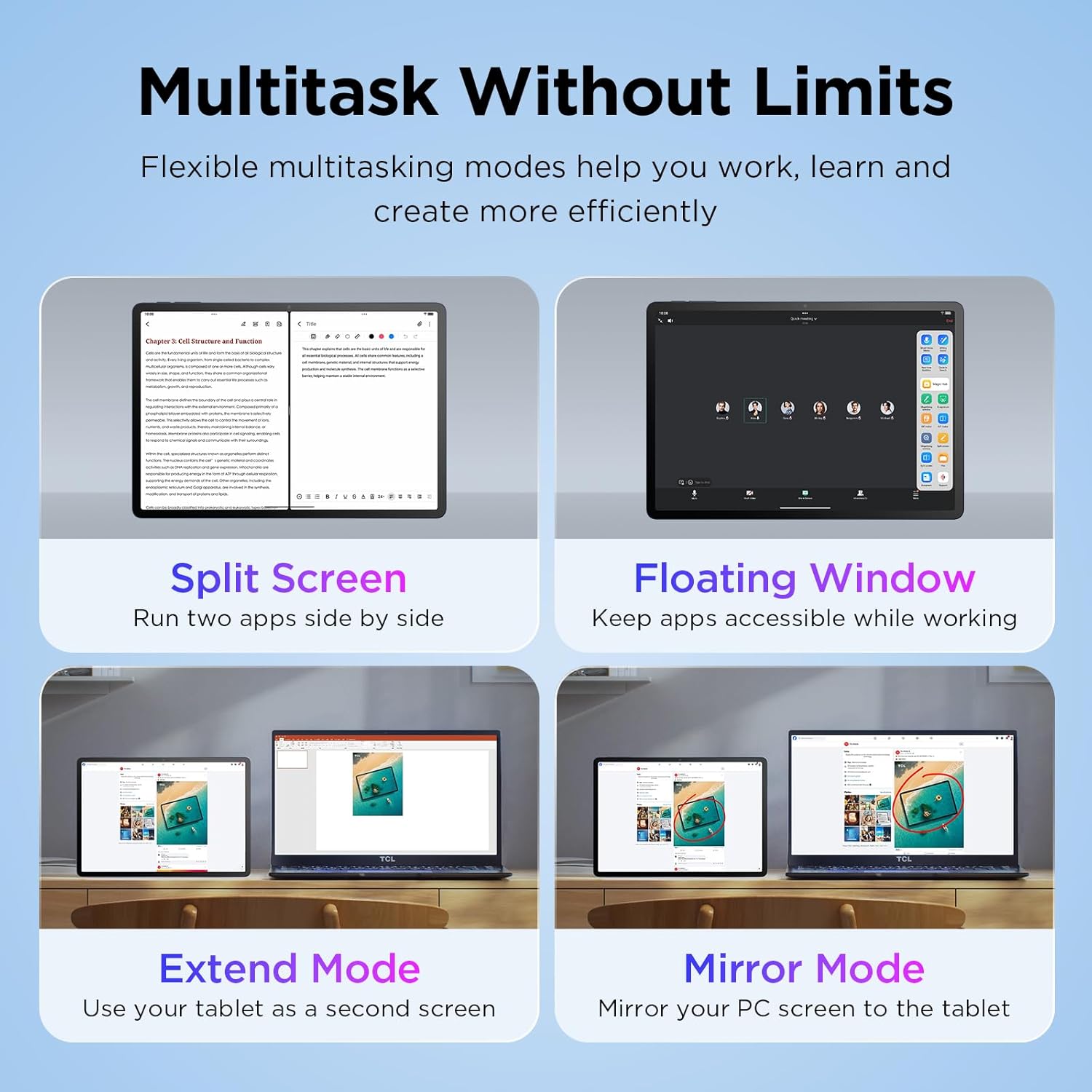
Image: The TCL TAB A1 Plus tablet displaying a search result for a landmark, with icons representing Google Gemini, Circle to Search, Writing Assist, Text Assist, and Smart Translator.
2.5 Audio and Camera
The tablet features quad stereo speakers for rich audio and 5MP front and 8MP rear cameras for clear video calls and photography.

Image: A split image showing the TCL TAB A1 Plus tablet with sound waves emanating from its quad speakers on one side, and the tablet's front and rear cameras (5MP front, 8MP rear) with examples of video calls and photos on the other.
Video: This official video from TCL showcases the smart performance and simple operation of the TCL TAB A1 Plus, demonstrating its key features and user experience.
3. Maintenance
3.1 Cleaning the Tablet
- Use a soft, lint-free cloth to clean the screen and body.
- Avoid using abrasive cleaners, alcohol, or solvents, as these can damage the screen and finish.
- For stubborn smudges, slightly dampen the cloth with water.
3.2 Software Updates
Regularly check for and install software updates to ensure optimal performance, security, and access to new features.
- Go to Settings.
- Tap System > System update.
- Follow the on-screen instructions to download and install any available updates.
3.3 Battery Care
- Avoid exposing the tablet to extreme temperatures.
- Do not let the battery completely drain frequently.
- Use the provided Type-C cable for charging.
4. Troubleshooting
4.1 Tablet Not Turning On
- Ensure the battery is charged. Connect the tablet to a power source and wait a few minutes before attempting to power on again.
- Try a force restart by holding the Power button for 10-15 seconds.
4.2 Screen Unresponsive
- Restart the tablet.
- Ensure the screen is clean and free of moisture or debris.
4.3 Wi-Fi Connectivity Issues
- Toggle Wi-Fi off and on in Settings.
- Restart your Wi-Fi router.
- Forget the network and reconnect, entering the password again.
4.4 Apps Crashing or Freezing
- Close and reopen the app.
- Clear the app's cache and data in Settings > Apps > [App Name] > Storage.
- Ensure the app is updated to its latest version.
- If issues persist, uninstall and reinstall the app.
5. Specifications
| Brand | TCL |
| Model Name | TCL TAB A1 Plus |
| Screen Size | 12.2 inches |
| Display Resolution | 2400 x 1600 pixels (2.4K) |
| Refresh Rate | 120Hz |
| Processor | Snapdragon 4 Gen 2 |
| RAM | 6 GB (expandable to 16GB) |
| Storage | 128 GB (expandable up to 2TB via microSD) |
| Operating System | Android 16 (Upgradable to Android 17), 3 Years Security Updates |
| Battery Capacity | 8000 mAh |
| Front Camera | 5 MP |
| Rear Camera | 8 MP |
| Dimensions (L x W x Thickness) | 10.85"L x 7.45"W x 0.26"Th |
| Weight | 1.19 lb |
| Connectivity | Bluetooth, Wi-Fi (802.11ac, 802.11ax), USB Type C |
| Special Features | AI-Powered Productivity Tools, Advanced Multitasking Modes, NXTVISION Display |
6. Warranty Information
The TCL TAB A1 Plus Android Tablet comes with a 1 Year Manufacturer Warranty. This warranty covers defects in materials and workmanship under normal use. Please refer to the included Product Safety Information (PSI) document for full terms and conditions.
Keep your proof of purchase for warranty claims.
7. Support
For further assistance, technical support, or to view frequently asked questions, please visit the official TCL support website or contact customer service.
- Online Support: Visit the TCL Official Store on Amazon for product information and support resources.
- Contact Customer Service: Refer to the contact information provided in your Quick Guide or on the TCL official website.


