
1. Introduction
This manual provides instructions for the safe and effective use of your LK-027 Mini Camera. Please read this manual thoroughly before using the product and retain it for future reference. The LK-027 is a compact and portable camera designed for daily recording, travel, and outdoor activities, featuring a 180-degree rotating lens and HD720P video capabilities.
2. Product Overview
The LK-027 Mini Camera is designed for ease of use and portability. It includes a 180-degree rotatable lens, a flip-up screen, and comes with a 64GB SD card for immediate use.

Image: The LK-027 Mini Camera, highlighting its 180-degree rotating lens and beauty filter capabilities.

Image: Two LK-027 Mini Cameras, one with its flip-up screen open, demonstrating its design.
2.1 Package Contents
- LK-027 Mini Camera
- 64GB SD Card
- USB Type-C Cable
- User Manual (English)
3. Getting Started (Setup)
3.1 Charging the Camera
- Connect the included USB Type-C cable to the camera's charging port.
- Connect the other end of the cable to a USB power adapter (not included) or a computer's USB port.
- The charging indicator light will illuminate. Once fully charged, the light may change color or turn off.
Note: The camera does not include a built-in battery. It operates when connected to a power source or a portable power bank.
3.2 Inserting the SD Card
- Locate the SD card slot on the side of the camera.
- Insert the provided 64GB SD card into the slot with the metal contacts facing down until it clicks into place.
- To remove, gently push the SD card until it pops out.
4. Operating Instructions
4.1 Power On/Off
- Power On: Press and hold the power button for a few seconds until the screen illuminates.
- Power Off: Press and hold the power button again until the screen turns off.
4.2 Taking Photos
- Ensure the camera is powered on and in photo mode (indicated on the screen).
- Frame your shot using the LCD screen.
- Press the shutter button to capture a photo.
4.3 Recording Videos
- Ensure the camera is powered on and in video mode.
- Press the record button to start recording. A red indicator or timer on the screen will confirm recording is active.
- Press the record button again to stop recording.

Image: A user demonstrating selfie and vlog recording with the LK-027 Mini Camera.
4.4 Using the 180° Rotating Lens and Flip Screen
The camera features a lens that can rotate 180 degrees and a flip-up screen, allowing for versatile shooting angles, including selfies and vlogging.
- Gently rotate the lens to your desired angle.
- Adjust the flip-up screen for optimal viewing, especially for self-portraits or vlogging.

Image: A close-up view of the LK-027 Mini Camera's 180-degree flip screen, enabling multi-angle shooting.
4.5 Adjusting Settings
The camera offers basic settings adjustments. Navigate through the menu using the directional buttons and confirm selections with the OK button.
- Photo/Video Mode Switch: Use the mode button to switch between photo and video recording.
- Resolution: Set video resolution to HD720P (1280x720).
- White Balance: Automatic adjustment.
- Exposure: Automatic exposure control.
- Beauty Filters: Apply various beauty filters for enhanced photos.

Image: A collage showcasing various beauty filter effects achievable with the LK-027 Mini Camera.

Image: The LK-027 Mini Camera, illustrating the difference in lighting with and without flash.
5. Maintenance
5.1 Cleaning
- Use a soft, dry cloth to clean the camera body.
- For the lens, use a specialized lens cleaning cloth and solution. Avoid harsh chemicals.
5.2 Storage
- Store the camera in a cool, dry place away from direct sunlight and extreme temperatures.
- Remove the SD card if storing for extended periods.
6. Troubleshooting
| Problem | Possible Cause | Solution |
|---|---|---|
| Camera does not power on. | No power supply. | Connect the camera to a power source using the USB Type-C cable. |
| Cannot take photos/videos. | SD card full or not inserted correctly. | Check SD card insertion. Delete unnecessary files or replace the SD card. |
| Poor image/video quality. | Insufficient lighting, dirty lens. | Ensure adequate lighting. Clean the lens with a soft cloth. |
| Camera freezes. | Temporary software issue. | Press and hold the power button to force a shutdown, then restart the camera. |
7. Specifications
| Feature | Detail |
|---|---|
| Model Name | LK-027 |
| Brand | Generic |
| Special Feature | 180° Rotating Lens |
| Video Capture Resolution | 720p (1280x720) |
| Photo Sensor Technology | CMOS |
| Screen Size | 2 inches |
| Optical Zoom | 1X |
| Max Aperture | F2.8 |
| Photo Sensor Resolution | 8 MP |
| Compatible Mount | Clip |
| Aspect Ratio | 16:9 |
| File Format | MP4 |
| Image Stabilization | None |
| Exposure Control | Auto |
| Form Factor | Compact Digital Camera |
| Image Sensor Size | 1/3 inch |
| Flash Function | None |
| Waterproof | No |
| Frame Rate | 24, 30, 60 fps |
| Self-Timer | No |
| ISO Range | 100-3200 |
| Connectivity | USB Type-C |
| Focus Function | Autofocus (AF-A) |
| Included Memory | 64GB SD Card |
| Battery Included | No (Requires external power via USB-C) |
| Origin | China |
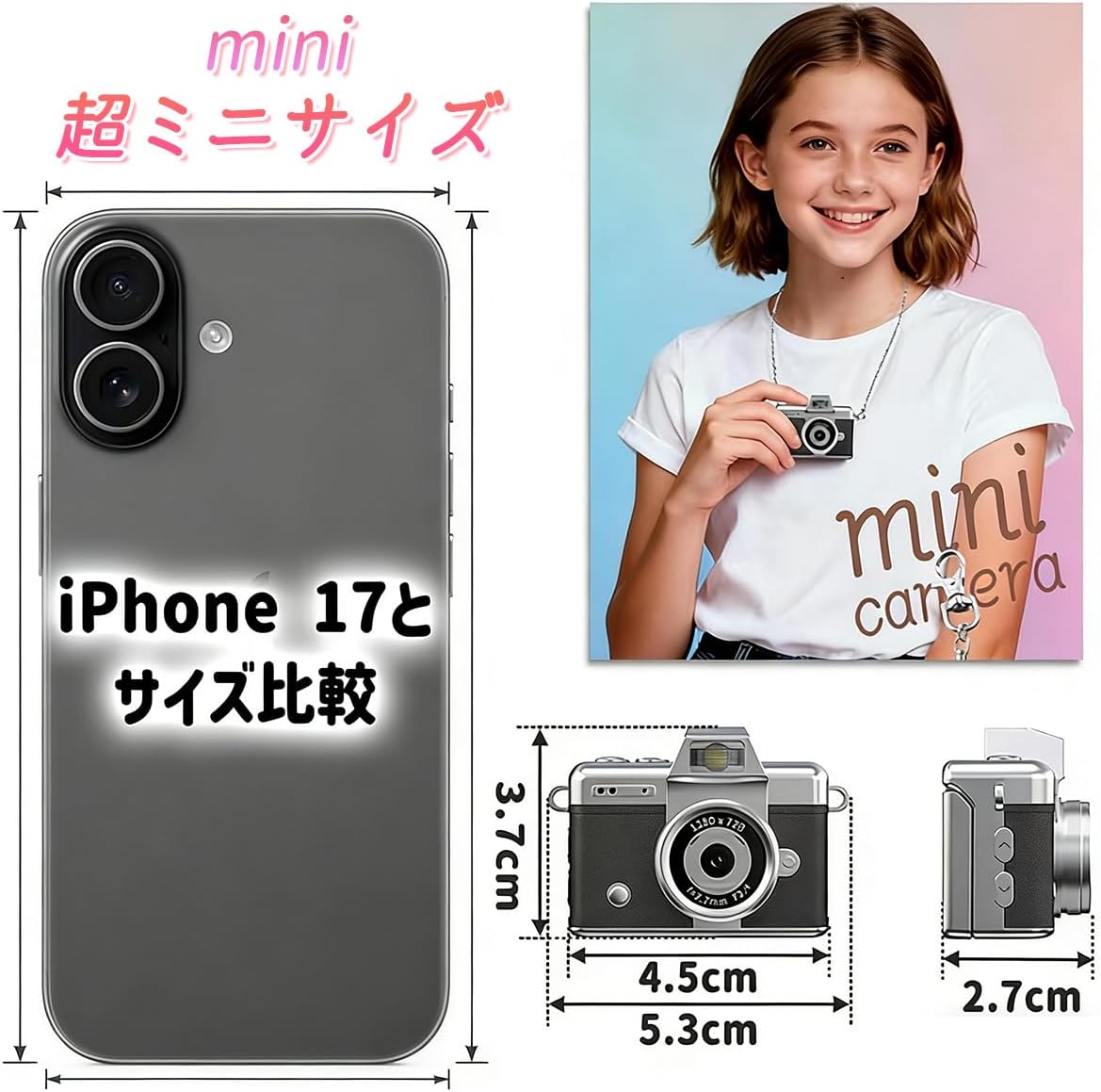
Image: A visual comparison of the LK-027 Mini Camera's compact size relative to a smartphone.

Image: The LK-027 Mini Camera shown being worn as a pendant and attached to a backpack, demonstrating its portability.
8. Warranty and Support
For warranty information and customer support, please refer to the documentation provided at the time of purchase or contact your retailer. Keep your purchase receipt as proof of purchase.


