
Introduction
This manual provides detailed instructions for the installation, operation, and maintenance of your Supersonic SC-5005NVR 8-Channel HD Wireless Security Camera System. Please read this document thoroughly before attempting to set up or operate the system to ensure proper functionality and safety.
Package Contents
Verify that all items listed below are present in your package:
- NVR System (Network Video Recorder)
- Power Supply for NVR
- Antenna Extension Cord
- 4x IP Cameras with individual Power Supplies
- Instruction Manual (this document)
Product Specifications
| Feature | Specification |
|---|---|
| Brand | Supersonic |
| Model Number | SC-5005NVR |
| Connectivity Technology | Wireless |
| Video Capture Resolution | 1080p HD |
| Special Features | IP66 Water Proof, Two-Way Audio, Night Vision |
| Number of Channels | 8 |
| Memory Storage Capacity | Up to 6 TB (HDD not included) |
| Power Source | Corded Electric |
| Item Dimensions (NVR) | 5.5 x 3.34 x 2.95 inches |
| UPC | 639131250055 |
System Overview
The Supersonic SC-5005NVR is an 8-channel wireless security camera system designed for comprehensive indoor and outdoor monitoring. It features 1080P HD cameras with advanced capabilities such as night vision, two-way audio, and motion detection. The system includes a Network Video Recorder (NVR) for efficient recording, playback, and backup of surveillance footage, accessible remotely via a dedicated mobile application.

The complete Supersonic SC-5005NVR system, including the Network Video Recorder (NVR) and four 1080P HD wireless IP cameras.
Setup Instructions
1. NVR Connection
Follow these steps to connect your NVR unit:
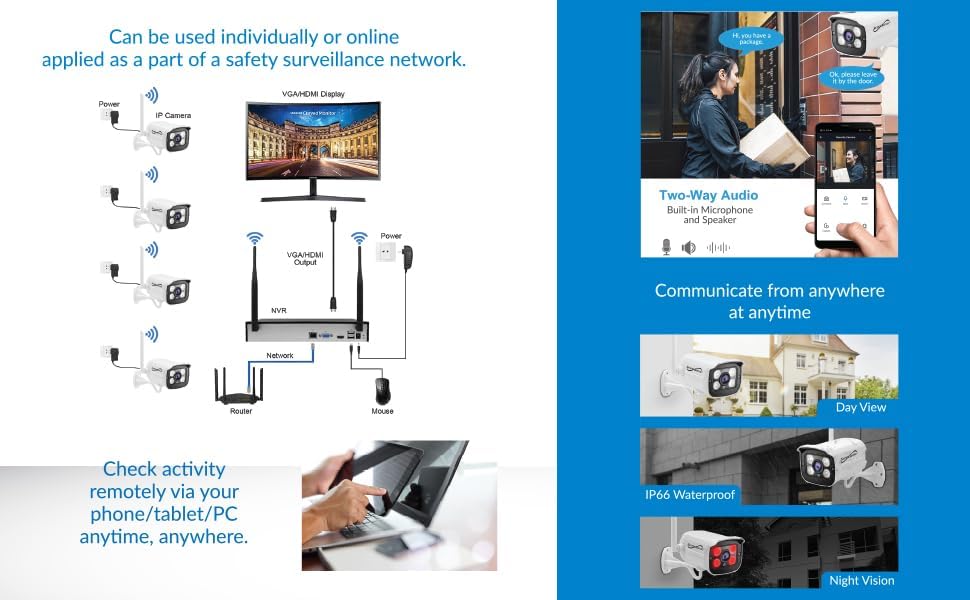
- Connect the NVR to a monitor or TV using an HDMI or VGA cable.
- Plug a USB mouse into one of the NVR's USB ports for system navigation.
- Connect the NVR to your internet router using an Ethernet cable to enable network access and remote viewing features.
- Connect the NVR power supply to the NVR and then plug it into an electrical outlet. The NVR will power on automatically.

This diagram illustrates the essential connections for the NVR, including monitor, mouse, network, and power supply.
2. Camera Installation and Power
Install and power your IP cameras:
- Mount the IP cameras in your desired indoor or outdoor locations. The cameras are rated IP66 waterproof, making them suitable for various weather conditions.
- Connect each camera to its dedicated power supply and plug it into an electrical outlet.
- Ensure that the cameras are positioned within the wireless signal range of the NVR. An antenna extension cord is provided to help improve signal strength if needed.

A detailed view of a Supersonic wireless IP camera, highlighting its lens and infrared LEDs for night vision, suitable for indoor or outdoor mounting.
3. Mobile App Setup for Remote Viewing
To access your system remotely, set up the mobile application:
- Download the designated mobile application (e.g., TUYA SMART app) from your smartphone's app store (Apple App Store or Google Play Store).
- Follow the in-app instructions to register an account and add your NVR system by scanning the QR code or entering the device ID.
- Once connected, you can view live footage, monitor activity, and receive push notifications directly on your mobile device from anywhere.

An illustration of the mobile application's interface, demonstrating live view, two-way audio controls, and remote communication capabilities.
Operating Instructions
Video Recording and Playback
The NVR system supports various recording modes, including continuous recording, scheduled recording, and motion-triggered recording. Use the NVR interface (via the connected monitor and mouse) to configure your preferred recording settings. To review recorded footage, navigate to the playback menu on the NVR. You can search for specific events by date, time, or type of event.
Motion Detection
The system is equipped with motion detection capabilities. When motion is detected within the camera's field of view, the NVR can automatically trigger recording and send instant push notifications to your mobile device. You can customize motion detection zones and sensitivity levels through the NVR settings to minimize false alarms.
Two-Way Audio
Each camera features a built-in microphone and speaker, enabling two-way audio communication. Through the mobile app, you can listen to audio from the camera's location and speak through the camera's speaker, allowing for direct interaction with visitors or deterring intruders.
Night Vision
The cameras provide advanced night vision capabilities, ensuring clear surveillance even in low-light or complete darkness. They can capture clear images up to 150 feet in total darkness and 200 feet in ambient light. The system automatically switches between day and night modes based on lighting conditions.
An example of night vision footage from a Supersonic security camera, demonstrating clear visibility in dark conditions.
Maintenance
Regular maintenance helps ensure the longevity and optimal performance of your security system:
- Cleaning: Regularly clean camera lenses with a soft, dry cloth to prevent dust and smudges from affecting image clarity.
- Connections: Periodically check all power and network cable connections to ensure they are secure and free from damage.
- Firmware Updates: Check for available firmware updates for both the NVR and cameras through the system settings or mobile app. Keeping firmware updated ensures access to the latest features and security enhancements.
- Weather Protection: While cameras are IP66 waterproof, avoid submerging them in water or exposing them to extreme environmental conditions beyond their rating.
Troubleshooting
If you encounter issues with your system, refer to the following common troubleshooting tips:
- Cameras Not Connecting: Ensure all cameras are powered on and within the wireless range of the NVR. Check for any physical obstructions that might interfere with the wireless signal.
- No Video Display on Monitor: Verify that the HDMI or VGA cable is securely connected between the NVR and the monitor, and that the monitor's input source is correctly selected.
- Remote Viewing Issues: Confirm that the NVR is connected to the internet via an Ethernet cable and that your mobile device has a stable internet connection. Ensure the mobile app is correctly configured and you are logged into your account.
- Poor Image Quality: Clean camera lenses to remove any dirt or smudges. Ensure there is adequate lighting in the surveillance area, especially for optimal day-time performance.
- No Recording: Check the NVR's recording settings to ensure recording schedules or motion detection are properly configured. Verify that a hard drive is installed and has sufficient storage space.
Warranty and Support
This Supersonic product is covered by a 90-day manufacturer's warranty. For technical support, warranty claims, or further assistance, please refer to the contact information provided in your original product packaging or visit the official Supersonic website for customer service resources.

