
1. Introduction
Thank you for choosing the FLEXISPOT ErgoX Max Ergonomic Office Chair. This manual provides essential information for the safe assembly, operation, and maintenance of your new chair. Please read it thoroughly before use and retain it for future reference.
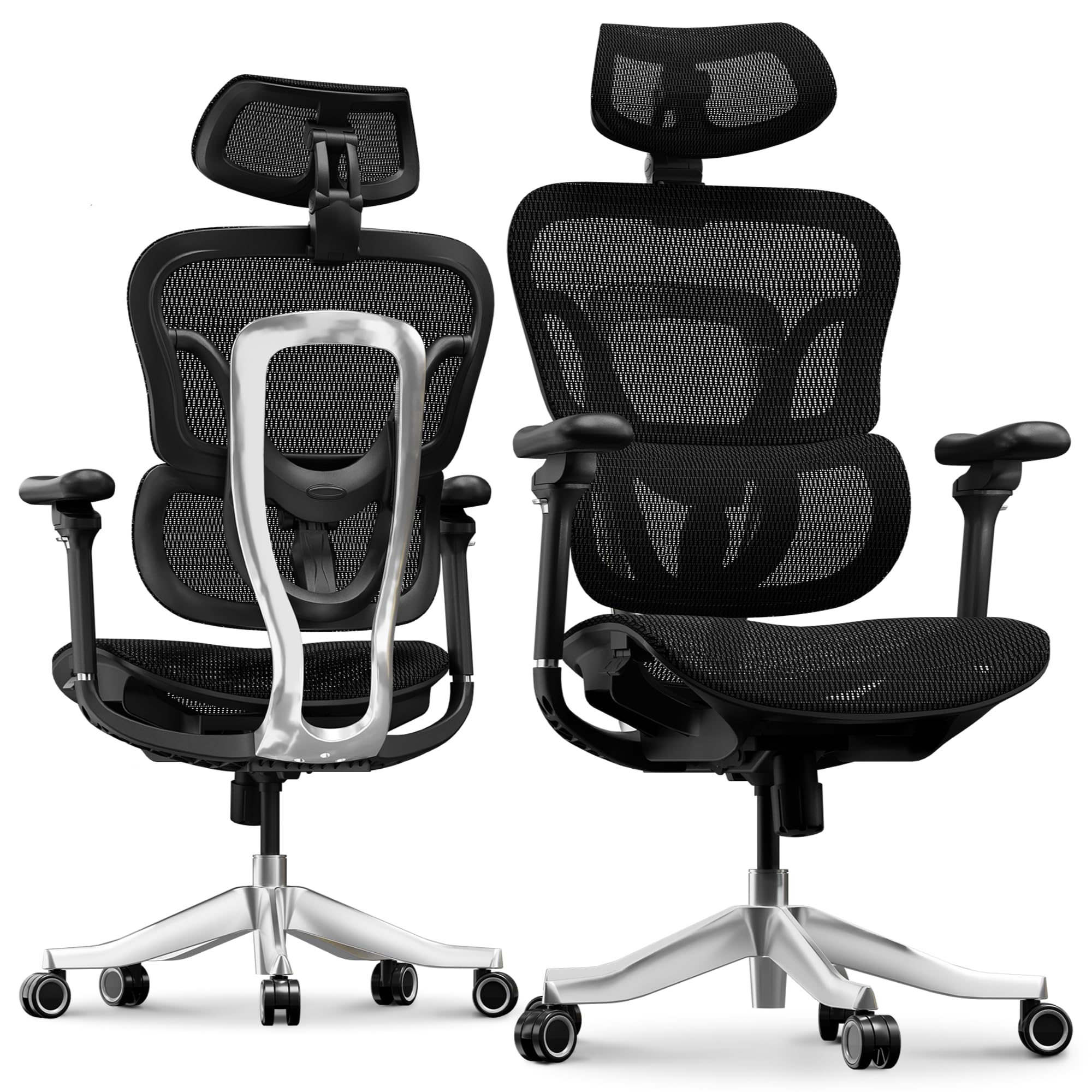
Image 1.1: The FLEXISPOT ErgoX Max Ergonomic Office Chair in a typical office environment.
2. Safety Information
- Ensure all components are present and undamaged before assembly.
- Follow assembly instructions carefully. Do not overtighten screws.
- Do not stand on the chair.
- Do not use the chair if any parts are missing, damaged, or worn.
- Keep children away from moving parts during adjustment.
- The maximum weight capacity for this chair is 661 lbs (300 kg). Do not exceed this limit.
3. Package Contents
The FLEXISPOT ErgoX Max chair package typically includes the following components:
- Armrests
- Headrest
- Wheels (Casters)
- Backrest
- Seat
- User manual (this document)
- Assembly tools (e.g., Allen wrench)
- Aluminum Alloy Frame and Base components
4. Assembly Instructions
Detailed step-by-step assembly instructions are provided in a separate guide included with your product packaging. Please refer to that guide for specific assembly procedures. Ensure all parts are securely fastened before using the chair.
5. Adjustments and Features
The ErgoX Max chair offers extensive adjustability to customize your seating experience for optimal comfort and ergonomic support.
5.1. 4D Adjustable Headrest
The headrest can be adjusted in four dimensions (height, angle, and depth) to provide continuous and effective support for your head and neck. Adjust it to align with the natural curve of your neck.

Image 5.1: Illustration of the 4D adjustable headrest, demonstrating various positions for neck support.
5.2. 5D Adjustable PU Armrests
The armrests offer five-dimensional adjustment for ultimate support. They can be moved up/down, forward/backward, pivoted inward/outward, and adjusted for width. Position them so your arms are comfortable and your shoulders are relaxed.

Image 5.2: Visual guide to the 5D adjustable PU armrests, highlighting their multi-directional movement.
5.3. 4D Adaptive Lumbar Support (BDLS)
The Bionic Dynamic Lumbar Support (BDLS) automatically adjusts to your posture, providing dynamic lower-back support. This feature helps reduce fatigue and improves sitting comfort during extended periods.

Image 5.3: Detail of the Bionic Dynamic Lumbar Support (BDLS) system, engineered for spinal alignment.
5.4. Seat Depth Adjustment
Adjust the seat depth to ensure proper leg support and circulation. There is a lever located under the seat to slide the seat pan forward or backward.
5.5. Backrest Height Adjustment
The backrest height can be adjusted to accommodate different user heights, ensuring the lumbar support is correctly positioned for your spine.
5.6. Reclining and Tilt-Lock Mechanism
The chair features a 3-position tilt-lock mechanism, allowing you to adjust and lock the backrest at various angles (e.g., 104°, 113°, 124°) for working, relaxing, or reclining. Use the lever under the seat to engage or disengage the tilt lock and adjust the recline tension.

Image 5.4: Illustration of the 3-position tilt-lock mechanism, showing different reclining angles.
5.7. Retractable Footrest
An optional retractable footrest is integrated into the chair. Pull it out for a complete reclining and relaxation experience, or push it back in when not needed.
6. Care and Maintenance
To ensure the longevity and appearance of your FLEXISPOT ErgoX Max chair, follow these care instructions:
- Cleaning: For the mesh material, dry clean only. For other surfaces, wipe with a soft, damp cloth. Avoid harsh chemicals or abrasive cleaners.
- Inspection: Periodically check all screws and bolts to ensure they are tight. Retighten if necessary.
- Casters: The electroplated chrome casters are designed for smooth and silent mobility on various floor surfaces. Keep them free of debris.
- Avoid Direct Sunlight: Prolonged exposure to direct sunlight may cause fading of materials.
7. Troubleshooting
If you encounter any issues with your FLEXISPOT ErgoX Max chair, please refer to the following common solutions:
- Chair wobbles: Check that all assembly screws are securely tightened. Ensure the chair is on a flat, even surface.
- Adjustments not working: Verify that no levers are jammed or obstructed. Ensure you are using the correct lever for the desired adjustment.
- Casters not rolling smoothly: Check for hair or debris caught in the casters and clean them if necessary.
For further assistance, please contact FLEXISPOT customer support.
8. Specifications
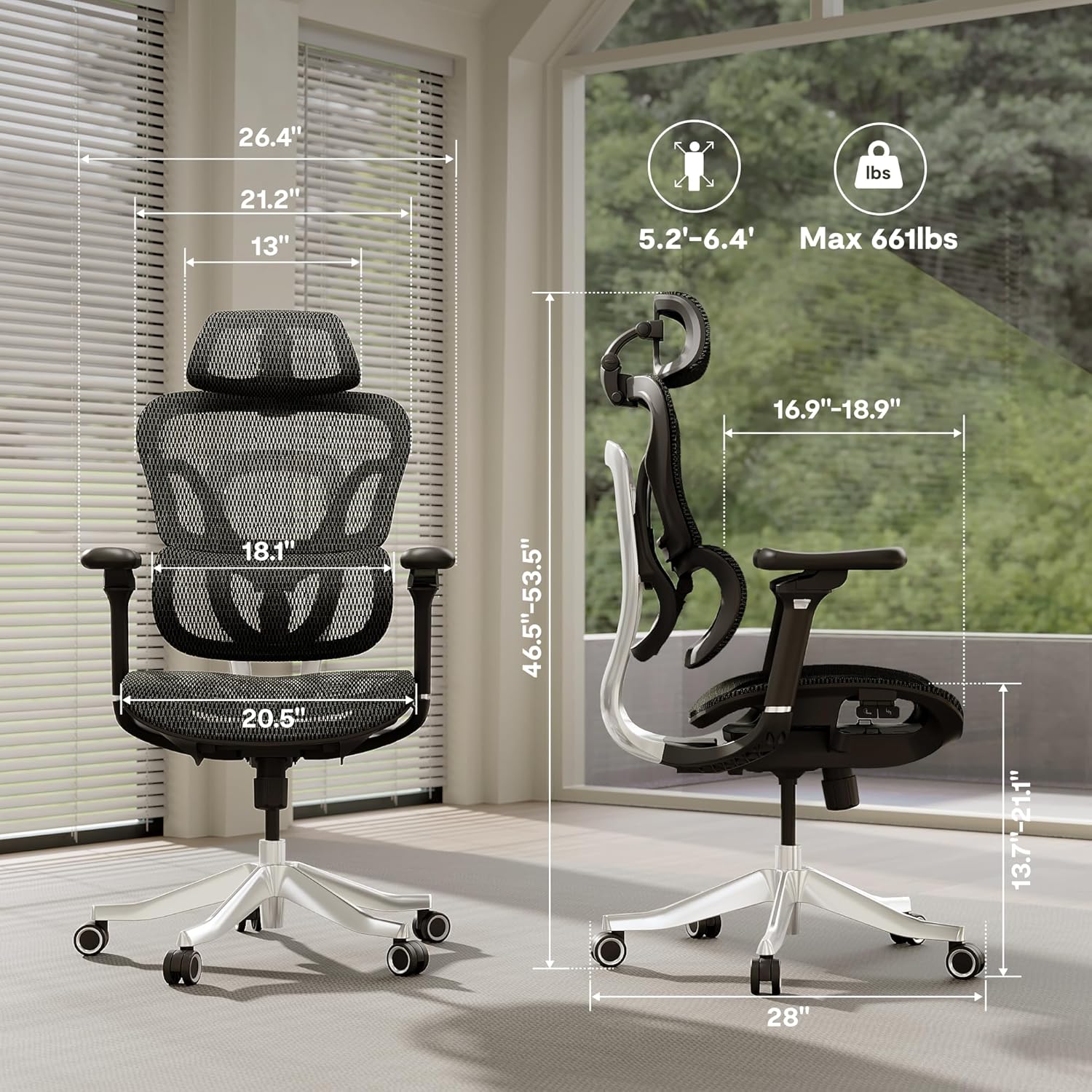
Image 8.1: Key dimensions of the FLEXISPOT ErgoX Max Ergonomic Office Chair.
| Feature | Detail |
|---|---|
| Brand | FLEXISPOT |
| Model Name | Ergonomic Executive Chair (ErgoX Series) |
| Color | Breathable Black |
| Material | Nylon (Mesh seat and back) |
| Frame Material | Aluminum Alloy Frame & Reinforced Nylon |
| Product Dimensions (D x W x H) | 27.95"D x 27.95"W x 53.5"H |
| Item Weight | 46 Pounds |
| Maximum Weight Recommendation | 661 Pounds |
| Adjustable Headrest | 4D Adjustable |
| Armrests | 5D Adjustable |
| Lumbar Support | 4D Adaptive (Bionic Dynamic Lumbar Support) |
| Reclining Position Count | 3 (90-130° range) |
| Casters | Electroplated Chrome, Mute Casters |
| Assembly Required | Yes |
| Recommended Uses | Drafting, Gaming, Office, Reading, Relaxing, Sleeping |
9. Warranty and Support
The FLEXISPOT ErgoX Max Ergonomic Office Chair comes with a 5-year warranty, as indicated by the manufacturer. Additionally, a 3-Year Protection Plan is available for purchase to extend coverage.
For warranty claims, technical support, or any inquiries, please contact FLEXISPOT customer service through their official website or the retailer where the product was purchased.