
1. Product Overview
The Ortizan Portable Bluetooth Speaker X8 Pro delivers powerful 40W peak sound with deep bass, offering up to 30 hours of playtime. It features IPX7 waterproof protection, dynamic light shows, and multiple EQ modes for a customized audio experience. Its robust design makes it suitable for various indoor and outdoor environments.
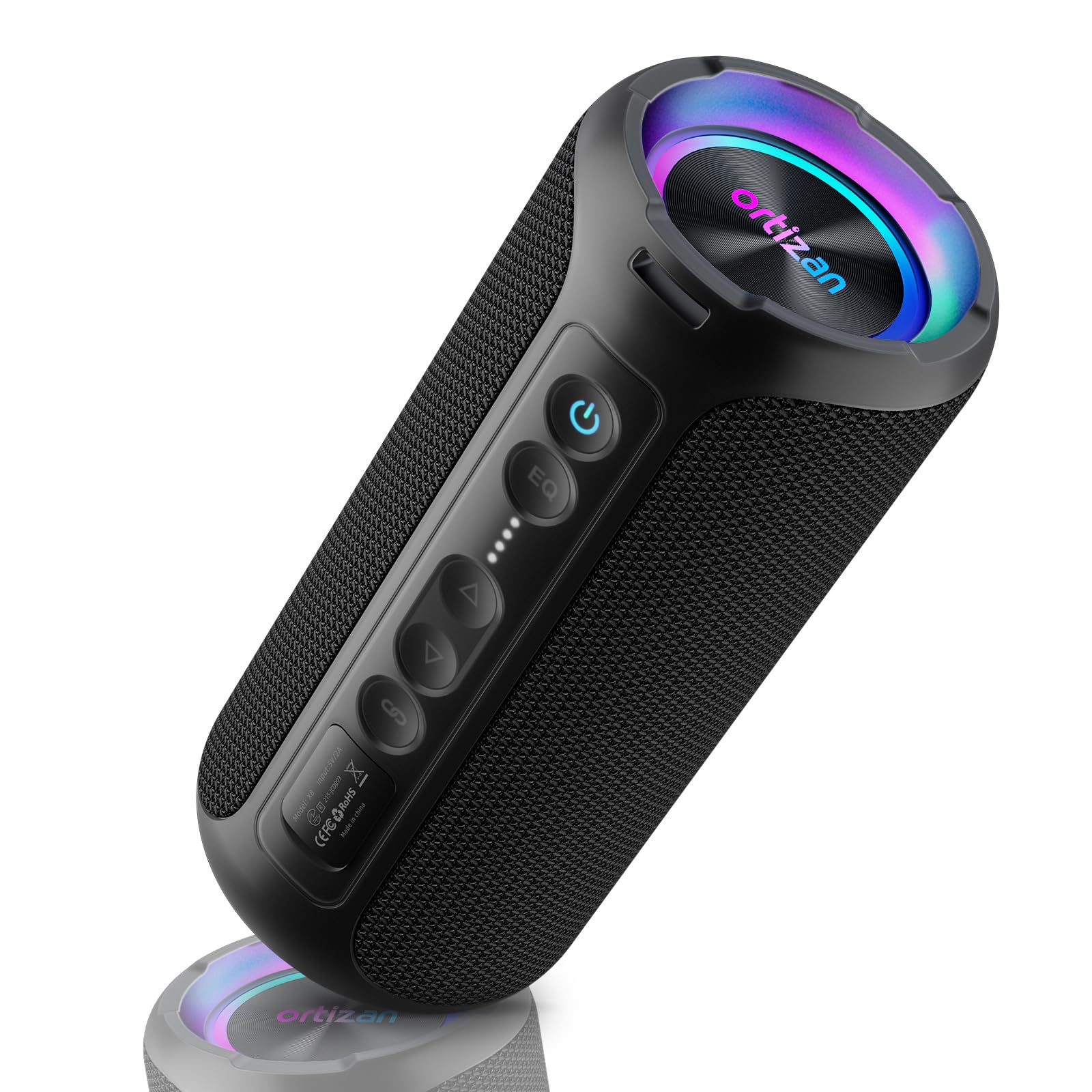
Image 1.1: Ortizan Portable Bluetooth Speaker X8 Pro (Black)
2. What's in the Box
- 1 x Ortizan Portable Bluetooth Speaker X8 Pro
- 1 x USB-C Charging Cable
- 1 x 3.5mm AUX Audio Cable
- 1 x Silica Gel Lanyard
- 1 x User Guide (this manual)
3. Setup
3.1 Charging the Speaker
Before first use, fully charge the speaker. Connect the provided USB-C charging cable to the speaker's charging port and the other end to a compatible USB power adapter (not included). The power indicator lights will show the charging status.

Image 3.1: Charging and auxiliary ports on the Ortizan X8 Pro speaker.
3.2 Powering On/Off
- To Power On: Press and hold the power button (⏻) for 2-3 seconds.
- To Power Off: Press and hold the power button (⏻) for 2-3 seconds.
3.3 Bluetooth Pairing
- Ensure the speaker is powered on and in Bluetooth pairing mode (the Bluetooth indicator light will flash).
- On your device (smartphone, tablet, laptop), enable Bluetooth and search for available devices.
- Select "X8 Pro" from the list of devices.
- Once connected, the Bluetooth indicator light on the speaker will become solid.

Image 3.2: Ortizan X8 Pro demonstrating Bluetooth 5.3 connectivity with various devices.
4. Operating Instructions
4.1 Basic Controls
- Volume Up: Press the '+' button.
- Volume Down: Press the '-' button.
- Play/Pause: Press the Play/Pause button (⏸).
- Next Track: Press and hold the '+' button.
- Previous Track: Press and hold the '-' button.
- Answer/End Call: Press the phone icon button (☎).
4.2 EQ Modes
The X8 Pro offers three professional EQ modes to optimize your listening experience:
- Bass Mode: Tap the EQ button. The button turns red for deeper, richer bass.
- Pop Mode: Tap the EQ button again. The button turns blue, enhancing bass and treble for a richer musical experience.
- Vocal Mode: Tap the EQ button a third time. The light turns off, focusing on mid-range frequencies for clear vocals.

Image 4.1: Ortizan X8 Pro highlighting the three EQ modes: Popular, Deep Bass, and Vocal.
4.3 True Wireless Stereo (TWS) Pairing
To pair two Ortizan X8 Pro speakers for a stereo sound experience:
- Ensure both speakers are powered on and not connected to any other Bluetooth device.
- On one speaker (this will be the primary speaker), press the TWS button (∞). The speaker will enter TWS pairing mode.
- On the second speaker, press the TWS button (∞).
- The speakers will automatically connect to each other. Once connected, the primary speaker's Bluetooth indicator will flash, and the secondary speaker's indicator will be solid.
- Connect your device to the primary speaker via Bluetooth.

Image 4.2: Two Ortizan X8 Pro speakers demonstrating True Wireless Stereo pairing for enhanced sound.
4.4 Dynamic Light Show
The speaker features a beat-dynamic light show that synchronizes with your music. The 7-color dynamic light will pulse with the rhythm. You can turn off the lights by pressing and holding the light button if not desired.

Image 4.3: Ortizan X8 Pro showcasing its dynamic lighting feature.
5. Maintenance
5.1 Waterproof Care (IPX7)
The Ortizan X8 Pro is IPX7 waterproof, meaning it can be submerged in up to 1 meter (3.3 feet) of water for up to 30 minutes. To maintain its waterproof integrity:
- Ensure the rubber flap covering the charging and AUX ports is securely closed before exposing the speaker to water.
- Do not expose the speaker to saltwater or other chemicals.
- After exposure to water, wipe the speaker dry with a soft cloth before charging or opening the port cover.

Image 5.1: The Ortizan X8 Pro speaker being splashed with water, illustrating its IPX7 waterproof capability.
5.2 Cleaning
Use a soft, dry cloth to clean the speaker. Do not use abrasive cleaners or solvents.
6. Troubleshooting
6.1 Speaker Not Powering On
- Ensure the speaker is fully charged. Connect it to a power source and allow it to charge for at least 30 minutes before attempting to power on again.
6.2 Unable to Pair via Bluetooth
- Ensure the speaker is in pairing mode (Bluetooth indicator flashing).
- Make sure your device's Bluetooth is enabled and within range (up to 66 feet).
- Forget or delete "X8 Pro" from your device's Bluetooth list and try pairing again.
- Restart both the speaker and your device.
6.3 No Sound or Low Volume
- Increase the volume on both the speaker and your connected device.
- Ensure the speaker is properly connected via Bluetooth or AUX cable.
- Check if the audio source is playing correctly.
6.4 TWS Pairing Issues
- Ensure both speakers are fully charged and not connected to any other Bluetooth devices.
- Follow the TWS pairing steps precisely (Section 4.3).
- Try resetting both speakers and attempting TWS pairing again.
7. Specifications
| Feature | Detail |
|---|---|
| Brand | Ortizan |
| Model Number | X8 Pro |
| Speaker Maximum Output Power | 40 Watts |
| Connectivity Technology | Wireless, Bluetooth, Auxiliary, TF Card |
| Bluetooth Range | 66 Feet |
| Battery Capacity | 6600 mAh |
| Playtime | Up to 30 hours (at 30% volume, lights off) |
| Water Resistance Level | IPX7 Waterproof |
| EQ Modes | 3 (Pop, Deep Bass, Vocal) |
| Dimensions (D x W x H) | 3.15"D x 3.15"W x 7.09"H |
| Item Weight | 585 Grams |

Image 7.1: Detailed dimensions of the Ortizan X8 Pro speaker.
8. Warranty and Support
The Ortizan Portable Bluetooth Speaker X8 Pro comes with a 1-year manufacturer's warranty. For any product inquiries or support, please refer to the contact information provided in your purchase documentation or visit the official Ortizan website.
Additionally, a 30-day no-questions-asked return policy is available through the retailer.


