
1. Important Safety Instructions
Please read all instructions carefully before beginning installation and retain this manual for future reference. Improper installation or use can lead to electric shock, fire, or personal injury.
- Always disconnect power at the main circuit breaker before installation, cleaning, or servicing.
- All wiring must be in accordance with national and local electrical codes. If you are unfamiliar with wiring, consult a qualified electrician.
- The fan must be mounted to a ceiling joist or support structure capable of supporting a minimum of 35 lbs (15.9 kg).
- Ensure the fan blades are at least 7 feet (2.1 meters) from the floor.
- Do not operate the fan if any parts are damaged or missing.
- Avoid placing objects in the path of the fan blades.
2. Package Contents
Verify that all components are present and undamaged before proceeding with installation.
- Fan Motor Assembly
- Fan Blades (5 pieces)
- Mounting Bracket
- Downrod (if applicable)
- Canopy
- Light Kit with LED Module
- Remote Control with Wall Mount
- Hardware Pack (screws, wire nuts, washers)
- User Manual
3. Specifications
| Brand | Sofucor |
| Model Number | KBS-52K349 |
| Size | 52 Inch |
| Color | White+wood |
| Motor Type | DC Motor (Reversible) |
| Number of Blades | 5 |
| Number of Speeds | 6 |
| Noise Level | 30 Decibels |
| Wattage | 60 Watts |
| Air Flow Capacity | 5000 Cubic Feet Per Minute |
| Control Method | Remote Control |
| Light Kit | Integrated LED (Dimmable, 3 Color Temperatures: 3000K, 4000K, 6000K) |
| Product Dimensions | 132.1D x 132.1W x 35.6H Centimetres |
| Mounting Type | Ceiling Mount |
| Material | Acrylonitrile Butadiene Styrene (Blades), Painted Wood (Finish) |
| Indoor/Outdoor Usage | Indoor (Suitable for covered outdoor areas like patios/porches as per product description) |
| Certification | ETL |
The fan features a brushless DC motor, high transmittance lampshade, 2100 lumens LED light, unique curved blades, and a reinforced metal canopy.

Image: Detailed view of the Sofucor ceiling fan components, highlighting the brushless DC motor, high transmittance lampshade, 2100 lumens LED light, unique curved blades, and reinforced metal canopy.
4. Setup and Installation
Follow these general steps for installation. Refer to the detailed diagrams in the included printed manual for specific instructions.
- Turn Off Power: Ensure power is disconnected at the circuit breaker to prevent electric shock.
- Mounting Bracket Installation: Secure the mounting bracket to a ceiling joist or an outlet box rated for fan support.
- Fan Assembly: Attach the downrod (if used) to the fan motor assembly. Carefully lift the fan motor assembly and hang it from the mounting bracket using the safety cable.
- Wiring: Connect the fan's electrical wires to the household wiring according to the wiring diagram provided in the full manual. Use appropriate wire nuts.
- Canopy Installation: Slide the canopy up to the ceiling and secure it to the mounting bracket, covering the wiring connections.
- Blade Attachment: Attach the fan blades to the motor housing. Ensure all blade screws are tightened securely.
- Light Kit Installation: Connect the light kit wiring and attach the light kit to the bottom of the fan motor assembly.
- Restore Power: Once all connections are secure and components are installed, restore power at the circuit breaker.

Image: Illustration of the easy installation process, showing how to tighten blade screws and attach the safety rope for secure ceiling mounting.
5. Operating Instructions
Your Sofucor ceiling fan is operated using the included remote control. Ensure the remote has fresh batteries installed.
5.1 Fan Speed Control
The fan offers 6 adjustable speeds to suit your comfort needs. Press the fan speed buttons on the remote to cycle through the settings.
- Levels 1-2: Low, soft wind for gentle air circulation.
- Levels 3-4: Medium, natural wind for comfortable airflow.
- Levels 5-6: High, cool wind for maximum air movement.

Image: Visual representation of the 6-speed fan settings, illustrating the airflow intensity for different comfort levels.
5.2 Customizable Lighting
The integrated LED light offers adjustable brightness and three color temperature options.
- Light On/Off: Press the light button on the remote to turn the light on or off.
- Color Temperature Adjustment: Cycle through Warm Light (3000K), Natural Light (4000K), and Cold Light (6000K) by pressing the dedicated color temperature button.
- Stepless Dimming: Hold down the dimming button to adjust the brightness from 1% to 100%. The fan includes a light memory function, retaining your last brightness setting.
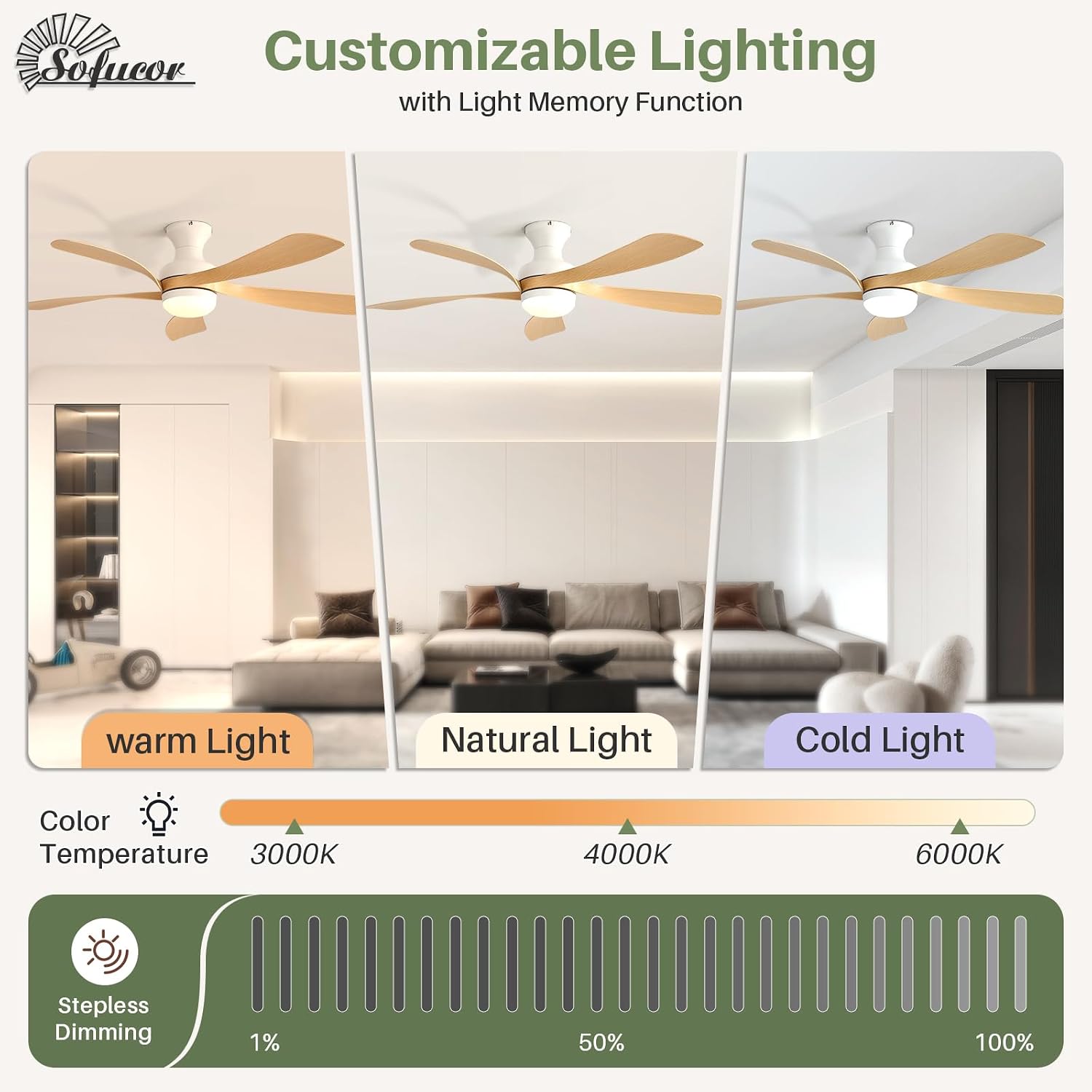
Image: Depicts the customizable lighting features, showing the three color temperature options (warm, natural, cold) and the stepless dimming capability.
5.3 Reversible DC Motor (Summer/Winter Mode)
The reversible DC motor allows you to change the direction of the fan blades for optimal air circulation throughout the year.
- Summer Mode (Downward Airflow): Blades rotate counter-clockwise to create a cooling breeze.
- Winter Mode (Upward Airflow): Blades rotate clockwise to circulate warm air near the ceiling, distributing it throughout the room.
Press the reverse button on the remote control to switch between modes.

Image: Illustrates the reversible function of the DC motor, showing how airflow changes for summer cooling and winter heat circulation.
5.4 Timer Function
Set the fan to automatically turn off after a specified period using the timer function.
- Press the timer button on the remote to select 1, 4, or 8 hours. The fan will operate for the selected duration and then turn off.

Image: Highlights the low-noise operation of the DC motor (under 30dB) and the available timer settings (1, 4, 8 hours).
6. Maintenance
Regular maintenance ensures optimal performance and extends the life of your ceiling fan.
- Cleaning: To avoid scratching the finish, clean the fan with a soft, damp cloth. Do not use abrasive cleaners or solvents. Dust the blades regularly.
- Blade Inspection: Periodically check that all blade screws are tight. Loose screws can cause noise and wobble.
- Motor: The DC motor is permanently lubricated and requires no oiling.
- Light Kit: The LED module is integrated and not user-replaceable. If the light fails, contact customer support.
7. Troubleshooting
If you experience issues with your fan, refer to the following common problems and solutions:
| Problem | Possible Cause | Solution |
|---|---|---|
| Fan does not start | No power to the fan Loose wire connections Remote control battery low/dead | Check circuit breaker and wall switch Ensure all wire connections are secure (power off first) Replace remote control batteries |
| Fan wobbles | Loose blade screws Unbalanced blades Loose mounting bracket | Tighten all blade screws Ensure blades are balanced (use balancing kit if needed) Verify mounting bracket is securely fastened to the ceiling |
| Fan is noisy | Loose screws Motor housing rubbing Incorrect installation | Check and tighten all screws on the fan and mounting bracket Ensure no wires are rubbing against the canopy or motor housing Review installation steps to ensure proper assembly |
| Light does not work | Loose wire connection Remote control battery low/dead Faulty LED module | Check light kit wiring connections (power off first) Replace remote control batteries Contact customer support for assistance |
| Remote control not working | Low/dead batteries Obstruction between remote and receiver Remote not paired (if applicable) | Replace batteries Ensure clear line of sight to the fan's receiver Refer to the full manual for remote pairing instructions |
If you are unable to resolve the issue after following these steps, please contact Sofucor customer support.
8. Warranty and Customer Support
Your Sofucor ceiling fan is covered by a manufacturer's warranty. Please refer to the warranty card included in your package or visit the official Sofucor website for detailed warranty information, terms, and conditions.
For technical assistance, troubleshooting not covered in this manual, or to inquire about replacement parts, please contact Sofucor customer support. Have your model number (KBS-52K349) and purchase date ready when contacting support.
Contact Information: Please refer to the contact details provided on the Sofucor official website or your purchase documentation.


