
1. Introduction
This manual provides detailed instructions for the assembly, operation, and maintenance of your SEDETA L Shaped Electric Standing Desk. Please read this manual thoroughly before use to ensure proper functionality and safety. This desk is designed to offer a versatile and ergonomic workspace for home offices or gaming setups, combining adjustable height with integrated storage solutions.
2. Safety Information
- Proper Assembly: Always ensure the desk is properly assembled and anchored to the floor to prevent tipping.
- Lifting Motor Caution: Be cautious when adjusting the desk height to avoid injury from the lifting motor. Keep hands and objects clear of moving parts.
- Weight Limit: Do not exceed the weight limit of the desk to maintain stability and prevent damage. Refer to the specifications section for maximum load capacity.
- Electrical Safety: Ensure the power cord is not damaged or pinched. Do not operate the desk with a damaged cord or plug. Keep liquids away from electrical components.
3. Package Contents
The SEDETA L Shaped Electric Standing Desk is shipped in multiple boxes and includes the following main components:
- L-shaped tabletop sections
- Electric lifting column and base
- Integrated storage cabinet with sliding doors and drawers
- Control panel with memory presets
- Built-in power strip (2 AC outlets, 2 USB ports)
- All necessary assembly hardware (screws, tools, etc.)
- Power adapter and cables

Figure 3.1: Overview of desk components and dimensions.
4. Setup and Assembly
Assembly of the SEDETA L Shaped Electric Standing Desk is required. Please refer to the separate detailed assembly guide included in your package for step-by-step instructions. It is recommended to have two people for the assembly process to ensure stability and ease of construction.
Video 4.1: This video demonstrates the assembly process for the SEDETA Farmhouse L Shaped Standing Desk, providing a visual guide to construction.
After assembly, ensure all connections are secure and the desk is stable before placing any equipment on it. Properly route all cables to prevent entanglement or damage during height adjustments.
5. Operating Instructions
5.1. Height Adjustment
The desk features an electric height adjustment system. Use the control panel, located on the front edge of the desk, to raise or lower the tabletop. The height can be adjusted infinitely between approximately 28.7 and 46.8 inches.
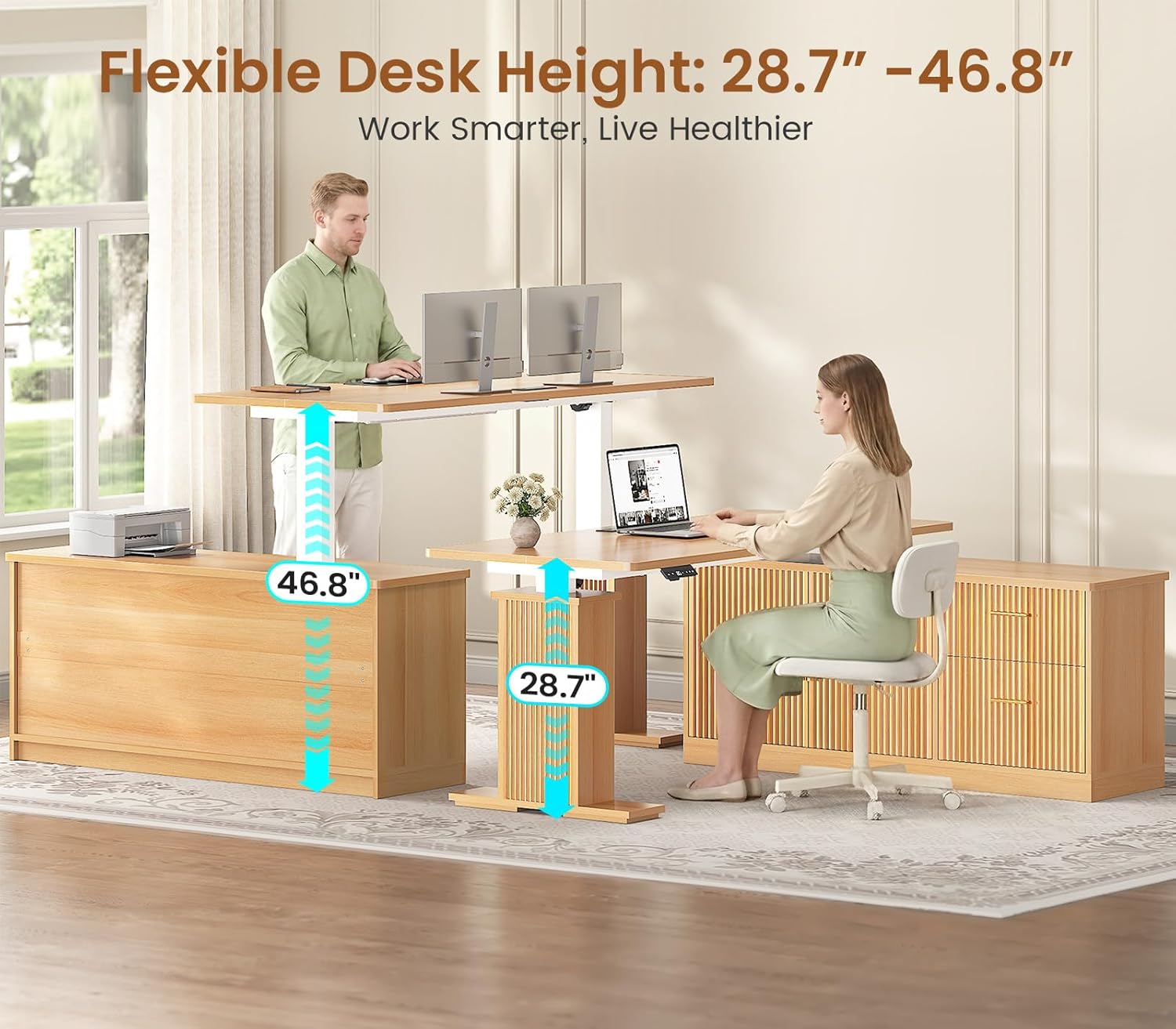
Figure 5.1: The desk offers a flexible height range for both sitting and standing positions.
5.2. Memory Presets
The control panel includes three programmable memory settings (labeled 1, 2, 3). To save a preferred height:
- Adjust the desk to your desired height using the up (▲) or down (▼) buttons.
- Press and hold one of the memory buttons (1, 2, or 3) until the display flashes or beeps, indicating the height has been saved.
To recall a saved height, simply press the corresponding memory button (1, 2, or 3). The desk will automatically move to the saved position.

Figure 5.2: The control panel allows for precise height adjustments and saving up to three preferred height settings.
5.3. Power Outlets
The desk is equipped with a built-in power strip featuring 2 AC outlets (125V/12A) and 2 USB ports (5V/2A) for convenient charging of up to four devices simultaneously. These are integrated into the tabletop for easy access.

Figure 5.3: Integrated power outlets and USB ports for convenient device charging.
6. Storage and Features
6.1. L-Shaped Design
The L-shaped design of this desk maximizes corner space, providing an expansive work surface suitable for multiple monitors and various office essentials. This configuration promotes a productive and organized work environment.
6.2. Integrated Storage Cabinet
The desk includes an integrated storage cabinet with two sliding barn-style doors and two drawers. The smooth sliding tracks ensure effortless opening and closing, providing easy access to stored items while maintaining a tidy appearance.

Figure 6.1: The integrated storage cabinet offers ample space for files, books, and office essentials.
6.3. Versatile Drawers
The two drawers provide versatile storage options. The large file cabinet drawer is specifically designed to accommodate letter, A4, and legal-sized documents, helping to keep your important papers organized and accessible.

Figure 6.2: The drawers offer versatile storage, including filing capabilities for various document sizes.
7. Maintenance
7.1. Cleaning
To clean the desk surfaces, use a soft, damp cloth. Avoid using harsh chemicals, abrasive cleaners, or solvents, as these may damage the finish. For spills, wipe immediately with a dry cloth.
7.2. Motor and Mechanism Care
Periodically inspect the electric lifting mechanism for any visible obstructions or loose connections. Ensure that cables are not pinched or tangled during height adjustments. If you notice any unusual sounds or resistance during operation, discontinue use and consult the troubleshooting section or contact customer support.
8. Troubleshooting
8.1. Desk Not Adjusting Height
- Power Connection: Check all power connections. Ensure the power cord is securely plugged into both the desk and a working wall outlet.
- Overload: Verify that the desk is not overloaded beyond its maximum weight capacity. Remove some items and try again.
- Reset Procedure: If the issue persists, perform a reset. Typically, this involves pressing and holding the 'RST' or reset button on the control panel for several seconds until the desk moves to its lowest position and resets. Refer to your specific assembly guide for detailed reset instructions.
8.2. Unusual Noises During Adjustment
- Obstructions: Ensure there are no obstructions beneath the tabletop or around the lifting columns that might be causing friction or resistance.
- Loose Fasteners: Check if any assembly fasteners have become loose. Tighten them if necessary.
- Contact Support: If noises continue or worsen, contact customer support for further assistance.
9. Specifications
| Brand | SEDETA |
| Desk Design | L-Shaped Electric Standing Desk |
| Color | Oak |
| Product Dimensions (D x W x H) | 23.6"D x 55"W x 29.5"H (at lowest setting) |
| Adjustable Height Range | 28.7" - 46.8" |
| Top Material Type | Engineered Wood |
| Number of Drawers | 2 |
| Item Weight | 125.7 Pounds |
| Power Outlets | 2 AC Outlets (125V/12A) |
| USB Ports | 2 USB Ports (5V/2A) |
| Required Assembly | Yes |
10. Warranty and Support
For specific warranty details and to register your product, please refer to the documentation included with your purchase or visit the official SEDETA website. SEDETA offers a 3-year service guarantee for this product.
If your desk arrives damaged, scratched, or with missing parts, please contact SEDETA customer service immediately. They will assist you with a free replacement or offer a partial refund as applicable. Keep your proof of purchase for all warranty and support claims.
Customer Service Contact: Refer to your product packaging or the SEDETA official website for the most current contact information.