
1. Introduction and Overview
The Onkyo C-30 CD Player is engineered for audiophiles seeking superior digital audio reproduction. It features a premium 32-bit/768 kHz stereo DAC and Onkyo's proprietary VLSC (Vector Linear Shaping Circuit) technology for noise reduction, ensuring crystal-clear and faithful sound reproduction. Its fanless design eliminates unwanted vibrations, complemented by a flat anti-vibration chassis and an extruded aluminum heat sink for optimal stability. The high-rigidity aluminum front panel with a sandblasted finish provides both elegance and durability.
This player supports various disc formats, including CD Audio, CD-R, CD-RW, and digital audio formats like MP3 and WMA. It offers multiple playback modes: normal, random, programmed, and repeat. Connectivity options include gold-plated stereo RCA analog outputs, optical and coaxial digital outputs, and a gold-plated headphone output on the front panel. A precision clock with a deviation of ±10 PPM ensures impeccable synchronization for an undisturbed listening experience.
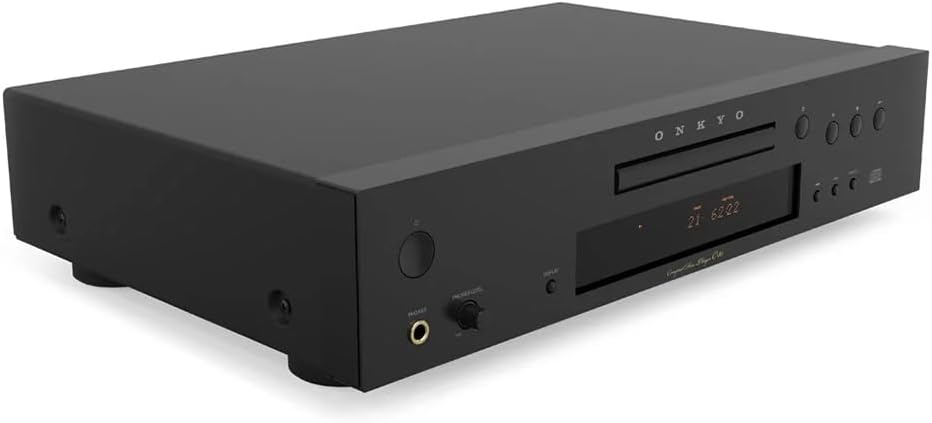
Figure 1: Front view of the Onkyo C-30 CD Player, showcasing its sleek black finish and control buttons.
2. Setup
Follow these steps to correctly set up your Onkyo C-30 CD Player:
- Placement: Place the CD player on a stable, level surface away from direct sunlight, heat sources, and excessive dust. Ensure adequate ventilation around the unit.
- Power Connection: Connect the power cord to the AC inlet on the rear panel of the CD player and then plug it into a suitable wall outlet.
- Audio Output Connection: Choose one of the following methods to connect the CD player to your amplifier or receiver:
- Analog Connection (RCA): Use a stereo RCA cable to connect the gold-plated 'ANALOG AUDIO OUT' jacks (red for right, white for left) on the CD player to the corresponding analog input jacks on your amplifier/receiver.
- Digital Optical Connection: Use an optical digital cable to connect the 'DIGITAL OPTICAL OUT' jack on the CD player to an optical digital input on your amplifier/receiver.
- Digital Coaxial Connection: Use a coaxial digital cable to connect the 'DIGITAL COAXIAL OUT' jack on the CD player to a coaxial digital input on your amplifier/receiver.
- Headphone Connection: For private listening, connect your headphones to the gold-plated headphone jack on the front panel. Adjust the 'PHONES LEVEL' knob to control headphone volume.

Figure 2: Rear panel of the Onkyo C-30 CD Player, showing analog RCA, digital optical, and coaxial output connections.
3. Operating Instructions
This section details the basic operation of your Onkyo C-30 CD Player.
3.1 Power On/Off
Press the POWER button on the front panel or the remote control to turn the unit on or off.
3.2 Loading and Playing a Disc
- Press the OPEN/CLOSE button to open the disc tray.
- Place a CD (Audio CD, CD-R, CD-RW, MP3, or WMA disc) gently into the tray with the label side facing up.
- Press the OPEN/CLOSE button again to close the tray. The player will read the disc.
- Press the PLAY button to start playback.
3.3 Basic Playback Controls
- PLAY/PAUSE: Press to start or pause playback.
- STOP: Press to stop playback.
- SKIP (◀◀ / ▶▶): Press to skip to the previous or next track. Hold to fast forward or rewind within a track.
- REPEAT: Press to repeat the current track, all tracks, or a programmed sequence.
- RANDOM: Press to play tracks in a random order.
3.4 Programmed Playback
To create a custom playback sequence:
- With the disc stopped, press the PROGRAM button.
- Use the SKIP buttons to select the desired track number.
- Press PROGRAM again to add the track to the sequence.
- Repeat steps 2 and 3 for all desired tracks.
- Press PLAY to start programmed playback.
4. Maintenance
Proper maintenance ensures the longevity and optimal performance of your CD player.
- Cleaning the Unit: Wipe the exterior of the unit with a soft, dry cloth. For stubborn dirt, use a slightly damp cloth and then dry thoroughly. Avoid using abrasive cleaners, solvents, or chemical sprays, as these can damage the finish.
- Cleaning Discs: Handle discs by their edges. If a disc is dirty, wipe it gently from the center outwards with a soft, lint-free cloth. Do not use harsh cleaners or abrasive materials.
- Disc Tray Care: Keep the disc tray clean and free of dust. Avoid placing heavy objects on the tray or forcing it open or closed.
- Ventilation: Ensure that the ventilation openings on the unit are not blocked to prevent overheating.
- Storage: When not in use for extended periods, disconnect the power cord and store the unit in a cool, dry place.
5. Troubleshooting
If you encounter issues with your Onkyo C-30 CD Player, refer to the following common problems and solutions:
| Problem | Possible Cause | Solution |
|---|---|---|
| No power | Power cord not connected securely. | Check power cord connection to the unit and wall outlet. |
| No sound | Incorrect audio cable connection or input selection on amplifier. | Ensure audio cables are correctly connected to the amplifier and the correct input is selected. Check amplifier volume. |
| Disc does not play / "NO DISC" error | Disc inserted incorrectly, disc is dirty or scratched, or unsupported disc format. | Insert disc with label side up. Clean the disc. Ensure the disc format (CD Audio, CD-R, CD-RW, MP3, WMA) is supported. |
| Skipping or distorted sound | Dirty or scratched disc, or unit is subject to vibrations. | Clean the disc. Place the unit on a stable surface away from vibrations. |
| Remote control not working | Batteries are depleted or remote is not aimed correctly. | Replace batteries. Ensure no obstacles are between the remote and the unit's sensor. |
6. Specifications
Key technical specifications for the Onkyo C-30 CD Player:
- Model Name: C-30
- Brand: Onkyo
- Color: Black
- DAC: 32-bit / 768 kHz Stereo DAC
- Noise Reduction: VLSC (Vector Linear Shaping Circuit)
- Supported Audio Formats: CD Audio, CD-R, CD-RW, MP3, WMA
- Connectivity Technology: RCA, Optical, Coaxial, Headphone
- Analog Input (RGB): RCA, Optical Output, 3.5 mm Jack (This seems to be a misinterpretation from the source data, likely referring to output types rather than RGB input)
- Number of Channels: 2
- Compatible Devices: Speakers, Headphones
- Precision Clock: ±10 PPM
- Chassis Design: Fanless, flat anti-vibration chassis, extruded aluminum heat sink, high-rigidity aluminum front panel.
7. Warranty and Support
For warranty information and customer support, please refer to the documentation included with your product or visit the official Onkyo website. Keep your proof of purchase for any warranty claims.
If you require further assistance or have questions not covered in this manual, please contact Onkyo customer service or your authorized dealer.


