
Introduction
Thank you for choosing the TROPOW 14000 BTU Portable Air Conditioner. This manual provides essential information for the safe operation, installation, maintenance, and troubleshooting of your new appliance. Please read this manual thoroughly before use and retain it for future reference.
This 3-in-1 unit offers cooling, fan, and dehumidifier functions, designed to provide comfort in rooms up to 750 sq. ft. Its portable design and user-friendly controls ensure convenient use in various living spaces.
Safety Instructions
To prevent injury to the user or other people and property damage, the following instructions must be followed. Incorrect operation due to ignoring instructions may cause harm or damage.
- Always ensure the unit is placed on a flat, stable surface.
- Do not operate the unit with a damaged power cord or plug.
- Keep the air intake and exhaust vents clear of obstructions.
- Do not insert fingers or foreign objects into the air vents.
- Unplug the unit before cleaning or performing any maintenance.
- This appliance is not intended for use by persons (including children) with reduced physical, sensory or mental capabilities, or lack of experience and knowledge, unless they have been given supervision or instruction concerning use of the appliance by a person responsible for their safety.
- Do not use chemical solvents (e.g., benzene, alcohol, gasoline) to clean the unit.
Package Contents
Verify that all items are present in the package:
- TROPOW Portable Air Conditioner Unit
- Remote Control
- Window Kit (Adjustable panels)
- Exhaust Hose
- Hose Adapters (for unit and window kit connection)
- Washable Air Filter (pre-installed or separate)
- User Manual
Product Overview
Key Features
- Powerful Cooling: 14,000 BTU (ASHRAE) / 9,300 BTU (SACC) for rooms up to 750 sq. ft.
- 3-in-1 Functionality: Cooling, Fan, and Dehumidifier modes.
- Dehumidification Capacity: Up to 90 pints per day.
- Quiet Operation: Noise levels as low as 53 dB.
- User-Friendly Controls: Digital LED display and remote control.
- Programmable Timer: 24-hour timer for scheduled operation.
- Sleep Mode: For comfortable and energy-efficient overnight use.
- Self-Evaporating System: Reduces the need for manual drainage.
- Portable Design: Equipped with 360° caster wheels for easy movement.
- Washable Air Filter: For improved air quality.
- 4-Way Swing: Automatic louver movement for even air distribution.
Product Dimensions and Performance

Figure 1: Product Dimensions. The unit measures 18.9 inches wide, 15.4 inches deep, and 31.1 inches high. The exhaust hose is 63 inches long.
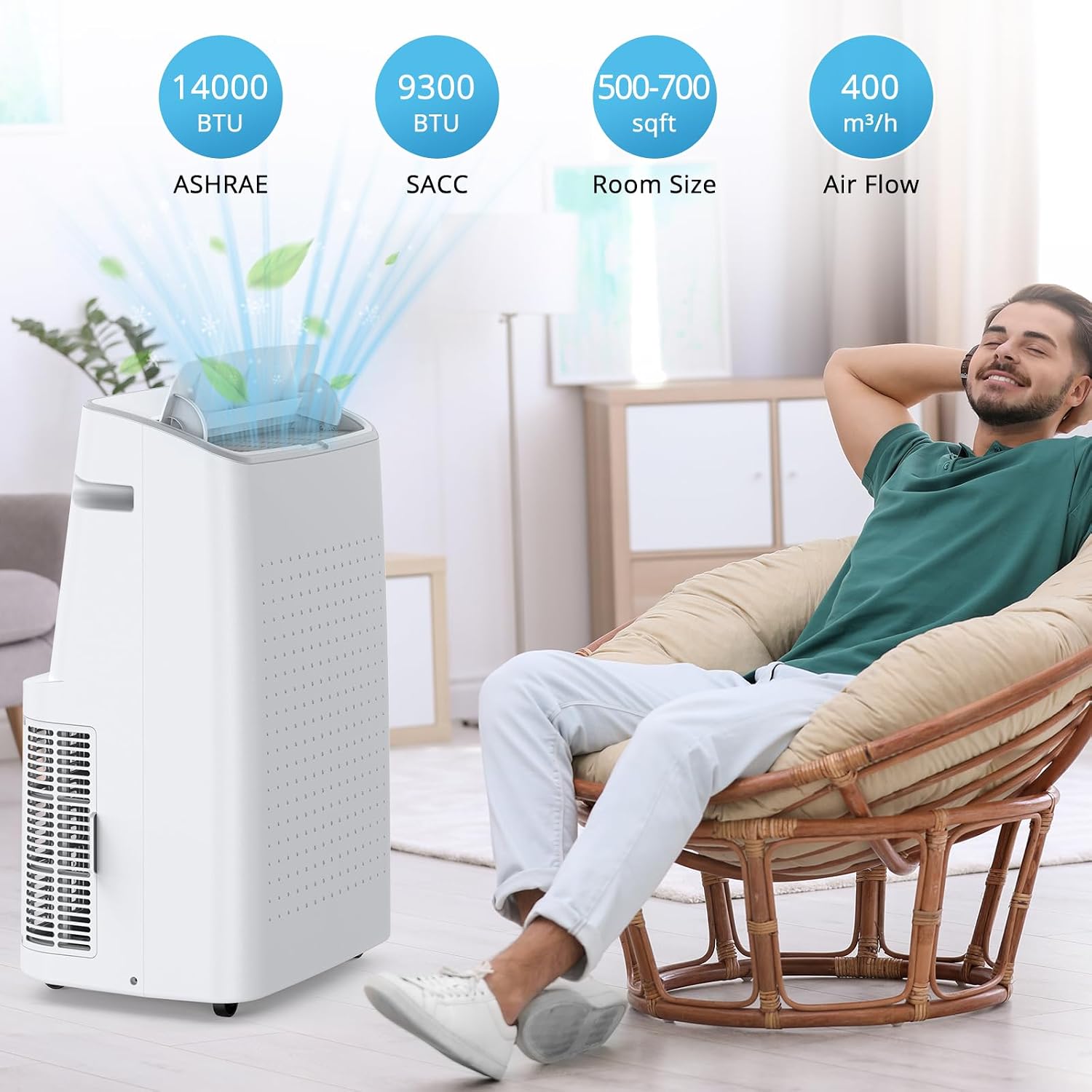
Figure 2: Performance Overview. This unit provides 14000 BTU (ASHRAE) / 9300 BTU (SACC) cooling, suitable for rooms 500-700 sq. ft., with an air flow of 400 m³/h.
Setup and Installation
Proper installation is crucial for the efficient operation of your portable air conditioner. Follow these steps carefully.
Step 1: Positioning the Unit
- Place the unit on a firm, level surface in the desired room.
- Ensure there is at least 20 inches (50 cm) of space around the unit for proper airflow.
- Position the unit near a window for exhaust hose installation and a grounded electrical outlet.
Step 2: Installing the Window Kit
The window kit is designed for both double-hung and sliding windows, accommodating openings from 26.5 inches to 48.5 inches.

Figure 3: Window Kit Compatibility. The kit supports both sliding and double-hung windows.
- Adjust the window slider kit to the length of your window opening.
- Secure the adjustable panels using the provided screws or fasteners.
- Open the window and place the assembled window kit into the window frame. Close the window securely against the kit to seal it.
Step 3: Connecting the Exhaust Hose

Figure 4: Exhaust Hose Installation. Steps include attaching the hose to the unit and then to the window kit.
- Twist one end of the exhaust hose onto the hose adapter.
- Insert the other end of the hose adapter into the exhaust outlet on the back of the air conditioner unit.
- Attach the second hose adapter to the other end of the exhaust hose.
- Insert this adapter into the opening of the window slider kit. Ensure a tight seal to prevent hot air from re-entering the room.
- Extend the exhaust hose as straight and short as possible to maximize cooling efficiency. Avoid sharp bends.
Operating Instructions
Familiarize yourself with the control panel and remote control for optimal use.
Control Panel

Figure 5: LED Control Panel. Buttons include Swing, Timer, Speed, Up/Down, Mode, Sleep, and Power.
- Power Button: Turns the unit ON or OFF.
- Mode Button: Cycles through Cooling, Dehumidifier (Dry), and Fan modes.
- Speed Button: Adjusts fan speed (High, Mid, Low) in Cooling and Fan modes.
- Up/Down Buttons: Adjusts the desired temperature in Cooling mode or sets the timer.
- Timer Button: Sets the auto-on or auto-off time (1-24 hours).
- Swing Button: Activates or deactivates the automatic 4-way louver swing.
- Sleep Button: Activates Sleep mode for quiet, energy-efficient operation overnight.
Remote Control
The remote control allows you to operate the unit from up to 20 feet away.

Figure 6: Remote Control Usage. The remote allows convenient operation from a distance.
All functions available on the control panel are also accessible via the remote control. Ensure the remote control is pointed towards the unit's receiver when pressing buttons.
Operating Modes
- Cooling Mode: Select "Cool" mode. Use Up/Down buttons to set desired temperature (61°F - 88°F). Adjust fan speed as needed.
- Dehumidifier Mode (Dry): Select "Dry" mode. The unit will operate at a low fan speed to remove moisture from the air. The fan speed cannot be adjusted in this mode. The unit can remove up to 90 pints of moisture per day.
- Fan Mode: Select "Fan" mode. The unit will circulate air without cooling. Adjust fan speed (High, Mid, Low) as desired.
Special Functions
- Timer Function: Press the Timer button to set the desired auto-on or auto-off time. Use Up/Down buttons to adjust the hours (1-24).
- Sleep Mode: Press the Sleep button. The unit will operate quietly and gradually increase the set temperature by 1°F after 30 minutes, and another 1°F after another 30 minutes, maintaining this temperature for 7 hours before returning to normal operation. This mode is designed for comfortable sleep and energy saving.
- 4-Way Swing: Press the Swing button to activate the automatic louver movement, distributing air more evenly.

Figure 7: Quiet Operation. The unit operates at a low noise level of 53dB, ideal for undisturbed sleep.

Figure 8: Dehumidification Function. The unit effectively removes up to 90 pints of moisture per day, improving indoor air quality.
Maintenance
Regular maintenance ensures optimal performance and extends the lifespan of your air conditioner.
Cleaning the Air Filter
The unit is equipped with a washable air filter. A dirty filter can reduce cooling efficiency and airflow.
- Power Off: Always unplug the unit from the power outlet before cleaning.
- Remove Filter: Locate the air filter access panel (usually at the back or side) and carefully remove the filter.
- Clean Filter: Wash the filter under running tap water (warm, not hot) or use a vacuum cleaner to remove dust. For heavy dirt, a mild detergent can be used.
- Dry Filter: Allow the filter to air dry completely before re-installing. Do not expose to direct sunlight.
- Re-install Filter: Place the dry filter back into the unit and close the access panel.
Recommendation: Clean the air filter every two weeks or more frequently if the unit is used in a dusty environment.
Drainage
This unit features a self-evaporating system, which typically eliminates the need for manual drainage by expelling condensed water through the exhaust hose. However, in high humidity conditions, the internal water tank may fill up. If the tank becomes full, the unit will stop operating and display an error code (e.g., "FL" or "E4").
- Power Off: Unplug the unit.
- Locate Drain Port: Find the drain port at the bottom rear of the unit.
- Drain Water: Place a shallow pan or tray under the drain port. Remove the drain plug to allow water to flow out.
- Replace Plug: Once all water has drained, securely replace the drain plug.
For continuous drainage in dehumidifier mode, a drain hose can be connected to the continuous drain port (if available) and routed to a floor drain.
Storage
If storing the unit for an extended period:
- Drain all condensed water from the unit.
- Clean the air filter.
- Run the unit in Fan mode for a few hours to dry the interior.
- Unplug the power cord and wrap it neatly.
- Store the unit in a cool, dry place, away from direct sunlight and extreme temperatures.
Troubleshooting
Before contacting customer service, please refer to the following troubleshooting guide for common issues.
| Problem | Possible Cause | Solution |
|---|---|---|
| Unit does not turn on. | No power; Power cord not plugged in; Circuit breaker tripped; Full water tank. | Ensure unit is plugged in; Check circuit breaker; Drain water tank if "FL" or "E4" error is displayed. |
| Unit does not cool effectively. | Dirty air filter; Room too large; Doors/windows open; Exhaust hose blocked or improperly installed; Temperature setting too high. | Clean air filter; Ensure room size is within specifications; Close all doors/windows; Check exhaust hose for kinks or blockages and proper sealing; Lower temperature setting. |
| Unit is noisy. | Unit not on a level surface; Air filter dirty; Internal components vibrating. | Place unit on a flat, stable surface; Clean air filter; If noise persists, contact customer support. |
| Water leaks from the unit. | Drain plug not securely closed; Unit tilted; Continuous drain hose (if used) is blocked or improperly connected. | Ensure drain plug is tightly closed; Place unit on a level surface; Check continuous drain hose for blockages or proper connection. |
| Remote control not working. | Batteries dead or incorrectly inserted; Obstruction between remote and unit. | Replace batteries; Ensure correct battery polarity; Remove any obstructions. |
Specifications
| Feature | Detail |
|---|---|
| Brand | TROPOW |
| Model Number | 9-bePpA1372864F1HBmrTQNIa6 |
| Cooling Power | 14000 BTU (ASHRAE) / 9300 BTU (SACC) |
| Room Size Coverage | Up to 750 sq. ft. |
| Dehumidification Capacity | Up to 90 pints/day |
| Product Dimensions (D x W x H) | 15.4" x 18.9" x 31.1" |
| Item Weight | 82.17 Pounds |
| Voltage | 115V |
| Wattage | 1155W |
| Noise Level | As low as 53 Decibels |
| Controller Type | Remote Control, Digital LED Display |
| Special Feature | 4 Way Swing, 24H Timer, Sleep Mode, Washable Filter |
| Color | White |
| UPC | 823256511034 |
Note: Specifications are subject to change without notice for product improvement.
Warranty and Support
Warranty Information
Based on the provided product information, there is no specific warranty description available. Please refer to your purchase receipt or contact the retailer for details regarding any applicable warranty.
Customer Support
If you encounter any issues not covered in the troubleshooting section or require further assistance, please contact TROPOW customer support. Contact information can typically be found on the product packaging or the official TROPOW website.