
1. Introduction
The VILTROX Vintage Z2 TTL Mini Speedlite Flash is a compact and lightweight external flash unit designed for Nikon cameras. It features TTL auto flash for automatic exposure adjustment, a foldable design for improved lighting, and Type-C fast charging. This manual provides detailed instructions for its setup, operation, and maintenance.
2. What's in the Box
Please check the contents of your package to ensure all items are present:
- VILTROX Vintage Z2 Camera Flash Light
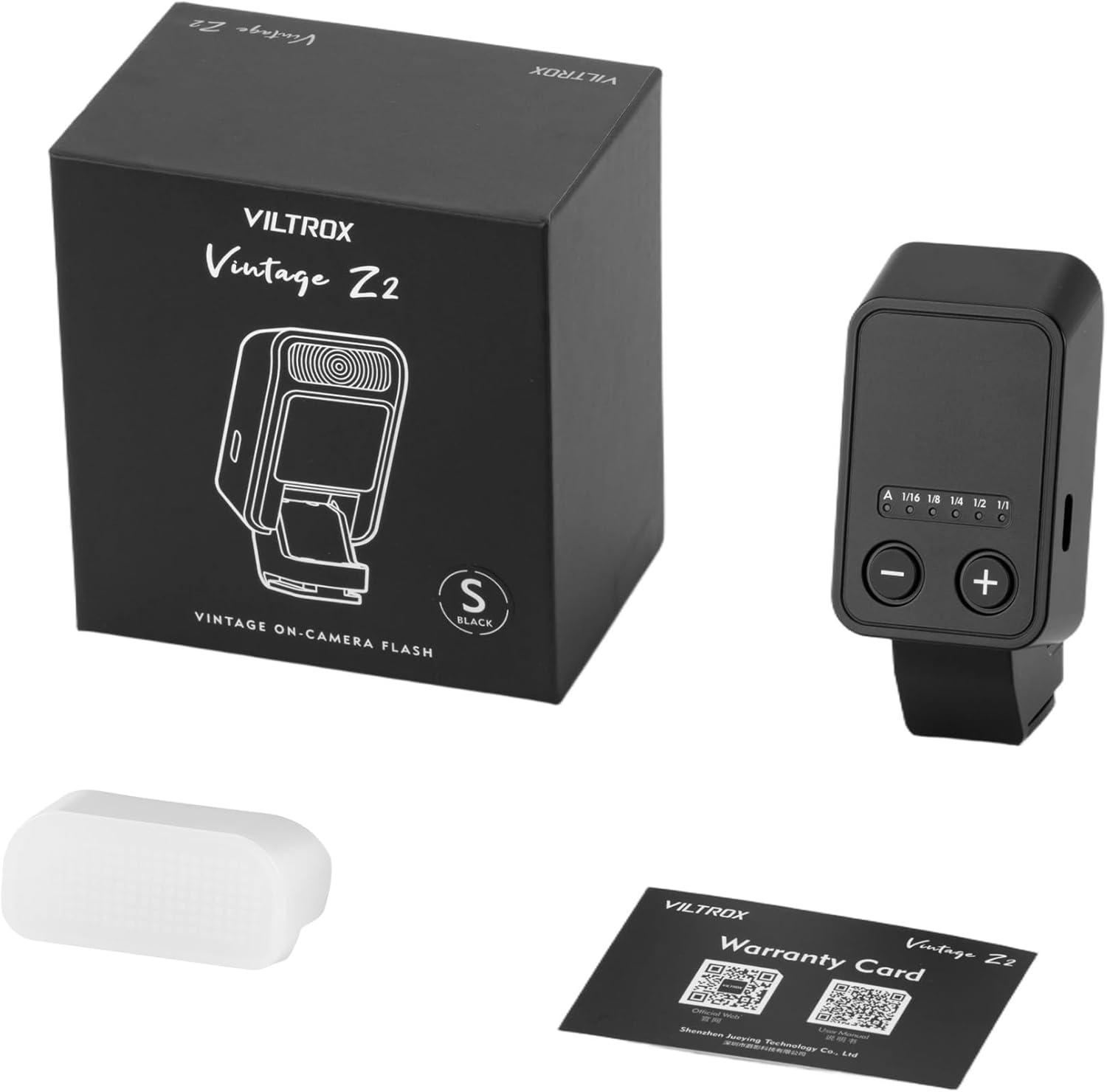
3. Product Overview
3.1 Controls and Indicators
- Power Switch / Pre-flash Button / Recycle Indicator: Located on the side, this button turns the unit on/off and can be pressed to test fire the flash. The indicator light shows the flash's readiness.
- Type-C Charging Interface: A USB-C port for charging the internal battery.
- Power Plus (+) Button: Used to increase flash power in Manual mode or for other adjustments.
- Power Minus (-) Button: Used to decrease flash power in Manual mode or to switch between TTL (A) and Manual (M) modes (long press).
- Battery Level Indicator: LEDs on the top surface indicate the remaining battery charge.
- Manual Mode Power Indicator: LEDs indicating power levels (1/16, 1/8, 1/4, 1/2, 1/1) in Manual mode.
- A (TTL) Indicator Light: An LED that illuminates when the flash is in TTL automatic mode.
- Light-Emitting Area: The flash head where light is emitted.
- Hot Shoe: The mounting foot for attaching the flash to your camera.

4. Setup
4.1 Charging the Flash
The VILTROX Vintage Z2 flash uses a built-in rechargeable battery. To charge the device:
- Connect a Type-C USB cable to the charging port on the side of the flash unit.
- Connect the other end of the cable to a suitable USB power source (e.g., wall adapter, computer USB port).
- The power indicator lights will flash to indicate charging.
- Once fully charged, the indicator lights will stop flashing and remain solid. You can then disconnect the power cable.

4.2 Mounting and Detaching
To attach the flash to your Nikon camera:
- Align the hot shoe of the flash with the camera's hot shoe mount.
- Gently push the flash forward until it is fully seated and securely connected. Ensure it is firm to prevent accidental detachment.
- Unfold the flash head to its upright position for use. The foldable design raises the flash head approximately 60mm, which helps reduce harsh shadows and provides more natural lighting.
To detach the flash:
- Hold the base of the flash unit.
- Gently push it backward (outward from the camera) to release it from the hot shoe.

4.3 Using the Diffuser
If the flash light appears too harsh, you can attach the included diffuser to the flash head. This will soften the illumination, resulting in more pleasing and natural-looking photographs.

5. Operating Instructions
5.1 Camera Settings (Nikon)
To ensure proper communication and functionality with your Nikon camera, follow these steps:
- Long press the power button on the flash unit to turn it on.
- Adjust your camera's shooting mode to M (Manual) mode.
- Press the camera's MENU button.
- Navigate to the Custom Settings Menu.
- Select Shooting/Display.
- Under Shutter Type, select Mechanical Shutter.
- Return to the Photo Shooting Menu.
- Find Flash Mode and select Fill Flash.
- Go back to the Custom Settings Menu.
- Find Bracketing/Flash.
- Set the Flash Sync Speed to 1/200s.
- If shooting in A (TTL) mode and the flash output is too dim, go to the Photo Shooting Menu, find Flash Compensation, and adjust it to the appropriate power output.
5.2 Mode and Power Adjustment
The VILTROX Vintage Z2 flash supports both TTL (Automatic) and Manual modes.
- Switching Modes (A/M): Long press the Power Minus (-) button to toggle between Automatic (A) and Manual (M) modes. The corresponding indicator light (A or power level LEDs) will illuminate.
- Adjusting Power (Manual Mode): In Manual (M) mode, short press the Power Plus (+) or Power Minus (-) buttons to adjust the flash power output. The available power levels are typically 1/16, 1/8, 1/4, 1/2, and 1/1.

5.3 Official Product Video Tutorial
6. Maintenance
- Cleaning: Use a soft, dry cloth to clean the flash unit. Do not use abrasive cleaners or solvents.
- Storage: Store the flash in a cool, dry place away from direct sunlight and extreme temperatures.
- Battery Care: For long-term storage, ensure the battery is partially charged (around 50%) and recharge it every few months to maintain battery health.
7. Troubleshooting
| Problem | Possible Cause | Solution |
|---|---|---|
| Flash not firing | Low battery; Incorrect camera settings; Flash not securely mounted. | Charge the flash; Verify camera settings (M mode, mechanical shutter, fill flash); Re-mount flash securely. |
| Flash output too dim/bright | Incorrect flash compensation; Incorrect manual power setting. | Adjust Flash Compensation in camera menu (A mode); Adjust manual power using +/- buttons (M mode). |
| Flash head not folding/unfolding smoothly | Obstruction or debris. | Gently check for and remove any obstructions. Do not force the mechanism. |
8. Specifications
| Feature | Specification |
|---|---|
| Brand | VILTROX |
| Model Name | Vintage Z2 |
| Compatible Mountings | Nikon 1 |
| Camera Flash Type | Hotshoe |
| Exposure Control Type | TTL, Manual |
| Guide Number | 6 |
| Flash Sync Speed | 1/6000s-1/55000s |
| Connectivity Technology | Wired |
| Hardware Interface | USB Type C |
| Color Temperature | 6500 Kelvin |
| Battery Life | 1.5 Hours (Average) |
| Item Dimensions (D x W x H) | 1.51"D x 1.46"W x 2.62"H |
| Color | Black |
| Water Resistance Level | Not Water Resistant |
9. Warranty and Support
The VILTROX Vintage Z2 TTL Mini Speedlite Flash comes with a 2-Year Manufacturer Warranty. For warranty claims, technical support, or service inquiries, please contact VILTROX customer service through their official website or the retailer where the product was purchased. Please retain your proof of purchase for warranty validation.