
Philips NX5300/00
Philips OneChef Smart All-in-One Cooking Device NX5300/00 User Manual
Model: NX5300/00
1. Introduction
Welcome to the Philips OneChef Smart All-in-One Cooking Device user manual. This appliance is designed to simplify your cooking experience with its versatile 33-in-1 functions and AmbiHeat Technology. Please read this manual thoroughly before using the device to ensure safe and optimal performance. Keep this manual for future reference.
2. Important Safety Instructions
When using electrical appliances, basic safety precautions should always be followed, including the following:
- Read all instructions carefully before use.
- Do not touch hot surfaces. Use handles or knobs.
- To protect against electrical shock, do not immerse cord, plugs, or the main unit in water or other liquid.
- Close supervision is necessary when any appliance is used by or near children.
- Unplug from outlet when not in use and before cleaning. Allow to cool before putting on or taking off parts.
- Do not operate any appliance with a damaged cord or plug, or after the appliance malfunctions or has been damaged in any manner.
- The use of accessory attachments not recommended by the appliance manufacturer may cause injuries.
- Do not use outdoors.
- Do not let cord hang over edge of table or counter, or touch hot surfaces.
- Do not place on or near a hot gas or electric burner, or in a heated oven.
- Extreme caution must be used when moving an appliance containing hot oil or other hot liquids.
- Always attach plug to appliance first, then plug cord into the wall outlet. To disconnect, turn any control to "off", then remove plug from wall outlet.
- Do not use appliance for other than intended use.
- This appliance is for household use only.
3. Product Overview
3.1 Key Features
- 33-in-1 Smart Cooking Functions: Offers multiple cooking modes including Airfry, Stirfry, Boil, Steam, Curry, Bake, and Keep Warm.
- AmbiHeat Technology: Intelligent sensors automatically adjust heat and temperature across different cooking stages for consistent results.
- 6L Large Capacity: Suitable for cooking meals for up to 5 people.
- Premium Design: Features a sleek matte finish and a soft-touch lid landing mechanism.
- Effortless Cooking: Reduced supervision with intelligent temperature sensors and preset modes.
- Philips HomeID App: Access recipe inspiration and cooking guidance.
- 2-Year Warranty: Manufacturer's warranty for peace of mind.
3.2 Components and Accessories
The Philips OneChef comes with the following components and accessories:
- OneChef Main Unit
- Cooking Pot
- Airfrying Rack
- Steaming Basket
- Idli Tray
- Glass Lid (for cooking pot)

Figure 1: Philips OneChef Smart All-in-One Cooking Device main unit. This image shows the sleek black and copper design of the appliance with its digital control panel.

Figure 2: Close-up of the Philips OneChef control panel, displaying various preset cooking functions like Airfry, Stir Fry, Curry, Steam, Boil, Keep Warm, and specific food options such as Veg, Chicken, Fish, Paneer, Cake, Pizza, Fries, Manual, Tadka, Idli/Momos, Sambar, Rice/Biryani, Dal, and Pasta.

Figure 3: Diagram illustrating the AmbiHeat Technology, showing heat circulating evenly within the cooking pot to ensure thorough and consistent cooking.

Figure 4: All included accessories for the Philips OneChef, including the main unit, cooking pot, glass lid, steaming basket, airfrying rack, and idli plate.
4. Setup and First Use
- Unpacking: Carefully remove all components from the packaging. Retain packaging for future storage or transport.
- Cleaning: Before first use, wash the cooking pot, airfrying rack, steaming basket, idli tray, and glass lid with warm soapy water. Rinse thoroughly and dry all parts. Wipe the main unit with a damp cloth.
- Placement: Place the OneChef main unit on a stable, level, heat-resistant surface, away from walls and other appliances to allow for proper ventilation.
- Power Connection: Ensure the appliance is unplugged before placing the cooking pot inside. Insert the cooking pot into the main unit.
- Initial Power On: Plug the power cord into a grounded electrical outlet. The display will light up.
5. Operating Instructions
5.1 Understanding the Control Panel
The digital control panel allows you to select various cooking functions, adjust time and temperature, and start/stop cooking. Refer to Figure 2 for a visual guide.
- Preset Functions: Select from a range of pre-programmed settings for common dishes like Veg, Chicken, Fish, Paneer, Cake, Pizza, Fries, Tadka, Idli/Momos, Sambar, Rice/Biryani, Dal, and Pasta.
- Cooking Modes: Dedicated buttons for Airfry, Stir Fry, Curry, Steam, Boil, and Keep Warm.
- Manual Mode: Allows for custom temperature and time settings.
- Temperature/Time Adjustment: Use the arrow buttons to increase or decrease cooking time or temperature.
- Start/Pause Button: Initiates or pauses the cooking process.
5.2 Basic Cooking Steps
- Prepare Ingredients: Place your ingredients into the cooking pot or appropriate accessory (e.g., airfrying rack, steaming basket).
- Select Function: Choose your desired cooking function from the control panel. For preset functions, the device will suggest a default time and temperature.
- Adjust Settings (Optional): If using Manual mode or if you wish to modify a preset, adjust the time and temperature using the arrow buttons.
- Start Cooking: Press the Start/Pause button to begin cooking.
- Monitoring: The AmbiHeat Technology will intelligently manage the cooking process. You can monitor the remaining time on the display.
- Keep Warm: After cooking, the device may automatically switch to Keep Warm mode, or you can select it manually to maintain food temperature.
- Serve: Carefully remove the cooked food using heat-resistant utensils.
5.3 Using Specific Functions
- Airfry: Use the airfrying rack for crispy results with minimal oil. Ideal for fries, chicken, and other fried snacks.
- Stir Fry: Use the cooking pot for stir-frying vegetables or meats.
- Steam: Place water in the cooking pot and use the steaming basket for steaming vegetables, momos, or idlis.
- Boil: Suitable for boiling water, pasta, or vegetables directly in the cooking pot.
- Curry: Optimized settings for preparing various curries.
- Bake: Use for baking cakes or other baked goods.
- Keep Warm: Automatically or manually activated to keep food at serving temperature without overcooking.
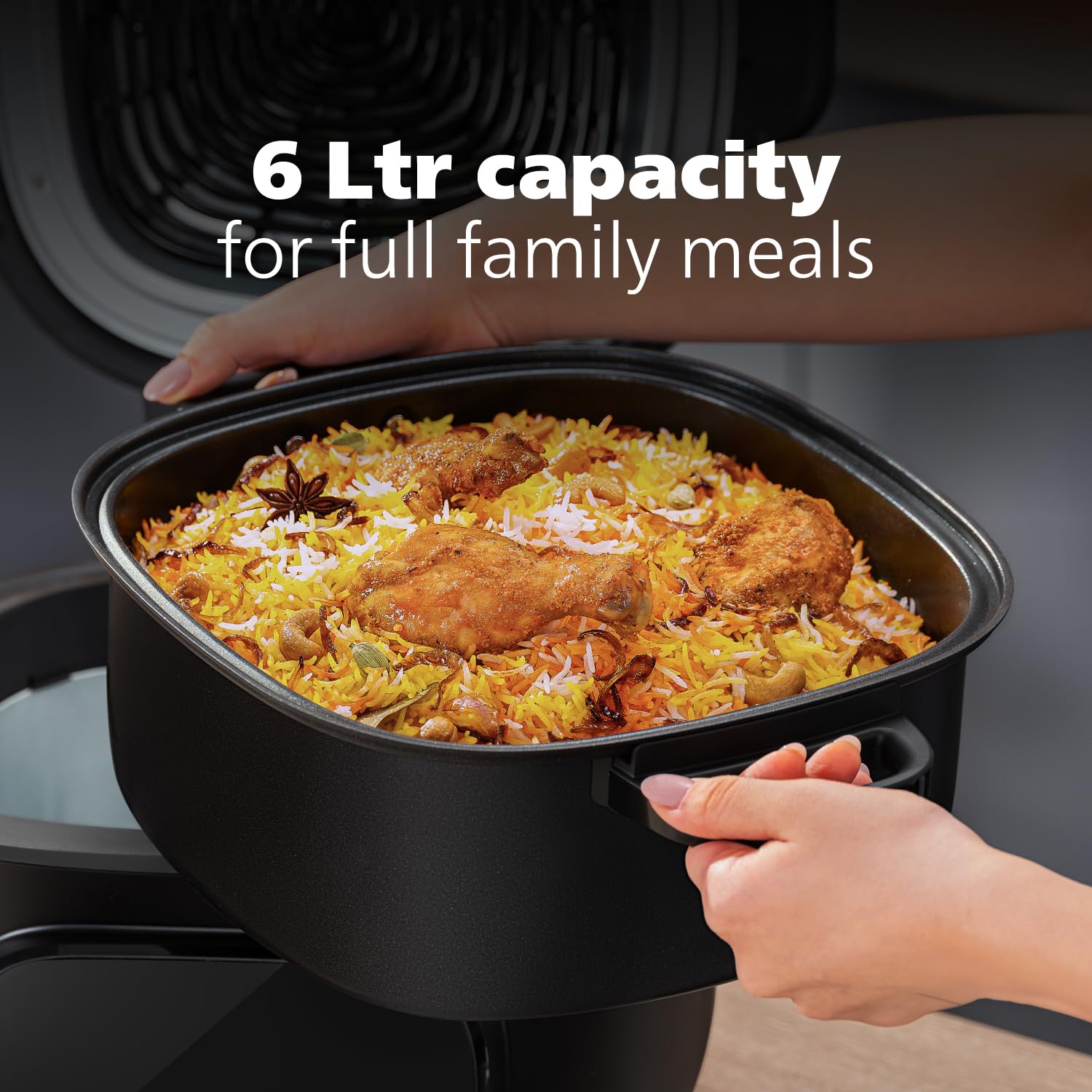
Figure 5: The 6-liter cooking pot filled with Biryani, demonstrating the large capacity suitable for family meals.

Figure 6: The Philips OneChef in Keep Warm mode, showing a dish of cooked vegetables being served, indicating the food remains warm and ready.
5.4 Official Product Video
Video 1: An official product video showcasing the Philips OneChef Smart All-in-One Cooking Device, demonstrating various cooking functions like Boil, Steam, Stir Fry, and highlighting the AmbiHeat Technology and its 33 smart cooking functions.
6. Cleaning and Maintenance
Regular cleaning ensures the longevity and optimal performance of your Philips OneChef.
- Unplug and Cool: Always unplug the appliance and allow it to cool completely before cleaning.
- Dishwasher Safe Parts: The cooking pot, airfrying rack, steaming basket, idli tray, and glass lid are dishwasher safe. Alternatively, wash them with warm soapy water and a non-abrasive sponge.
- Main Unit: Wipe the exterior of the main unit with a soft, damp cloth. Do not immerse the main unit in water or any other liquid.
- Interior: Clean the interior of the main unit with a damp cloth, ensuring no food residue remains.
- Storage: Store the appliance in a dry place once all parts are clean and dry.
7. Troubleshooting
If you encounter issues with your Philips OneChef, refer to the following common problems and solutions:
| Problem | Possible Cause | Solution |
|---|---|---|
| Appliance does not turn on. | Not plugged in, power outage, faulty outlet. | Ensure the power cord is securely plugged into a working outlet. Check your home's circuit breaker. |
| Food is not cooking evenly. | Overcrowding, incorrect temperature/time settings. | Do not overcrowd the cooking pot or accessories. Adjust temperature and time as per recipe or desired doneness. Ensure AmbiHeat sensors are clean. |
| Smoke coming from the appliance. | Food residue, excessive oil, or fat. | Unplug immediately. Allow to cool and clean thoroughly. Use less oil if air frying. Ensure no food is stuck to heating elements. |
| Display shows an error code. | Internal malfunction. | Unplug the appliance, wait a few minutes, then plug it back in. If the error persists, contact customer support. |
8. Specifications
| Attribute | Detail |
|---|---|
| Brand | Philips |
| Model Number | NX5300/00 |
| Capacity | 6 Litres |
| Colour | Black |
| Product Dimensions (D x W x H) | 38.5D x 38.5W x 35.7H Centimeters |
| Wattage | 2280 Watts |
| Voltage | 230 Volts |
| Item Weight | 6220 Grams |
| Dishwasher Safe Parts | Yes (Cooking Pot, Airfrying Rack, Steaming basket, Idli Tray, Glass Lid) |
| Country of Origin | India |
9. Warranty and Support
Your Philips OneChef Smart All-in-One Cooking Device comes with a 2-Year Manufacturer's Warranty from the date of purchase.
For warranty claims, technical support, or any product-related inquiries, please contact Philips customer service:
- Customer Service Number: 18005721800
- Manufacturer: Versuni India Home Solutions Limited
- Manufacturer Address: NEW SURVEY NO .797, GALLOPS INDUSTRIAL PARK 1, RAJODA, AHMEDABAD, -382220, GUJARAT, INDIA
Please retain your purchase receipt as proof of purchase for warranty purposes.
Ask a question about this manual
Ask about setup, troubleshooting, compatibility, parts, safety, or missing instructions. Manuals+ will review the question and use this page’s manual context to help answer it.