
Introduction
This manual provides comprehensive instructions for the jioeuinly phone case and tempered glass screen protector designed specifically for the Consumer Cellular IRIS Connect II SN512CC. This product offers robust protection, enhanced grip, and convenient features for your device. Please read these instructions carefully before installation and use.
Setup
Installing the Phone Case
The phone case is designed for easy installation and removal. It features a 2-in-1 construction with a hard PC back panel and a soft silicone frame, incorporating four-corner thickening and shock airbags for enhanced protection.
- Ensure your Consumer Cellular IRIS Connect II SN512CC phone is clean and free of dust.
- Align the phone with the soft silicone frame of the case.
- Gently press the phone into the case, ensuring all edges are securely seated within the frame.
- Verify that all ports, buttons, and camera cutouts align correctly.

Figure 1: Illustration of the case's shockproof features, including 2-in-1 hard PC and soft silicone construction, four-corner thickening, and shock airbags.
Installing the Tempered Glass Screen Protector
The included tempered glass screen protector provides 9H high hardness, shatterproof properties, and 99.9% super transparency, offering robust protection against scratches and impacts.
- Clean your phone screen thoroughly using a lint-free cloth and screen cleaner. Ensure no dust particles remain.
- Carefully peel off the protective film from the adhesive side of the tempered glass screen protector.
- Align the screen protector precisely with your phone's screen, paying attention to the speaker, camera, and home button cutouts.
- Once aligned, gently lower the screen protector onto the screen. It will adhere automatically.
- Use a clean cloth to gently press out any air bubbles from the center outwards.

Figure 2: Key features of the tempered glass screen protector, including 9H hardness and shatterproof design.

Figure 3: Visual representation of the screen protector's scratch-proof and impact-resistant properties.
Operating Instructions
Using the Ring Stand
The integrated metal finger ring support offers versatile functionality for improved handling and media viewing.
- Enhanced Grip: Slide your finger through the ring for a secure hold, reducing the risk of accidental drops.
- Kickstand Function: Rotate the ring 360 degrees and flip it 180 degrees to position your phone at an optimal viewing angle for hands-free use.
- One-Hand Operation: The ring allows for easier reach across the screen, improving one-handed usability.
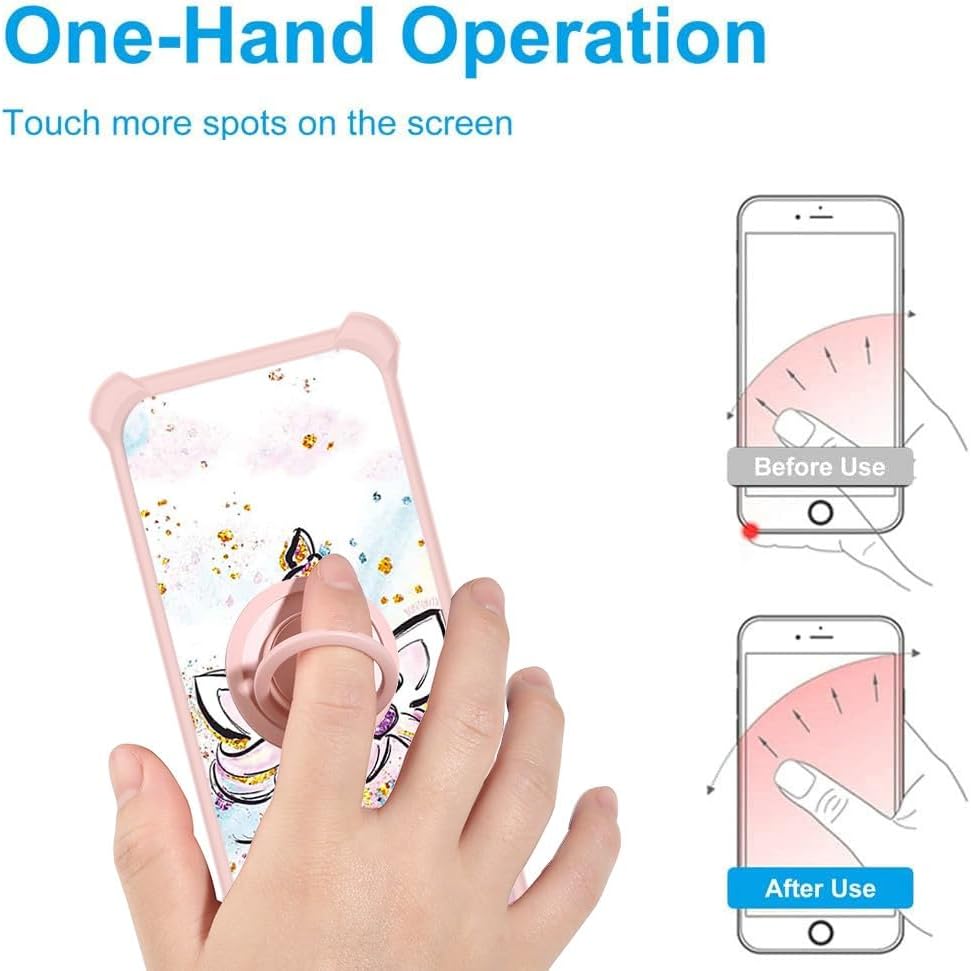
Figure 4: Demonstrating improved one-hand operation and reach with the integrated ring stand.
Magnetic Car Mount Compatibility
The metal finger ring support is designed with magnetic properties for compatibility with magnetic car mounts.
- Magnetic Suction: The metal ring allows the phone case to attach securely to magnetic car mounts (car mount not included).
- Important Note: This case does not support wireless charging due to the integrated metal ring. Remove the case for wireless charging.

Figure 5: The ring stand's magnetic feature for use with car mounts, along with rotation capabilities.
Luminous Effect
The case features a unique gold glitter and luminous design.
- Shining Effect: The gold powder layer produces a shining effect when exposed to light or sunlight.
- Fluorescent Glow: After absorbing light and sunlight, the case will exhibit a fluorescent glow in dark environments.

Figure 6: Details of the gold glitter craft and luminous style, including the layered back panel construction.
Maintenance
Proper care will extend the life and appearance of your phone case and screen protector.
- Cleaning the Case: Wipe the case regularly with a soft, damp cloth to remove dust and smudges. Avoid harsh chemicals or abrasive materials.
- Cleaning the Screen Protector: Use a microfiber cloth to gently wipe the screen protector. For stubborn smudges, a small amount of screen cleaner can be applied to the cloth, not directly to the screen.
- Avoid Extreme Temperatures: Do not expose the case or screen protector to extreme heat or cold, as this may affect their material integrity.
Troubleshooting
Common issues and their solutions.
- Screen Protector Bubbles: If bubbles appear after installation, gently lift the nearest edge of the protector and reapply, pushing the bubble out with a clean cloth. Small bubbles may disappear naturally within 24-48 hours.
- Ring Stand Looseness: If the ring stand becomes loose over time, ensure it is properly tightened. If it continues to loosen, it may indicate wear.
- Case Fit Issues: If the case does not fit perfectly, ensure you have the correct model (Consumer Cellular IRIS Connect II SN512CC). Remove and re-install the case, ensuring all corners are properly seated.
Specifications
Detailed specifications for the jioeuinly phone case and screen protector.
| Brand | jioeuinly |
| Compatible Phone Model | Consumer Cellular IRIS Connect II SN512CC |
| Case Material | Hard PC back panel + Soft Silicone frame + Metal support finger ring |
| Screen Protector Material | Tempered Glass (9H Hardness) |
| Case Features | 2-in-1 design (Hard PC + Soft Silicone), Four-corner shock airbags, Raised edges for camera and screen protection, Gold glitter + Luminous effect |
| Ring Stand Features | 360-degree rotation, 180-degree flip, Magnetic car mount compatible (car mount not included), Does not support wireless charging |
| Screen Protector Features | 9H High Hardness, Shatterproof, 99.9% Super Transparency, Anti-fingerprint, Case Friendly |