
1. Introduction and Overview
This manual provides detailed instructions for the assembly, operation, and maintenance of your DWVO Folding Sewing Table with Charging Station & Storage. This versatile furniture piece is designed to maximize your workspace efficiency with its foldable design and integrated features.
The DWVO Folding Sewing Table functions as a dedicated sewing station, a craft desk, a computer desk, a vanity table, a side cabinet, or an entryway cabinet. Key features include a built-in charging station with AC outlets and USB ports, ample storage compartments, lockable wheels for mobility, and magnetic doors for secure closure.

Figure 1: DWVO Folding Sewing Table in open configuration, ready for use.
2. Safety Information
Please read and understand all safety instructions before assembly and use to prevent injury or damage to the product.
- Always ensure the product is fully opened and stable before use.
- Keep fingers away from the folding mechanism during opening and closing to avoid pinching.
- Use the lockable wheels carefully to prevent accidental movement, especially when the table is in use or loaded.
- Always follow the assembly instructions precisely for safe and secure setup.
- Do not overload shelves or the work surface beyond recommended weight limits.
3. Package Contents
Verify that all components are present before beginning assembly. If any parts are missing or damaged, contact customer support.
- Main table panels (top, side, base, back)
- Folding work surface panels
- Internal shelves and dividers
- Magnetic door panels
- Lockable wheels (4 units)
- Built-in charging station unit (2 AC outlets, 2 USB ports)
- Hardware pack (screws, dowels, cam locks, hinges, handles, etc.)
- Assembly instructions (this manual)
Note: Basic assembly tools such as a screwdriver and hammer are required but not included.
4. Setup and Assembly
Follow the step-by-step instructions provided in the separate assembly guide included with your product. Ensure you have adequate space and the necessary tools before starting.
- Unpack and Identify Parts: Carefully remove all components from the packaging and lay them out. Compare them against the parts list in your assembly guide.
- Assemble Main Frame: Connect the side panels to the base and top panels using the provided hardware.
- Install Internal Shelving: Insert the fixed and adjustable shelves into their designated slots.
- Attach Wheels: Secure the four lockable wheels to the bottom of the base panel. Ensure they are tightened for stability.
- Install Charging Station: Integrate the built-in charging station into the designated cutout on the work surface or top panel, following the electrical connection instructions.
- Attach Folding Work Surface: Secure the folding work surface panels using the hinges and support mechanisms. Test the folding action to ensure smooth operation.
- Install Magnetic Doors: Attach the magnetic doors to the cabinet frame. Adjust hinges as needed for proper alignment and secure closure.
- Final Check: Verify all connections are secure and the table is stable before use.
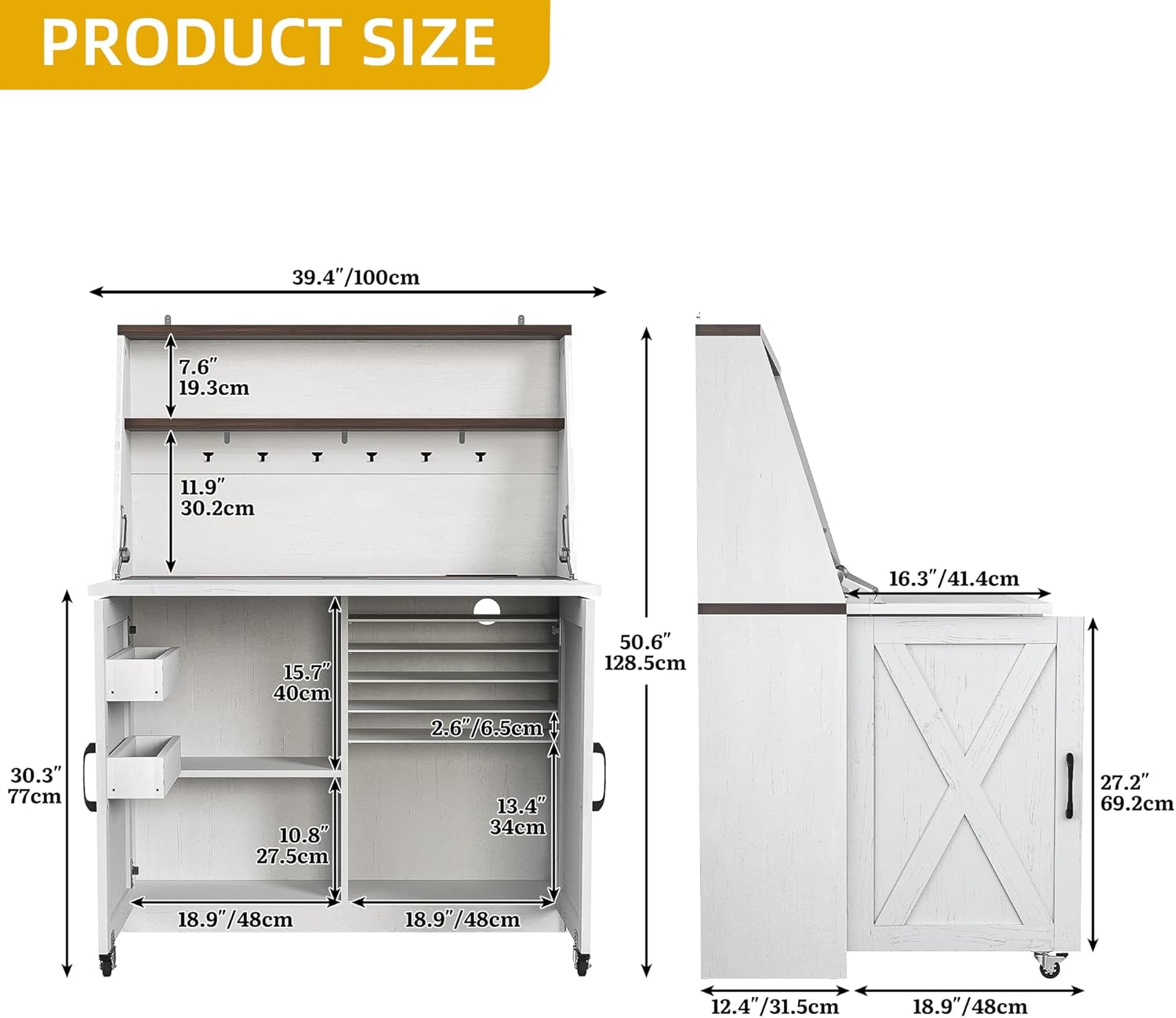
Figure 2: Product dimensions for planning your space.
5. Operating Instructions
5.1 Folding and Unfolding the Work Surface
- To unfold the work surface: Gently pull the side panels outwards. The hinged tabletop will extend, creating a larger work area. Ensure the support rollers are fully extended and locked into place for stability.
- To fold the work surface: Push the side panels inwards. The hinged tabletop will retract, converting the unit into a compact cabinet. Ensure the magnetic doors close securely.

Figure 3: The table in its open and folded configurations.
5.2 Using the Charging Station
The integrated charging station provides convenient power for your devices.
- Plug the table's power cord into a standard wall outlet.
- Use the 2 AC outlets (120V/12A) to power your sewing machine or other small appliances.
- Use the USB A port (5V/2A) and USB C port (5V/2A) to charge your electronic devices such as phones or tablets.

Figure 4: Detail of the built-in charging station.
5.3 Utilizing Storage and Mobility
- Storage: Organize your sewing supplies, craft materials, or other items in the various open shelves and hidden compartments. The magnetic doors ensure contents are concealed when not in use.
- Mobility: The lockable wheels allow you to easily move the table to different locations. Engage the wheel locks when the table is in your desired position to prevent unwanted movement.

Figure 5: Examples of the table's multi-functional uses.
6. Maintenance
Regular maintenance will ensure the longevity and optimal performance of your sewing table.
- Cleaning: Wipe surfaces with a soft, damp cloth. Avoid harsh chemicals or abrasive cleaners, which can damage the painted finish. For stubborn spots, use a mild soap solution and dry immediately.
- Hardware Check: Periodically check all screws, bolts, and connections to ensure they are tight. Retighten if necessary to maintain stability.
- Wheel Maintenance: Keep the wheels free of debris. If they become difficult to roll, clean the axles and apply a small amount of silicone lubricant if needed.
- Electrical Components: Ensure the charging station's power cord is not pinched or damaged. Do not attempt to repair the electrical components yourself; contact a qualified technician if issues arise.
7. Troubleshooting
If you encounter any issues with your DWVO Folding Sewing Table, refer to the following common problems and solutions.
7.1 Table is Unstable
- Solution: Ensure all assembly hardware is securely tightened. Check that the folding work surface supports are fully extended and locked. Verify the lockable wheels are engaged when the table is stationary.
7.2 Charging Station Not Working
- Solution: Confirm the table's main power cord is securely plugged into a functional wall outlet. Check if the devices you are trying to charge are properly connected to the outlets/ports. Avoid overloading the charging station.
7.3 Folding Mechanism is Stiff or Stuck
- Solution: Ensure no objects are obstructing the folding path. Gently apply pressure to the mechanism. If stiffness persists, check hinges for debris and clean if necessary. Do not force the mechanism.
For issues not covered here, please contact DWVO customer support.
8. Specifications
| Feature | Specification |
|---|---|
| Brand | DWVO |
| Model Number | MADWVObq65 |
| Product Dimensions (D x W x H) | 44.48" x 9.44" x 22.24" (folded) |
| Item Weight | 73.74 Pounds |
| Color | White |
| Material Type | Engineered Wood |
| Finish Type | Painted |
| Special Features | Lockable Wheels, Built-in Charging Station (2 AC outlets, 1 USB-A, 1 USB-C) |
| Number of Shelves | 3 (open) + 1 (enclosed) |
| Assembly Required | Yes |
9. Warranty Information
The DWVO Folding Sewing Table is covered by a Limited Warranty. For specific details regarding warranty coverage, duration, and claims process, please refer to the warranty card included with your product or contact DWVO customer support directly.
10. Customer Support
If you have any questions, require assistance with assembly, or need to report missing/damaged parts, please contact DWVO customer support. Have your model number (MADWVObq65) and purchase information ready when contacting support.
For the most up-to-date contact information, please visit the official DWVO website or refer to your product packaging.