
Introduction
Thank you for choosing the Cearvol Nano-M-2 Audio Device. This manual provides essential information for the safe and effective use of your device. Please read it thoroughly before use and keep it for future reference.
The Cearvol Nano-M-2 is designed to enhance your listening experience with its discreet design, intuitive controls, and multiple listening modes. It is suitable for individuals with mild to moderate hearing loss.
What's in the Box
Verify that all components are present in your package:
- 1 x Cearvol Nano-M-2 Sound Amplifier (Left & Right)
- 1 x Charging Case
- 1 x Type-C Charging Cable
- 3 x Pairs of Eartips (S/M/L)
- 1 x Cleaning Brush
- 1 x User Manual (this document)
- 1 x Quick Start Guide

Image: All components included in the Cearvol Nano-M-2 package.
Setup
1. Initial Charging
Before first use, fully charge the device and its charging case. Connect the Type-C charging cable to the charging case and a power source. The indicator lights on the case will show charging status.
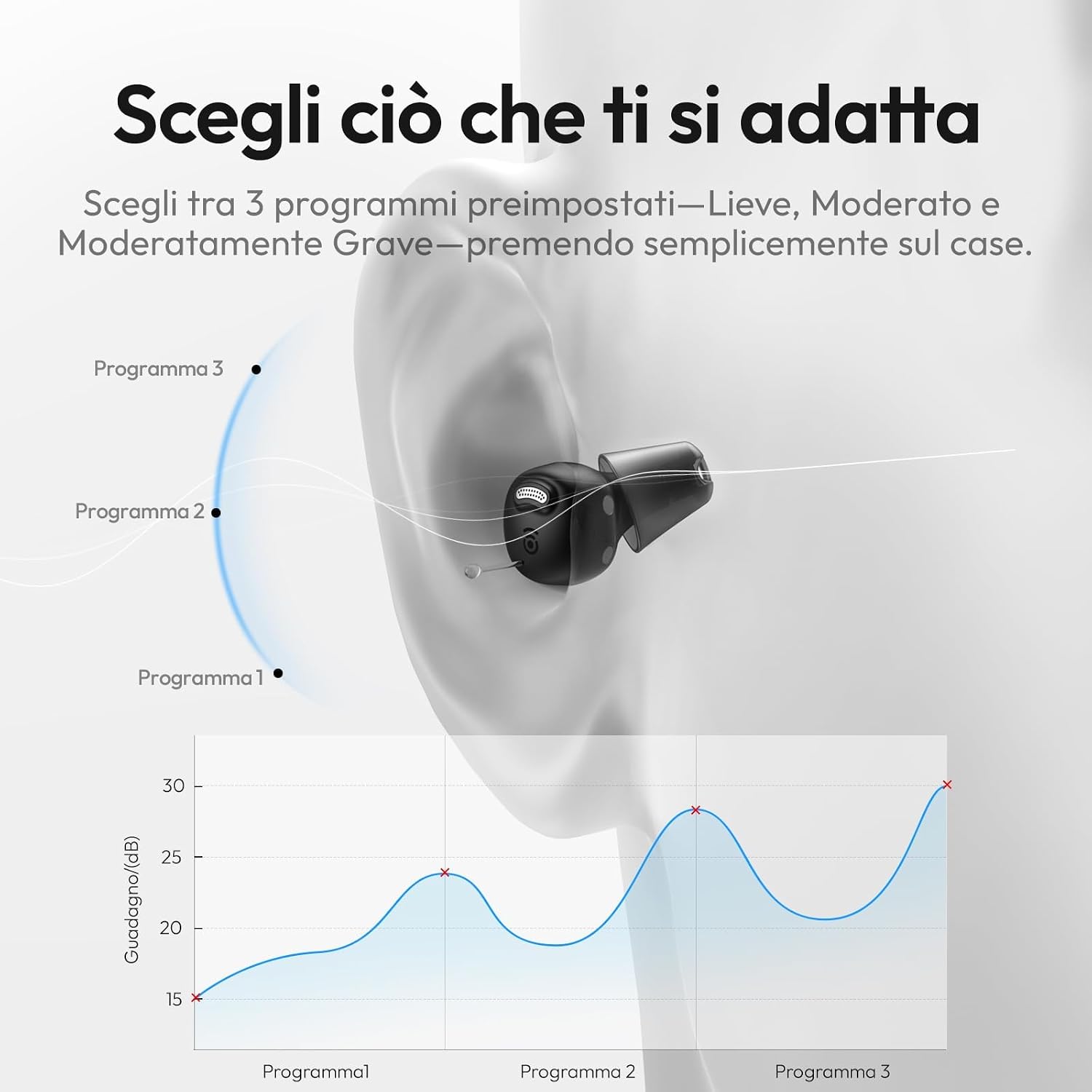
Image: The Cearvol Nano-M-2 charging case being charged via a Type-C cable.
A 15-minute quick charge provides several hours of use. A full charge offers up to 54 hours of total autonomy with the charging case.
2. Selecting Eartips
Choose the eartip size (S, M, L) that provides a comfortable and secure fit in your ear canal. A proper fit is crucial for optimal sound quality and to prevent feedback (whistling).

Image: Various sizes of eartips for the Cearvol Nano-M-2 device.
3. Wearing the Device
Follow these steps for correct placement to ensure comfort and prevent whistling:
- Remove the left device from the charging case.
- Hold the device as shown in the image before inserting.
- Ensure the "L" (for Left) marking faces forward, towards your face.
- Gently press to adapt it securely in your ear. Repeat for the right device.

Image: Quick guide illustrating the correct way to wear the Cearvol Nano-M-2 device.
If you experience whistling, adjust the device's position or try a different eartip size. Contact support if the issue persists.
Operating Instructions
1. Power On/Off
The devices automatically power on when removed from the charging case and power off when placed back into the case.
2. Adjusting Volume
Volume adjustments are made directly on the charging case. Use the '+' and '-' buttons to increase or decrease the volume for both devices simultaneously.

Image: Controls on the charging case for volume and mode selection.
3. Changing Listening Modes
The Cearvol Nano-M-2 offers three distinct listening modes, selectable via a button on the charging case:
- Indoor Mode: Optimized for quiet environments like your home.
- Outdoor Mode: Reduces wind noise and enhances sounds in open spaces.
- Restaurant Mode: Emphasizes human speech, making conversations clearer in noisy environments.
Press the 'M' button on the charging case to cycle through the modes. An adaptation period of 7-14 days may be required to get accustomed to new frequencies.

Image: Illustration of the three intelligent listening modes for various situations.
Maintenance
1. Cleaning the Device
Regular cleaning ensures optimal performance and hygiene. Use the provided cleaning brush to gently remove any earwax or debris from the eartips and sound outlets. Do not use liquids or harsh chemicals.

Image: The cleaning brush included with the device.
2. UV Sanitation
The charging case features integrated UV cleaning to sanitize the audio devices while they charge, eliminating up to 99.9% of bacteria for hygienic use.

Image: Charging case with UV sanitation in action.
3. Battery Care
To prolong battery life, avoid fully discharging the devices frequently. Store them in the charging case when not in use.
Troubleshooting
| Problem | Possible Cause | Solution |
|---|---|---|
| Whistling/Feedback sound | Improper fit, eartip too small, earwax blockage. | Adjust device position, try a larger eartip, clean the device and ear canal. |
| No sound or low volume | Device not powered on, low battery, volume too low, sound outlet blocked. | Ensure devices are removed from case, charge devices, increase volume, clean sound outlet. |
| My own voice sounds "boomy" or unnatural | Common during adaptation period, eartip fit. | Allow 7-14 days for adaptation. Ensure eartips are not too large, creating an overly sealed feeling. |
| Device not charging | Cable issue, power source issue, dirty charging contacts. | Check cable connection, try a different power adapter, clean charging contacts on device and case. |
If you encounter issues not listed here or if solutions do not resolve the problem, please contact Cearvol customer support.
Specifications
| Feature | Detail |
|---|---|
| Brand | Cearvol |
| Model Name | Nano-M-2 |
| Color | Midnight |
| Style | In-Ear |
| Power Source | Battery Powered |
| Special Functions | Volume Control, Adjustable, Rechargeable |
| Form Type | In-Ear |
| Number of Batteries | 1 Lithium Polymer (included) |
| Control Type | Button Control |
| Battery Composition | Lithium Ion |
| Audio Sensitivity | 30 Decibels |
| Noise Control | Adaptive Noise Cancellation |
| Recommended Product Uses | Indoor, Outdoor, Restaurant |
| UPC | 765267412767 |
| GTIN | 765267412767 |

Image: The Cearvol Nano-M-2 audio devices.
Warranty and Support
Cearvol provides 24/7 customer support. If you have any questions about the device's operation, controls, or experience issues like echoing, please contact our team. We aim to resolve technical problems within 24 hours.
For support, please refer to the contact information provided in your Quick Start Guide or visit the official Cearvol website.
The EU spare parts availability duration is 3 years.
Important Safety Information
- Do not expose the device to extreme temperatures or humidity.
- Keep out of reach of children and pets.
- Do not attempt to open or repair the device yourself. This will void the warranty.
- If you experience discomfort or pain, discontinue use and consult a medical professional.
- The device is IPX5 water-resistant, meaning it is protected against dust and splashes of water (rain, sweat). Do not submerge it in water.

Image: The Cearvol Nano-M-2 is designed for comfort and breathability.
Adaptation Period
Your hearing requires an adaptation period to adjust to new frequencies and amplified sounds. This typically takes 7-14 days. We recommend a gradual introduction:
- Week 1: Wear at home for 1-2 hours a day. New sounds will feel normal.
- Week 2: Wear outdoors for 3-4 hours a day. Your brain will continue to adapt.
- Week 3: Wear all day. Sounds will become clearer and more natural.
- Week 4: Sounds will feel completely natural. Enjoy your improved hearing!

Image: Gradual adaptation schedule for optimal user experience.

