
1. Introduction
Thank you for choosing the SEDETA Farmhouse L-Shaped Desk. This manual provides essential information for the safe assembly, operation, and maintenance of your new desk. Please read these instructions carefully before beginning assembly and retain them for future reference.
2. Safety Information
Always follow basic safety precautions when assembling and using this product to reduce the risk of injury or damage.
- Ensure all parts are present before assembly.
- Assemble on a soft, clean surface to prevent scratches.
- Do not overtighten screws during assembly.
- Keep small parts away from children.
- Do not stand or sit on the desk during assembly.
- Distribute weight evenly on the desk surface and shelves.
- Only use the integrated power outlet for compatible devices.
- Do not exceed the maximum weight capacity of the desk or shelves.
3. Package Contents
Verify that all components listed below are included in your package. If any parts are missing or damaged, please contact customer service.
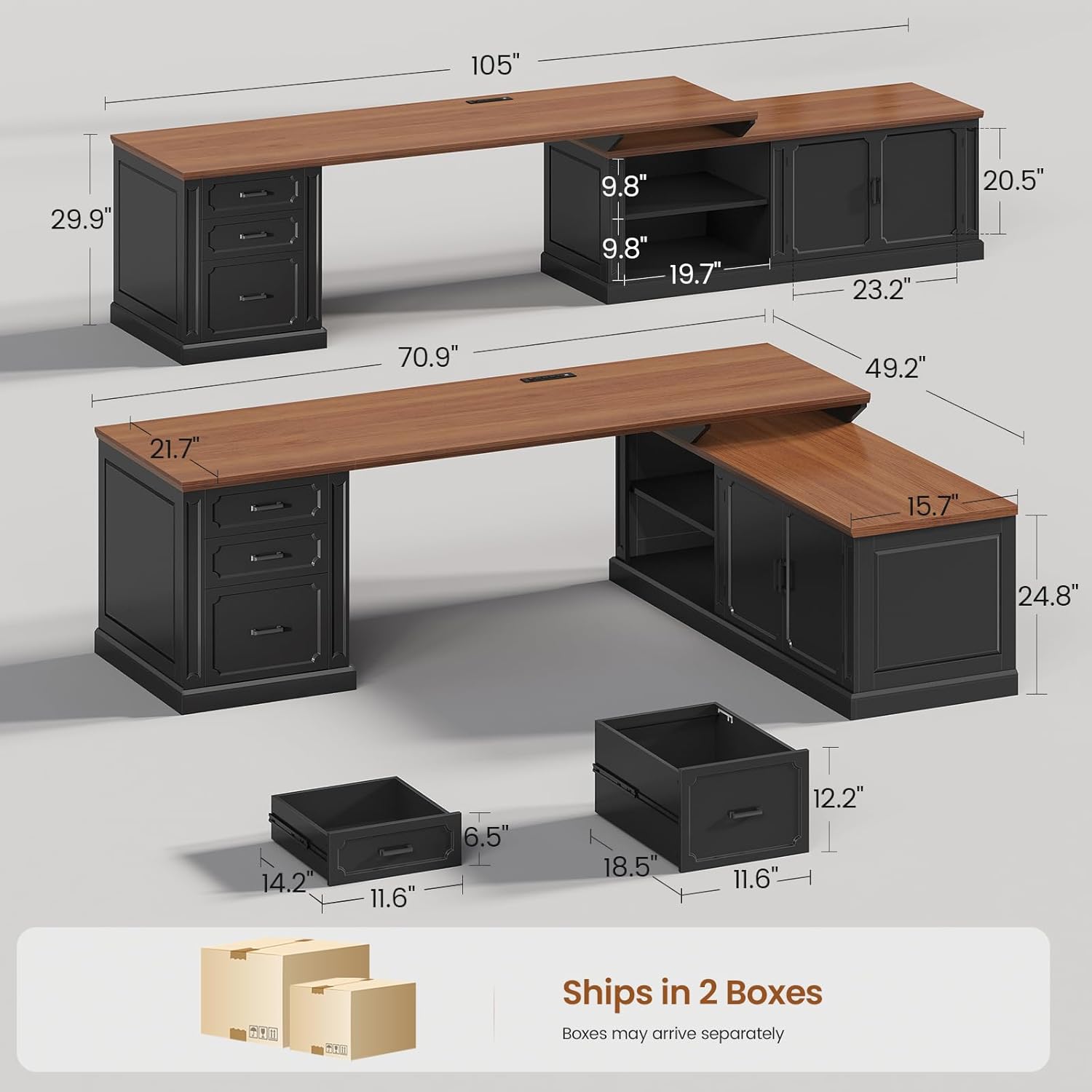
Image Description: This image displays the overall dimensions of the SEDETA Farmhouse L-Shaped Desk in both its L-shaped (49.2"D x 70.9"W x 29.9"H) and long (105"W x 21.7"D x 29.9"H) configurations. It also details the dimensions of the file drawer (14.2" x 11.6" x 6.5") and regular drawer (18.5" x 11.6" x 12.2"), and indicates that the product ships in two boxes.
Parts List:
- Desk Panels (various sizes)
- Drawer Components (fronts, sides, backs, bottoms)
- Cabinet Doors and Hinges
- Shelves
- Integrated Power Outlet Unit
- Assembly Hardware (screws, dowels, cam locks, etc.)
- Assembly Tools (Allen wrench, screwdriver - if included)
4. Setup and Assembly
Follow these step-by-step instructions for assembling your SEDETA Farmhouse L-Shaped Desk. It is recommended to have two people for assembly.
4.1 Preparation
- Clear a spacious area for assembly.
- Lay out all parts and hardware, matching them with the provided parts list.
- Keep the instruction manual handy for reference.
4.2 Assembly Steps
The desk can be assembled in an L-shaped configuration or as a long, straight desk. Choose the configuration that best suits your space.
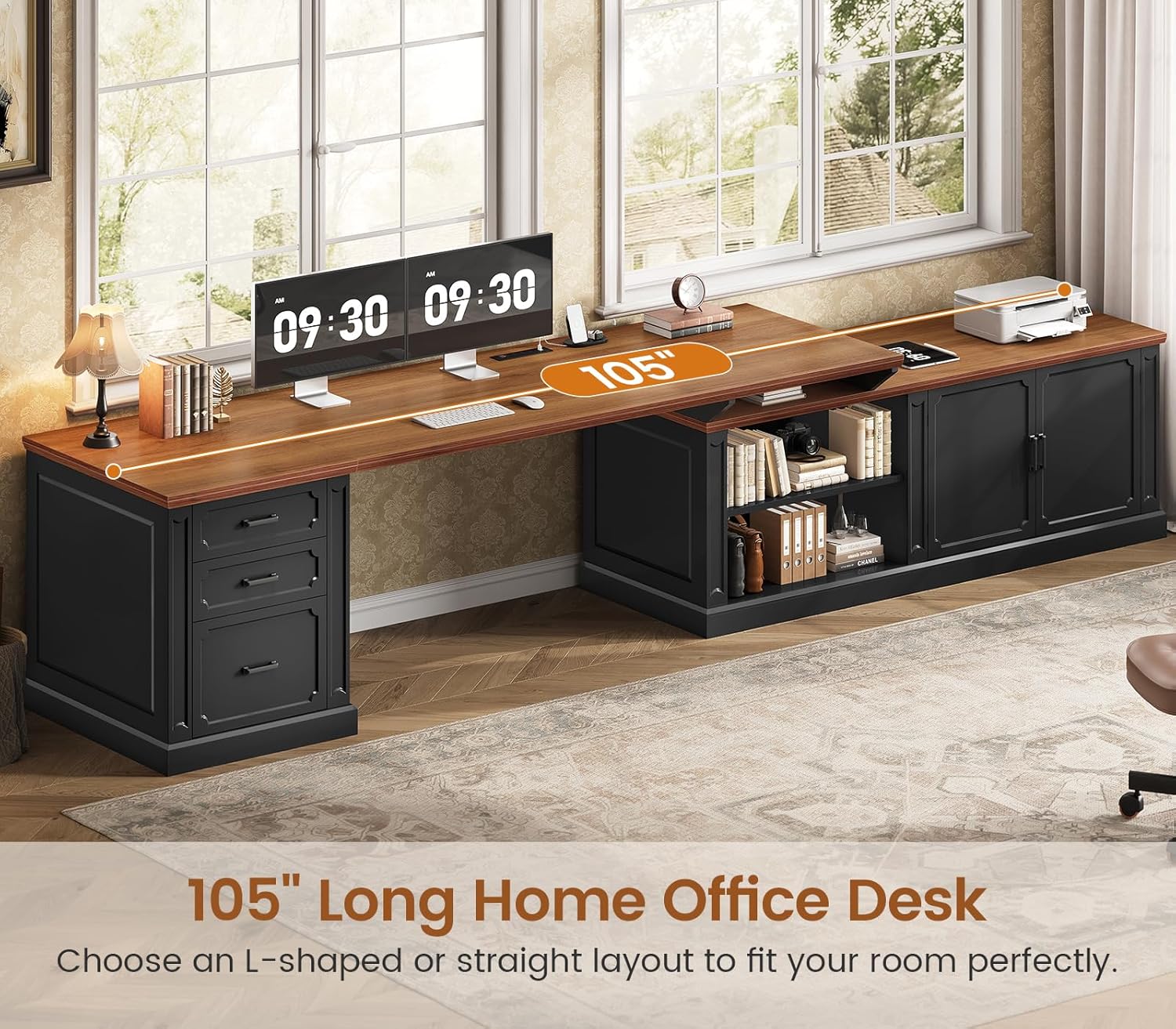
Image Description: This image illustrates the SEDETA Farmhouse L-Shaped Desk assembled into a 105-inch long desk configuration. It highlights the expansive workspace, accommodating two computer monitors, a keyboard, and various office items, set against a window backdrop.

Image Description: This image presents the SEDETA Farmhouse L-Shaped Desk in its L-shaped arrangement within a home office setting. It features a computer workstation, a printer on the side cabinet, and various decorative elements, emphasizing its practical and aesthetic appeal.
- Assemble the Main Desk Section: Attach the side panels to the main desktop using the provided hardware. Ensure all connections are secure.
- Assemble the Drawer Units: Construct the drawer boxes according to the diagrams. Install the drawer slides onto the desk frame and the drawers. Insert the assembled drawers into their respective slots.
- Assemble the Storage Cabinet and Shelves: Attach the cabinet side panels and back panel to the base. Insert the adjustable shelves into the desired positions. Attach the cabinet doors using the hinges.
- Integrate the Power Outlet: Carefully place the power outlet unit into the designated cutout on the desktop. Secure it if necessary and route the power cord safely.
- Connect Sections (for L-shaped configuration): If assembling as an L-shaped desk, connect the main desk section to the storage cabinet section using the provided connectors. Ensure alignment and stability.
- Final Checks: Verify that all screws are tightened, and the desk is stable.
5. Operating Instructions
Your SEDETA Farmhouse L-Shaped Desk is designed for versatile use in a home office or study environment.
5.1 Storage Features

Image Description: This diagram highlights the extensive storage options of the desk. It shows three drawers (one large file drawer, two regular drawers), a storage cabinet, and two open shelves, each clearly numbered to indicate their location and type.
- Drawers: The desk includes one file drawer and two regular drawers. The file drawer is designed to accommodate letter, A4, and legal-sized documents.
- Storage Cabinet: Use the cabinet for larger items or to keep supplies out of sight.
- Open Shelves: Ideal for books, decorative items, or frequently accessed materials.

Image Description: This image provides a detailed view of the desk's three drawers. It shows a top storage drawer, a middle drawer configured for legal-size files, and a bottom drawer set up for letter or A4-size files, illustrating the versatile filing options.

Image Description: This image showcases the open shelves and the closed storage cabinet section of the desk. The shelves are filled with books and binders, while the cabinet provides concealed storage, emphasizing the desk's organizational capabilities.
5.2 Integrated Power Outlet

Image Description: This image focuses on the desk's built-in power strip, which includes four AC outlets and two USB ports. It shows a smartphone and tablet charging, and features informational icons detailing the power strip's specifications: 4 AC outlets (120V/12A), 2 USB ports (5V/2A), a 6.5-foot power cord, and a safety switch.
- The charging station includes 4 AC outlets (120V/12A) and 2 USB ports (5V/2A).
- Use this to power and charge your electronic devices such as laptops, phones, and tablets.
- Ensure the safety switch is in the "ON" position for power delivery.
6. Maintenance and Care
Proper care will extend the life and appearance of your desk.
- Cleaning: Wipe surfaces with a soft, damp cloth. Avoid harsh chemicals or abrasive cleaners.
- Spills: Clean spills immediately to prevent staining or damage to the wood finish.
- Hardware: Periodically check and tighten all screws and fasteners to ensure stability.
- Sunlight: Avoid prolonged exposure to direct sunlight to prevent fading or discoloration.
- Heat: Do not place hot items directly on the desk surface without protection.
7. Troubleshooting
If you encounter any issues with your desk, refer to the following common problems and solutions.
7.1 Assembly Issues
- Wobbly Desk:
- Ensure all screws and fasteners are fully tightened.
- Verify that the desk is on a level surface. Adjust leg levelers if present.
- Drawers Not Sliding Smoothly:
- Check that drawer slides are correctly installed and aligned.
- Ensure no obstructions are in the drawer tracks.
- Missing Parts:
- Double-check the packaging. If parts are genuinely missing, contact customer service with your parts list and purchase information.
7.2 Power Outlet Issues
- No Power from Outlets/USB Ports:
- Ensure the desk's power cord is securely plugged into a functional wall outlet.
- Check if the safety switch on the power strip is in the "ON" position.
- Verify that the wall outlet itself is receiving power (test with another device).
- If the power strip has a reset button, press it.
8. Specifications
| Feature | Detail |
|---|---|
| Brand | SEDETA |
| Model | 70.9 inch L-Shaped Desk |
| Material | Engineered Wood |
| Color | Black (with Natural Wood finish top) |
| L-Shaped Dimensions (D x W x H) | 49.2" x 70.9" x 29.9" |
| Long Desk Dimensions (W x D x H) | 105" x 21.7" x 29.9" (approximate, based on images) |
| Item Weight | 136.6 Pounds |
| Storage | 1 File Drawer, 2 Regular Drawers, 1 Storage Cabinet, 2 Open Shelves |
| Power Outlet | 4 AC Outlets (120V/12A), 2 USB Ports (5V/2A), 6.5-foot Power Cord, Safety Switch |
| Assembly Required | Yes |
9. Warranty and Customer Support
SEDETA offers a 3-year service and is a 10-year trusted brand. For any questions, missing parts, or assistance with assembly, please contact SEDETA customer support.
Refer to your purchase documentation for specific warranty terms and contact information.
Contact Information: Please refer to the contact details provided with your product packaging or visit the official SEDETA website.