
Introduction
This manual provides detailed instructions for the safe and effective operation of your VSTM YDS-681 Wire Tracer. This tool is designed for automotive electrical diagnostics, including tracing wires, locating open circuits, identifying short circuits, and checking continuity in DC 6-42V electrical systems. Please read this manual thoroughly before use and retain it for future reference.
Important Safety Information
Always observe the following safety precautions to prevent personal injury or damage to the tool or vehicle:
- Ensure the vehicle's ignition is off and the battery is disconnected before connecting or disconnecting the tracer, unless specifically instructed otherwise for a test.
- Do not use the tool on AC circuits or circuits exceeding the specified DC 6-42V range.
- Wear appropriate personal protective equipment, including safety glasses, when working with electrical systems.
- Avoid contact with hot engine parts or moving components.
- Keep the tool dry and clean. Do not expose it to moisture or extreme temperatures.
- If the tool appears damaged, do not use it. Contact customer support for assistance.
Package Contents
Verify that all items are present in the package:
- Wire Tracer Transmitter
- Tracer Receiver
- Test Leads (with alligator clips)
- User Manual (this document)
- 9V Batteries (2 required, included)
Product Overview
The VSTM YDS-681 Wire Tracer is a comprehensive diagnostic tool designed to simplify automotive electrical troubleshooting. It consists of a transmitter and a receiver, working together to identify various circuit issues.
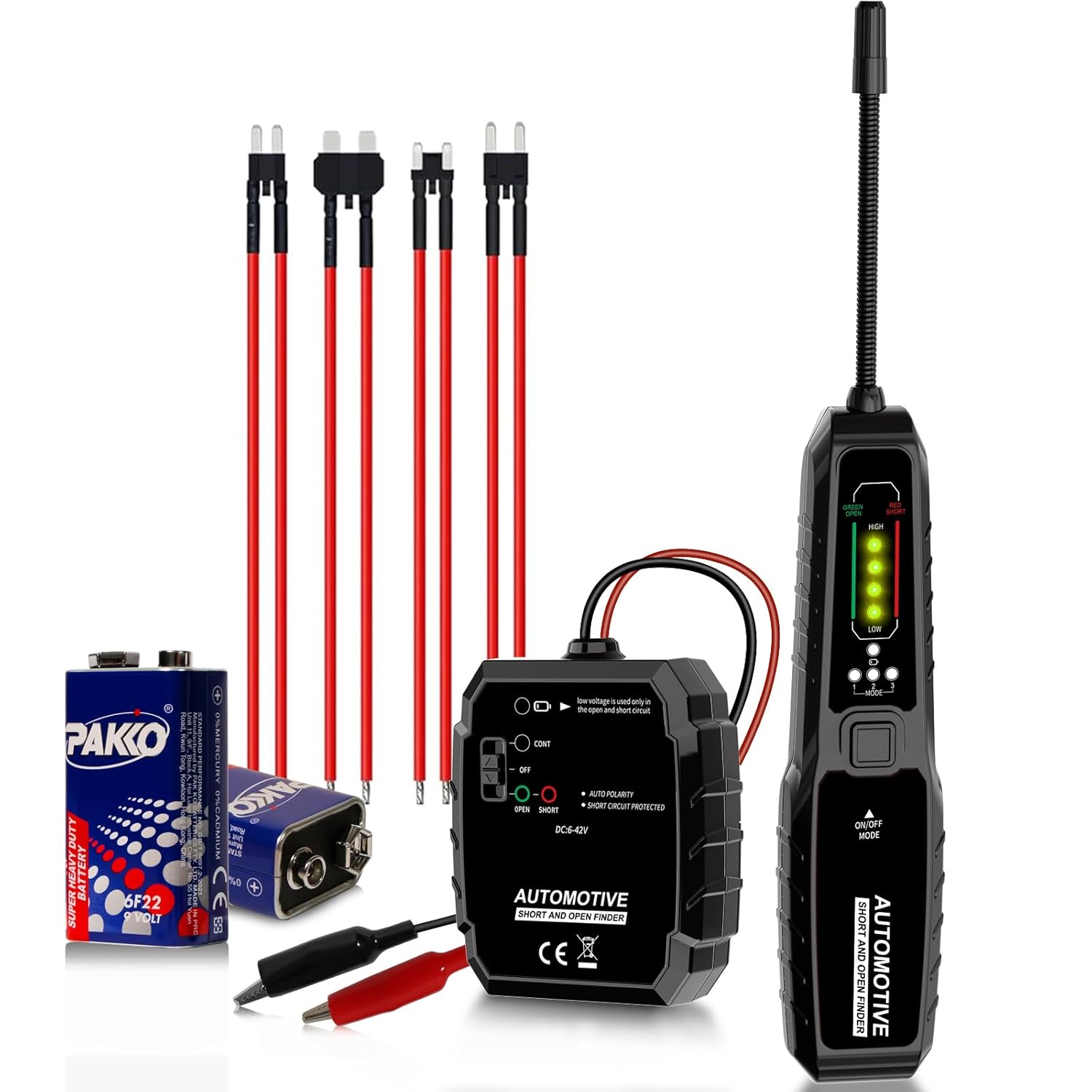
Image: The VSTM Wire Tracer kit, illustrating the transmitter and receiver units along with their primary functions: wire tracing, open circuit location, short circuit checking, and continuity testing.
Key Features:
- Dual Function Design: Combines open and short circuit finding with a circuit breaker locator.
- Wide Voltage Range: Compatible with DC 6-42V electrical systems (12V, 24V, 36V).
- Accurate Fault Detection: Precisely locates breaks, shorts, and continuity issues.
- Flexible Probe: Allows for accurate and safe circuit testing in confined spaces.
- Clear LED Indicators: Provides visual feedback for circuit status and sensitivity.
Setup and Battery Installation
Battery Installation:
The VSTM Wire Tracer requires two 9V batteries (included) for operation, one for the transmitter and one for the receiver.
- Locate the battery compartment on the back of both the transmitter and receiver units.
- Open the battery cover.
- Connect a 9V battery to the battery clip, observing correct polarity (+/-).
- Place the battery into the compartment and close the cover securely.

Image: Illustration of the battery compartment on the VSTM Wire Tracer receiver and the process of replacing the 9V battery (6F22 type).
Initial Connection:
Before performing any tests, ensure the vehicle's electrical system is within the DC 6-42V operating range. Connect the test leads from the transmitter to the circuit under test. The red lead is typically for positive (+) and the black lead for negative (-).
Operating Instructions
1. Wire Tracing
This function allows you to trace wires within a vehicle's electrical system without damaging insulation.
- Connect the transmitter's test leads to the circuit you wish to trace. For example, connect to a fuse socket or a connector.
- Turn on the receiver and select the appropriate sensitivity mode (Low, Medium, High) using the MODE button. Start with a lower sensitivity and increase if needed.
- Move the receiver's flexible probe along the suspected wire path. The receiver will emit an audible tone and illuminate LED indicators to guide you along the wire. The signal strength will be stronger closer to the wire.

Image: A diagram illustrating the connection points for wire tracing (transmitter connected to a fuse socket) and locating an open circuit (transmitter connected to one side of a break, receiver used to find the other side).

Image: Close-up of the flexible probe on the VSTM Wire Tracer receiver, highlighting its ability to bend at a 90-degree angle for accessing difficult areas, ensuring accurate and safe testing.
2. Locating Open Circuits
An open circuit indicates a break in the electrical path. The tracer helps pinpoint the exact location of this break.
- Connect the transmitter to one end of the suspected open circuit. For example, connect the red lead to the positive side of a component and the black lead to a known good ground, or directly across a suspected wire.
- With the receiver turned on, sweep the flexible probe along the wire. The signal will stop or significantly weaken at the point of the open circuit.
- Observe the LED indicators on the receiver. In a normal area, the "OPEN" (Green) LED will be off. When an open circuit is detected, the "OPEN" (Green) LED will illuminate, and the signal will drop.

Image: The VSTM Wire Tracer's LED indicators, demonstrating the difference between a normal circuit (no "OPEN" light) and a broken circuit where the green "OPEN" LED illuminates, indicating an open circuit.
3. Locating Short Circuits
A short circuit occurs when current bypasses its intended path, often leading to blown fuses or component failure. The tracer helps find the short to ground or another wire.
- Disconnect power from the circuit. Connect the transmitter's test leads across the suspected shorted circuit. For example, connect one lead to the shorted wire and the other to a known good ground.
- Turn on the receiver and sweep the flexible probe along the wire. The signal will be strongest at the point of the short.
- Observe the LED indicators on the receiver. In a normal area, the "SHORT" (Red) LED will be off. When a short circuit is detected, the "SHORT" (Red) LED will illuminate, and the signal will peak at the short location.

Image: The VSTM Wire Tracer's LED indicators, showing the difference between a normal circuit (no "SHORT" light) and a shorted circuit where the red "SHORT" LED illuminates, indicating a short circuit.
4. Continuity Function
The continuity function verifies if a complete electrical path exists between two points.
- Ensure the circuit is de-energized.
- Connect the transmitter's test leads to the two points you want to test for continuity.
- If a continuous path exists, the receiver will indicate a strong signal. If there is no continuity (an open circuit), the signal will be absent or very weak.
Using Fuse Sockets and Adapters
The VSTM Wire Tracer includes various fuse socket adapters to facilitate connection to different fuse types, ensuring versatility across various vehicles.

Image: The VSTM Wire Tracer shown with a selection of fuse socket adapters, including Standard, Mini, Micro2, and Micro sizes, designed to connect to various vehicle fuse types.
Maintenance
Cleaning:
Wipe the tool with a soft, damp cloth. Do not use abrasive cleaners or solvents. Ensure the tool is completely dry before storage.
Battery Replacement:
When the low battery indicator flashes on the receiver, replace both 9V batteries to ensure optimal performance. Refer to the "Setup and Battery Installation" section for instructions.
Image: The VSTM Wire Tracer receiver displaying a flashing low battery warning indicator, alongside a visual guide for replacing the 9V battery.
Storage:
Store the tool in a dry, cool place away from direct sunlight and extreme temperatures. If storing for extended periods, remove the batteries to prevent leakage.
Troubleshooting
| Problem | Possible Cause | Solution |
|---|---|---|
| No signal from receiver. |
|
|
| Weak or inconsistent signal. |
|
|
| False open/short indication. |
|
|
Specifications
| Model Number | YDS-681 |
| Brand | VSTM |
| Operating Voltage Range | DC 6-42V |
| Power Source | 2 x 9V Batteries (included) |
| Product Dimensions | 24.13 x 5.08 x 2.54 cm (9.5 x 2 x 1 inches) |
| Item Weight | 0.3 kg (0.66 lbs) |
| Colour | Black |
Warranty and Support
For warranty information or technical support, please contact your retailer or the manufacturer directly. Keep your purchase receipt as proof of purchase.