
1. Introduction
This manual provides essential information for the safe and efficient operation of your Riuiio Folding Electric Scooter. Please read it thoroughly before your first ride and keep it for future reference. This scooter is designed for adults, offering a blend of performance, comfort, and portability for daily commuting and leisure.
- Powerful Performance: Equipped with a 350W brushless motor, reaching speeds up to 19 MPH and offering a range of up to 21 miles per charge.
- Comfort & Durability: Features 8.5-inch puncture-proof honeycomb tires with 3D shock absorption and an aircraft-grade aluminum frame supporting up to 220 lbs. A detachable seat is included for enhanced comfort.
- Advanced Safety: Incorporates a dual braking system (drum + EABS) for 25% shorter stopping distances, IPX4 water resistance, and a lighting system with a 20-lux headlight and rear brake light for visibility.
- Smart Control: Customize your ride with a dedicated app, offering Beginner, Eco, and Sport modes, cruise control, anti-theft alarms, and real-time diagnostics.
- Ultra-Portable Design: Folds in 3 seconds to a compact size (42×16×18 inches) and weighs 31 lbs, making it easy to carry and store.

2. Setup
2.1 Unboxing and Initial Inspection
Carefully remove all components from the packaging. Verify that all included components are present: electric scooter, scooter's seat, and user manual. Inspect the scooter for any visible damage from shipping.
2.2 Seat Installation
The detachable seat provides added comfort for longer rides. Follow these steps to install the seat:
- First, install the screws to the seat base.
- Install the base onto the scooter, ensuring correct orientation.
- Fasten the base screws securely to the scooter.
- Lay the scooter down and tighten the screws on both sides.
- Install the seat post into the base and secure it.

Video 1: Step-by-step tutorial on how to install the seat on your Riuiio Electric Scooter.
2.3 Initial Charging
Before first use, fully charge the scooter's 36V/7.8Ah lithium battery. A full charge typically takes approximately 5 hours. The UL2272 certified battery provides up to 21 miles of range.

2.4 App Connection
Download the companion app (e.g., Tuya Smart) from your smartphone's app store. Ensure Bluetooth is enabled on your phone. Follow the in-app instructions to pair your scooter. The app allows for advanced control and monitoring.
Video 2: Troubleshooting guide for connecting the Riuiio Electric Scooter to its companion app.
3. Operating Instructions
3.1 Power On/Off and Riding Modes
Press and hold the power button on the handlebar to turn the scooter on or off. Double-click the power button to cycle through the three riding modes:
- Beginner Mode (Eco): Up to 9 MPH for new riders or extended range.
- Drive Mode (D): Up to 12 MPH for balanced performance.
- Sport Mode (S): Up to 19 MPH for maximum speed.

3.2 Smart App Control
The app provides additional functionalities:
- Cruise Control: Activate for consistent speed on long rides.
- Anti-Theft Alarms: Enhance security when leaving your scooter unattended.
- Real-time Diagnostics: Monitor battery status, speed, and other vital information.
- Light Control: Manage the headlight and taillight settings.
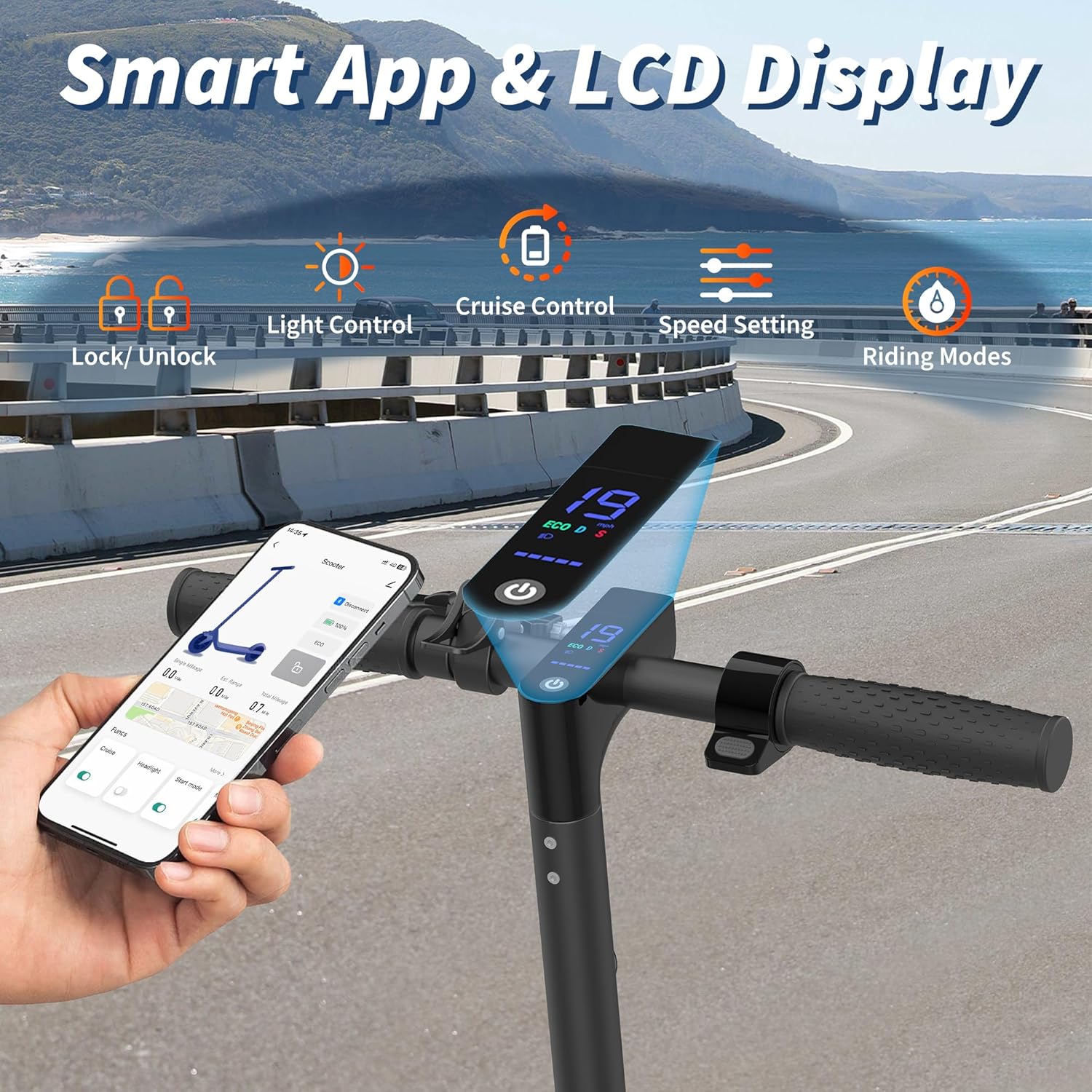
Video 3: Guide on how to adjust the speed settings of your Riuiio Electric Scooter using the mobile app.
3.3 Braking System
The scooter is equipped with a military-grade dual braking system (drum brake + EABS) for reliable and responsive stopping power. Always use both brakes for optimal safety, especially at higher speeds or in emergency situations.

3.4 Folding and Portability
The scooter features a 3-second ultra-portable folding mechanism. To fold, ensure the scooter is powered off, then release the locking mechanism and fold the stem down until it clicks into place. Use the built-in handle for easy carrying.

4. Maintenance
4.1 Tire Care
Your scooter is equipped with 8.5-inch puncture-proof honeycomb solid tires. These tires require minimal maintenance compared to pneumatic tires. Regularly inspect them for any signs of wear or damage. While puncture-proof, extreme impacts can still affect their integrity.
4.2 Battery Care
To maximize battery life and performance:
- Charge the battery fully before its first use.
- Avoid completely draining the battery before recharging.
- Store the scooter in a cool, dry place when not in use, and ensure the battery is partially charged (around 50-70%) if storing for extended periods.
- Use only the original charger provided with the scooter.
4.3 General Cleaning
Clean your scooter regularly with a damp cloth. Avoid using high-pressure water jets or harsh chemicals, as these can damage electronic components. Ensure the charging port cover is securely closed to prevent water ingress.
5. Troubleshooting
5.1 Scooter Not Connecting to App
If you experience issues connecting your scooter to the mobile app, try the following:
- Ensure Bluetooth is enabled on your smartphone.
- Make sure the scooter is powered on and within close proximity to your phone.
- Restart both the scooter and your smartphone.
- Check for any app updates and ensure you are using the latest version.
- If the issue persists, refer to the app's help section or contact customer support.
Video 4: Troubleshooting steps for app connectivity issues with the Riuiio Electric Scooter.
6. Specifications
| Feature | Specification |
|---|---|
| Brand | Riuiio |
| Model Name | R-G01S |
| Color | Black |
| Motor | 350W Brushless Motor |
| Max Speed | 19 MPH |
| Max Range | 21 Miles |
| Battery | 36V/7.8Ah Lithium Battery (UL2272 Certified) |
| Charging Time | 5 Hours |
| Tires | 8.5 Inches Solid Honeycomb Tires |
| Braking System | Dual Braking System (Drum + EABS) |
| Weight Limit | 220 Pounds |
| Frame Material | Aluminum |
| Water Resistance | IPX4 |
| Special Features | App Control, LCD Display, Scooter Seat Included |
7. Warranty & Support
7.1 Product Warranty
The Riuiio Folding Electric Scooter comes with a 1-year limited warranty. Key components are covered for 180 days. Please retain your proof of purchase for warranty claims.
7.2 Customer Support
For any questions, issues, or technical assistance, our 24/7 customer service team is available to help. Please refer to the contact information provided in your purchase documentation or visit the official Riuiio website for support.