
Important Safety Information
Please read all instructions carefully before assembly and use. Keep this manual for future reference. Failure to follow these instructions may result in serious injury or product damage.
- Anchoring: The bed must be securely anchored to a wall using the provided anti-detachment nails to prevent tipping. This is crucial for safety.
- Weight Limit: The upper bunk has a maximum weight capacity of 400 LBS. Do not exceed this limit.
- Mattress Thickness: Use a mattress with a recommended thickness of 4 to 6 inches for the top bunk to ensure guardrail effectiveness.
- Guardrails: Ensure all guardrails are properly installed and secured before use.
- Ladder Safety: Always use the provided ladder for access to the top bunk. Ensure hands and feet are clean and dry when climbing.
- Assembly: Assembly requires two adults. Do not attempt to assemble alone.

Figure 1: Safety features including sturdy steel structure, 400 lbs capacity, anti-tipping device, and buckle design for secure assembly.
Product Overview
The BYSAUD Twin Size Loft Bed with Desk is designed to optimize space, offering a sleeping area, a dedicated workspace, and extensive storage solutions. It features integrated LED lighting and a charging station for convenience.
Key Features:
- Integrated Desk: A spacious desk area beneath the loft bed for study or work.
- Charging Station: Includes 2 AC outlets, 1 USB port, and 1 Type-C port.
- RGB LED Lights: Customizable lighting with app and remote control, music sync, and timing functions.
- Ample Storage: 6 large storage drawers, 4 open storage shelves, 1 DIY pegboard with 6 hooks, 1 bedside storage bag, 1 side storage bag, and 1 clothes hanging rail.
- Safety Features: Full-length 12.6"H guardrail, 15.8" safety handrails for stairs, 4" wide stair pedals, and anti-tipping device.
- Comfort: Upholstered headboard for enhanced comfort.
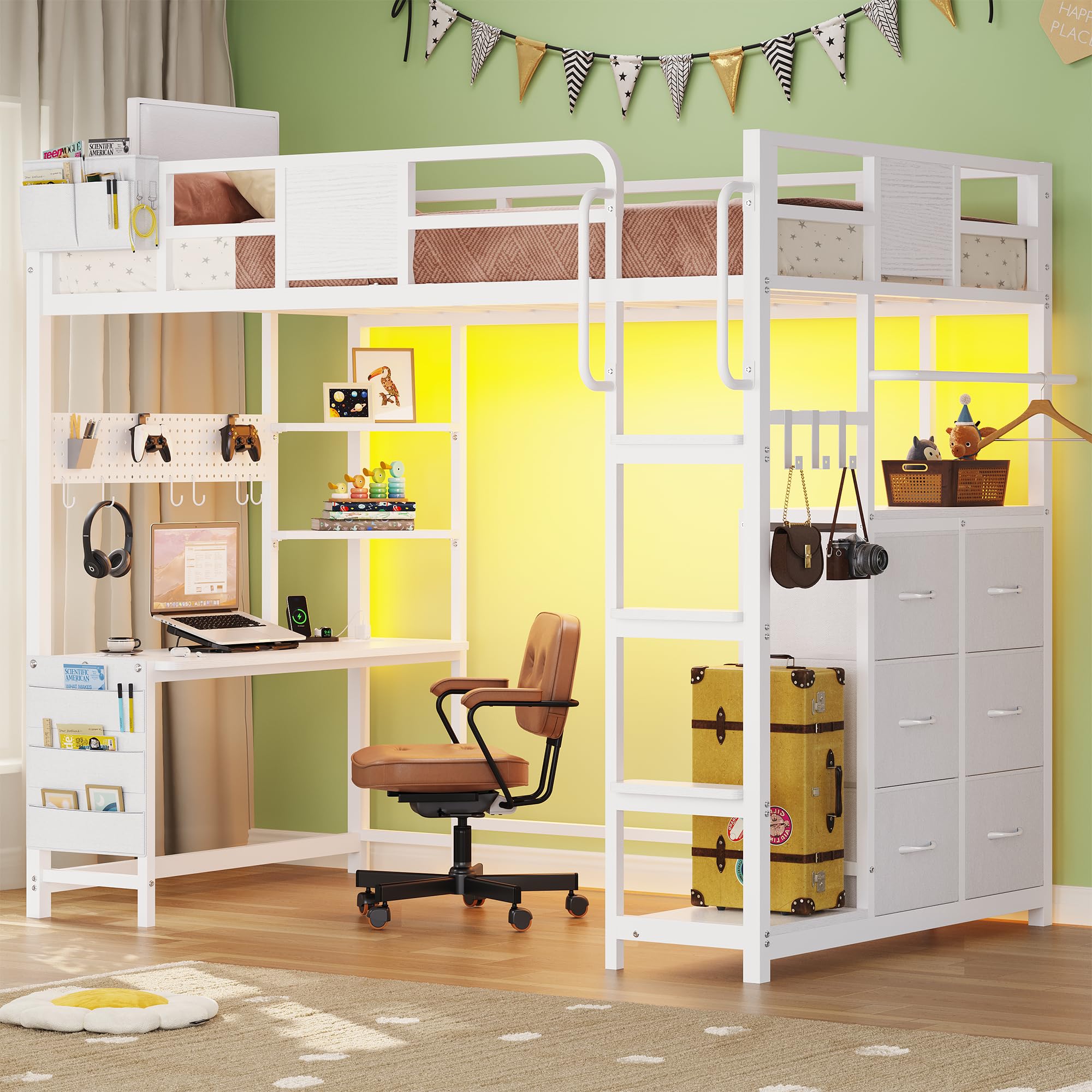
Figure 2: The BYSAUD Twin Size Loft Bed with Desk, showcasing its integrated design.

Figure 3: Various storage options: 6 drawers, 4 shelves, pegboard, and storage bags.
Setup and Assembly
Assembly of the BYSAUD Loft Bed requires careful attention to detail. It is recommended that two adults perform the assembly. All necessary tools and an installation manual are included.
Before You Begin:
- Clear a spacious area for assembly.
- Unpack all components and verify against the parts list in the included manual. Ensure all parts are present and undamaged.
- Keep children and pets away from the assembly area.
Assembly Steps:
- Follow the step-by-step instructions provided in the separate installation manual. Each part is labeled for easy identification.
- Assemble the main frame components first, ensuring all connections are secure but not overtightened until the structure is complete.
- Install the desk, shelves, and drawers according to the manual.
- Attach the ladder and ensure it is firmly secured.
- Install the guardrails on the top bunk. Verify they are at the correct height (12.6"H).
- Crucial Step: Securely fasten the bed to the wall using the provided anti-tipping device and nails. This prevents accidental tipping and ensures stability.
- Connect the LED lights and charging station as per their specific instructions.

Figure 4: Dimensional overview of the BYSAud Loft Bed, useful for planning placement and assembly.
Operating Instructions
Using the LED Lights:
The integrated RGB LED lights can be controlled via a dedicated app or the included remote control.
- App Control: Download the specified app (refer to the LED light manual for details). Connect the lights via Bluetooth or Wi-Fi as instructed. The app allows for color adjustment (over 60,000 colors), brightness control, dynamic modes, music sync mode, microphone mode, and timing functions.
- Remote Control: Use the remote to turn lights on/off, change colors, and adjust brightness.

Figure 5: RGB LED lights in operation, demonstrating color options and control methods.
Using the Charging Station:
The charging station is located on the desk and provides convenient power access for your devices.
- Plug the 6.6-foot power cord into a standard 125V/12A wall outlet.
- Use the 2 AC outlets for larger electronics.
- Use the 5V/2.1A USB port for charging compatible USB devices.
- Use the 5V/2.1A Type-C port for charging compatible Type-C devices.

Figure 6: The integrated charging station on the desk, providing multiple power options.
Utilizing Storage Features:
- Storage Drawers: Use the 6 large drawers for clothes, books, or other personal items.
- Open Shelves: The 4 open shelves are suitable for displaying items or storing frequently accessed belongings.
- DIY Pegboard: Customize the pegboard with the 6 included hooks to organize headphones, hats, or small accessories.
- Storage Bags: The bedside storage bag is ideal for glasses or cell phones, while the side storage bag can hold magazines or notebooks.
- Clothes Rail: The clothes hanging rail can be repositioned to suit your needs, providing space for hanging garments.

Figure 7: Six spacious storage drawers for organizing belongings.
Maintenance
Regular maintenance will help prolong the life and appearance of your BYSAUD Loft Bed.
- Cleaning: Wipe down metal and wood surfaces with a soft, damp cloth. Avoid harsh chemicals or abrasive cleaners.
- Fasteners: Periodically check all bolts and screws to ensure they remain tight. Retighten as necessary to maintain structural integrity.
- LED Lights: If LED lights become dusty, gently wipe them with a dry, soft cloth. Do not use liquids directly on the lights or charging station.
- Storage Bags: The fabric storage bags can be spot cleaned with a mild detergent and water. Allow to air dry completely.
Troubleshooting
If you encounter any issues with your loft bed, refer to the following common troubleshooting tips:
- Bed feels wobbly:
- Ensure all assembly bolts and screws are fully tightened.
- Verify the bed is securely anchored to the wall using the anti-tipping device.
- Check that the bed is placed on a flat, level surface.
- LED lights not working:
- Check if the power cord for the LED lights is properly plugged into an outlet.
- Ensure the connection between the lights and the controller is secure.
- Try using both the app and remote control to rule out a control issue.
- If issues persist, contact customer support for a replacement.
- Charging station not providing power:
- Verify the main power cord for the charging station is securely plugged into a functional wall outlet.
- Test the outlet with another device to ensure it has power.
- Ensure devices are properly connected to the USB, Type-C, or AC outlets.
- Drawers are difficult to open/close:
- Check for any obstructions in the drawer slides.
- Ensure the drawers were assembled correctly and are aligned with their tracks.
Specifications
| Feature | Detail |
|---|---|
| Model Number | Loft Bed Twin Size |
| Product Dimensions (L x W x H) | 76.8"L x 40.2"W x 71.1"H |
| Frame Material | Metal |
| Material Type | Wood, Metal |
| Color | White |
| Item Weight | 114 Pounds |
| Upper Bunk Weight Capacity | 400 LBS |
| Recommended Mattress Thickness | 4" - 6" |
| Charging Station | 2 AC Outlets (125V/12A), 1 USB Port (5V/2.1A), 1 Type-C Port (5V/2.1A) |
| Power Cord Length | 6.6 Feet |
| Guardrail Height | 12.6"H |
| Stair Handrail Height | 15.8" |
| Stair Pedal Width | 4" |
| Storage | 6 Drawers, 4 Shelves, 1 Pegboard (6 hooks), 2 Storage Bags, 1 Clothes Rail |

Figure 8: Comprehensive dimensions of the BYSAUD Loft Bed.
Warranty and Support
BYSAUD is committed to providing quality products and customer satisfaction. If your Bunk Bed arrives damaged, is missing parts, or if you encounter any other issues, please do not hesitate to contact our customer service team.
We are here to assist you every step of the way to ensure a satisfactory resolution.
For support, please refer to the contact information provided in your purchase documentation or on the BYSAUD official website.