
1. Safety Information
Please read this manual carefully before operating your ZAFRO Portable Air Conditioner. Keep it for future reference.
- Ensure the unit is placed on a flat, stable surface to prevent tipping.
- Do not block air inlets or outlets. Maintain at least 20 inches (50 cm) clearance from walls or other objects.
- Connect the unit to a properly grounded electrical outlet with the correct voltage (115 Volts).
- Do not operate the unit with a damaged power cord or plug. Contact qualified service personnel for repairs.
- Keep children and pets away from the unit during operation.
- Unplug the unit before cleaning or performing any maintenance.
- Do not use the unit in wet areas like bathrooms or laundries.
2. Product Overview
The ZAFRO Portable Air Conditioner is a versatile 3-in-1 unit designed to provide cooling, dehumidification, and fan functions for your living space. It features smart control options, quiet operation, and an efficient self-evaporating system.
Key Features:
- 3-in-1 Functionality: Cooling, Dehumidification, and Fan modes.
- 10,000 BTU Cooling Capacity: Effectively cools areas up to 250 sq. ft.
- Smart Control: Operate via ZAFRO app, Amazon Alexa, Google Home, or remote control.
- Quiet Operation: Operates at a low noise level of 47 dB in Sleep mode.
- Self-Evaporating System: Reduces the need for frequent manual drainage.
- 24-Hour Timer: Program on/off times for energy efficiency.
- Portable Design: Equipped with 360° caster wheels and side handles for easy movement.
Included Components:
- Air conditioner machine
- Remote control
- Air exhaust hose
- Window panel
- Drainage hose
- Sealing foam
- Window kit
- User Manual

Image: The ZAFRO Portable Air Conditioner in a living room setting, illustrating its primary functions and coverage area.

Image: Detailed view of the portable design features including adjustable louver, built-in handle, and caster wheels.
3. Setup and Installation
Proper installation is crucial for the efficient operation of your portable air conditioner. Follow these steps carefully.
3.1 Exhaust Hose Installation:
- Attach the exhaust hose to the air outlet on the back of the unit.
- Connect the other end of the exhaust hose to the window panel adapter.
3.2 Window Kit Installation:
The adjustable window kit is compatible with both horizontal (double/single-hung) and vertical (sliding) windows.
- Measure your window opening.
- Adjust the window panel to fit the opening, securing it with the provided screws or clips.
- Insert the window panel adapter with the exhaust hose into the opening in the window kit.
- Use the sealing foam to ensure a tight seal around the window kit and prevent air leakage.

Image: Visual guide for installing the exhaust hose and window kit in different window types.
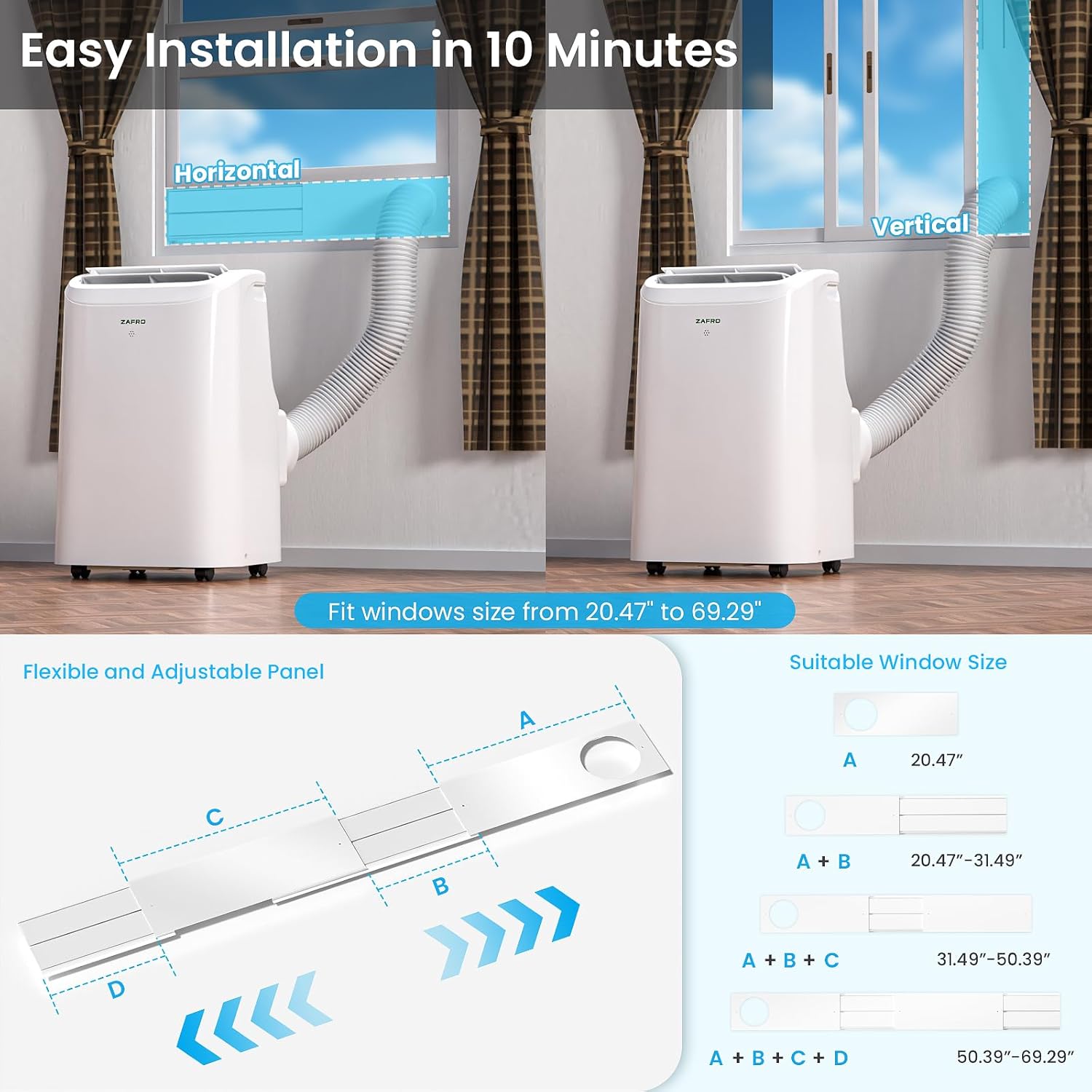
Image: Breakdown of the adjustable window panel, illustrating how to measure and fit it to your window.
4. Operating Instructions
Your ZAFRO Portable Air Conditioner offers multiple ways to control its functions for optimal comfort.
4.1 Control Panel:
The LED touch control panel on top of the unit allows direct access to all settings.
- Power Button: Turns the unit on/off.
- Mode Button (M): Cycles through Cooling, Dehumidifier, and Fan modes.
- Fan Speed Button: Adjusts fan speed (Low, Mid, High, Auto).
- Temperature +/- Buttons: Adjusts the desired temperature in Cooling mode (61°F to 86°F / 16°C to 30°C).
- Timer Button: Sets the 24-hour timer for automatic on/off.
- Sleep Mode Button: Activates quiet operation and gradual temperature adjustment.
- Swing Button: Controls the oscillation of the air outlet louvers.
- Child Lock: Press and hold the Fan Speed button for 3 seconds to activate/deactivate.
- Temperature Unit Switch: Press and hold the '+' and '-' buttons simultaneously for 3 seconds to switch between Celsius and Fahrenheit.
4.2 Remote Control:
The included remote control provides convenient operation from a distance of up to 22.97 feet (7 meters).
- All functions available on the control panel are also accessible via the remote.
- Ensure there are no obstructions between the remote and the unit's receiver.

Image: Illustration of the unit's control panel and remote control in use, highlighting various functions.
4.3 App Control (Smart Features):
Download the ZAFRO app to control your air conditioner from your smartphone or integrate with Amazon Alexa or Google Home for voice commands.
- Download the 'ZAFRO' app from your device's app store.
- Follow the in-app instructions to connect your portable AC unit to your Wi-Fi network.
- Once connected, you can adjust modes, fan speeds, set timers, and monitor performance remotely.
- For voice control, enable the ZAFRO skill in your Amazon Alexa or Google Home app and link your account.

Image: The ZAFRO app interface on a smartphone, demonstrating smart control capabilities and integration with voice assistants.
5. Maintenance
Regular maintenance ensures optimal performance and longevity of your ZAFRO Portable Air Conditioner.
5.1 Cleaning the Air Filter:
The easily detachable filter should be cleaned regularly (every two weeks or as needed) to maintain air quality and unit efficiency.
- Unplug the air conditioner from the power outlet.
- Locate the air filter panel, usually on the side or back of the unit.
- Gently pull out the filter.
- Wash the filter with warm, soapy water. Rinse thoroughly.
- Allow the filter to air dry completely before reinserting it into the unit.

Image: Steps for removing and cleaning the washable air filter.
5.2 Drainage:
The unit features a self-evaporating system. However, in high humidity conditions or when using the Dehumidifier mode, manual drainage may be required.
- When the water tank is full, the unit will stop operating and display an indicator.
- Unplug the unit.
- Place a shallow pan or tray under the drainage outlet at the bottom rear of the unit.
- Remove the drain plug and allow the water to drain completely.
- Replace the drain plug securely before restarting the unit.
Image: Explanation of the zero-drain technology and conditions under which manual drainage is necessary.
6. Troubleshooting
Before contacting customer support, please refer to the following common issues and solutions:
| Problem | Possible Cause | Solution |
|---|---|---|
| Unit does not turn on. | No power, power cord unplugged, circuit breaker tripped. | Check power connection, ensure outlet is functional, reset circuit breaker. |
| Unit is running but not cooling. | Air filter clogged, exhaust hose not properly installed, room too large, doors/windows open. | Clean air filter, ensure exhaust hose is sealed, close doors/windows, check room size against unit capacity. |
| Water leakage. | Drain plug loose, unit not level, excessive humidity. | Ensure drain plug is secure, place unit on a level surface, drain water manually if necessary. |
| Unusual noise. | Unit not level, internal component issue. | Ensure unit is on a level surface. If noise persists, contact customer support. |
| Remote control not working. | Batteries dead, obstruction between remote and unit. | Replace batteries, remove any obstructions. |
7. Specifications
| Feature | Detail |
|---|---|
| Brand | ZAFRO |
| Model Name | Portable Air Conditioner |
| Model Number | YAC-06CPD/PL7 |
| Cooling Power | 10000 British Thermal Units (BTU) / 6000 BTU SACC |
| Capacity | 250 Cubic Feet (approx. 250 sq. ft. coverage) |
| Product Dimensions (D x W x H) | 12.99"D x 14.8"W x 23.23"H |
| Item Weight | 52.03 Pounds |
| Voltage | 115 Volts |
| Wattage | 900 watts |
| Noise Level | 47 Decibels (in Sleep Mode) |
| Controller Type | App Control, Remote Control, Touch Control |
| Special Features | Child Lock, Dehumidifier, Fast Cooling, Remote Controlled, Sleep Mode |
| Installation Type | Window |
| Annual Energy Consumption | 675 Kilowatt Hours Per Year |
8. Warranty and Support
8.1 Product Warranty:
This ZAFRO Portable Air Conditioner (Model YAC-06CPD/PL7) comes with a 1-Year Limited Warranty from the date of purchase. This warranty covers defects in materials and workmanship under normal use. Please retain your proof of purchase for warranty claims.
8.2 Customer Support:
For technical assistance, troubleshooting beyond this manual, or warranty inquiries, please contact ZAFRO customer support. Refer to the contact information provided on the ZAFRO official website or your purchase documentation.


