
Introduction
This manual provides comprehensive instructions for the assembly, operation, and maintenance of your LIKIMIO Twin Daybed. This versatile furniture piece is designed to function as both a comfortable bed and a stylish sofa, featuring integrated storage drawers and a convenient charging station. Please read these instructions carefully before assembly and use to ensure safe and proper operation.
Safety Information
- Maximum Weight Capacity: The daybed is designed to support a maximum weight of 900 pounds. Do not exceed this limit to prevent damage or injury.
- Assembly: Ensure all parts are securely fastened before use. Periodically check and re-tighten all bolts and screws.
- Small Parts: Keep all small parts and packaging materials away from children during assembly to prevent choking hazards.
- Rounded Design: The daybed features rounded armrests to minimize the risk of bumps and injuries.
- Electrical Safety: When using the charging station, ensure all devices and cables are in good condition. Do not overload the outlets.
- Placement: Place the daybed on a level surface to ensure stability.
Package Contents
Before beginning assembly, verify that all components listed below are present and undamaged. If any parts are missing or damaged, please contact customer support.
- Daybed Frame Components (Metal and Engineered Wood)
- Boucle Upholstered Headboard with Integrated Charging Station and Storage Shelf
- Two (2) Storage Drawers with Sliding Wheels
- One (1) Storage Bag
- Hardware Pack (screws, bolts, Allen wrench, etc.)
- Installation Manual (this document)
Setup and Assembly Instructions
Assembly of the LIKIMIO Twin Daybed is designed to be straightforward with clearly labeled parts and detailed instructions. It is recommended to have two people for assembly.
- Unpack and Identify Parts: Carefully unpack all components and lay them out on a clean, soft surface to prevent scratches. Refer to the parts list in your included manual to identify each piece.
- Assemble the Main Frame: Begin by connecting the main metal frame sections. Insert bolts loosely at first. This allows for minor adjustments later.
- Attach Headboard and Footboard: Secure the headboard (with charging station) and footboard to the assembled frame. Ensure the headboard is oriented correctly.
- Install Bed Slats: Place and secure the bed slats onto the frame. Ensure they are evenly spaced and firmly attached to provide adequate mattress support.
- Assemble Storage Drawers: Assemble the two storage drawers according to the instructions. Attach the sliding wheels to the bottom of each drawer.
- Insert Drawers: Slide the assembled drawers into place under the daybed. The drawers feature a latch design for secure placement.
- Attach Storage Bag: Hook or attach the included storage bag to the side of the daybed frame as desired.
- Final Tightening: Once all components are in place and aligned, fully tighten all bolts and screws using the provided Allen wrench. Do not overtighten.

Figure 1: Quick and easy setup showing how frame components connect.
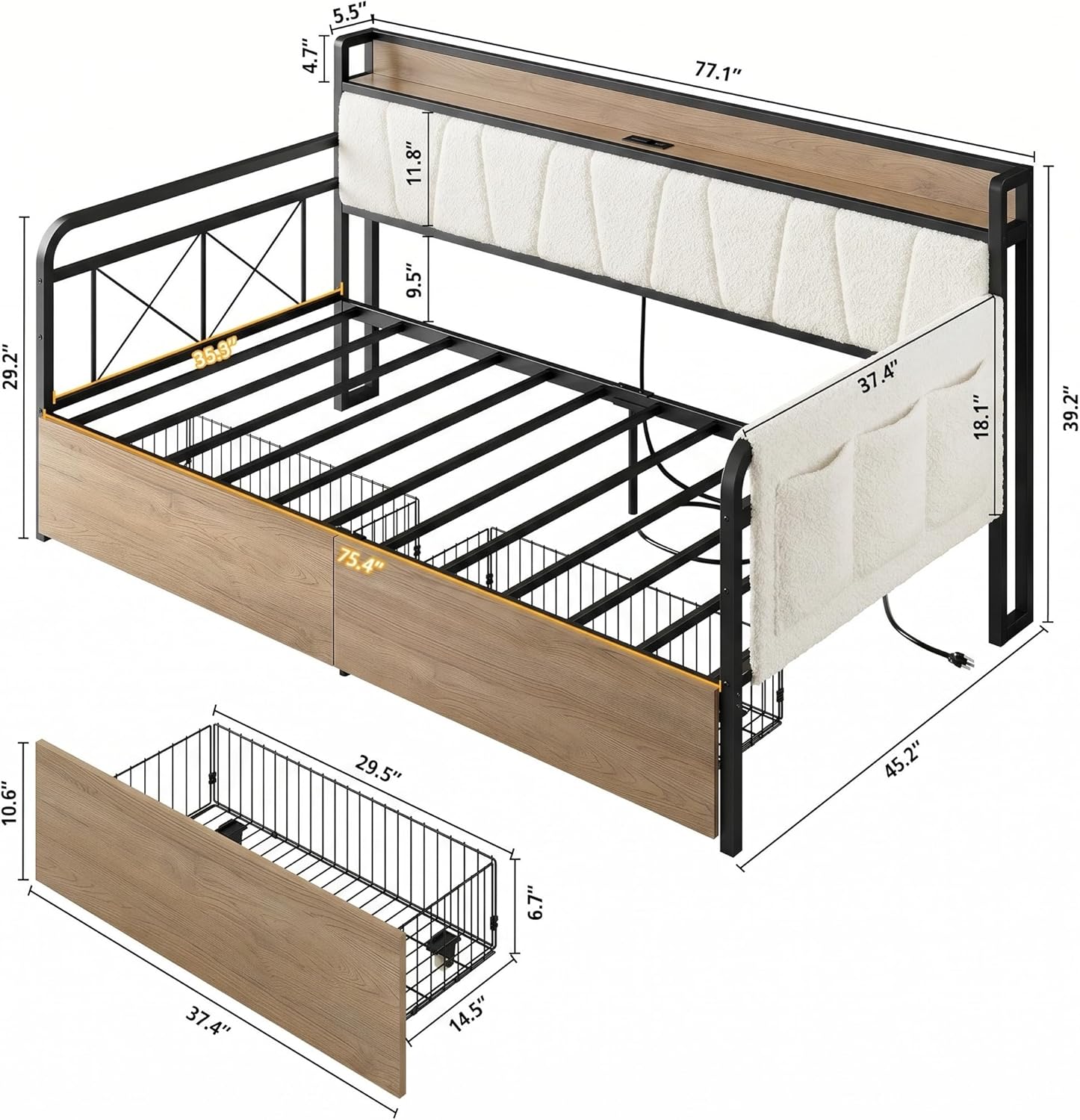
Figure 2: Overall dimensions of the daybed and individual drawer measurements.
Video 1: Assembly overview for the LIKIMIO Daybed with Storage Drawers. This video demonstrates key steps in setting up the daybed, including frame assembly and drawer installation.
Operating Instructions
Using the Daybed as a Sofa or Bed
The LIKIMIO Twin Daybed offers a versatile 2-in-1 design. During the day, it functions as a comfortable sofa, ideal for lounging, reading, or entertaining. For overnight guests or sleeping, it serves as a spacious twin bed. The boucle upholstered headboard provides a soft backrest for sofa use.

Figure 3: The daybed's dual functionality as a bed and a sofa.
Utilizing Storage Drawers
The daybed includes two large storage drawers (29.5"L x 14.5"W x 6.7"H each) designed to maximize space. Each drawer is equipped with sliding wheels for easy access and a latch mechanism to keep them securely in place when closed.
- To open, gently pull the drawer handle until the latch disengages, then roll the drawer out.
- To close, push the drawer back into the frame until the latch engages, securing it in position.

Figure 4: Details of the storage drawers, highlighting the latch and sliding wheels.
Using the Charging Station
The integrated charging station in the headboard provides convenient power access for your electronic devices. It features:
- 2 AC Outlets (125V/12A)
- 1 USB Port (5V/2A)
- 1 Type-C Port (5V/2A)
Simply plug your devices into the appropriate ports. Ensure the daybed is connected to a power source for the charging station to function.

Figure 5: The 2-in-1 storage and charging headboard.
Using the Storage Bag
The included storage bag can be attached to the side of the daybed frame. It is designed to help organize smaller items such as books, remote controls, or headphones, keeping them within easy reach.

Figure 6: Storage bag design for item categorization.
Maintenance
Cleaning
- Frame: Wipe the metal and engineered wood surfaces with a dry cloth. Avoid abrasive cleaners or harsh chemicals that may damage the finish.
- Boucle Fabric: For the upholstered headboard, gently spot clean with a mild detergent and a damp cloth if necessary. Blot dry. Do not saturate the fabric.
General Care
- Periodically check all bolts and screws to ensure they remain tight. Re-tighten as needed to maintain stability.
- Avoid dragging the daybed when moving it; lift it to prevent damage to the frame or floor.

Figure 7: Soft luxurious boucle fabric details.
Troubleshooting
| Problem | Possible Cause | Solution |
|---|---|---|
| Daybed feels unstable or wobbly. | Loose bolts or screws. Uneven floor surface. | Check and tighten all assembly hardware. Ensure the daybed is placed on a flat, level surface. |
| Storage drawers do not slide smoothly. | Obstruction in the track. Wheels are dirty or damaged. Drawer is misaligned. | Clear any obstructions. Clean the wheels and tracks. Re-align the drawer within its designated space. |
| Charging station is not working. | Daybed not plugged into a wall outlet. Power outlet is faulty. Device cable is faulty. | Ensure the daybed's power cord is securely plugged into a functional wall outlet. Test the outlet with another device. Try a different charging cable or device. |
| Parts do not align during assembly. | Bolts were overtightened prematurely. Incorrect part orientation. | Loosen all bolts, adjust alignment, then re-tighten. Double-check part numbers and orientation against the assembly diagrams. |
Specifications
| Feature | Detail |
|---|---|
| Model | Daybed |
| Size | Twin |
| Material | Engineered Wood, Metal, Boucle Upholstered Fabric |
| Product Dimensions (L x W x H) | 77.1" x 45.2" x 39.2" |
| Item Weight | 86 pounds |
| Maximum Weight Recommendation | 900 pounds |
| Number of Storage Drawers | 2 |
| Drawer Dimensions (L x W x H) | 29.5" x 14.5" x 6.7" (each) |
| Charging Station | 2 AC Outlets (125V/12A), 1 USB Port (5V/2A), 1 Type-C Port (5V/2A) |
| Ground to Item Distance | 13.2 inches |
| Color | Cream |
| UPC | 722385214192 |
Warranty Information
For detailed warranty information regarding your LIKIMIO Twin Daybed, please refer to the documentation included with your purchase or contact LIKIMIO customer support directly. Warranty terms and conditions may vary.
Customer Support
If you require assistance, have questions about assembly, or need to report missing/damaged parts, please contact LIKIMIO customer support. You can typically find contact information through the retailer where the product was purchased or by visiting the official LIKIMIO website.