Introduction
Welcome to the CURSOR FITNESS 3-in-1 Walking Pad Treadmill user manual. This document provides essential information for the safe and effective operation, setup, and maintenance of your new fitness equipment. Designed for versatility, this compact unit offers walking, light running, and incline training, making it suitable for various home and office environments.
Safety Information
Before operating the treadmill, please read all instructions carefully. Ensure the treadmill is placed on a flat, stable surface with adequate clearance around it. Always wear appropriate athletic footwear. The maximum user weight capacity for this treadmill is 300 pounds. Keep children and pets away from the treadmill during operation. Use the safety key feature to immediately stop the treadmill if needed.

Image: The treadmill supports up to 300 LBS, ensuring stability for a wide range of users.
What's in the Box
- CURSOR FITNESS 3-in-1 Walking Pad Treadmill
- Remote Control
- Tool Kit
- User Manual
Setup
The CURSOR FITNESS 3-in-1 Walking Pad Treadmill comes largely pre-assembled. Minimal setup is required to begin use.
- Unpacking: Carefully remove the treadmill from its packaging.
- Placement: Position the treadmill on a flat, stable surface. Ensure there is sufficient space around the unit for safe operation.
- Handlebar Installation (Optional): If using the treadmill with the handlebar, ensure it is securely fastened. The handlebar provides additional stability and support during workouts.
- Power Connection: Plug the power cord into a standard electrical outlet. Locate the power switch on the unit and turn it ON. The LED display should illuminate.
- Safety Key: Attach the safety key to the designated slot on the console. The treadmill will not operate without the safety key in place.
Video: This video demonstrates various features of the treadmill, including its setup and operation.
Operating Instructions
Power On/Off
- To power on, ensure the power cord is plugged in and the main power switch is flipped to ON.
- To power off, press the power button on the remote control or flip the main power switch to OFF.
Using the Remote Control
The included remote control allows for convenient adjustment of speed and mode without interrupting your workout.
- Power Button: Turns the treadmill ON/OFF.
- '+' Button: Increases speed.
- '-' Button: Decreases speed.
- 'M' Button: Switches between different display modes (Time, Speed, Distance, Calories).
- Mode Switch Button (bottom button with arrows): Toggles between walking/running mode and vibration platform mode.

Image: The remote control provides easy access to speed and mode adjustments, complementing the clear LED display.
Understanding the LED Display
The bright LED display shows your workout metrics:
- Speed: Current speed in MPH (0.6-6.2 MPH).
- Distance: Total distance covered.
- Time: Duration of your workout.
- Calories: Estimated calories burned.
Walking, Jogging, and Running Modes
The treadmill offers a speed range of 0.6 to 6.2 MPH, accommodating various fitness levels and activities.
- Walking: Speeds from 0.6 to approximately 2.5 MPH.
- Jogging: Speeds from approximately 2.5 to 4.0 MPH.
- Running: Speeds from approximately 4.0 to 6.2 MPH.
Vibration Platform Usage
The integrated vibration platform can be activated for additional benefits. Use the mode switch button on the remote to enter vibration mode. There are multiple vibration intensity levels to choose from. The vibration mode typically operates with a 5-minute timer.
Manual Incline Adjustment
This treadmill features a 15% manual incline to simulate uphill training and increase workout intensity. To adjust the incline, manually raise or lower the rear support legs to the desired position. Ensure both legs are set to the same incline level for stability.

Image: The treadmill offers a 15% manual incline for varied workout intensity.
Folding and Storage
The treadmill's foldable design and transport wheels make it easy to store in compact spaces.
- To fold, ensure the treadmill is off and unplugged.
- Carefully lower the handlebar (if extended) and fold the unit flat.
- Use the integrated transport wheels to move the treadmill under a bed, sofa, or into a closet.
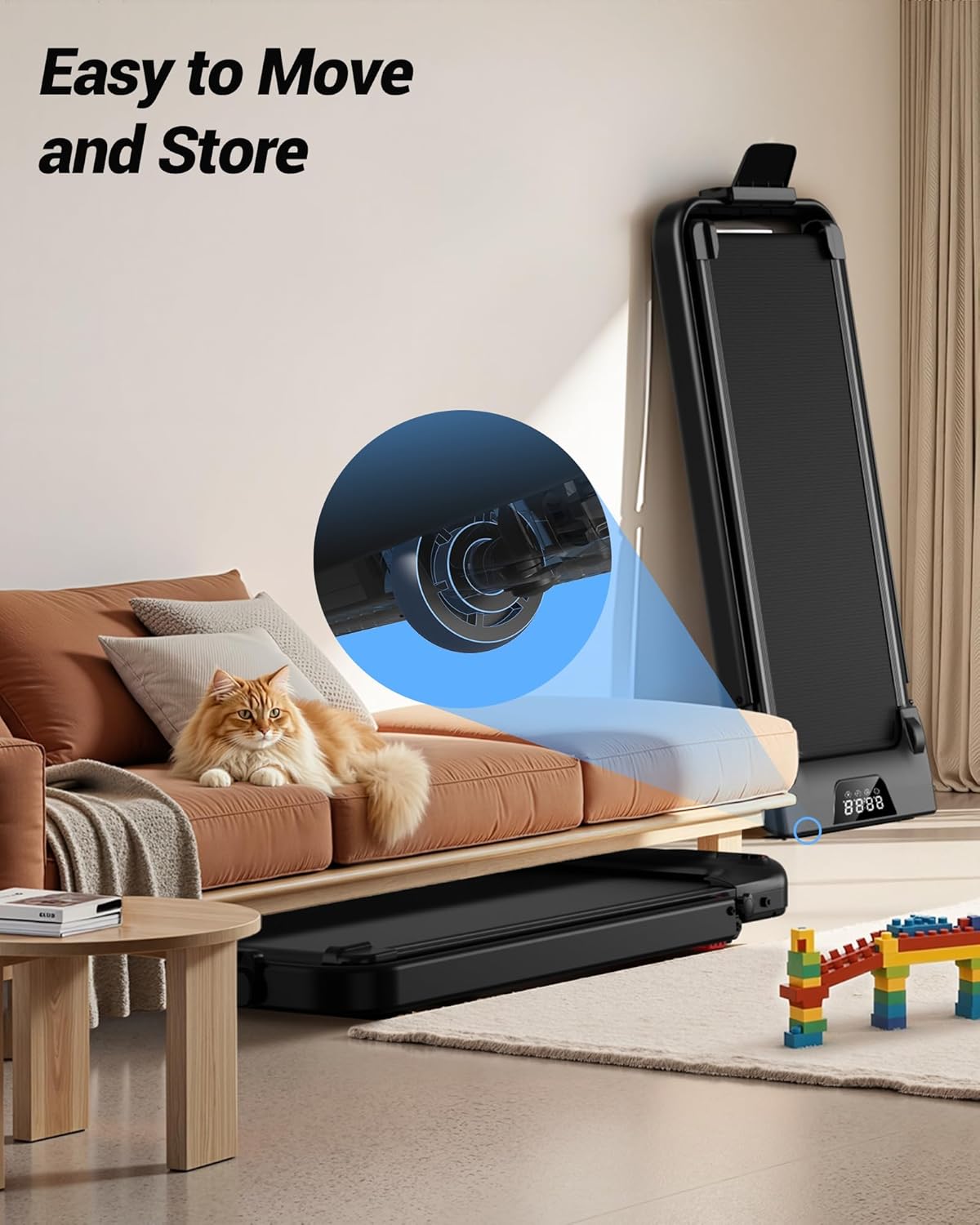
Image: The treadmill's compact, foldable design allows for easy storage under furniture.
Maintenance
Regular maintenance ensures the longevity and optimal performance of your treadmill.
- Lubrication: The running belt requires periodic lubrication to ensure smooth operation. Refer to the included user manual for specific instructions and frequency (typically once a year or as needed). Lubricant is provided in the tool kit.
- Cleaning: Wipe down the treadmill surface and running belt with a damp cloth after each use to remove sweat and dust. Do not use abrasive cleaners.
- Belt Adjustment: If the running belt becomes misaligned or too loose/tight, refer to the user manual for instructions on how to adjust it using the provided tools.
Troubleshooting
If you encounter any issues with your treadmill, refer to the following common troubleshooting tips:
- Treadmill not starting: Ensure the power cord is securely plugged into both the unit and the outlet, the main power switch is ON, and the safety key is correctly placed on the console.
- Unusual noise: Check for any loose parts or debris under the running belt. Ensure the belt is properly lubricated and aligned.
- Belt slipping: The running belt may need adjustment or lubrication. Refer to the maintenance section or the detailed user manual.
- Remote control not responding: Check the battery in the remote control. Ensure there are no obstructions between the remote and the treadmill's sensor.
For further assistance, please contact CURSOR FITNESS customer support.
Specifications
| Feature | Specification |
|---|---|
| Brand | CURSOR FITNESS |
| Model | B0G6SWZCSG |
| Motor Horsepower | 2.5 HP |
| Speed Range | 0.6 - 6.2 MPH |
| Maximum Incline | 15% (Manual) |
| Weight Capacity | 300 LBS |
| Running Belt Dimensions | 35.8" x 15.2" |
| Noise Level | <45DB |
| Product Dimensions (LxWxH) | 45" x 22" x 4.3" |
| Item Weight | 21 Kilograms (approx. 46 lbs) |
| Display Type | LED |
| Special Features | Adjustable Speed, Compact Design, Foldable, Manual Incline, Vibration Pad |
Warranty and Support
For warranty information, product support, or to purchase replacement parts, please refer to the official CURSOR FITNESS website or contact their customer service department. Details can typically be found in the included user manual or on the product packaging.


