
1. Product Overview
The SEDETA Farmhouse L-Shaped Electric Standing Desk is designed to provide a versatile and ergonomic workspace. It features an electric height adjustment mechanism, integrated storage, and a built-in power outlet for convenience.
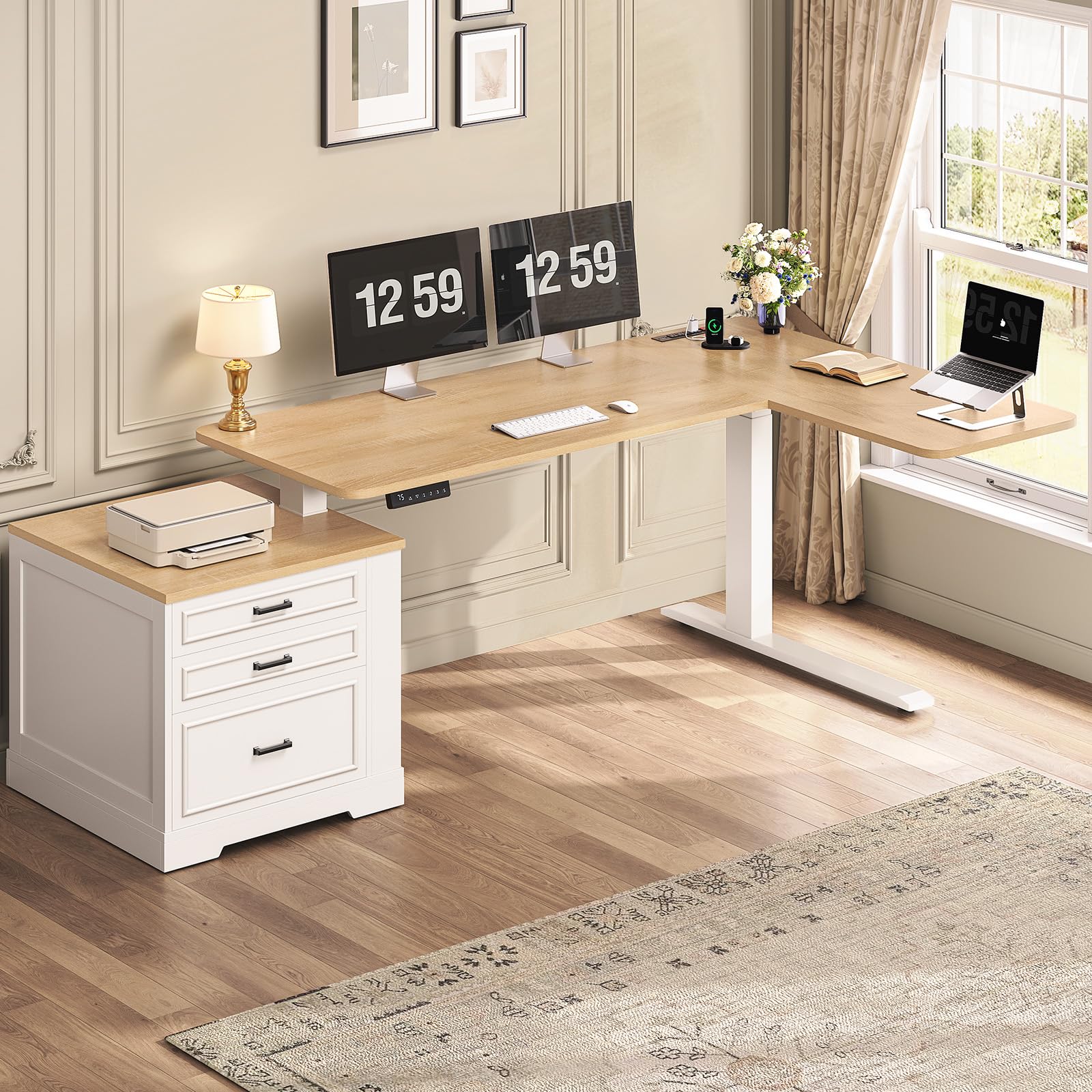
Image: Overall view of the SEDETA Farmhouse L-Shaped Electric Standing Desk.
Key Features:
- Electric Height Adjustment (28.3" to 47.2") with 3 memory presets.
- L-shaped design for maximized workspace.
- Integrated storage: 1 file drawer and 2 additional drawers.
- Built-in charging station with 4 AC outlets and 2 USB ports.
- Durable construction with P2 particle board and cold-rolled steel, supporting up to 200 lbs.
- Quiet operation (below 45 dB).
Video: Official product video showcasing the SEDETA Farmhouse L-Shaped Electric Standing Desk features, including height adjustment and storage.
2. Setup and Assembly
This desk requires assembly. Please follow the detailed instructions and numbered parts provided in the packaging. Ensure all components are present before beginning assembly.
Assembly Tips:
- Lay out all parts and hardware on a clean, soft surface to prevent scratches.
- Identify each component using the provided labels.
- Do not overtighten screws during initial assembly; tighten fully once the structure is stable.
- Two people are recommended for assembly due to the size and weight of the desk components.

Image: Product dimensions and maximum load capacity of 200 lbs.
Connecting the Power Outlet:
The desk includes a built-in power outlet. Connect the desk's main power cord to a standard wall outlet after assembly is complete. Ensure all internal connections for the power strip and height adjustment motor are securely fastened.

Image: Detail of the convenient charging station with multiple outlets and USB ports.
3. Operating Instructions
Height Adjustment:
The desk features an electric height adjustment system with a control panel located on the front edge of the desk. The height can be adjusted from 28.3 inches to 47.2 inches.
- Up/Down Buttons: Use the ▲ (Up) and ▼ (Down) buttons to manually adjust the desk height.
- Memory Presets (1, 2, 3): The desk has three programmable height memory presets. To save a height: adjust the desk to your desired height, then press the 'S' button followed by the desired number (1, 2, or 3). The LED display will confirm the setting.
- Recall Presets: Press the corresponding number button (1, 2, or 3) to automatically move the desk to the saved height.
- Reset (RST): If the desk encounters an error or needs recalibration, press and hold the 'RST' button until the desk moves to its lowest position and resets.

Image: Multifunctional control panel with LED display, memory presets, and up/down controls.

Image: Visual representation of the desk's adjustable height range from 28.3" to 47.2".
Using the Charging Station:
The integrated charging station provides convenient power access for your devices.
- Plug devices into the 4 AC outlets (120V/12A) or the 2 USB ports (5V/2A).
- Use the ON/OFF switch to control power to the outlets.
- The power cord is 5.3-foot long.
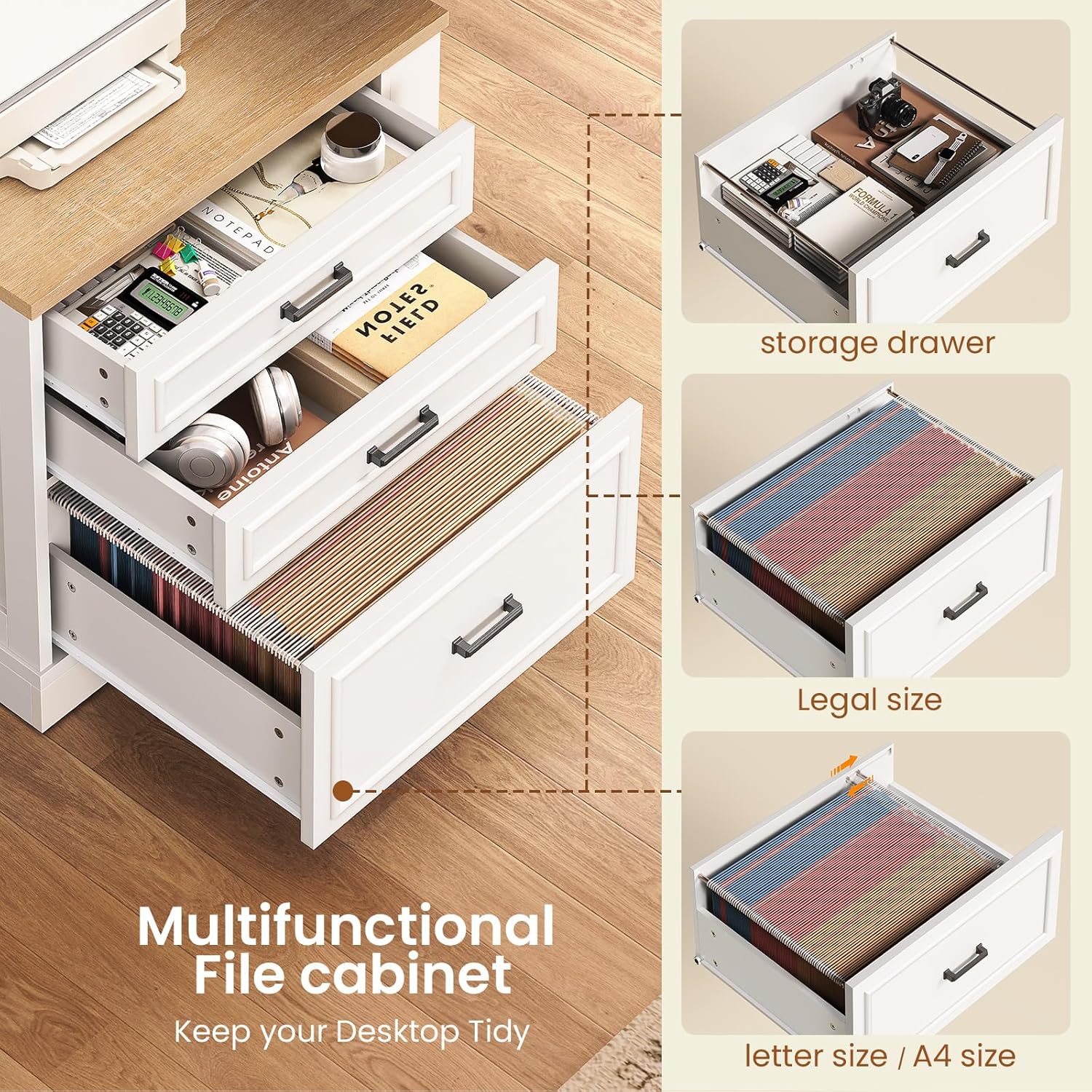
Image: Multifunctional file cabinet with storage for legal and letter/A4 size files, and general storage drawers.
4. Maintenance
Regular maintenance ensures the longevity and optimal performance of your SEDETA standing desk.
- Cleaning: Wipe surfaces with a soft, damp cloth. Avoid harsh chemicals or abrasive cleaners that may damage the finish.
- Check Connections: Periodically inspect all screws and bolts to ensure they are tight. Re-tighten if necessary to maintain stability.
- Cable Management: Organize cables to prevent tangling and interference with the desk's movement.
- Weight Distribution: Avoid placing excessive weight on one side of the desk. Distribute items evenly to prevent strain on the lifting mechanism. The maximum load capacity is 200 lbs.
5. Troubleshooting
If you encounter any issues with your desk, refer to the following common solutions:
- Desk Not Moving / E10 Error: If the control panel displays an "E10" error or the desk does not respond, unplug the desk from the wall outlet, wait for 10-15 seconds, and then plug it back in. This often resets the system.
- Uneven Movement: Ensure the desk is placed on a level surface. Check that no objects are obstructing the lifting columns. Perform a reset if necessary.
- Noise During Operation: The desk is designed for quiet operation (below 45 dB). If you notice unusual or excessive noise, ensure all assembly connections are secure.
- Power Outlet Not Working: Check the ON/OFF switch on the power strip. Ensure the desk's main power cord is securely plugged into a functional wall outlet.
If problems persist, please contact customer support for assistance.
6. Specifications
| Feature | Detail |
|---|---|
| Brand | SEDETA |
| Model | B0GQH6BFVL |
| Shape | L-Shape |
| Product Dimensions (D x W x H) | 39.4"D x 70.9"W x 28.3"H |
| Adjustable Height Range | 28.3" to 47.2" |
| Lifting Mechanism | Electric |
| Color | Oak |
| Style | Farmhouse |
| Base Material | Engineered Wood |
| Top Material Type | Engineered Wood |
| Finish Type | Wood |
| Number of Drawers | 3 (1 file drawer, 2 storage drawers) |
| Item Weight | 97 Pounds |
| Maximum Load Capacity | 200 lbs |
| Power Outlet | 4 AC Outlets (120V/12A), 2 USB Ports (5V/2A) |
| Required Assembly | Yes |
7. Warranty and Support
SEDETA is committed to providing quality products and customer satisfaction.
- After-sales Service: If your desk arrives damaged, scratched, or with missing parts, please contact SEDETA customer service immediately for a free replacement or partial refund.
- Contact Information: Refer to your purchase documentation or the SEDETA official website for the most current customer support contact details.
For further assistance or inquiries, please visit the SEDETA Store on Amazon.