
Product Overview
The AT&T EL2131-11 is a DECT 6.0 cordless landline phone designed for reliable communication. It features a powerful call blocker, caller ID, a full-duplex speakerphone, and a backlit display and keypad for enhanced visibility. This model includes one handset.
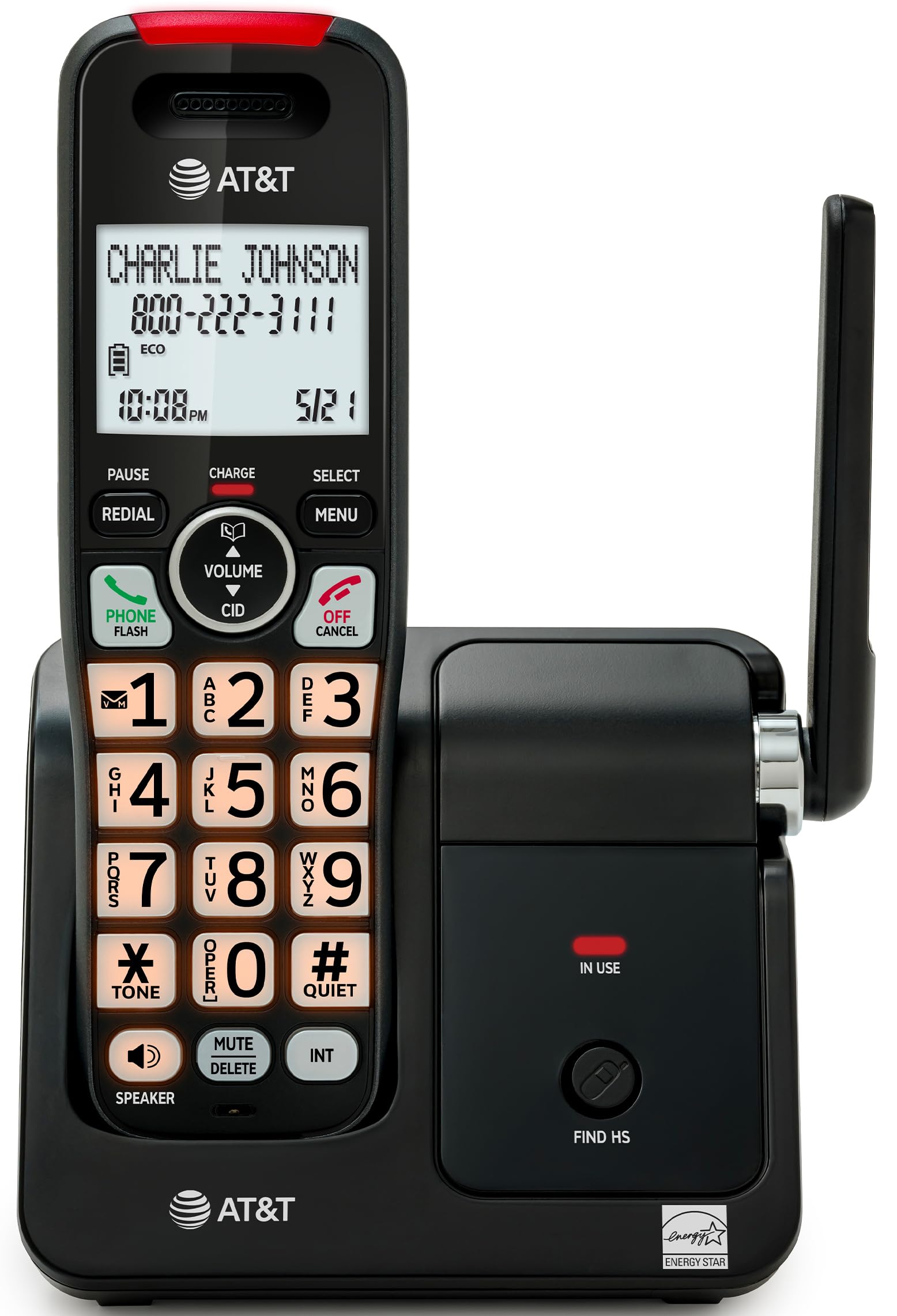
Image: The AT&T EL2131-11 cordless phone, showing the handset docked in its base unit.
Key Features:
- Call Blocker: Blocks up to 50 unwanted numbers.
- Caller ID: Stores up to 50 calls, displaying name, number, time, and date.
- Full-Duplex Speakerphone: Allows both parties to speak and listen simultaneously.
- Backlit Display & Keypad: Provides clear visibility in low-light conditions.
- Quiet Mode: Silences the ringer instantly.
- ECO Mode: Reduces power consumption and extends battery life.
- DECT 6.0 Technology: Ensures interference-free communication and extended range.
Setup
What's in the Box:
- Base Unit
- 1 Cordless Handset
- 1 Power Adapter
- Telephone Line Cord
- 2 Battery Cells
- Quick Start Guide
- Wall-mount bracket
1. Battery Installation
- Locate the battery compartment on the back of the handset.
- Insert the two supplied battery cells, ensuring correct polarity (+ and -).
- Close the battery compartment cover securely.
2. Base Unit Connection
- Connect the small end of the power adapter to the power jack on the back of the base unit.
- Plug the large end of the power adapter into a standard electrical outlet.
- Connect one end of the telephone line cord to the TEL LINE jack on the back of the base unit.
- Plug the other end of the telephone line cord into a telephone wall jack.
3. Initial Charging
Place the handset in the base unit with the display facing forward. The handset will begin charging. Allow the handset to charge for at least 16 hours before initial use to ensure optimal battery performance.

Image: The handset charging in its base, with an overlay indicating a 5-day battery life on a single charge.
Operating Instructions
Making and Receiving Calls
- To Make a Call: Press PHONE/FLASH, then dial the number.
- To Answer a Call: When the phone rings, press PHONE/FLASH or any dialing key (0-9, * or #).
- To End a Call: Press OFF/CANCEL or place the handset back in the base unit.
Using the Speakerphone
During a call, press the SPEAKER button to activate the full-duplex speakerphone. Press it again to switch back to the handset earpiece.

Image: A man holding a small dog, speaking hands-free using the phone's speakerphone function. The phone's base unit is visible on a table.
Caller ID
When a call comes in, the caller's information (name and number) will appear on the handset display if you subscribe to Caller ID service. The phone stores up to 50 caller ID records.

Image: A close-up of the phone's display showing a caller's name and number, along with the time and date.
Call Blocker
The call blocker feature allows you to block up to 50 unwanted numbers. To block a number:
- During a call or from the Caller ID log, press MENU.
- Scroll to 'Call Blocker' and press SELECT.
- Follow the on-screen prompts to add the number to the block list.

Image: A visual representation of the call blocker feature, showing a list of blocked numbers on the phone's display.
Quiet Mode
To temporarily silence the ringer, press and hold the #QUIET button on the handset. The ringer will be silenced for a set period, typically 1 to 12 hours, which can be adjusted in the settings.

Image: A close-up of the phone's display indicating that 'Quiet mode' is active.
ECO Mode
The ECO mode automatically adjusts power consumption to conserve battery life. This mode is typically active by default and indicated by an 'ECO' icon on the display.

Image: The phone's display showing the 'ECO' icon, indicating power-saving mode is active.
Redial
To redial the last number called, press the REDIAL button.

Image: The phone's display showing the 'Redial' function with a previously dialed number.
Backlit Display and Keypad
The handset features a backlit LCD display and illuminated keypad for easy readability and operation in various lighting conditions.

Image: A hand holding the phone, demonstrating its bright backlit screen and illuminated keypad in a low-light environment.
Maintenance
Cleaning the Phone
- Use a soft, slightly damp cloth to clean the surfaces of the phone and base unit.
- Do not use cleaning sprays or harsh chemicals, as they may damage the finish or electronic components.
- Ensure the phone is unplugged from the power outlet before cleaning.
Battery Care
- For optimal battery life, keep the handset in the base unit when not in use.
- If the phone will be unused for an extended period, remove the batteries to prevent leakage.
- Replace batteries when they no longer hold a charge effectively. Use only the specified battery type.
Troubleshooting
If you experience issues with your AT&T EL2131-11 phone, refer to the following common troubleshooting steps:
| Problem | Solution |
|---|---|
| No dial tone |
|
| Handset not charging |
|
| Cannot make/receive calls |
|
| Poor sound quality/static |
|
Specifications
| Feature | Detail |
|---|---|
| Brand | AT&T |
| Model Number | EL2131-11 |
| Telephone Type | Cordless |
| Technology | DECT 6.0 |
| Color | Black & Silver |
| Material | Plastic |
| Power Source | Battery Powered |
| Item Dimensions (L x W x H) | 5.06 x 4.65 x 7.23 inches (Base Unit) |
| Phone Talk Time | 10 Hours |
| Phone Standby Time | 5 Days |
| Caller Identification | Yes |
| Multiline Operation | Single-Line Operation |
| Answering System Type | No |
| UPC | 650530034510 |

Image: The AT&T EL2131-11 base unit with handset, showing its height (7.23 inches), length (5.06 inches), and width (4.65 inches).
Warranty Information
This AT&T EL2131-11 Cordless Landline Phone comes with a 1-Year limited warranty from the manufacturer. Please retain your proof of purchase for warranty claims. For specific terms and conditions, refer to the warranty card included in your product packaging or visit the official AT&T support website.
Customer Support
For further assistance, technical support, or to inquire about replacement parts, please contact AT&T customer service. You can typically find contact information on the official AT&T website or in the quick start guide provided with your phone.
Online resources may include FAQs, detailed user manuals, and support forums.


