
Introduction
The LOOP GEAR SK05 Pro 2 is a versatile flat EDC (Everyday Carry) flashlight designed for various lighting needs. It features a powerful 5000 lumen output with both spotlight and floodlight functions, a high-CRI sidelight with RGB capabilities, and dual replaceable 4000mAh batteries that also function as a 22W power bank. Its robust IP68 waterproof rating and magnetic base enhance its utility for diverse applications.
Package Contents
Please verify that all items listed below are included in your package:
- LOOP GEAR SK05 Pro 2 Flashlight
- 2 x 4000mAh Rechargeable Batteries (pre-installed or separate)
- USB-C Charging Cable
- Backplate
- Pocket Clip
- 4 x Screws
- User Manual

Image: The SK05 Pro 2 flashlight and its included accessories, such as batteries, charging cable, and user manual, laid out on a dark surface.
Product Overview
The SK05 Pro 2 features a compact, flat design with multiple light sources and intuitive controls. Familiarize yourself with the main components:
- Main Headlights: Consist of a spotlight and a floodlight for varied beam patterns.
- Sidelight: High-CRI white LEDs and RGB LEDs for ambient or signaling light.
- Control Dial: For precise and stable control over light modes and brightness.
- Magnetic Base: Allows hands-free attachment to metal surfaces.
- USB-C Port: For charging the flashlight and using it as a power bank.
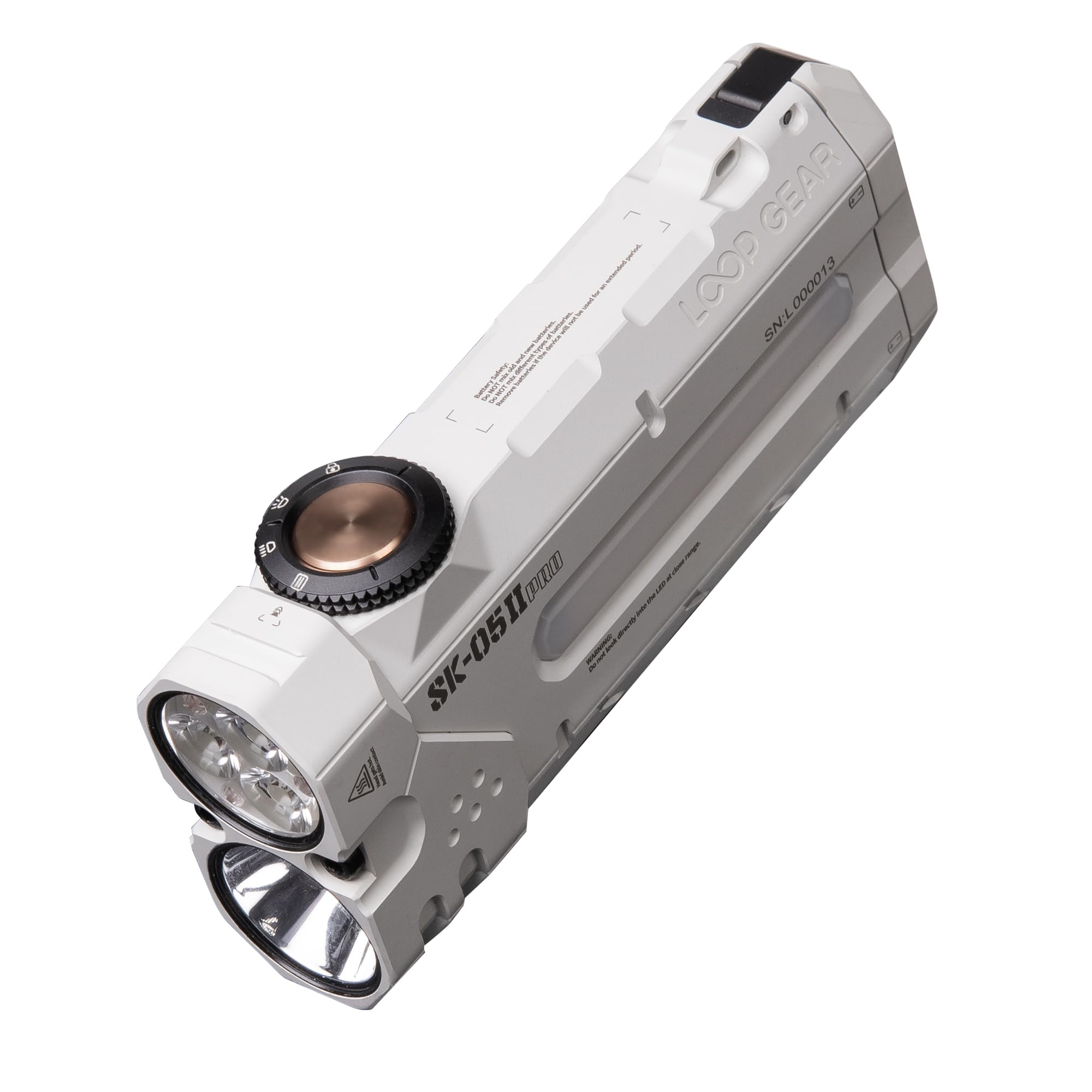
Image: A white LOOP GEAR SK05 Pro 2 flashlight, showcasing its flat design and dual main light sources.

Image: A detailed view of the flashlight's control dial, indicating its tactile design for mode selection.
Setup
Battery Installation
The SK05 Pro 2 uses two replaceable 4000mAh batteries. To install or replace them:
- Locate the battery compartment cover, typically on the side or bottom of the flashlight.
- Open the cover and insert the two 4000mAh batteries, ensuring correct polarity (+/-).
- Securely close the battery compartment cover.

Image: The flashlight's battery compartment open, revealing two removable 4000mAh batteries, ready for installation or replacement.
Charging the Flashlight and Using as Power Bank
The SK05 Pro 2 can be charged via its USB-C port and can also function as a power bank to charge other devices.
- To Charge the Flashlight: Connect the provided USB-C cable to the flashlight's USB-C port and to a compatible power source (e.g., wall adapter, computer USB port). The charging indicator will show the charging status.
- To Use as a Power Bank: Connect your device (e.g., smartphone) to the flashlight's USB-C port using a compatible cable. The flashlight will output up to 22W to charge your device.

Image: The SK05 Pro 2 flashlight connected via USB-C cable to a smartphone, demonstrating its power bank functionality.
Operation
Power On/Off and Main Light Modes
The flashlight features a control dial for managing its main light functions (spotlight and floodlight).
- Power On/Off: Rotate the control dial to the desired light mode (spotlight or floodlight) to turn on the flashlight. Rotate it back to the 'off' position to turn it off.
- Switching Modes: The dial allows direct selection between spotlight and floodlight.
- Adjusting Brightness: Within each mode, further rotation of the dial or specific button presses (refer to detailed instructions in the included manual) will cycle through brightness levels (Low, Med, High).
- Turbo Mode: To activate the combined 5000LM Turbo mode (spotlight + floodlight), typically a quick double-press or specific action on the control dial is required. This provides a burst of maximum power.

Image: The flashlight demonstrating its powerful dual light sources (spotlight and floodlight) in an outdoor night setting.
Sidelight Modes (High-CRI and RGB)
The integrated sidelight offers both high-CRI white light for accurate color rendition and RGB lighting for signaling or ambient effects.
- Activating Sidelight: Refer to your included manual for the specific button press or dial action to activate the sidelight.
- Cycling Modes: Once active, subsequent presses or rotations will cycle through high-CRI white light brightness levels and various RGB colors/modes.
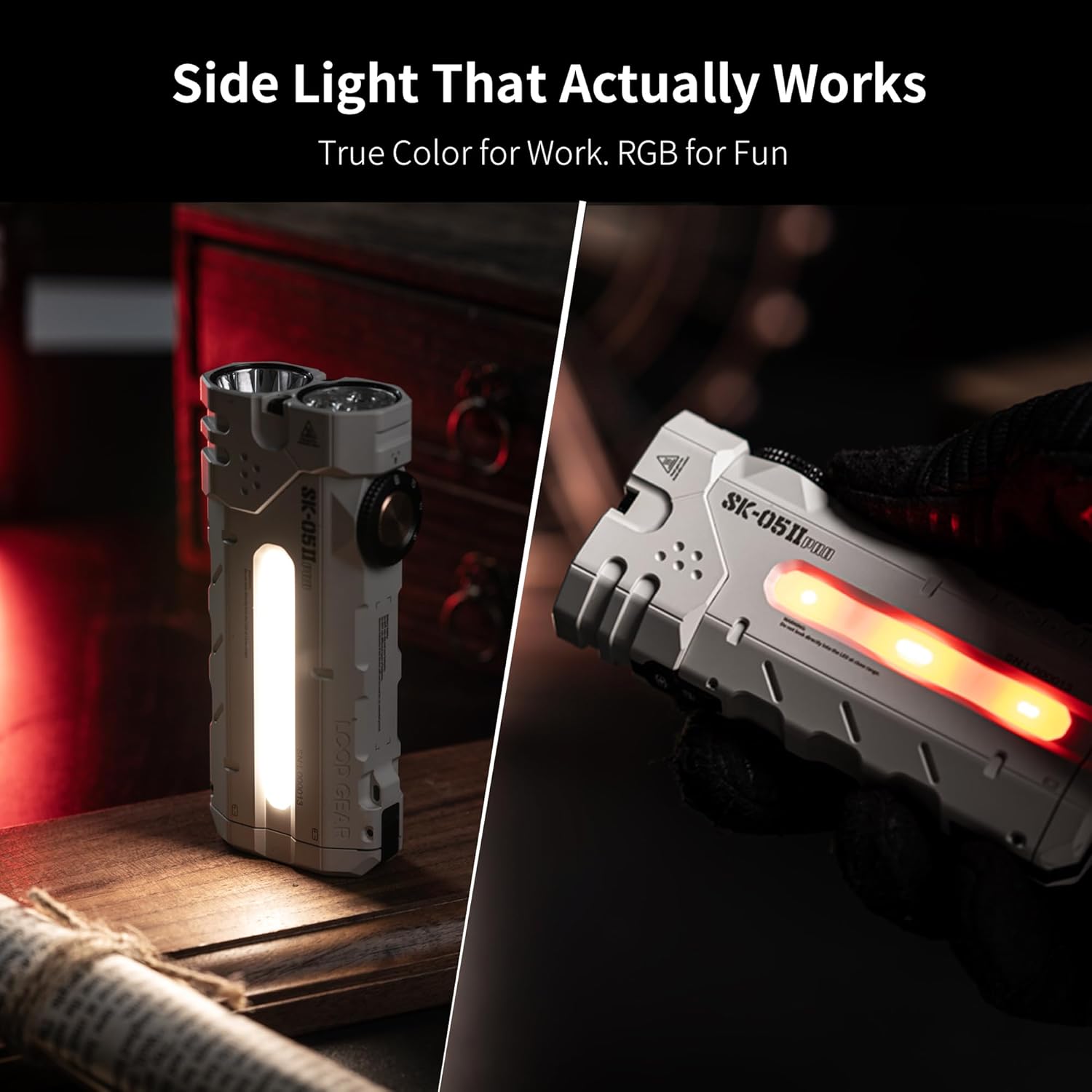
Image: The flashlight displaying its versatile sidelight, showing both a bright white high-CRI mode and a vibrant red RGB mode.
Auto-Lock Function
The flashlight defaults to auto-lock off. To prevent accidental activation, you can enable the auto-lock feature.
- Activate Auto-Lock: Perform 7 consecutive presses on the main button (refer to the image for visual guidance). The indicator light will change from red to green.
- After auto-lock is activated, allow the flashlight to sit for 5 minutes for the setting to take effect. Do not press any buttons or turn the dial during this time.
- Deactivate Auto-Lock: Repeat the 7 consecutive presses. The indicator light will change from green to red.

Image: A visual guide demonstrating the 7-press sequence to toggle the auto-lock function, with indicators for red (locked) and green (unlocked).
Magnetic Base Usage
The integrated magnetic base allows for hands-free operation by attaching the flashlight to any ferrous metal surface.
- Simply place the magnetic base firmly against a metal surface.
- Ensure the flashlight is stable before releasing it.

Image: The flashlight magnetically attached to a metal pole, demonstrating its hands-free capability for various tasks.
Official Product Video
Video: An official overview of the LOOP GEAR SK05 Pro 2 flashlight, showcasing its features and operation.
Maintenance
Cleaning
To maintain optimal performance and appearance:
- Wipe the flashlight body with a soft, damp cloth.
- Avoid using harsh chemicals or abrasive materials, as these can damage the finish.
- Keep the lens clean for clear light output. Use a lens cleaning cloth if necessary.
Water Resistance
The SK05 Pro 2 has an IP68 waterproof rating, meaning it is protected against continuous immersion in water up to a specified depth and duration. Ensure all ports and covers are securely closed before exposing the flashlight to water.
Troubleshooting
If you encounter issues with your SK05 Pro 2 flashlight, please refer to the following common solutions:
- Flashlight Not Turning On:
- Check if the batteries are correctly installed and fully charged.
- Ensure the auto-lock function is not active (indicator light should be green).
- Charging Issues:
- Verify the USB-C cable is securely connected to both the flashlight and the power source.
- Try a different USB-C cable or power adapter.
- Inconsistent Light Output:
- Ensure the batteries have sufficient charge.
- Clean the lens if there is any obstruction.
For further assistance, please contact LOOP GEAR customer support.
Specifications
Detailed technical specifications for the LOOP GEAR SK05 Pro 2 flashlight:
Spotlight Performance
| Mode | Brightness | Runtime | Max. Light Intensity | Max. Beam Distance |
|---|---|---|---|---|
| TURBO | 2500-850lm | 40s+3.2h | 41000cd | 410m |
| HIGH | 950-40lm | 2.2h+18h | - | - |
| MED | 320lm | 11.2h | - | - |
| LOW | 40lm | 48h | - | - |
Spotlight Floodlight TURBO: 5000-1500lm
Floodlight Performance
| Mode | Brightness | Runtime | Max. Light Intensity | Max. Beam Distance |
|---|---|---|---|---|
| TURBO | 3800-950lm | 40s+2.5h | 11000cd | 210m |
| HIGH | 1050-50lm | 2.2h+10h | - | - |
| MED | 400lm | 8.5h | - | - |
| LOW | 50lm | 48h | - | - |
Sidelight Performance
| Mode | Brightness | Runtime |
|---|---|---|
| Low | 10lm | 79.1h |
| Med | 40lm | 22.2h |
| High | 120lm | 6.5h |
| Moonlight | <1lm | 111.4h |
General Specifications
| Feature | Value |
|---|---|
| Impact Resistance | 1m |
| Waterproof Rating | IP68 |
| Battery Capacity | 8000mAh (2 x 4000mAh) |
| Max. Charging Power | 22W |
| Max. Discharge Power | 22W |
| Dimensions (L x W x H) | 106mm x 47.8mm x 22.5mm (4.17"L x 1.88"W x 0.89"H) |
| Weight (With Battery) | 231.2g (8.15oz) |
| Weight (Without Battery) | 130.9g |
| Power Source | Battery Powered |
| Light Source Type | LED |
| Material | MAO |
| Mounting Type | Magnetic Base |
| Number of Light Sources | 3 (Spotlight, Floodlight, Sidelight) |

Image: A comprehensive table detailing the performance specifications for the spotlight, floodlight, and sidelight modes of the SK05 Pro 2.
Warranty and Support
Warranty Information
The LOOP GEAR SK05 Pro 2 flashlight comes with a manufacturer's warranty:
- Flashlight: 5 years warranty
- Batteries: 1 year warranty
Please retain your proof of purchase for warranty claims.
Customer Support
For any questions, technical support, or warranty inquiries, please contact LOOP GEAR customer service through the retailer where you purchased the product or visit the official LOOP GEAR website for contact information.