
1. Introduction and Overview
The ByteWave QY10 Bone Conduction Under Pillow Speaker is designed to provide a private and comfortable audio experience for sleep, meditation, and relaxation. Utilizing bone conduction technology, it delivers sound directly through your pillow, minimizing disturbance to others. Its ultra-thin design ensures comfort for side sleepers, and versatile connectivity options include Bluetooth 5.3 and TF card playback.
2. Product Features
- Private Bone-Conduction Audio: Enjoy immersive, ear-friendly ambient sound through your pillow. Designed specifically for soft or standard pillows, this technology lets you listen to white noise, ASMR, or podcasts privately without disturbing your partner.
- Ultra-Thin & Zero Foreign Body Sensation: At less than 0.4 inches thick and weighing just 30g, its flexible, flat design contours naturally under your head. Ideal for side sleepers and those with sensitive ears, providing unparalleled comfort with no bulky feeling throughout the night.
- Bluetooth 5.3 & Phone-Free TF Mode: Connect seamlessly to devices via ultra-stable Bluetooth 5.3, or play offline audio directly from a TF card (Memory Card Not Included). Perfect for bedtime meditation or creating a phone-free sleep environment to reduce screen time.
- 15H Playtime & Smart Sleep Timer: Features up to 15 hours of continuous playback, 150 days standby, and built-in 10-minute/15-minute auto-off timers. The clear LED display keeps you informed of the status at a glance.
- Type-C Fast Transfer & Ideal Sleep Gift: Use the included Type-C cable to charge and quickly transfer your favorite audiobooks or soothing tracks to your TF card—no extra app needed.
3. What's in the Box
- ByteWave QY10 Bone Conduction Under Pillow Speaker
- Type-C Charging Cable
- User Manual (this document)
4. Setup
4.1 Initial Charge
Before first use, fully charge the speaker using the provided Type-C cable. Connect the Type-C cable to the speaker's charging port and the other end to a 5V/1A USB power adapter (not included) or a computer USB port. The LED display will indicate charging status.
4.2 Placement
Place the ByteWave QY10 speaker under your pillow. For optimal sound, position it directly beneath where your head rests. The bone conduction technology works best when in close contact with your head through the pillow material.

Image: The ByteWave QY10 speaker positioned under a pillow for private listening, showing sound waves emanating from the device to the user's head.
5. Operating Instructions
5.1 Power On/Off
- To Power On: Press and hold the Power button (usually marked with a power icon) for a few seconds until the LED display illuminates.
- To Power Off: Press and hold the Power button again for a few seconds until the LED display turns off.
5.2 Bluetooth Mode
- Ensure the speaker is powered on and in Bluetooth pairing mode (indicated by a flashing Bluetooth icon on the LED display).
- On your smartphone or other Bluetooth-enabled device, go to Bluetooth settings.
- Search for "QY10" in the list of available devices and select it to pair.
- Once paired, the Bluetooth icon on the speaker's LED display will become solid, and you can begin playing audio from your device.
5.3 TF Card Mode
- Insert a TF (Micro SD) card (not included) with pre-loaded audio files into the TF card slot on the speaker.
- The speaker will automatically switch to TF card playback mode. If it doesn't, short press the Power button to cycle through modes until TF card mode is active.
- Use the track skip buttons to navigate between audio files.

Image: Diagram illustrating the two listening methods: Bluetooth connection to a smartphone and direct playback from a TF card inserted into the speaker.
5.4 Volume Control
Use the volume up (+) and volume down (-) buttons on the speaker to adjust the audio level. You can also control the volume from your connected Bluetooth device.
5.5 Smart Sleep Timer
The speaker features built-in auto-off timers (e.g., 10-minute, 15-minute). Consult the specific button layout on your device for timer activation. Typically, a dedicated timer button or a long press on a volume button might cycle through timer options. The LED display will show the active timer setting.

Image: A person sleeping peacefully with the speaker's timer function highlighted, indicating 10 and 15-minute auto-off options.
6. Media Integration
6.1 Product Images
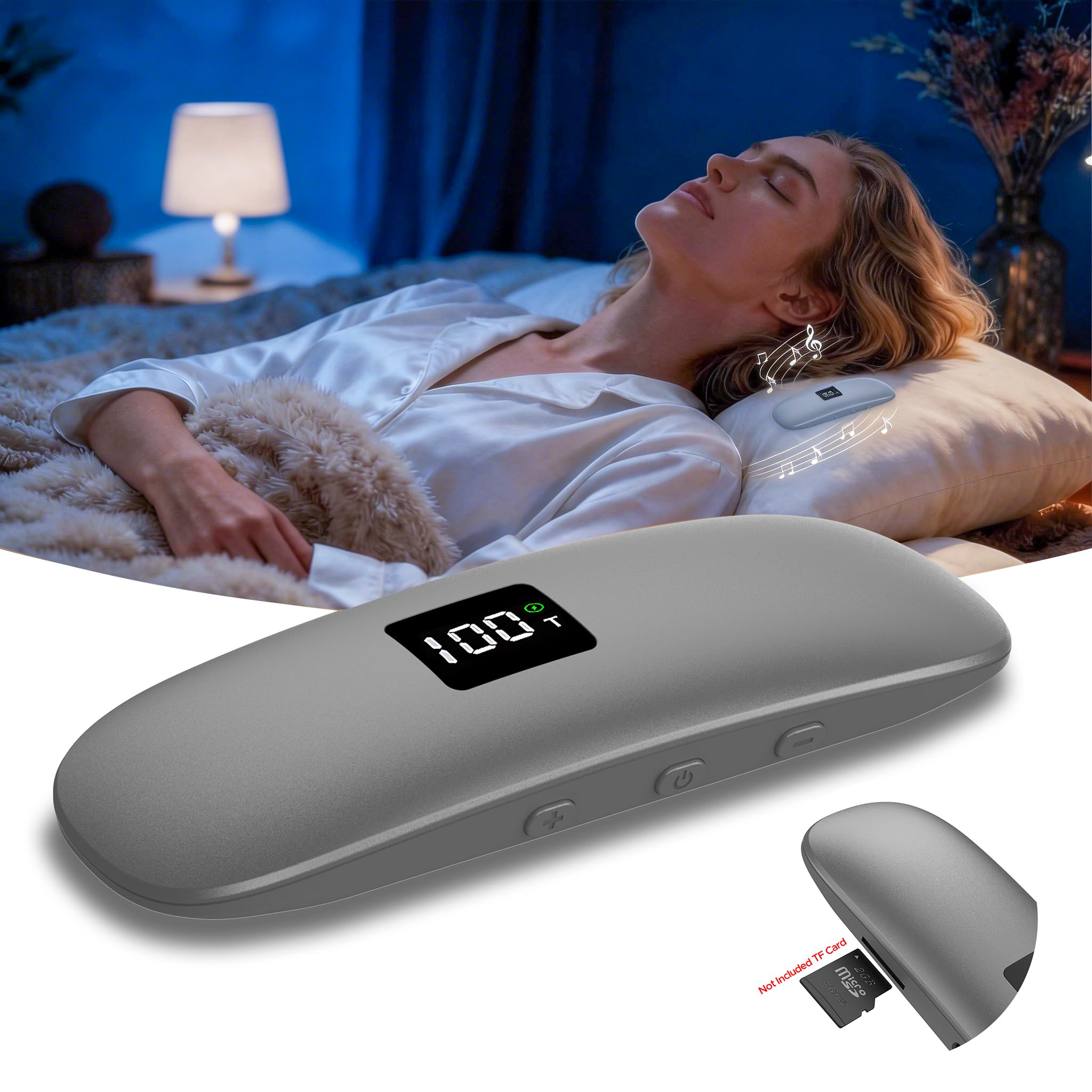
Image: The ByteWave QY10 Bone Conduction Under Pillow Speaker in gray, showcasing its sleek, minimalist design.

Image: A side profile of the ByteWave QY10 speaker, emphasizing its ultra-thin design for comfortable use under a pillow.

Image: A detailed view of the ByteWave QY10 speaker, highlighting its LED display and control buttons for power, volume, and mode selection.
6.2 Official Product Videos
Pillow Speaker for Sleeping - ByteWavelife
Video Description: An overview of the ByteWave pillow speaker, demonstrating its use for a peaceful sleep experience. This video highlights the speaker's features and benefits for users seeking undisturbed rest.
Under Pillow Speaker - Bone Conduction Technology - ByteWavelife
Video Description: This video explains the bone conduction technology used in the ByteWave under pillow speaker, showing how sound is transmitted for private listening without external noise.
Bone Conduction Under Pillow Speaker - Bluetooth 5.3 - ByteWavelife
Video Description: A demonstration of the ByteWave under pillow speaker's Bluetooth 5.3 connectivity, highlighting its stable connection and ease of pairing with various devices.
7. Specifications
| Feature | Detail |
|---|---|
| Brand | ByteWave |
| Model Number | QY10 |
| Connectivity Technology | Bluetooth 5.3 |
| Audio Output Mode | Bone Conduction |
| Playtime | Up to 15 hours |
| Standby Time | 150 days |
| Control Method | Touch buttons |
| Item Dimensions (D x W x H) | 3.94" x 1.26" x 0.6" |
| Weight | 30g (approx. 0.066 lbs) |
| Power Source | Battery Powered (1 Lithium Ion battery included) |
| Built-In Media | Type-C cable for charging and data transfer |
| Additional Features | TF Card Slot, LED Display, Smart Sleep Timers (10/15 min) |
8. Maintenance
- Cleaning: Wipe the speaker with a soft, dry cloth. Do not use harsh chemicals or abrasive cleaners.
- Storage: Store the speaker in a cool, dry place away from direct sunlight and extreme temperatures.
- Battery Care: To prolong battery life, avoid fully discharging the battery frequently. Charge it regularly, even if not in use for extended periods.
9. Troubleshooting
| Problem | Solution |
|---|---|
| No sound from speaker |
|
| Cannot pair via Bluetooth |
|
| Sound is too low or distorted |
|
| Speaker does not charge |
|
10. Warranty and Support
The ByteWave QY10 Bone Conduction Under Pillow Speaker comes with a limited warranty. For detailed warranty information, product support, or technical assistance, please contact ByteWave customer service.
- Email: aftersales.team@outlook.com
- Online Support: Refer to the official ByteWave website for FAQs and additional resources.
ByteWave is committed to providing high-quality products and responsive customer support. We care about you very much and offer a two-year protection plan, quick response in 18 hours, and professional expert consultation.