
1. Introduction
The PQWT PQ225A is an advanced underground water detector designed for efficient well borehole and groundwater exploration. Utilizing natural electric field principles, this device provides automatic mapping and analysis of subsurface geological structures to identify potential water sources. It is engineered for precision and ease of use, making it suitable for various groundwater exploration needs.

Image 1.1: The PQWT PQ225A Natural Electric Field Water Detector in operation, displaying a geological map on its screen.
2. Product Features
- One-Click Automatic Mapping: Generates geological profiles and curve graphs instantly on-site, eliminating the need for post-processing.
- Selectable Depths: PQ225A offers selectable depths of 50/100/200M, adapting to various groundwater exploration requirements.
- Dual Measurement Modes: Includes Exploration Scan Mode for quick screening of large areas and Full-Range Precision Mode for detailed analysis of abnormal regions.
- Anti-Interference Design: Multi-level anti-interference design ensures stable operation in complex electromagnetic environments.
- Traceable Data: All data and images can be exported to an SD card for transfer, backup, secondary analysis, and reporting.
- Precision Engineering: Equipped with a 32-bit high-speed controller and 16-bit 3.6 MSPS A/D converter for accurate data capture.
- Multi-Language Interface: Supports 12 languages for global usability.

Image 2.1: The PQWT PQ225 Series water detector shown in a field setting with a drilling rig, highlighting its application in well drilling.
3. Components and Package Contents
The PQWT PQ225A package includes the following items:
- Host Machine (with Memory Card)
- Electrode Rod + Handle
- 10-meter Measuring Cable
- 5V 2A Charger
- Power Adapter
- Type-C Data Cable
- Shoulder Strap
- Black plastic box (for storage and transport)

Image 3.1: All components of the PQWT PQ225A water detector, including the host machine, cables, electrode rods, and accessories.
4. Setup and Preparation
Follow these steps to set up your PQWT PQ225A water detector for operation:
- Charge the Device: Ensure the host machine is fully charged using the provided charger and Type-C data cable.
- Connect Electrode Rods: Attach the electrode rods to the measuring cable.
- Connect Cable to Host: Securely connect the measuring cable to the aviation plug interface on the host machine.
- Power On: Press the power switch to turn on the device. The system operation indicator light will illuminate.
- Initial Settings: Navigate through the on-screen menu to select your preferred language and measurement parameters (e.g., measurement line, gain, and depth).
- Line Test: Before starting a survey, perform a line test. Cross the two installed electrode rods and click the line test button on the device. The indicator light will confirm a normal connection.
- Wiring: Extend a measuring tape along your desired survey line and mark the starting point. Insert one electrode rod at the 1-meter mark and the other at the 10-meter mark for the initial measurement.

Image 4.1: Visual guide to the four simple steps for operating the PQWT PQ225 series: setting parameters, performing a line test, wiring the electrodes, and collecting data.
5. Operating Instructions
5.1 Data Collection
After completing the setup and wiring:
- Click the "Collect" button on the device.
- A progress bar will indicate data collection. Once complete, a prompt will appear.
- To continue detection, move both electrode rods in the same direction by 1 meter.
- Repeat the data collection process for each subsequent point along the measurement line. Each survey line should have no less than 10 points for accurate results.
Video 5.1: This video provides detailed operating instructions for the PQWT PQ225 Series Field Water Finder, demonstrating the data collection process.
5.2 Measurement Modes
- Exploration Scan Mode: Use this mode for quickly screening large areas to identify potential aquifer zones. This helps in reducing unnecessary detailed work in unproductive regions.
- Full-Range Precision Mode: Once potential zones are identified, switch to this mode for detailed analysis. It conducts in-depth examination of abnormal regions, comparing shallow and deep profiles to precisely locate vertical water channels or deep aquifer structures.
Video 5.2: This video illustrates how the PQ225 Series Water Detector assists in locating water sources, demonstrating its application and effectiveness.
Video 5.3: This video demonstrates how the PQ225 Series Water Detector helps in locating water for drilling operations, showcasing its practical use.
6. Data Interpretation
The PQWT PQ225A automatically generates curve graphs and geological profiles to visualize subsurface information. Understanding these outputs is crucial for identifying water sources.
6.1 Curve Graph Interpretation
- The X-axis represents the measurement point, and the Y-axis represents the recorded value.
- A stable, flat line indicates uniform geological layers with poor water storage potential.
- Curves shaped like "V", "W", "L", or "A" often indicate fractures, faults, or aquifers, which are promising drilling spots.
- Regular mutations in the three frequency curves at the same point or area suggest a change in geological structure or stratum medium, indicating a potential water seepage channel.
6.2 Profile Map Interpretation
- The X-axis represents the measurement points, and the Y-axis shows the detection depth.
- The color spectrum from blue to red indicates increasing values.
- Similar colors imply similar lithology. Color transitions suggest geological or layer changes.
- Blue areas indicate low values, often associated with mud, water, or soft rock.
- Yellow represents medium values, typical of rock formations.
- Red indicates high values, often the hardest rock or possible cavities.
- A transition from blue to yellow/red suggests fractures or cracks, indicating excellent potential zones for water storage or exploration.
- If the mutation position of the shallow profile coincides with the mutation position of the deep profile longitudinally, and the amplitude changes regularly with increasing depth, it indicates a vertically penetrating water channel. A significant low value anomaly in the deep profile may indicate a deep aquifer or a water-rich fault zone.

Image 6.1: Visual guide to interpreting curve graphs and profile maps generated by the PQWT water detector, showing how to identify potential water sources.
7. Specifications
| Feature | Specification |
|---|---|
| Model | PQ225A |
| Measurement Depth | 50/100/200M (selectable) |
| Measuring Time | Approximately 45 seconds |
| Measuring Mode | Scan & Precision |
| Graph Display | Curve, Profile, 3D |
| Battery | 3.7V/7000mAh lithium battery |
| Signal Processing | Digital Integration |
| Filter | FFT Digital Filter |
| Number of Channels | Single channel |
| A/D Conversion | 16 bits 3.6 MSPS |
| Controller | 32-bit high-speed controller |
| Charging Time | 6 Hours |
| Standby Time | 6 Hours |
| Display Screen | 7" Capacitive Touch (1024×600) |
| Brightness | 260 cd/m² |
| Product Dimensions | 12.8"L x 5.8"W x 15.2"H |
| Item Weight | 10.2 pounds |
| Power Source | Battery Powered |
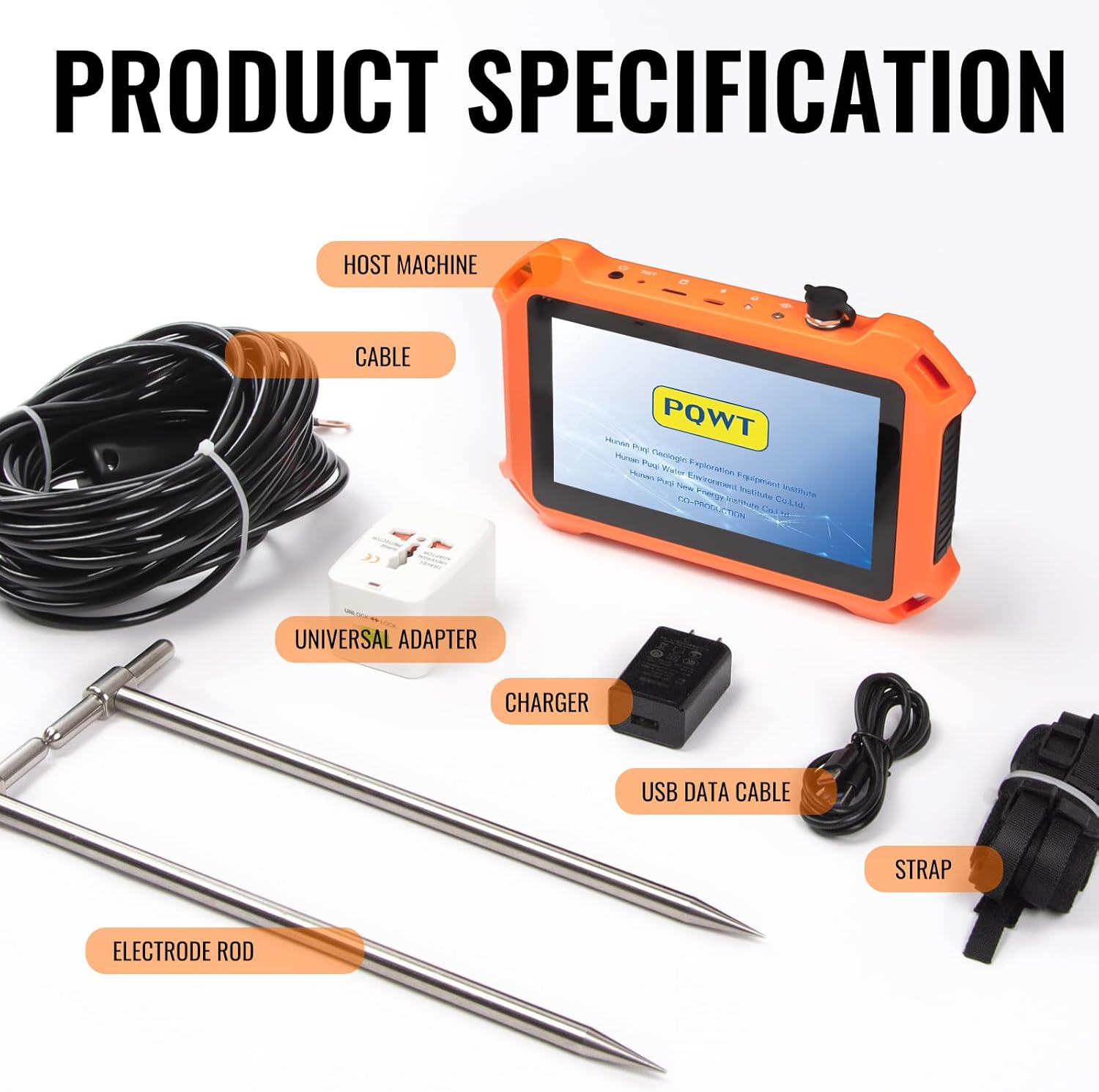
Image 7.1: A comprehensive table detailing the specifications for the PQ225 series, including measurement depth, time, battery life, and display features.
8. Maintenance
To ensure the longevity and optimal performance of your PQWT PQ225A water detector, follow these maintenance guidelines:
- Cleaning: Regularly clean the host machine and accessories with a soft, dry cloth. Avoid using abrasive cleaners or solvents.
- Storage: Store the device and its components in the provided black plastic box in a cool, dry place, away from direct sunlight and extreme temperatures.
- Battery Care: For long-term storage, ensure the battery is partially charged (around 50%) and recharge it every few months to prevent deep discharge.
- Cable Inspection: Periodically inspect the measuring cable and electrode rods for any signs of wear, damage, or corrosion. Replace damaged components immediately.
- Software Updates: Check the manufacturer's website for any available software or firmware updates to ensure your device operates with the latest features and improvements.
9. Troubleshooting
If you encounter issues with your PQWT PQ225A, refer to the following common troubleshooting steps:
- Device Not Powering On:
- Ensure the battery is fully charged.
- Check the power switch for proper engagement.
- No Signal or Erratic Readings:
- Verify all cable connections are secure, especially the aviation plug interface.
- Perform a line test to confirm cable integrity and electrode contact with the ground.
- Ensure electrode rods are firmly inserted into the ground.
- Check for strong electromagnetic interference sources nearby (e.g., power lines, large machinery). Move to a different location if interference is suspected.
- Data Export Issues:
- Ensure the SD card is properly inserted and not full.
- Check the Type-C data cable connection to your computer.
- Try restarting the device and your computer.
- Display Problems:
- Adjust the display brightness settings.
- If the screen is unresponsive, try restarting the device.
If these steps do not resolve the issue, please contact customer support for further assistance.
10. Warranty and Support
PQWT provides a quality assurance period of 2 years for every instrument, along with lifelong maintenance support. For any usage questions, performance concerns, or technical assistance, please contact PQWT customer service. Prompt solutions are guaranteed to ensure long-term reliable service for your water finding projects.
For more information, visit the official PQWT store: PQWT Store on Amazon


